If your iPhone storage fills up fast, a Lightning flash drive can make backups and file transfers simple. It is one of the easiest ways to save photos, videos, and documents without relying only on cloud storage.
In this roundup, we focus on practical picks that are easy to use, MFi-certified where it matters, and suited for different storage needs, from casual photo backups to larger creator workflows.
Best 10 Lightning Flash Drive for IPhone Picks for 2026
Best for Easy iPhone Backups
SANDISK 128GB iXpand Flash Drive Go

- Direct Lightning storage expansion for iPhone 14 or older
- Automatic photo and video backups via Memory Zone
- USB 3.0 transfer support for computers
Best For: iPhone owners who want a simple way to free space and back up media.
Best Dual-Connector Pick
SanDisk 64GB Phone Drive for iPhone

- Lightning and USB-C compatibility
- Made for iPhone certified
- Portable 64GB transfer drive
Best For: iPhone users who need a compact drive that works across Lightning and USB-C devices.
MFi Certified Backup Pick
128GB 3-in-1 Flash Drive for iPhone

- MFi certified with 128GB of storage
- Lightning, USB, and Type-C connectors
- One-click backup plus file encryption
Best For: iPhone users who want an easy backup drive for photos, videos, and cross-device transfers.
Best for Dual-Connector Workflows
SanDisk 256GB Creator Phone Drive

- Lightning + USB-C connectors for broad Apple compatibility
- Up to 256GB for photos, videos, and files
- Includes backup app support and 3 months of Lightroom
Best For: iPhone users who also move files between iPad, Mac, and USB-C devices.
Best for Multi-Device Creators
SanDisk 128GB Creator Phone Drive
- Lightning and USB-C connectors in one drive
- 128GB for iPhone photo and video backups
- Includes 3 months of Adobe Lightroom
Best For: Creators who switch between Lightning iPhones and USB-C devices and want simple mobile backup storage.
Best for All-in-One Backup
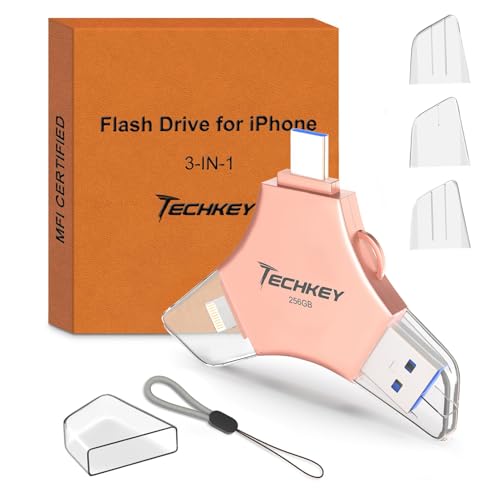
- Lightning, USB-C, and USB-A in one compact drive
- 256GB capacity for photos, videos, and files
- MFi certified with optional file encryption
Best For: iPhone users who want one portable drive for backups and cross-device transfers.
Best for Wide Compatibility
MFi Certified 256GB Flash Drive for iPhone

- MFi certified for iPhone and iPad use
- Works with USB, Lightning, Micro USB, and Type-C
- 256GB capacity with app-based file encryption
Best For: iPhone users who need a flexible backup drive for photos, videos, and cross-device transfers.
Best for Multi-Device Backup
256GB MFi 3-in-1 iPhone Flash Drive

- MFi-certified Lightning support for iPhone/iPad
- USB, Lightning, and USB-C connectors in one drive
- 256GB capacity with one-click backup and encryption
Best For: iPhone users who want a portable, cross-device backup drive.
Best for Easy iPhone Backups – SANDISK 128GB iXpand Flash Drive Go
If you want a Lightning flash drive for iPhone that makes storage cleanup simple, the SanDisk iXpand Flash Drive Go is a practical pick for older iPhones. It plugs into your iPhone 14 or earlier for quick file transfers, then switches to USB 3.0 for moving content to a computer.
Best For: iPhone users who want an easy way to free up space, back up photos, and move files between devices.
Pros:
- Frees up iPhone storage fast with direct Lightning-based transfers
- Automatically backs up photos and videos through the updated Memory Zone app
- USB 3.0 connector helps speed up transfers to PC or Mac
- Swivel cap design helps protect the connectors and adds a keyring hole
Cons:
- Only works with iPhone 14 or older
- Requires the Memory Zone app instead of the legacy iXpand app
For shoppers comparing a Lightning flash drive for iPhone, this model stands out for straightforward backup and file-moving convenience rather than flashy extras. It is a solid choice if you mainly want to create space on your phone and keep your photos accessible across devices.
Best Dual-Connector Pick – SanDisk 64GB Phone Drive for iPhone
If you want a Lightning flash drive for iPhone that also works with USB-C devices, this SanDisk Phone Drive is a practical all-in-one option. It gives you an easy way to move photos, videos, and files between iPhone, iPad, Mac, and newer USB-C gear without relying on cloud storage.
Best For: iPhone users who want a simple plug-and-play drive for fast file transfers across Apple and USB-C devices.
Pros:
- Dual connectors add flexibility for Lightning and USB-C use
- Made for iPhone certified for better device compatibility
- 64GB capacity is handy for backups and everyday transfers
- Compact metallic blue design is easy to carry
Cons:
- 64GB may feel small for large video libraries
- Works best when you manage files intentionally instead of as long-term storage
Overall, this is a balanced Lightning flash drive for iPhone if you want cross-device convenience more than maximum capacity. It’s a smart pick for quick transfers, occasional backups, and users who split time between older Lightning ports and newer USB-C devices.
MFi Certified Backup Pick – 128GB 3-in-1 Flash Drive for iPhone
If you want a practical Lightning flash drive for iPhone that can move photos, videos, and files without relying on cloud storage, this 128GB 3-in-1 stick is built for everyday backup and sharing. It adds Lightning, USB, and Type-C support in one compact drive, making it easy to shift data between iPhone, Android, PC, and Mac.
Best For: iPhone users who want an MFi-certified, easy-to-carry backup drive for photos, videos, and cross-device file transfers.
Pros:
- MFi certified for iPhone use, with 128GB of storage for quick space relief
- 3-in-1 design works with Lightning, USB, and Type-C devices
- One-click backup and sharing through the app for photos, videos, and contacts
- Includes encryption options for added file protection
Cons:
- iPhone backup and file management require the U-Disk app
- Best suited for casual backups rather than heavy professional workflows
This is a sensible Lightning flash drive for iPhone buyers who want simple offline storage, fast transfers, and cross-platform compatibility in one portable accessory. The value is strongest if you regularly back up media and want a drive you can also use with other devices.
Best for Dual-Connector Workflows – SanDisk 256GB Creator Phone Drive
If you want a Lightning flash drive for iPhone that also works with newer USB-C devices, this SanDisk Creator Phone Drive is a practical all-in-one pick. It gives you up to 256GB of extra storage, supports quick transfers between Apple devices, and includes the SanDisk Memory Zone app for easier backup and file management.
Best For: iPhone users who also move files between iPad, Mac, and USB-C devices and want a simple backup drive.
Pros:
- Lightning and USB-C connectors cover older iPhones and newer iPhone 15 models
- Up to 256GB of extra storage for photos, videos, and documents
- Memory Zone app helps automate backup and content transfers
- Includes 3 months of Adobe Lightroom for creators
Cons:
- iOS 15 or higher is required for the app features
- Premium price compared with basic single-connector drives
This is a strong Lightning flash drive for iPhone if you want flexibility across old and new Apple gear without juggling adapters. It’s especially useful for creators who regularly offload media and want bonus software included.
Best for Multi-Device Backups – MFi 256GB Lightning Flash Drive
If you want a Lightning flash drive for iPhone that can move files between Apple, Android, and USB devices without a lot of setup, this 256GB MFi-certified model is a practical choice. It combines a Lightning connector with USB and USB-C support, plus a metal build that’s designed for everyday carry and quick backups.
Best For: iPhone users who want a portable, cross-device storage stick for photos, videos, and file transfers.
Pros:
- MFi-certified and compatible with iPhone, iPad, Android, and PCs
- Three-way connectivity with Lightning, USB, and USB-C ports
- 256GB capacity is useful for photo, video, and backup storage
- Metal body and keychain design make it easy to carry
Cons:
- iPhone and iPad backups require the companion app
- Write speeds are moderate compared with higher-end drives
As a Lightning flash drive for iPhone, this is a sensible pick if you want simple on-the-go backups and easy sharing across devices. It’s less about flashy extras and more about broad compatibility, decent capacity, and a compact design that helps reduce storage headaches.
Best for Multi-Device Creators – SanDisk 128GB Creator Phone Drive
If you want a Lightning flash drive for iPhone that also works with newer USB-C devices, the SanDisk Creator Phone Drive is built for flexible everyday transfers. It gives you 128GB of extra space, makes it easier to move photos and videos between Apple devices, and adds a useful Lightroom trial for creators who edit on the go.
Best For: Creators who use both older Lightning iPhones and newer USB-C devices and want one compact drive for backups, transfers, and mobile editing.
Pros:
- Includes both Lightning and USB-C connectors for broad iPhone, iPad, Mac, and laptop compatibility
- 128GB capacity is plenty for offloading photos, videos, and documents from an iPhone
- SANDisK Memory Zone app supports simple backup, move, and copy workflows
- Three months of Adobe Lightroom adds value for photo-focused users
Cons:
- iOS 15 or higher is required for the app-based workflow
- Not the cheapest option if you only need a basic iPhone storage stick
This is a strong pick if you need a Lightning flash drive for iPhone but also want a drive that stays useful as your devices change. The dual-connector design and creator-friendly extras make it more versatile than a single-purpose backup drive.
Best for All-in-One Backup – 256GB MFi 3-in-1 Flash Drive
If you want a Lightning flash drive for iPhone that can also handle Android, USB-C, and standard USB ports, this 256GB MFi-certified drive is built for flexible everyday backups. It’s a practical pick for moving photos, videos, and files between devices without relying on iCloud or a cable.
Best For: iPhone users who want a single, portable drive for quick photo/video backups and cross-device transfers.
Pros:
- 3-in-1 design with Lightning, USB-C, and USB-A connectors
- 256GB capacity gives plenty of room for media backups
- MFi certified with encryption options for added data protection
- Compact metal build and keychain make it easy to carry
Cons:
- iPhone use requires the companion U-Disk app
- Not the simplest option if you only need basic USB storage
This Lightning flash drive for iPhone stands out most for convenience: it covers multiple devices, offers one-click backup, and is easy to keep on your keys. If you want a straightforward way to offload phone storage and move files fast, it’s a solid all-around choice.
Best for Wide Compatibility – MFi Certified 256GB Flash Drive for iPhone
If you want a practical Lightning flash drive for iPhone that works across iPhone, iPad, Android, and PC, this MFi-certified model is built for easy everyday backups. The 256GB capacity gives you room for photos, videos, and files, while the multi-port design makes it simple to move data between devices without juggling cables or cloud storage.
Best For: iPhone users who want a simple, cross-device storage stick for backing up photos and videos on the go.
Pros:
- MFi certified for iPhone/iPad compatibility
- USB, Lightning, Micro USB, and Type-C connections
- 256GB capacity helps free up phone storage fast
- App-based encryption adds a layer of file security
Cons:
- iPhone use requires the companion app
- Transfer speeds are good, but not the fastest available
This is a solid choice if you value flexibility over premium extras. For shoppers comparing a Lightning flash drive for iPhone, it stands out for broad device support, simple plug-and-play convenience, and enough storage to handle routine photo and video backups.
Best for Multi-Device Backup – 256GB MFi 3-in-1 iPhone Flash Drive
If you want a Lightning flash drive for iPhone that can move files between Apple devices, Android phones, and computers without a lot of hassle, this 256GB MFi-certified 3-in-1 drive is a practical pick. It adds extra storage, supports quick transfers, and gives you a simple way to back up photos, videos, and contacts on the go.
Best For: iPhone users who need a portable, multi-connector backup drive for photos, videos, and cross-device transfers.
Pros:
- MFi-certified for iPhone/iPad use with a Lightning connector
- 3-in-1 design works with USB, Lightning, and USB-C devices
- 256GB capacity is strong for media backups and file storage
- One-click backup and encryption features add convenience and security
Cons:
- iOS devices require the U-Disk app for full functionality
- Metal form factor is compact, but not as slim as a simple Lightning adapter
- Best suited to file transfer and backup, not a long-term cloud replacement
Overall, this Lightning flash drive for iPhone stands out for users who want one compact accessory that can handle storage expansion, fast transfers, and easy sharing across multiple platforms.
Best Simple Pick – MFi Certified 256GB iPhone Flash Drive
If you want a practical Lightning flash drive for iPhone use, this 256GB MFi-certified model stands out for easy backups and broad compatibility. Its four-in-one design lets you move photos, videos, and documents between iPhone, iPad, Android, and USB devices without relying on iCloud or a cable-heavy workflow.
Best For: Users who want one compact drive to back up iPhone media and transfer files across multiple devices.
Pros:
- MFi certified for iPhone compatibility and reliable performance
- Four interfaces, including Lightning, USB, Micro USB, and Type-C
- One-click backup makes saving photos and videos fast and simple
- Retractable design and keychain help protect the connector and improve portability
Cons:
- Requires an app on iPhone before use
- Android users need OTG enabled for plug-and-play operation
- Full feature set is more than casual users may need
For shoppers comparing a Lightning flash drive for iPhone, this one is strongest when you need a flexible backup tool that also works across other platforms. It is a sensible pick if your main goal is freeing storage quickly and moving files without extra steps.
How We Picked the Best Lightning Flash Drive for IPhone
We focused on drives that solve the most common iPhone storage problems: freeing space quickly, backing up media reliably, and moving files between devices with minimal hassle. Priority went to MFi-certified options, strong capacity choices, dual-connector designs, and models that support easy photo and video backups.
Quick Comparison: What Matters Most
For most buyers, the biggest differences come down to capacity, connector type, and ease of backup. A Lightning Flash Drive for IPhone with USB-C plus Lightning gives you more flexibility across newer iPhones, iPads, Macs, and USB-C laptops. Higher-capacity drives are better for frequent video shooters and creators, while smaller drives can be enough for occasional backups and sharing files.
Key Buying Factors for a Lightning Flash Drive for IPhone
Capacity
Choose 64GB to 128GB for light-to-moderate photo storage, or 256GB if you record lots of 4K video, keep large libraries, or want fewer transfer bottlenecks.
Connector Compatibility
Make sure the drive matches your device. Traditional Lightning-only models are fine for older iPhones, while dual Lightning and USB-C drives are a smarter choice if you also use newer Apple devices or laptops.
MFi Certification
MFi certification helps reduce compatibility issues on iPhone and usually indicates better reliability with iOS file access and backup workflows. It is especially important if you want a smoother plug-and-play experience.
Backup Features and App Support
Some drives offer automatic backup or companion apps that help move photos and videos in batches. If you do this often, those features can save time. If you only need occasional storage expansion, a simpler drive may be enough.
Speed and File Handling
Look for USB 3.0 or faster where possible. Faster transfer speeds matter most when you are moving large videos, hundreds of photos, or full-device media libraries.
Who Should Buy Which Lightning Flash Drive for IPhone?
If you just need a straightforward way to offload photos and videos, a compact, MFi-certified Lightning Flash Drive for IPhone with 64GB or 128GB is usually the best value. If you work across iPhone, iPad, Mac, and USB-C devices, choose a dual-connector model for broader compatibility.
Creators, heavy video users, and anyone who backs up often should lean toward 256GB options with automatic backup support. That extra headroom makes it easier to manage large files without constantly deleting content or moving data in small batches.