If you want clean, low-latency wireless audio from a USB-C device, the right dongle can make a huge difference. The best models now support newer codecs, broader device compatibility, and features like Auracast and dual pairing.
This roundup focuses on practical options for gaming, streaming, and everyday headphone use, so you can match the transmitter to your setup without paying for features you will not use.
Best 10 USB C Bluetooth Audio Transmitter Picks for 2026
PS5 Low-Latency Pick
UGREEN USB-C Bluetooth Adapter for PS5

- Plug-and-play USB-C transmitter for PS5 and PC
- Supports aptX LL, aptX Adaptive, aptX HD, and SBC
- Low-latency mode rated below 100ms
Best For: Gamers who want simple wireless audio with minimal delay
Premium Codec Choice

- aptX Adaptive and aptX Lossless support
- Gaming mode reduces lag to 30ms
- Auracast multistreaming for multiple listeners
Best For: Users who want premium codec support and ultra-low latency
LE Audio Broadcast Pick
UGREEN USB-C Bluetooth Adapter with LE Audio

- LE Audio with low-latency and high-quality modes
- Dual pairing in Classic mode and one-to-many in LE mode
- Qualcomm QCC3086 Bluetooth 6.0 chip
Best For: People who want LE Audio, dual pairing, and broadcast sharing
Auracast Travel Option
eppfun LE Audio Bluetooth Auracast Transmitter

- Bluetooth 5.4 with Qualcomm chip
- USB-C, 3.5mm Aux, and RCA inputs
- Auracast supports multiple listeners
Best For: Travel and shared-listening setups with compatible receivers
Dual-Port Gaming Adapter
USB-C/USB-A Bluetooth Audio Dongle for PS5

- Dual USB-C and USB-A ports
- aptX-HD, aptX-AD, aptX-LL support
- Plug-and-play pairing with LED codec indicators
Best For: Console and PC users who need flexible Bluetooth audio output
Auracast Hearing Aid Transmitter
USB-C Auracast Audio Adapter for LE Audio

- Made for Auracast-enabled hearing aids
- Private or Open Auracast broadcast modes
- Qualcomm Bluetooth 5.4 with firmware upgrades
Best For: Auracast hearing-aid users with USB-C audio sources
Compact Console Transmitter
USB-C Bluetooth Audio Adapter for PS5/PS4
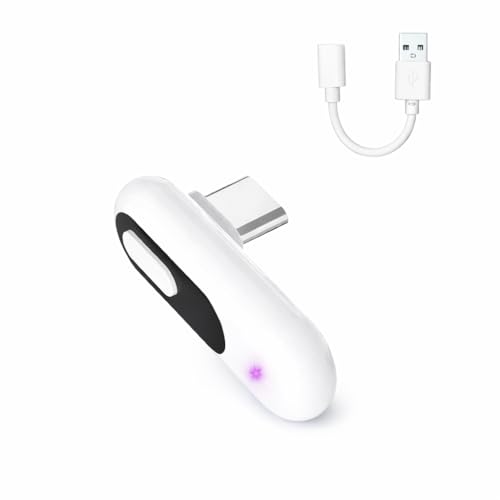
- USB-C with included USB-A adapter
- aptX-Adaptive and aptX-LL support
- Plug-and-play pairing for gaming audio
Best For: Console players wanting simple wireless headphone audio
Premium Auracast Audio Hub
Bluetooth 6.0 USB-C Auracast LE Audio Transmitter

- Bluetooth 6.0 with Classic, LE Audio, and Auracast modes
- aptX, aptX HD, aptX LL, LDAC, LC3, and more
- App support for modes, codecs, password, and firmware
Best For: Users who want a feature-rich USB-C transmitter for gaming and multi-device sharing
Simple PS5 Wireless Audio
USB-C Bluetooth Adapter for PS5

- Plug-and-play with no drivers required
- aptX Low Latency for synced game audio
- Compact USB-C dongle for PS5, Mac, laptop, and PC
Best For: PS5 players who want a simple low-latency audio transmitter
Broadcast-Ready Sharing
Auracast Transmitter USB-C Bluetooth LE Audio Adapter

- Classic Bluetooth plus Auracast broadcast mode
- One-to-many sharing for compatible receivers
- 24kHz and 48kHz modes for hearing aids or headphones
Best For: People who want USB-C audio broadcasting to compatible receivers
PS5 Low-Latency Pick – UGREEN USB-C Bluetooth Adapter for PS5
If you want a USB C Bluetooth audio transmitter for a PS5, PC, or laptop, this UGREEN dongle focuses on simple setup and low-latency wireless sound. It plugs in without drivers or software and supports aptX LL, aptX Adaptive, aptX HD, and SBC, with LED indicators to show the active mode.
Best For: PS5 and PC players who want easy wireless headphone audio with low delay.
Pros:
- Plug-and-play design with no drivers or software required
- Supports aptX LL, aptX Adaptive, aptX HD, and SBC
- Low-latency performance is rated below 100ms
- Works with USB-C PS5, Switch, and compatible Windows/macOS computers
Cons:
- Not compatible with PS4 or PS5 Portal
- AirPods Pro 2 and dual-device pairing are not supported
- Bluetooth calling mode can reduce audio quality
For buyers prioritizing gaming delay and straightforward operation, this adapter is a practical choice. Just make sure your headphones support the same codec standard you want to use, and note that microphone behavior and platform recognition can vary.
Premium Codec Choice – Sennheiser BTD 700 Dongle
This USB C Bluetooth audio transmitter is built for users who want higher-end codec support and very low latency in a compact dongle. The Sennheiser BTD 700 offers aptX Adaptive and aptX Lossless, plus a gaming mode that cuts lag to 30 milliseconds for smoother audio and video sync.
Best For: Listeners and gamers who want premium Bluetooth audio with excellent latency performance.
Pros:
- Supports aptX Adaptive and aptX Lossless for high-definition streaming
- Gaming mode lowers latency to 30ms
- Plug-and-play setup with no drivers required
- Auracast multistreaming can send audio to multiple devices
Cons:
- Compatibility is limited to supported operating systems and USB devices
- Requires compatible headphones to benefit from advanced codec features
- Higher-end feature set may be more than casual users need
If you want a polished transmitter with broad codec support and a strong focus on latency, this model stands out. The USB-C and USB-A support also makes it more flexible than many single-connector dongles.
LE Audio Broadcast Pick – UGREEN USB-C Bluetooth Adapter with LE Audio
If you need a USB C Bluetooth audio transmitter for PS5 or PC that adds newer wireless features, this UGREEN adapter combines LE Audio, aptX codec support, and dual-pairing options. It is plug and play, supports Bluetooth audio devices only, and can switch between low-latency and high-quality modes depending on whether you are gaming or listening to music.
Best For: Users who want LE Audio features, dual pairing, and broadcast-style sharing.
Pros:
- Supports LE Audio with low-latency and high-quality modes
- Classic Bluetooth mode supports dual-device connection
- LE Audio mode supports one-to-many broadcasting
- Uses a Qualcomm QCC3086 Bluetooth 6.0 chip for stable pairing
Cons:
- LE Audio requires headphones or speakers that support LE Audio or LC3
- Not compatible with mice, keyboards, TV, car, or microphone use
- aptX HD does not support dual-device connection
This is a good fit if you want more than basic wireless audio and value sharing features for group listening. It is especially appealing for PS5 and PC setups, but the headset or speaker compatibility requirements matter a lot.
Auracast Travel Option – eppfun LE Audio Bluetooth Auracast Transmitter
This USB C Bluetooth audio transmitter is aimed at travel, TV, and shared-listening use, with Bluetooth 5.4, a Qualcomm chip, and support for LC3, aptX Adaptive, aptX Lossless, and aptX HD. It includes USB-C and 3.5mm Aux inputs, plus RCA audio input, so it can fit a wide range of playback setups.
Best For: People who want a portable transmitter for multi-listener or travel-friendly audio setups.
Pros:
- Supports Bluetooth 5.4 with a Qualcomm chip
- Works with LC3, aptX Adaptive, aptX Lossless, and aptX HD
- Auracast broadcast can support multiple receiving devices
- USB-C, 3.5mm Aux, and RCA inputs add flexibility
Cons:
- Auracast requires compatible receiving headphones or devices
- Claimed ultra-low latency depends on LE Audio support at the receiver
- Battery-powered design may not suit every fixed setup
For shared viewing or listening environments, this model offers a flexible input lineup and modern codec support. It is best suited to users who already have compatible Auracast or LE Audio headphones and want a compact transmitter they can move around easily.
Dual-Port Gaming Adapter – USB-C/USB-A Bluetooth Audio Dongle for PS5
If you want a USB C Bluetooth audio transmitter that can handle both USB-C and USB-A setups, this YOCOWOCO dongle is built for flexible console and PC use. It focuses on audio-only transmission, with easy plug-and-play pairing and codec support aimed at low-latency gaming and everyday wireless listening.
Best For: PS5, Switch, PC, and iMac users who want a simple dual-port Bluetooth audio solution for headphones or earbuds.
Pros:
- Dual USB-A and USB-C ports make it easier to use across multiple devices.
- Supports aptX-HD, aptX-AD, aptX-LL, aptX, and SBC for flexible audio compatibility.
- aptX-LL support is listed at about 40 ms with compatible headphones.
- LED indicators show the active codec for quick status checks.
Cons:
- Audio transmission only; it does not support data transfer.
- aptX-LL performance depends on headphone support.
- Primarily aimed at audio output, not microphone-heavy use cases.
This is a practical pick if you need broad console and computer compatibility in a compact transmitter. The standout feature is the 2-in-1 port design, which helps reduce adapter clutter while keeping setup straightforward.
Auracast Hearing Aid Transmitter – USB-C Auracast Audio Adapter for LE Audio
This USB C Bluetooth audio transmitter is designed for a very specific job: sending USB-C audio from compatible devices to Auracast-enabled hearing aids. If you need a broadcast-style audio adapter rather than a standard headphone transmitter, the C82 Aura focuses on LE Audio, stable low-latency playback, and flexible private or public listening modes.
Best For: Auracast hearing aid users who need a USB-C transmitter for PCs, tablets, or phones.
Pros:
- Built for Auracast-enabled hearing aids with LE Audio and LC3 support.
- Offers Private Mode or Open Mode for controlled or public listening.
- Can broadcast to multiple Auracast hearing aids at once.
- Uses Qualcomm Bluetooth 5.4 hardware and is firmware upgradeable.
Cons:
- Not compatible with regular Bluetooth headphones, speakers, or earbuds.
- Only works with devices that output audio via USB-C.
- Not suitable for TVs, cars, or game consoles.
For the right user, this is a highly targeted transmitter with features that go beyond typical Bluetooth adapters. Just make sure your hearing aids are Auracast-enabled and your source device uses USB-C audio output before buying.
Compact Console Transmitter – USB-C Bluetooth Audio Adapter for PS5/PS4
For gamers who want a USB C Bluetooth audio transmitter with simple setup, this YOCOWOCO dongle keeps things straightforward. It connects to PS5, PS4, PC, or Mac and is focused on wireless audio output only, with codec support designed to help reduce delay when paired with compatible headphones.
Best For: PS5 and PS4 players who want a compact Bluetooth audio transmitter for headphones or earbuds.
Pros:
- USB-C interface plus included USB-A adapter broadens device compatibility.
- Supports aptX-HD, aptX-Adaptive, aptX-LL, aptX, and SBC.
- aptX-LL is listed at about 40 ms with compatible headphones.
- Plug-and-play pairing makes setup quick and easy.
Cons:
- Audio transmission only, with no data transfer support.
- Low-latency performance depends on headphone compatibility.
- Less specialized than the Auracast option for hearing-aid users.
This model is a sensible pick if you want a lightweight transmitter for console audio without extra setup steps. Its broad codec support and included USB-A adapter make it a flexible choice for mixed-device gaming spaces.
Premium Auracast Audio Hub – Bluetooth 6.0 USB-C Auracast LE Audio Transmitter
If you want a USB C Bluetooth audio transmitter with the widest feature set, this model stands out for its Bluetooth 6.0 support, Auracast broadcast mode, and broad codec coverage. It is built for users who care about low-latency gaming, high-fidelity music, or sharing audio to multiple listeners without a messy setup.
Best For: Users who want a feature-rich USB-C transmitter for gaming, music, and multi-device Auracast sharing.
Pros:
- Supports Bluetooth 6.0 with Classic Bluetooth, LE Audio, and Auracast modes.
- Wide codec support includes aptX family, LDAC, and LC3 for different listening needs.
- Encrypted Auracast broadcast adds privacy for shared audio.
- Companion app allows mode changes, codec selection, password setup, and firmware updates.
Cons:
- Advanced feature set may be more than casual users need.
- Auracast features depend on compatible receiving devices.
- Best performance still depends on matching codec support on your headphones or speakers.
This is the most capable option in the group if you want one compact transmitter that can handle personal listening and broadcast-style sharing. The tradeoff is complexity, but the app and mode options make it easier to tailor the device to your setup.
Simple PS5 Wireless Audio – USB-C Bluetooth Adapter for PS5
This USB C Bluetooth audio transmitter focuses on straightforward wireless game audio for PS5 and other USB-C devices. It is a practical pick if you want a small plug-and-play dongle with aptX low latency support and no extra driver setup.
Best For: PS5 players who want a simple low-latency Bluetooth audio transmitter for headphones or earbuds.
Pros:
- Plug-and-play design with no drivers required.
- aptX Low Latency support helps reduce audio delay for gaming.
- Works with PS5, Mac, laptop, and PC through USB-C audio output.
- Compact size keeps it portable and out of the way.
Cons:
- Audio devices only; it does not support data.
- Not compatible with PS4, TV, mouse, or keyboard.
- Feature set is narrower than more advanced Auracast transmitters.
For users who mainly want wireless headphone audio on PS5, this is the most direct solution here. It keeps the setup minimal and stays focused on the core job of sending audio with lower latency.
Broadcast-Ready Sharing – Auracast Transmitter USB-C Bluetooth LE Audio Adapter
If your priority is sharing audio to more than one listener, this USB C Bluetooth audio transmitter is built around Auracast broadcast mode and classic Bluetooth. It works well for home listening, group setups, and accessibility-focused use where compatible receivers can join without pairing.
Best For: People who want USB-C audio broadcasting to compatible headphones, speakers, or hearing aids.
Pros:
- Switches between Classic Bluetooth and Auracast Broadcast Mode with one button.
- Supports one-to-many audio sharing to compatible headphones, speakers, and hearing aids.
- Includes dedicated 24kHz and 48kHz modes for hearing aids and headphones/speakers.
- Plug-and-play USB-C design works with phones, tablets, laptops, PCs, and PS5.
Cons:
- Auracast mode requires compatible LE Audio or Auracast receivers.
- Does not support microphone input or voice chat.
- May be more than needed if you only want basic one-headphone streaming.
This is the strongest choice if broadcast sharing matters more than simple private listening. Its long-range Auracast mode and easy mode switching make it useful for group audio and assistive listening scenarios.
How We Picked the Best USB C Bluetooth Audio Transmitter
We prioritized real-world compatibility, codec support, latency performance, and ease of use. For a USB C Bluetooth Audio Transmitter, the most important question is not just whether it connects, but whether it delivers stable sound with the devices you already own.
We also considered whether each model supports current needs like low-latency gaming, LE Audio, AptX Adaptive, and Auracast. That matters because a transmitter that sounds great on paper can still be a poor fit if it does not work with your TV, laptop, handheld, or hearing accessories.
Quick Comparison: What Matters Most
There is no single best choice for everyone. Some buyers should focus on low latency for gaming, while others need broader codec support or broadcast features for shared listening. If you are choosing between models, compare these basics first: USB-C compatibility, supported codecs, whether a USB-A adapter is included, and whether the device can handle both private headphone listening and public Auracast output.
Fast Decision Guide
Choose low-latency models for gaming and video sync. Choose LE Audio or Auracast models if you want newer ecosystem support or shared broadcast listening. Choose dual-input designs if you plan to use one transmitter with both USB-C and 3.5mm sources.
Key Buying Factors for USB C Bluetooth Audio Transmitter
Codec support: AptX Adaptive, aptX Low Latency, LDAC, LC3, and AptX Lossless each serve different needs. More codecs can mean better compatibility, but only if your headphones or earbuds support them too.
Latency: For gaming or video, lower latency keeps audio and on-screen action aligned. If you notice lip-sync issues, prioritize a model designed specifically for low-delay use.
Connection type: Some transmitters plug directly into USB-C, while others include USB-A adapters or 3.5mm input. Multi-input designs are more flexible for TVs, PCs, consoles, and travel setups.
Audio ecosystem: Auracast and LE Audio are more future-facing, especially for broadcast listening and compatible hearing devices. If you do not need that, a simpler Bluetooth 5.3 or 5.4 transmitter may be the smarter value.
Pairing features: Dual pairing can be helpful for shared viewing or switching between headphones. App support, firmware updates, and onboard controls are also worth considering if you want easier setup and better long-term use.
Who Should Buy Which USB C Bluetooth Audio Transmitter?
Gamers: Look for low-latency aptX models with stable USB-C support and quick pairing.
TV and home theater users: Choose a transmitter with stronger codec support and, if needed, 3.5mm input for broader compatibility.
Tech-focused buyers: If you want the newest features, prioritize LE Audio, Bluetooth 6.0, and Auracast support.
Hearing-aid and shared-audio users: Auracast-ready models are the best fit, especially when public/private broadcast modes matter.
Budget-conscious shoppers: Stick with a simpler USB-C Bluetooth audio transmitter that covers your main device and codec needs without extra features you will not use.