ACEMAGIC K1 Mini PC Ryzen R2544 review is best read as a compact desktop buying decision, not a spec sheet trophy.
It targets people who want a small Windows 11 Pro machine with real wired and wireless connectivity, multi-monitor support, and room to upgrade.
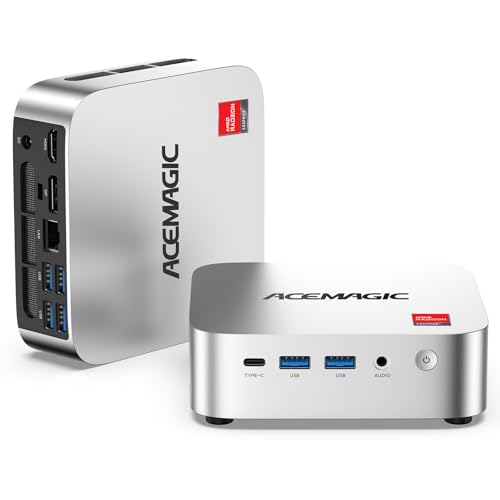
K1 Mini PC Review Summary
The ACEMAGIC K1 Mini PC is a strong fit for office users, home office setups, light content creators, and anyone who wants a tidy computer that can sit behind a monitor or disappear into a desk corner.
Based on the listing evidence, the value is in balance: a Ryzen R2544 processor, 8GB of DDR4 memory, a 256GB SSD, triple 4K display support, and connectivity that makes it more flexible than many entry-level mini PCs.
Verdict: this is a practical, upgrade-friendly mini desktop for everyday productivity and multi-display use.
It is not the kind of machine you buy for heavy gaming or demanding creative workloads, but it looks well matched to buyers who want a dependable Windows box for work, browsing, streaming, light editing, and always-on tasks.
Review Scorecard
| Category | Score | Editorial rationale |
|---|---|---|
| Everyday productivity | 8/10 | Ryzen R2544 with 4 cores and 8 threads should handle office apps, tabs, and video calls comfortably. |
| Multitasking headroom | 7/10 | 8GB DDR4 is usable, but it is the first spec power users will want to expand. |
| Display flexibility | 9/10 | Triple 4K support across HDMI, DP, and USB-C is a standout for a compact desktop. |
| Connectivity | 8/10 | USB-C, six USB 3.2 ports, Gigabit Ethernet, WiFi 5, and Bluetooth 4.2 cover most desk setups. |
| Upgrade potential | 9/10 | Dual DDR4 slots and expandable storage make it more future-friendly than many small PCs. |
| Quiet utility fit | 8/10 | The cooling setup and compact form factor suit daily office-style use and always-on roles. |
| Value for use case | 8/10 | It concentrates useful features into a small chassis without chasing unnecessary performance extras. |
Review Summary in Plain Terms
If you want a mini PC that can act like a proper desktop, the K1 makes sense.
Its strengths are the practical ones that matter after setup: more than one display, stable wired networking, enough USB ports for real peripherals, and upgrade paths if the starting memory and storage feel limited later.
Key Features and Specifications of K1 Mini PC
The ACEMAGIC K1 Mini PC is built around an AMD Ryzen R2544 processor with 4 cores, 8 threads, a 3.35GHz base clock, and boost speeds up to 3.7GHz.
The listing also describes integrated Radeon Graphics, which is the right expectation for this type of machine: useful for desktop graphics, media playback, and light visual workloads rather than serious gaming.
The included configuration is 8GB DDR4 RAM and a 256GB M.2 SSD.
That is a sensible starting point for Windows 11 Pro, browser-heavy work, schoolwork, office tasks, and streaming.
Just as important, the machine is positioned as upgradeable, with dual DDR4 SO-DIMM slots supporting up to 32GB of RAM and storage expansion up to 4TB.
Useful hardware and connectivity details from the listing:
- AMD Ryzen R2544 processor
- 4 cores and 8 threads
- Base clock 3.35GHz, boost up to 3.7GHz
- Integrated Radeon Graphics
- 8GB DDR4 memory
- 256GB M.2 SSD
- Dual DDR4 SO-DIMM slots
- Up to 32GB RAM support
- Storage expansion up to 4TB
- 6x USB 3.2 ports
- USB-C Gen 2 with up to 10Gbps transfer
- USB-C display output support via DP 1.4
- USB-C power delivery support
- HDMI 2.0
- DisplayPort 1.4
- Gigabit Ethernet
- WiFi 5
- Bluetooth 4.2
- Windows 11 Pro
- VESA mounting support
For buyers comparing mini PCs on practical features, the triple-display support matters a lot.
The listing says the machine can drive up to three 4K monitors through HDMI, DisplayPort, and USB-C.
That is not a niche perk; it is the sort of feature that changes how useful a compact desktop feels on a real desk.
Pros and Cons of K1 Mini PC
Pros
- Strong display flexibility for a small desktop, especially with triple 4K support.
- Upgrade-friendly layout with dual memory slots and storage expansion.
- Good everyday connectivity thanks to multiple USB ports, Ethernet, WiFi, Bluetooth, and USB-C.
- Windows 11 Pro included, which is useful for business, admin, and home-office users.
- Compact, mountable design that can reduce desk clutter.
Cons
- 8GB RAM is modest if you keep many apps, browser tabs, or remote sessions open.
- 256GB storage may feel small for users with lots of files or local media.
- Integrated graphics only means it is not aimed at gaming or demanding creative work.
- WiFi 5 and Bluetooth 4.2 are functional, not cutting-edge, compared with newer wireless standards.
Who Should Buy K1 Mini PC?
The K1 is a good buy for people who want a compact desktop for work-first use cases.
That includes home office buyers, students, remote workers, and small-business users who need a clean workstation with wired networking and more than one monitor.
It also fits light server-style roles, digital signage, and NAS-adjacent setups because the listing explicitly calls out auto power on, RTC wake, and Wake-on-LAN.
Buy it if you care about:
- a small Windows 11 Pro computer for everyday productivity
- multi-monitor setups without a bulky tower
- a tidy desk with VESA mounting support
- upgrade potential instead of fixed, sealed hardware
- stable wired networking for office or home-server tasks
Skip it if you need:
- a gaming PC
- strong 3D rendering or heavyweight video editing
- lots of memory right out of the box
- large built-in storage for media libraries or project files
Performance and Practical Use of K1 Mini PC
Office and Browser Workloads
The Ryzen R2544 should be the right class of processor for email, documents, spreadsheets, web apps, and video meetings.
The listing positions it specifically for office productivity, online learning, media playback, and multitasking, which is exactly the lane where a mini PC like this earns its keep.
Multi-Monitor Desk Setup
Triple 4K support is the most obvious standout here.
For buyers who live in browser tabs, reference windows, dashboards, or communication tools, the ability to spread work across HDMI, DisplayPort, and USB-C can matter more than raw benchmark bragging rights.
Storage and Upgrade Path
The starting 8GB/256GB configuration is fine for a basic workstation, but the real appeal is the upgrade path.
Dual memory slots and expanded storage support mean the machine can start simple and grow into a more comfortable desktop once workload needs become clearer.
Always-On and Network Roles
The inclusion of Gigabit Ethernet, Wake-on-LAN, Auto Power On, and RTC Wake makes the K1 more appealing than a generic mini PC if you want a light server, a home-office machine, or a system that needs to recover cleanly after power cycles.
Alternatives to K1 Mini PC
If you want to compare before buying, these are the most relevant mini PC alternatives on Amazon:
Beelink and MINISFORUM are the most direct comparison points if you want similar compact desktops with a focus on productivity and display flexibility.
GMKtec is worth checking if you want to compare value-oriented mini PCs with varied port layouts.
Intel NUC-style systems are the broader reference class for small-form-factor desktop buyers who want compactness first.
Is K1 Mini PC Worth It?
The ACEMAGIC K1 Mini PC is worth it if you want a small desktop that feels genuinely useful, not just tiny.
Its best qualities are practical: triple-display support, a healthy port selection, Windows 11 Pro, upgradeable memory and storage, and enough performance class to cover normal workday needs.
It is a smart buy for office and home-office users, but not for performance-heavy buyers. If your priority is productivity, compactness, and future upgrades, the K1 looks well judged.
If you need gaming power, bigger storage out of the box, or a machine that leans into creator workloads, look at stronger mini PC lines instead.