The G11 Lightweight Wireless Gaming Mouse is built for players who want a fast, flexible mouse without giving up everyday usability.
If you want a tri-mode setup with programmable controls and a lightweight shell, this G11 Lightweight Wireless Gaming Mouse review covers the important tradeoffs.
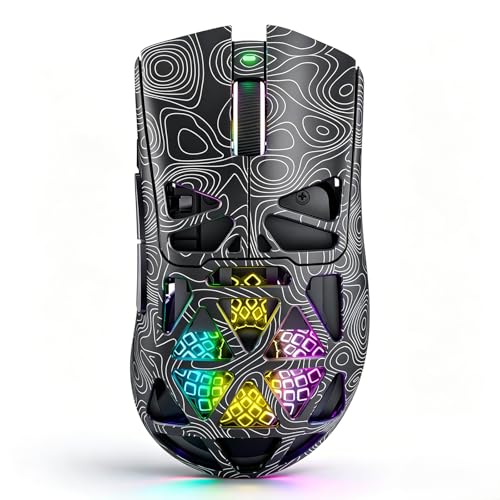
G11 Wireless Gaming Mouse Review Summary
The G11 Lightweight Wireless Gaming Mouse makes the most sense for buyers who want a gaming-first shape with enough versatility to handle work, school, and general desktop use.
Its strongest case is simple: a PAW3311 optical sensor, up to 22,000 DPI, Bluetooth 5.1, 2.4GHz wireless, USB-C wired mode, and a lightweight honeycomb design give it a broad feature set that is easy to justify for competitive players and multi-device users alike.
Best fit: FPS players, budget-conscious competitive gamers, and anyone who wants one mouse that can move between a gaming PC, laptop, and Mac without being locked into a single connection method.
Review Scorecard
| Category | Score | Why it scores this way |
|---|---|---|
| Sensor performance | 8/10 | The PAW3311 sensor and 22,000 DPI ceiling point to solid precision for aiming and fast pointer work. |
| Connectivity flexibility | 9/10 | Bluetooth 5.1, 2.4GHz, and USB-C wired modes make it easy to adapt to different setups. |
| Competitive features | 8/10 | The fast trigger button, 1000Hz polling claim, and macro support are directly relevant to fast-paced games. |
| Ergonomics and weight | 8/10 | The lightweight honeycomb shell should reduce fatigue, though comfort will still depend on hand size and grip style. |
| Customization | 8/10 | Programmable buttons, DPI levels, polling-rate control, and RGB tuning offer useful personalization. |
| Everyday practicality | 7/10 | It should work well beyond gaming, but the gaming-first design may not be ideal for everyone. |
| Long-term convenience | 7/10 | Rechargeable USB-C charging and play-while-charging are practical, but software-dependent customization adds complexity. |
Key Features and Specifications of G11 Wireless Gaming Mouse
The G11 Lightweight Wireless Gaming Mouse is positioned as a compact, feature-rich wireless mouse for FPS, MOBA, MMO, battle royale, and general desktop work.
The listing highlights a PAW3311 optical sensor with adjustable DPI up to 22,000, which is a strong indicator that the mouse is aimed at users who care about tracking accuracy and responsiveness.
Its tri-mode connection setup is one of the main selling points.
You can use Bluetooth 5.1 for convenience, 2.4GHz wireless for lower-latency play, or USB-C wired mode when you want a direct connection or need to charge while using it.
That makes the G11 more adaptable than many mice that only ship with one wireless option.
The shell is described as lightweight and honeycomb-style, which should help reduce hand fatigue during long sessions.
The ergonomic shape is meant to fit naturally in the hand, while also improving airflow and reducing sweat.
For buyers who play long hours or work at the same desk all day, that is a meaningful design choice rather than a cosmetic one.
Other useful claims from the listing include:
- PAW3311 optical sensor with adjustable DPI up to 22,000
- Bluetooth 5.1, 2.4GHz wireless, and USB-C wired operation
- Up to 1000Hz polling rate
- Fast Trigger Button aimed at FPS play
- 6 programmable buttons with macro support
- Custom RGB lighting
- Rechargeable 500mAh battery
- Play-while-charging support
- Compatibility with Windows, macOS, desktop PCs, laptops, and Mac devices
- 1-year warranty plus lifetime technical support
That combination makes the mouse look especially attractive for users who want gaming features without buying separate devices for different machines.
The software side matters too: the listing says you can customize macros, button assignments, DPI levels, polling rates, and lighting effects through the driver software.
That is useful, but it also means buyers should be comfortable with setup and configuration if they want the most from it.
Pros and Cons of G11 Wireless Gaming Mouse
Pros
- Highly flexible connectivity with Bluetooth, low-latency wireless, and wired USB-C options.
- Strong gaming-focused spec sheet for the class, including a PAW3311 sensor and 22,000 DPI support.
- Lightweight honeycomb design should appeal to players who prefer quicker mouse movement and reduced fatigue.
- Programmable controls are useful for games, shortcuts, and productivity.
- Rechargeable battery and play-while-charging improve day-to-day convenience.
Cons
- Honeycomb shells are not for everyone and can feel too open or too gamer-centric for some desks or hand sizes.
- Software dependence adds setup time if you want to tune macros, lighting, and button mapping.
- Many buyers will not need every feature if they only want a simple office mouse.
- A fast-trigger button is niche and most valuable to FPS players rather than general users.
Who Should Buy G11 Wireless Gaming Mouse?
The G11 Lightweight Wireless Gaming Mouse is a smart pick for players who want one device that can move between serious gaming and daily computing.
If you play FPS titles, value low-latency wireless performance, and like the idea of customizing DPI, macros, and side buttons, this mouse gives you a lot of control for the category.
It also makes sense for buyers who switch between a desktop, laptop, and Mac.
The tri-mode connectivity is a practical advantage if you hate juggling different peripherals for different machines.
You should probably skip it if:
- You want a very simple mouse with minimal setup.
- You dislike lightweight or perforated shells.
- You do not care about button programming, RGB, or gaming extras.
- You mainly want a quiet office mouse rather than a competitive gaming peripheral.
For the right buyer, the G11 Lightweight Wireless Gaming Mouse pros and cons lean strongly toward capability and flexibility.
For the wrong buyer, that same feature list may feel like overkill.
Gaming Performance and Daily Use
Fast Aiming and Responsive Movement
The combination of a PAW3311 sensor, adjustable DPI, and the advertised 1000Hz polling rate gives the G11 a spec profile that should suit fast cursor movement and competitive aiming.
That matters most in FPS games, where small inconsistencies in tracking or response can feel distracting.
The Fast Trigger Button is also clearly aimed at that same audience, making the mouse more specialized than a generic wireless peripheral.
Comfort Over Long Sessions
The lightweight honeycomb shell is the clearest comfort-related design decision here.
It should reduce drag and help with longer gaming sessions, especially if you use a claw or fingertip grip.
The tradeoff is familiar: a lighter shell often feels less substantial, and some users simply prefer a closed-body mouse for a more solid hand feel.
Comfort will depend on grip style, but the design points in the direction competitive players usually want.
Everyday Versatility
Outside gaming, the G11 still has useful qualities.
The programmable buttons can speed up browser navigation, productivity shortcuts, and general multitasking.
Bluetooth mode is convenient when you do not want the 2.4GHz dongle occupying a port, while USB-C wired mode removes battery anxiety altogether.
That makes the mouse more practical than many gaming models that only make sense when a game is open.
Software and Customization
The driver software is where the G11 becomes more than a plug-and-play mouse.
You can adjust macros, button assignments, DPI stages, polling rates, and RGB effects, which is ideal for users who like tuning their setup.
The downside is that this flexibility is only valuable if you are willing to spend a little time configuring it.
Buyers who never touch settings may not benefit from the full feature set.
Alternatives to G11 Wireless Gaming Mouse
If you want similar options, look at the Logitech G305 Lightspeed for a simple wireless gaming mouse with a strong reputation for competitive play.
The Razer Basilisk X HyperSpeed is another good comparison if you prefer a gaming mouse with wireless flexibility and a more conventional shape.
If you want a lighter, performance-oriented feel, the SteelSeries Rival 3 Wireless is worth checking for shoppers who want a mainstream gaming brand with broad compatibility.
For buyers who care more about top-end customization than a lightweight shell, the Logitech G502 X LIGHTSPEED is a stronger fit.
Is G11 Wireless Gaming Mouse Worth It?
The G11 Lightweight Wireless Gaming Mouse is worth considering if you want a feature-dense gaming mouse with tri-mode connectivity, lightweight construction, and enough customization to support both gaming and everyday work.
Its value is strongest for FPS players and multi-device users who will actually use the wireless modes, programmable buttons, and driver-based tuning.
If you want a simple, no-fuss mouse, this is probably more than you need.
But if you want one capable wireless mouse that can handle gaming, portability, and desktop flexibility, the G11 looks like a practical buy.