The Acer 8K DisplayPort Cable 10FT review comes down to one simple question: do you need a tough, high-bandwidth DP cable that can keep up with modern gaming monitors and graphics cards?
If you do, this is a focused, sensible option rather than a flashy one.
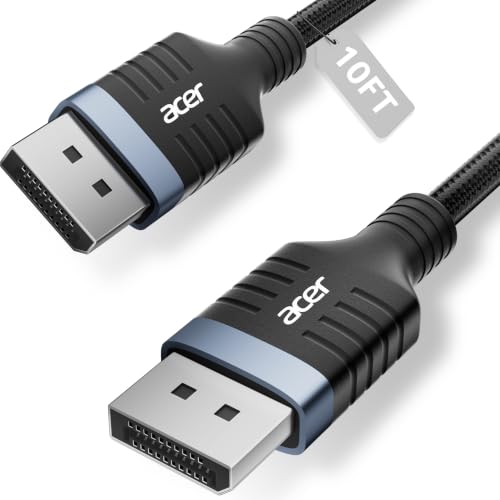
Acer 8K DisplayPort Cable 10FT Review Summary
This Acer 8K DisplayPort Cable 10FT is best for buyers who want a DP 1.4 cable with a long 10-foot reach, a braided outer jacket, and support for demanding monitor setups.
The listing positions it as a plug-and-play cable for high-refresh gaming, HDR displays, and multi-monitor workflows, so the appeal is straightforward: strong compatibility, high bandwidth, and a more durable build than a basic bargain cable.
Verdict: if you are connecting a high-end GPU to a gaming monitor, or you need a dependable cable for a clean desk and a little extra length, this product makes practical sense.
It is less about premium extras and more about giving you the signal headroom and build quality that many setups need.
Review Scorecard
| Category | Score | Buyer-focused rationale |
|---|---|---|
| Bandwidth and resolution support | 9/10 | Listed for up to 8K@60Hz and 4K@240Hz/144Hz, which is strong headroom for modern displays. |
| Gaming suitability | 9/10 | DP 1.4, FreeSync, G-Sync, and high refresh support point to a gaming-first use case. |
| Build quality | 8/10 | Braided jacket, reinforced aluminum shell, and shielding suggest better durability than thin generic cables. |
| Compatibility | 9/10 | Backward compatibility with older DP versions and broad monitor/GPU support make it easy to slot in. |
| Multi-monitor flexibility | 8/10 | MST-ready support is useful for users running more than one display from compatible hardware. |
| Everyday convenience | 8/10 | 10-foot length and plug-and-play use reduce setup friction, especially on larger desks. |
| Value for the right buyer | 8/10 | It looks aimed at buyers who care more about stable performance than the lowest possible cost. |
Key Features and Specifications of Acer 8K DisplayPort Cable 10FT
The core specification is simple: this is a 10-foot DisplayPort-to-DisplayPort cable built to the DP 1.4 standard.
The listing says it supports up to 8K@60Hz, 5K@240Hz, and 4K@144Hz, along with 32.4Gbps bandwidth, Dynamic HDR, and HDCP 2.2.
That combination matters if your display and GPU can actually use it, because the cable is designed to avoid becoming the weak link.
The cable is also listed as backward compatible with DisplayPort 1.3, 1.2, 1.1, and 1.0.
That makes it easier to use across older and newer desktops, gaming PCs, and monitors without having to think too hard about version mismatches.
Key details from the listing:
- 10-foot DisplayPort cable
- DP 1.4 support
- Up to 32.4Gbps bandwidth
- Supports 8K@60Hz, 5K@240Hz, and 4K@144Hz
- Dynamic HDR and HDCP 2.2 support
- MST-ready daisy-chaining for extended or mirrored display setups
- Nylon braided jacket
- Reinforced aluminum shell
- Multi-layer shielding
- Plug-and-play operation with no drivers required
- Listed compatibility with monitors from brands such as Odyssey, Alienware, Dell, ASUS, and HP
The listing also calls out support for RTX 4090/3090 and RX 7900 series GPUs, plus DP, DP++, and DisplayPort++ support.
In plain terms, the cable is positioned for modern PC hardware and not just generic office use.
Pros and Cons of Acer 8K DisplayPort Cable 10FT
Pros
- Strong spec sheet for gaming and high-refresh monitors. The supported resolution and refresh combinations are the main reason to buy it.
- Useful 10-foot reach. That extra length can matter when your tower sits under a desk or your monitor mount is not close to the PC.
- More durable than basic cables. The braided jacket and reinforced shell should appeal to buyers who move hardware around or route cables tightly.
- Broad compatibility. Backward support for older DP versions lowers the risk of a mismatch.
- MST support adds flexibility. Multi-monitor users may appreciate the daisy-chaining angle if their hardware supports it.
Cons
- It is still a cable, not a feature upgrade. If your monitor or GPU is the real bottleneck, this will not fix that.
- The listing is performance-forward, not proof-heavy. The product page makes strong claims, but buyers still have to match those claims to their own setup.
- Overkill for basic office use. If you only need a simple monitor connection at standard resolutions, this is probably more cable than you need.
Who Should Buy Acer 8K DisplayPort Cable 10FT?
This cable suits buyers who want one dependable DP connection for a gaming monitor, a high-refresh desktop setup, or a workstation with more demanding display requirements.
If you run a high-end AMD or NVIDIA card and want a cable that is explicitly marketed for high bandwidth, this is the type of accessory that fits the job.
It also makes sense for people who need a longer cable without sacrificing a sturdier build.
A 10-foot cable can be the difference between a neat setup and a strained one, especially when the PC is not positioned directly beside the display.
You should probably skip it if your display needs are modest, if you only connect a standard office monitor, or if your setup does not benefit from DP 1.4 bandwidth.
In those cases, a simpler and cheaper cable may be enough.
DisplayPort Cable Fit and Setup Considerations
Resolution and Refresh Match
The cable’s value depends on whether your monitor and GPU actually support the higher modes listed by Acer.
If you have an 8K display, a 4K high-refresh panel, or another demanding monitor, the cable is built for that kind of traffic.
Braided Build and Desk Use
The braided jacket and reinforced shell suggest a cable intended to survive being routed behind desks, around monitor arms, and through tighter cable-management paths.
That matters more than it sounds like, because a cable that kinks or frays can become annoying long before it fails completely.
Multi-Monitor and MST Scenarios
The MST-ready claim is most relevant to users who already know they want daisy-chaining or mirrored display support.
It is not a universal advantage, but for the right hardware stack it can simplify the number of cables running back to the PC.
Compatibility and Signal Headroom
Backward compatibility with earlier DP standards makes this easier to adopt across mixed hardware.
The practical buyer benefit is lower setup risk: you are not buying a niche cable that only works in one narrow configuration.
Alternatives to Acer 8K DisplayPort Cable 10FT
If you want to compare similar Amazon options, the most relevant alternatives are other well-known DisplayPort cable lines from brands such as Cable Matters DisplayPort cables, Club 3D DisplayPort cables, and IVANKY DisplayPort cables.
These are credible comparisons because they sit in the same general category: DP cables aimed at gaming monitors, higher refresh rates, and sturdier everyday use.
Another useful comparison is any certified DisplayPort 1.4 cable from a familiar brand with the length you actually need.
If your desk is shorter, a shorter cable may reduce clutter.
If your PC sits farther away, a longer certified cable may be the better buy.
Is Acer 8K DisplayPort Cable 10FT Worth It?
Yes, for the right setup. If you need a 10-foot DP 1.4 cable for a high-refresh gaming monitor, a modern GPU, or a multi-monitor desk, this Acer cable looks like a practical buy.
It is worth considering because it combines the features that matter most in this category: high bandwidth, broad compatibility, braided construction, and enough length to solve real placement problems.
If your setup is basic, though, you can step down to a simpler cable and save money without giving up anything important.