Choosing the right enclosure can make an old SSD feel new again. The best USB-C SSD enclosures turn internal drives into fast, portable storage for backups, gaming libraries, creative files, and everyday file transfer.
Below, we focus on the practical differences that matter most: drive type, speed, build quality, heat management, and ease of installation.
Best 10 USB C SSD Enclosures Picks for 2026
Tool-Free NVMe Speed Pick

- Flip-open, tool-free install
- Aluminum cooling for steadier transfers
- NVMe only; supports 2230-2280
Best For: NVMe users who want portable, fast, no-screw storage
Clear SATA Value Pick

- Sliding, tool-free 2.5-inch design
- UASP and TRIM for faster transfers
- Transparent shell with broad compatibility
Best For: Anyone needing a simple 2.5-inch SATA SSD/HDD enclosure
Dual-Format Tool-Free Pick
SABRENT M.2 NVMe & SATA Enclosure

- Fits both NVMe and SATA M.2 drives
- Tool-free install with 10Gbps USB-C
- Slim aluminum case with thermal pad
Best For: Users who need one compact enclosure for either M.2 drive type
Aluminum SATA Travel Pick

- Tool-free 2.5-inch SATA setup
- Aluminum body with chipset cooling
- USB-C with UASP and broad compatibility
Best For: Portable users with 2.5-inch SATA SSDs or HDDs
Tool-Free NVMe Pick
UGREEN SSD Enclosure Tool-Free USB C External 10Gbps

- 10Gbps USB 3.2 Gen2 NVMe enclosure
- Tool-free install with included cables
- Supports 2230-2280 NVMe drives up to 8TB
Best For: Fast, portable NVMe storage with easy drive swaps
2.5-Inch SATA Workhorse
SSK 2.5" Hard Drive Enclosure SATA to USB-C
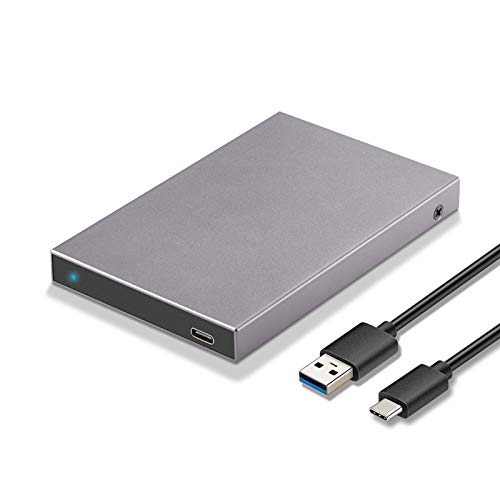
- For 2.5-inch SATA HDDs and SSDs up to 10TB
- USB C 3.2 Gen2 with UASP support
- Tool-free, hot-swap, aluminum shell design
Best For: Simple, everyday enclosure use with a 2.5-inch SATA drive
Budget SATA Pick
BENFEI 2.5 Inch SATA to USB Tool Free External Enclosure

- Tool-free 2.5-inch SATA enclosure
- USB-C and USB-A connection options
- Up to 5Gbps with UASP support
Best For: Basic SATA SSD use with flexible USB-C or USB-A connections
Tool-Free Everyday Pick
iDsonix 2.5" USB-C SATA Enclosure

- Tool-free, plug-and-play installation
- 6Gbps support with UASP acceleration
- Includes USB-C to USB-C cable and drive protection
Best For: A simple 2.5-inch SATA enclosure for everyday use
Fastest Gen2 Choice
ORICO USB 3.1 Gen2 2.5" Enclosure

- USB 3.1 Gen2 with up to 10Gbps speed
- Includes USB-C to C and USB-A to C cables
- Tool-free design with auto-sleep mode
Best For: Users who want the fastest listed 2.5-inch SATA enclosure
Clear Value Option
ORICO 5Gbps USB-C 2.5" Enclosure

- Transparent crystal PC design
- Tool-free USB-C setup with UASP
- Includes USB-A cable and sleep mode
Best For: Budget-minded users wanting a simple clear 2.5-inch enclosure
Tool-Free NVMe Speed Pick – SABRENT USB-C NVMe Enclosure
If you want usb c ssd enclosures built for fast NVMe storage, this SABRENT model keeps things simple: open the flip-top cover, drop in an M.2 NVMe drive, and close it without tools or screws. Its aluminum top helps press the thermal pad against the SSD for steadier 10Gbps performance during longer transfers and heavier workloads.
Best For: NVMe users who want a tool-free, portable enclosure for upgrades, cloning, and fast everyday transfers.
Pros:
- Tool-free flip-open design makes installation and drive swaps quick.
- Aluminum cooling approach is designed to improve heat transfer and stability.
- Supports M.2 NVMe drives in 2230, 2242, 2260, and 2280 sizes up to at least 8TB.
- USB-C plug-and-play operation with no drivers or external power needed.
Cons:
- NVMe only, so it does not work with M.2 SATA SSDs.
- Only supports one drive at a time.
This is a strong pick if your priority is speed, easy access, and a compact build for portable work. It is especially practical for creators, gamers, and anyone who wants a simple enclosure for a single NVMe drive.
Clear SATA Value Pick – POSUGEAR 2.5'' SATA Enclosure
Among usb c ssd enclosures for 2.5-inch drives, this POSUGEAR case focuses on easy handling and broad everyday compatibility. The sliding, tool-less shell fits 7mm/9mm SATA SSDs or HDDs, while UASP and TRIM support are intended to help the enclosure deliver faster, smoother transfers than basic USB 3.0 options.
Best For: Users who need a simple, transparent enclosure for 2.5-inch SATA SSDs or HDDs with plug-and-play convenience.
Pros:
- Tool-free sliding design makes installation straightforward.
- UASP and TRIM support are included for improved transfer efficiency.
- Transparent shell lets you see the drive inside.
- Works with Windows, Linux, Mac OS, and devices like PCs, laptops, routers, TVs, and game consoles.
Cons:
- Limited to 2.5-inch SATA drives, not M.2 NVMe.
- Supports up to 4TB according to the supplied notes.
This is a practical choice when you want a budget-friendly, easy-to-use enclosure for a SATA SSD or HDD rather than a high-speed NVMe setup. The built-in protection features and broad device support make it useful for general storage expansion and backup tasks.
Dual-Format Tool-Free Pick – SABRENT M.2 NVMe & SATA Enclosure
If you want usb c ssd enclosures that can handle more than one kind of M.2 drive, this SABRENT model is built for both NVMe and SATA SSDs. It is fully tool-free, supports common 2242, 2260, and 2280 lengths, and uses a slim aluminum body with a thermal pad to help move heat away from the drive.
Best For: People who need one enclosure for either M.2 NVMe or M.2 SATA drives and want a compact, no-screw setup.
Pros:
- Supports both M.2 NVMe and M.2 SATA SSDs.
- Tool-free installation makes drive changes quick and easy.
- USB 3.2 Type-C supports up to 10Gbps and up to 1000MB/s real transfers.
- Slim aluminum build with ABS frame and thermal pad helps with heat management.
Cons:
- Does not support 2.5-inch SATA drives or mSATA.
- No clearance for drives with a pre-installed heatsink.
This enclosure stands out for flexibility: it works if you switch between NVMe and SATA M.2 drives and want a single compact case for both. It is a good fit for laptop bags and general portable use, as long as your SSD has no heatsink attached.
Aluminum SATA Travel Pick – UGREEN 2.5" USB-C Enclosure
For shoppers comparing usb c ssd enclosures for 2.5-inch SATA drives, this UGREEN model keeps the formula straightforward: a tool-free aluminum case, USB-C connectivity, and support for SATA SSDs or HDDs up to 6TB. The built-in ASM235CM chipset and aluminum shell are designed for solid heat dissipation without needing a fan.
Best For: Users who want a portable 2.5-inch SATA SSD/HDD enclosure with simple setup and broad device compatibility.
Pros:
- Tool-free installation with plug-and-play use.
- USB-C connection with UASP support for faster transfers.
- Aluminum build and built-in chipset are aimed at better heat dissipation.
- Compatible with many 2.5-inch SATA SSDs/HDDs and platforms including Windows, Mac OS, and Linux.
Cons:
- Only supports 2.5-inch SATA drives, not M.2 NVMe.
- Transfer speed is capped by SATA at 6Gbps.
This is a sensible pick if you already have a 2.5-inch SATA SSD or hard drive and want a dependable USB-C enclosure for storage expansion or backups. It is not the fastest option for modern NVMe drives, but it is well suited to simple, portable everyday use.
Tool-Free NVMe Pick – UGREEN SSD Enclosure Tool-Free USB C External 10Gbps
If you want one of the more versatile usb c ssd enclosures for an M.2 NVMe drive, this UGREEN model focuses on speed, easy installation, and broad device support. It uses USB 3.2 Gen2 for up to 10Gbps performance, includes a tool-free buckle design, and is built for portable use with an aluminum shell and silicone case.
Best For: Users who want a tool-free NVMe enclosure for fast external storage on laptops, desktops, and mobile devices.
Pros:
- Up to 10Gbps over USB 3.2 Gen2, with backward compatibility.
- Tool-free installation makes swapping M.2 NVMe drives quick and simple.
- Supports M/B&M key NVMe drives in 2230/2242/2260/2280 sizes up to 8TB.
- RTL9210 chipset adds short-circuit, over-current, and multi-protection support.
Cons:
- Does not support SATA NGFF SSDs or mSATA SSDs.
- 10Gbps performance requires a matching USB C 3.2 Gen2 cable.
Overall, this is a strong pick if your setup calls for a compact NVMe enclosure rather than a SATA model. The tool-free design and included cables make it especially practical for frequent drive changes and travel use.
2.5-Inch SATA Workhorse – SSK 2.5" Hard Drive Enclosure SATA to USB-C
For shoppers comparing usb c ssd enclosures for a 2.5-inch SATA drive, this SSK enclosure keeps things simple and practical. It supports 7mm and 9.5mm SATA HDDs and SSDs, uses USB C 3.2 Gen2 with UASP, and pairs that with an aluminum shell for better heat dispersion and a slimmer build.
Best For: Anyone needing a straightforward 2.5-inch SATA enclosure for everyday external storage.
Pros:
- Compatible with 2.5-inch SATA HDDs and SSDs up to 10TB.
- USB C 3.2 Gen2 with UASP support for faster transfers.
- Tool-free, plug-and-play setup with hot-swap support.
- Aluminum shell adds sturdiness, heat dispersion, and antistatic performance.
Cons:
- Limited to 2.5-inch SATA drives, not NVMe.
- Advertised speed tops out at 6Gbps.
This is a sensible option if you already have a 2.5-inch SATA SSD or HDD and want a reliable USB-C case. It focuses on compatibility and ease of use rather than advanced NVMe features.
Budget SATA Pick – BENFEI 2.5 Inch SATA to USB Tool Free External Enclosure
If you need a practical entry-level option among usb c ssd enclosures, this BENFEI enclosure is built around 2.5-inch SATA drives and a very easy tool-free setup. It offers a USB Type-C/Type-A plug design, up to 5Gbps transfer speeds, and UASP support for better SATA III performance.
Best For: Users who want a simple, affordable 2.5-inch SATA enclosure with both USB-C and USB-A connection options.
Pros:
- Tool-free installation with plug-and-play operation.
- USB Type-C/Type-A design adds flexible connection options.
- Supports 2.5-inch SATA I/II/III drives up to 6TB.
- UASP support helps improve transfer performance.
Cons:
- Limited to 2.5-inch SATA drives, not NVMe.
- Maximum speed is 5Gbps.
- Designed for 7mm and 9.5mm drive thickness only.
For basic file transfers, backups, or repurposing an old SATA SSD, this BENFEI model covers the essentials without extra complexity. Its dual-connector design makes it especially convenient for mixed-device setups.
Tool-Free Everyday Pick – iDsonix 2.5" USB-C SATA Enclosure
If you want a straightforward option among usb c ssd enclosures, the iDsonix 2.5 inch enclosure focuses on easy setup, broad compatibility, and basic drive protection. It supports 7mm and 9.5mm SATA SSDs and HDDs, and the included USB-C to USB-C cable makes it simple to connect to a laptop or other compatible device.
Best For: Users who want a simple, tool-free 2.5-inch SATA enclosure for everyday storage transfers.
Pros:
- Tool-free installation with plug-and-play use
- 6Gbps support with UASP acceleration for faster transfers
- Built-in protection features plus EVA foam padding
- Works with Windows, Mac, Linux, TVs, PS4/5, and Xbox systems
Cons:
- Designed for 2.5-inch SATA drives only, not NVMe SSDs
- Listed transfer speed is capped at 5Gbps in the details section
Overall, this is a practical no-fuss enclosure for repurposing a 2.5-inch SATA drive. It stands out more for convenience and protection than for premium materials or advanced features.
Fastest Gen2 Choice – ORICO USB 3.1 Gen2 2.5" Enclosure
Among usb c ssd enclosures, this ORICO model is the speed-focused pick thanks to its USB 3.1 Gen2 connection and 10Gbps rating. It supports 2.5-inch SATA SSDs and HDDs, includes both USB-C to C and USB-A to C cables, and uses a transparent PC shell so you can see the drive inside.
Best For: Buyers who want the highest listed transfer speed in a 2.5-inch SATA enclosure.
Pros:
- USB 3.1 Gen2 design with up to 10Gbps transfer rate
- Tool-free installation with hot-swapping support
- Includes both USB-C to C and USB-A to C cables
- Auto-sleep mode helps reduce unnecessary power use
Cons:
- Still limited to 2.5-inch SATA drives, not NVMe
- Transparent polycarbonate build may not appeal to everyone
If transfer speed is your main priority, this ORICO enclosure has the strongest specs in the group. The extra cable bundle and auto-sleep feature make it a flexible, storage-friendly option for home or office use.
Clear Value Option – ORICO 5Gbps USB-C 2.5" Enclosure
This ORICO model is a good value-oriented choice in usb c ssd enclosures if you want a clear shell, simple setup, and reliable support for 2.5-inch SATA drives. It handles 7mm and 9.5mm SSDs or HDDs, supports UASP over USB-C at up to 5Gbps, and includes a USB-A cable for easy connection.
Best For: Budget-minded buyers who want a transparent, easy-to-use 2.5-inch SATA enclosure.
Pros:
- Transparent crystal PC body lets you see the drive inside
- Tool-free, plug-and-play setup with hot-swapping support
- Supports UASP and up to 5Gbps transfer rates
- Includes USB-A cable and 10-minute sleep mode
Cons:
- Speed is lower than Gen2 10Gbps enclosures
- Limited to 2.5-inch SATA drives only
For basic external storage or drive reuse, this enclosure covers the essentials well. It is especially appealing if you value the clear design and want a simple, low-hassle SATA enclosure rather than maximum performance.
How We Picked the Best USB C SSD Enclosures
We focused on real-world usefulness first: compatibility with common M.2 NVMe and 2.5-inch SATA drives, transfer-speed support, tool-free convenience, and enclosure materials that help with durability and heat dissipation. We also favored models that fit different budgets and use cases, since the best choice for a laptop upgrade is not always the best choice for content creation or backup storage.
Quick Comparison: What Matters Most
For most buyers, the biggest decision is drive format. NVMe enclosures are the right fit when speed matters and your SSD is M.2 PCIe-based. SATA enclosures are the better pick for older 2.5-inch SSDs and HDDs. If you want the simplest install, tool-free designs save time and reduce hassle. If you plan to travel with the drive, look for a sturdy shell and good thermal design.
Key Buying Factors for USB-C SSD Enclosures
Drive Compatibility
Make sure the enclosure matches your drive type exactly. A SATA SSD will not perform like an NVMe drive in an NVMe enclosure, and M.2 drives are not interchangeable unless the enclosure specifically supports both protocols.
Speed Ratings
USB-C is the connector, not the speed guarantee. Look at the rated interface speed: 5Gbps, 10Gbps, or higher. If your SSD and computer both support faster transfer rates, a 10Gbps enclosure can offer a noticeable improvement for large file transfers.
Thermals and Build Quality
Aluminum housings are popular because they help dissipate heat during long transfers. That matters most for NVMe drives, which can run warmer than SATA models. Good thermal design can help maintain more consistent performance.
Tool-Free Vs. Screw-Based
Tool-free enclosures are ideal if you swap drives often or want a quick setup. Screw-based models can feel less convenient, but they may offer a more secure fit depending on the design.
Who Should Buy Which USB C SSD Enclosures?
If you want maximum speed for a modern M.2 PCIe drive, choose one of the USB-C SSD enclosures designed for NVMe. If you are repurposing an older laptop SSD, a 2.5-inch SATA enclosure is usually the most affordable and sensible option. Frequent upgraders, testers, and DIY users should prioritize tool-free models, while anyone using the drive for travel or backup should lean toward a sturdy enclosure with solid heat management.