If you need crisp lines, accurate color, and true wide-format output, the right plotter can save time and reduce reprints.
This roundup focuses on reliable plotter printers for large prints, from compact 24-inch models to 36-inch options for bigger plans, posters, and mixed office workflows.
Best 10 Plotter Printers for Large Prints Picks for 2026
Compact CAD & Poster Plotter

- 24-inch roll printing with optional sheet feeding
- HP Click helps reduce errors and waste
- Wi-Fi, Ethernet, USB, and mobile support
Best For: Small teams needing easy wide-format CAD and poster printing
Wide 36-inch Office Plotter

- 36-inch media support with 59-foot roll length
- 5-color LUCIA TD pigment inks
- Wi-Fi, Ethernet, and USB connectivity
Best For: Offices needing a wide-format printer for technical and banner work
Service-Backed CAD Plotter
HP DesignJet T210 with 2-Year Care Pack
- 24-inch roll printing with optional sheet support
- Includes 2-year HP Care Pack with onsite support
- HP Click simplifies CAD and poster workflows
Best For: Professionals who want HP’s easy large-format printing with added service coverage
Fast 24-inch Technical Plotter

- Up to 30% faster than previous models
- 2400 x 1200 dpi with 15,360 nozzles
- UV- and water-resistant ink for outdoor use
Best For: Users who want a fast 24-inch plotter for sharp technical and signage prints
Compact MFP for CAD Teams
HP DesignJet T830 24-inch Large Format MFP
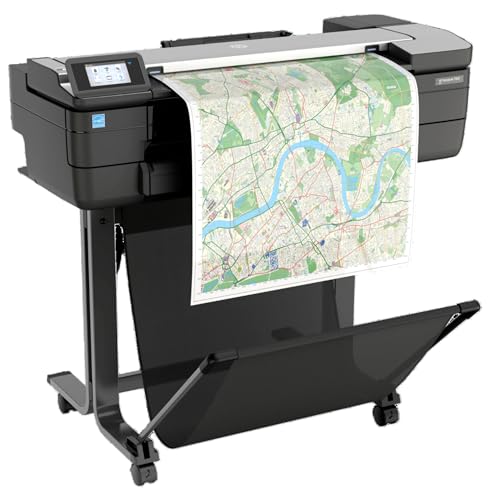
- Print, scan, and copy in one compact unit
- Supports 24-inch rolls and sheet feed
- Wi-Fi and mobile printing included
Best For: Architecture and construction offices needing a compact multifunction plotter
Easy Copy-and-Scan Plotter
Canon imagePROGRAF TC-21M 24-inch MFP

- Flatbed scanner can enlarge smaller originals
- Cloud printing and scanning are included
- Auto sheet feeder supports up to 100 sheets
Best For: Teams wanting a simple 24-inch multifunction printer with cloud tools
Secure Multi-Size Plotter
HP DesignJet T870 24-inch Plotter Printer

- Automatic sheet/roll switching reduces manual handling
- Includes 2-year onsite and phone support
- Print-only model with HP Click workflow tools
Best For: Busy technical teams needing fast, secure, mixed-size wide-format printing
Precision CAD Plotter

- 36-inch roll printing with 13 x 19-inch sheet support
- Automatic sheet/roll switching and built-in media bin
- HP Click helps simplify PDF and CAD printing
Best For: Technical line drawings, maps, posters, and CAD-heavy teams
Service-Backed Wide Format Printer

- 2-year onsite warranty included
- 36-inch roll printing with automatic sheet feeding
- HP Click and HP Smart support easier workflow
Best For: Buyers who want a supported 36-inch plotter for technical and poster prints
Compact Site Plotter

- Compact 24-inch plotter with portable design
- Optional sheet feeder for 13 x 19-inch sheets
- 2-year Care Pack included for added support
Best For: Small teams needing a space-saving large-format printer for everyday technical output
Compact CAD & Poster Plotter – HP DesignJet T210 24-inch
HP DesignJet T210 Large Format 24-inch Plotter Printer, for Easy CAD & Poster Prints (8AG32D)
Check Price On AmazonIf you need plotter printers for large prints that stay simple and cost-conscious, the HP DesignJet T210 is built for technical line drawings, posters, maps, and sewing patterns. It handles 24-inch rolls and, with the optional sheet feeder, can also take up to 13″ x 19″ sheets for mixed-format work.
Best For: Architects, designers, and small teams who want a 24-inch large-format printer for CAD files, posters, and everyday wide-format jobs.
Pros:
- Supports up to 24-inch roll media and optional 13″ x 19″ sheet feeding.
- HP Click adds PDF error checking, auto-nesting, and drag-and-drop printing.
- Built-in cutter and auto error detection help reduce paper and ink waste.
- Offers Wi-Fi, Ethernet, USB, and mobile printing through HP Smart.
Cons:
- Sheet feeder for wider sheet sizes is optional, not included.
- It is a print-only device, so it won’t scan or copy.
- Designed for efficiency, but still limited to 24-inch output width.
This is a practical entry-level large-format option if you want reliable output for CAD-style work without extra complexity. It emphasizes workflow convenience and ink-saving features more than high-volume production speed.
Wide 36-inch Office Plotter – Canon imagePROGRAF TM-300
For plotter printers for large prints that need a wider output range, the Canon imagePROGRAF TM-300 offers 36-inch media support with pigment-based LUCIA TD inks. It is aimed at office use and focuses on clean line quality, reliable Wi-Fi connectivity, and Canon’s well-known print consistency.
Best For: Offices that need a 36-inch plotter for technical drawings, banners, and general large-format printing.
Pros:
- Supports media up to 36 inches wide and 59 feet long.
- 5-color pigment ink system is built for crisp Canon print quality.
- Wi-Fi, Ethernet, and USB connectivity make it easy to place in an office.
- Compact footprint for a 36-inch-class device.
Cons:
- Print-only design means no scanning or copying features.
- Uses a monochrome output type in the listed specs, so it is not a color-first office MFP.
- Single-tray setup may be limiting for frequent media changes.
The TM-300 makes sense if width is your priority and you want a straightforward office plotter with pigment inks. It is best viewed as a dependable large-format workhorse rather than a multi-function device.
Service-Backed CAD Plotter – HP DesignJet T210 with 2-Year Care Pack
This HP DesignJet T210 is a strong pick among plotter printers for large prints if you want the same 24-inch CAD and poster capabilities plus added support coverage. It is designed for blueprints, indoor signage, maps, sewing patterns, and other wide-format jobs, while the included 2-year HP Care Pack adds onsite support.
Best For: Architects, engineers, and construction professionals who want a 24-inch plotter with extended onsite support.
Pros:
- Includes a 2-year HP Care Pack with onsite support.
- Handles up to 24-inch rolls and optional 13″ x 19″ sheets.
- HP Click software supports drag-and-drop printing, alerts, and auto-nesting.
- Ink-saving maintenance and auto cutter help keep operating costs down.
Cons:
- Still a print-only printer with no scanning function.
- Optional sheet feeder is required for larger sheet-based work.
- Best suited to light-to-moderate large-format use, not heavy production runs.
If you value support coverage as much as print quality, this version of the T210 is the safer buy. It keeps the same practical workflow features while adding onsite service for less downtime.
Fast 24-inch Technical Plotter – Canon imagePROGRAF TM-240
The Canon imagePROGRAF TM-240 is a practical choice when you want plotter printers for large prints with sharp detail, faster throughput, and outdoor-capable output. Its 24-inch format, 5-color ink set, and UV- and water-resistant inks make it well suited to construction sites, posters, and store signs.
Best For: Teams that need a 24-inch plotter for technical drawings, outdoor job-site documents, and poster signage.
Pros:
- Up to 30% faster than previous models, with up to 3.2 ppm for 24″ x 36″ sheets.
- 2400 x 1200 dpi resolution and 15,360 nozzles for sharp lines and text.
- UV- and water-resistant ink works with suitable media for outdoor conditions.
- Automatic media detection helps identify type, length, and width on the screen.
Cons:
- Maximum media size is Arch C, so it stays in the 24-inch class.
- Listed as a print-focused device with scan added, not a full office multifunction system.
- Single-tray setup may be less convenient for frequent media switching.
The TM-240 is a strong fit if you care about speed, crisp technical output, and outdoor-ready durability. It balances office-friendly operation with the color and line quality needed for professional large-format work.
Compact MFP for CAD Teams – HP DesignJet T830 24-inch Large Format MFP
If you need plotter printers for large prints that can also scan and copy, the HP DesignJet T830 is built for smaller technical offices that want a compact footprint without giving up wide-format capability. It handles up to 24-inch rolls and supports sheet feed, roll feed, and an automatic cutter, making it practical for plan sets, project markups, and quick client updates.
Best For: Architecture studios and construction offices that want a compact multifunction plotter for printing, scanning, and copying technical documents.
Pros:
- Multifunction design supports print, scan, and copy workflows.
- Handles 8.3 to 24-inch sheets and 11 to 24-inch rolls.
- Wi-Fi, Gigabit Ethernet, and mobile printing support add flexibility.
- Automatic cutter and integrated media bin help keep output organized.
Cons:
- Maximum copy speed is modest at 2 pages per minute in black and white.
- Designed for smaller footprint use, not as a high-volume production device.
- Uses HP 728 cartridges, and non-HP chip compatibility is restricted.
The T830 stands out when you want a space-saving wide-format MFP for everyday technical work. It’s a strong fit if scan-and-copy convenience matters as much as print size.
Easy Copy-and-Scan Plotter – Canon imagePROGRAF TC-21M 24-inch MFP
Among plotter printers for large prints, the Canon imagePROGRAF TC-21M is a straightforward multifunction option for users who want simple large-format output, copying, and cloud access. Its letter flatbed scanner can enlarge smaller originals, and the 2.7-inch tiltable touchscreen keeps everyday operation simple.
Best For: Teams that need an easy-to-use 24-inch multifunction printer for enlarging originals, cloud scanning, and flexible office printing.
Pros:
- Letter flatbed scanner can enlarge smaller originals in a few steps.
- USB flash drive port makes large-format printing convenient.
- Cloud printing and scanning are built in.
- Auto sheet feeder supports up to 100 letter sheets or 50 sheets of 11″ x 17″ paper.
Cons:
- Simplex printing only, so it does not offer automatic duplexing.
- Best for office and creative workflows rather than heavy production use.
- Limited to a single tray, so paper handling is more basic than some larger systems.
The TC-21M is a practical pick if you want an approachable large-format MFP with useful scanning and cloud tools. It gives you broad media flexibility without overcomplicating the workflow.
Secure Multi-Size Plotter – HP DesignJet T870 24-inch Plotter Printer
If you’re comparing plotter printers for large prints and want a model focused on speed, security, and multi-size convenience, the HP DesignJet T870 is a strong candidate. It prints up to 24-inch rolls and up to 13″ x 19″ sheets with the included automatic sheet feeder accessory, so switching between project sizes is much easier.
Best For: Architects, engineers, construction professionals, and educators who need secure, fast, multi-size wide-format printing with low-maintenance operation.
Pros:
- Included 2-year onsite and phone support adds peace of mind.
- Automatic sheet/roll switch simplifies multi-size printing.
- Supports a broad range of media, including banner, photo, film, and self-adhesive stock.
- HP Click software helps with PDF checks, auto-nesting, and drag-and-drop printing.
Cons:
- Print-only design, so it does not scan or copy.
- Requires genuine HP 738 inks and HP 739 printhead compatibility.
- At 82 pounds, it is still a substantial office printer.
The T870 is the most workflow-friendly option here if you print mixed-size technical jobs often. Its speed, support package, and automated media handling make it especially appealing for busy teams.
Precision CAD Plotter – HP DesignJet T630 36-inch
If you need plotter printers for large prints that can handle technical work without fuss, the HP DesignJet T630 is built for exactly that. It supports 36-inch rolls and up to 13 x 19-inch sheets with the included automatic sheet feeder, making it a practical choice for CAD drawings, maps, posters, and crisp line-based output.
Best For: Architects, engineers, and construction teams that want a 36-inch large-format printer for accurate linework and mixed roll-and-sheet jobs.
Pros:
- Supports up to 36-inch wide rolls plus 13 x 19-inch sheets with the included feeder
- Automatic sheet/roll switching, media bin, and horizontal cutter help streamline output
- HP Click software adds PDF error checking, auto-nesting, and drag-and-drop printing
- Offers Ethernet, USB, and Wi-Fi connectivity for flexible setup
Cons:
- Print-only design, so it is not meant for scanning or copying workflows
- Large footprint and 123-pound weight make it a dedicated office device
- Uses HP OEM 712/713 ink cartridges, which may limit third-party options
This model is a strong fit if your priority is dependable, large-format technical printing with low-friction media handling. It is less about all-in-one convenience and more about producing accurate, professional output for design and construction work.
Service-Backed Wide Format Printer – HP DesignJet T650 36-inch
For buyers comparing plotter printers for large prints, the HP DesignJet T650 stands out by pairing 36-inch wide-format support with a 2-year onsite warranty. It is designed for technical drawings, posters, and maps, while the included sheet feeder and automatic roll handling make it easier to move between different job sizes.
Best For: Teams that want a 36-inch plotter with onsite warranty coverage and simple mixed-media handling.
Pros:
- Includes a 2-year HP Care Pack with onsite support
- Handles up to 36-inch rolls and up to 13 x 19-inch sheets with the included sheet feeder
- Automatic sheet/roll switching, media bin, and horizontal cutter simplify workflow
- HP Click software supports drag-and-drop printing, PDF checks, and auto-nesting
Cons:
- Print-only device, so it will not replace a multifunction office machine
- Large-format size and 123-pound weight require dedicated space
- Primarily aimed at technical and poster output rather than general home use
This is the most service-oriented option in the group, which can matter if uptime is a priority. If you want wide-format performance plus peace of mind from onsite support, the T650 is the most complete package here.
Compact Site Plotter – HP DesignJet T230 24-inch
If you want plotter printers for large prints but do not need a 36-inch machine, the HP DesignJet T230 offers a smaller 24-inch footprint with wide-format capability. It is aimed at blueprints, posters, indoor signage, maps, and sewing patterns, and it can handle rolls plus up to 13 x 19-inch sheets with the optional sheet feeder.
Best For: Small teams, mobile workspaces, and professionals who need a compact 24-inch large-format printer with onsite warranty support.
Pros:
- Compact and portable compared with larger 36-inch plotters
- Supports up to 24-inch rolls and up to 13 x 19-inch sheets with an optional feeder
- Includes a 2-year Care Pack and uses automatic horizontal cutting
- Good fit for blueprints, posters, indoor signage, maps, and sewing patterns
Cons:
- Slower output than the larger T630 and T650 models
- Sheet feeder is optional, not included
- 24-inch maximum media width is less flexible than 36-inch alternatives
The T230 is the most space-conscious pick here, and it still covers the core large-format tasks many teams need. It makes the most sense when portability, smaller jobs, and lower physical size matter more than maximum width.
How We Picked These Plotter Printers for Large Prints
We prioritized print width, output quality, ease of use, and fit for common buyer needs such as CAD drawings, engineering plans, posters, and general large-format printing. We also looked for practical ownership details like wireless support, multifunction features, and included service coverage, since those often matter as much as raw print performance.
Quick Comparison
In simple terms: 24-inch models are the better fit for smaller offices and individual users, while 36-inch machines are stronger choices for teams that regularly produce oversized plans or presentation graphics. Multifunction units add scanning and copying, which is useful if your workflow involves markups, archiving, or document handling alongside printing.
Key Buying Factors for Plotter Printers for Large Prints
Print Width and Media Size
Choose the widest format you realistically need. A 24-inch printer covers many CAD and poster tasks, but 36-inch models give more flexibility for larger sheets and fewer layout compromises.
Print Quality and Ink System
For line drawings, precision matters more than saturation. For posters and client-facing graphics, look for smoother gradients and stronger color reproduction. An ink system designed for technical and graphic output is usually a better match than a general-purpose office printer.
Workflow Features
Wireless printing, mobile support, auto sheet feeding, and output bins can all improve day-to-day efficiency. If you handle mixed jobs, a multifunction device can reduce the need for separate scan and copy equipment.
Service and Support
Large-format devices are business tools, so warranty length and onsite support are important. Better coverage can lower downtime and make ownership easier to plan around.
Who Should Buy Which Plotter Printers for Large Prints?
If you are a solo architect, engineer, or student working mostly with standard-size plans, a 24-inch model is often the smartest value. If you need broader media support, heavier throughput, or presentation-ready output, a 36-inch option is worth the extra space and cost. Teams that scan, copy, or manage shared documents should favor multifunction machines, while buyers who want the simplest setup should stick with straightforward single-function Plotter Printers for Large Prints.
In the end, the best choice depends on how often you print, how wide your media needs to be, and whether you need extra office features beyond printing.