Choosing the right printer can make the difference between a good image and a print that looks truly gallery-ready. For photographers, designers, and studios, the best photo printers for professionals deliver accurate color, consistent detail, and dependable results.
Below, we’ve rounded up 10 standout models for different workflows, from high-end pigment printers to cost-conscious tank systems and wide-format options.
Best 10 Photo Printers for Professionals Picks for 2026
Flagship 17-inch Studio Printer

- 11-ink pigment system with Chroma Optimizer
- 17-inch wireless, borderless printing
- Print management and layout software included
Best For: Large-format photographers and fine art printing
Compact Archival Color Printer
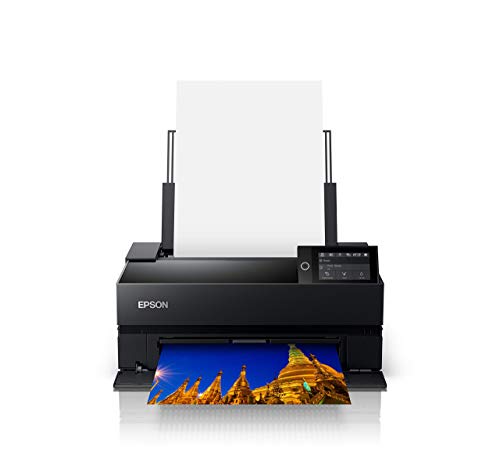
- UltraChrome PRO10 ink with Violet
- No Photo/Matte Black switching needed
- Roll and sheet media support
Best For: Compact professional printing with archival permanence
Fine Art 13-inch Print Bundle

- LUCIA PRO II pigment ink system
- Borderless output up to 13 x 19 inches
- ICC profiles and Print & Layout software
Best For: Desktop fine art and client-ready photo prints
High-Volume Photo Tank Printer

- Cartridge-free refillable ink system
- Wide-format printing up to 13 x 19
- All-in-one printer, scanner, and copier
Best For: Frequent photo printing with lower ink costs
Gallery-Grade Detail

- 9-color pigment ink system with Chroma Optimizer
- Matte black ink for deeper blacks and better dark-range detail
- Print-only design with 3-inch color LCD
Best For: Professional photographers prioritizing premium pigment prints
All-in-One Photo Versatility

- 6-color Claria Photo HD inks with 5760 x 1440 dpi resolution
- All-in-one with scanner, copier, touchscreen, and smart app support
- Borderless output up to 11 x 17 inches with separate paper trays
Best For: Studio users needing photo quality and multifunction convenience
Fast Borderless Output

- 8-color dye ink system for vibrant photo prints
- Borderless printing up to 13 x 19 inches
- Fast bordered output with a 3-inch color LCD
Best For: Photographers who want quick, vivid borderless prints
Studio Color Choice

- 8-color dye ink system for gallery-style color
- Borderless A3+ prints in as little as 90 seconds
- ICC profile support helps with color accuracy
Best For: Studio photographers wanting fast, vivid large-format prints
Low-Cost Ink Pick

- Up to 3,800 4 x 6 photos per ink set
- Estimated ink cost is 2.5 cents per print
- Compact all-in-one with wireless printing
Best For: High-volume photo printing with very low ink costs
Flagship 17-inch Studio Printer – Canon imagePROGRAF PRO-1100
If you want one of the most capable photo printers for professionals, the Canon imagePROGRAF PRO-1100 is built for large-format fine art and gallery-grade output. Its 11 pigment-based inks and Chroma Optimizer are aimed at improving gloss uniformity, reducing bronzing, and expanding the usable color range for demanding print work.
Best For: Professional photographers and fine art users who need 17-inch borderless prints with deep color control and archival pigment output.
Pros:
- 11 pigment-based inks plus Chroma Optimizer for broad gamut and smoother gloss.
- 17-inch wireless printer with borderless printing up to 17 x 22 inches.
- Professional Print & Layout software and printer management tools for workflow control.
- Anti-clogging FINE print head and air feeding system support precision output.
Cons:
- Large footprint and heavy 83-pound build.
- Print-only design, so it does not scan or copy.
- Uses individual pigment cartridges, which may be more specialized to manage.
This is a strong pick if your priority is uncompromising print quality and wide-format flexibility rather than all-in-one convenience. The PRO-1100 is clearly aimed at serious photography workflows where color accuracy, gloss consistency, and media handling matter.
Compact Archival Color Printer – Epson SureColor P700
The Epson SureColor P700 is a compact choice in photo printers for professionals who want premium output without moving up to a huge machine. Its UltraChrome PRO10 ink set with Violet, dedicated Photo Black and Matte Black lines, and Carbon Black Driver mode are all focused on rich color, dense blacks, and reliable glossy-paper results.
Best For: Photographers, designers, and exhibitors who want a compact 13-inch printer with archival image quality.
Pros:
- UltraChrome PRO10 ink with Violet for a wide color gamut.
- Dedicated Photo Black and Matte Black nozzles eliminate switching.
- Carbon Black Driver mode boosts black density on glossy papers.
- Roll and sheet media support plus a 4.3-inch touchscreen.
Cons:
- Maximum media size is 8.5 x 14 inches, so it is not a wide-format option.
- As a print-focused machine, it is not built for high-volume office tasks.
- Uses Epson-specific cartridges only.
For photographers who care about precision, permanence, and a smaller footprint, the P700 is an easy model to narrow in on. It offers a very professional feature set in a more manageable size than larger exhibition printers.
Fine Art 13-inch Print Bundle – Canon imagePROGRAF PRO-310
The Canon imagePROGRAF PRO-310 is a practical pick among photo printers for professionals who want archival color and manageable desktop sizing. With the LUCIA PRO II pigment ink system, ICC profile support, and Professional Print & Layout software, it is designed to keep on-screen edits closely aligned with final output.
Best For: Photographers and fine art printers who want a 13-inch pigment printer for gallery-ready output and borderless prints.
Pros:
- LUCIA PRO II pigment inks deliver strong vibrancy and deep blacks.
- Borderless prints up to 13 x 19 inches for ready-to-frame pieces.
- ICC profile support and layout software help with color control.
- Bundle includes a deluxe cleaning kit plus printer and Ethernet cables.
Cons:
- Maximum media size is 13 x 19 inches, so it is not for large-format work.
- Print-only design means no scanning or copying.
- Bundle extras add value, but the printer itself is still a specialized photo device.
If you need a serious desktop printer for client deliverables, portraits, or gallery prints, the PRO-310 fits that brief well. It focuses on precision output and archival performance without taking over an entire studio.
High-Volume Photo Tank Printer – Epson EcoTank Photo ET-8550
The Epson EcoTank Photo ET-8550 is a versatile option for professionals who want lab-quality output with lower running costs. Its cartridge-free design, 6-color Claria ET Premium inks, and 13 x 19 inch support make it appealing for photo projects, graphics, and creative deliverables where ink economy matters.
Best For: Creators and photographers who print often and want a refillable wide-format photo printer with scanner and copier functions.
Pros:
- Refillable ink tank system reduces cartridge waste and replacement frequency.
- Prints borderless photos and supports media up to 13 x 19 inches.
- All-in-one design adds scanning and copying.
- Low claimed photo cost and high page yield help with frequent use.
Cons:
- Maximum color print resolution is listed lower than some pro pigment models.
- It is a larger all-in-one unit with a 29.8-inch depth.
- Designed for home use, so it is less specialized than some studio-only printers.
This model makes sense when you need broad media support and frequent output without constantly thinking about ink cartridges. For professionals who also want scanning and copying in the same device, it is one of the more flexible choices in the group.
Gallery-Grade Detail – Canon imagePROGRAF PRO-310
If you’re comparing photo printers for professionals, the Canon imagePROGRAF PRO-310 is built around print quality first. Its 9-color pigment ink system with Chroma Optimizer is aimed at gallery-style output, while the matte black ink and LUCIA PRO II system help improve black density, gloss uniformity, and scratch resistance.
Best For: Photographers who want a 13-inch-class printer for high-end, pigment-based photo prints with strong black-and-white and color consistency.
Pros:
- 9-color pigment ink system with Chroma Optimizer for gallery-quality prints
- Matte black ink supports deeper blacks and wider dark-area reproduction
- LUCIA PRO II ink system improves gloss uniformity and scratch resistance
- 3-inch color LCD makes status and ink checks straightforward
Cons:
- Print-only design, so it does not include scanning or copying
- Top speed is modest at 2 pages per minute
- Single-tray setup is more specialized than an all-in-one
Overall, this is the most print-quality-focused option in the group and the strongest pick if your priority is premium pigment output rather than multifunction convenience.
All-in-One Photo Versatility – Epson Expression Photo XP-980
The Epson Expression Photo XP-980 is a versatile choice among photo printers for professionals who also need scanning and copying. It uses 6-color Claria Photo HD inks and 5760 x 1440 dpi resolution for borderless photos up to 11″ x 17″, and it adds fast 4″ x 6″ photo output, a touchscreen, and convenient paper handling.
Best For: Creators who want professional-looking photo output plus an all-in-one printer for everyday studio tasks.
Pros:
- 6-color Claria Photo HD ink set for detailed photo output
- Borderless printing up to 11 x 17 inches
- All-in-one functionality with scanner and copier
- Rear feed and separate trays support different paper types
Cons:
- Uses Epson genuine cartridges, limiting flexibility with third-party ink
- Maximum media size is wide-format, but not as large as 13-inch professional printers
- Designed more for versatility than pure print-specialist workflow
If you need a capable studio companion rather than a dedicated print-only machine, this Epson balances photo quality, convenience, and flexible media handling well.
Fast Borderless Output – Canon PIXMA PRO-200S
For buyers comparing photo printers for professionals, the Canon PIXMA PRO-200S stands out for speed and borderless flexibility. Its 8-color dye ink system is designed for vibrant, high-quality prints, with borderless output from 3.5″ x 3.5″ up to 13″ x 19″ and quick turnaround on common pro sizes.
Best For: Photographers who want fast, vivid 13-inch photo printing with broad borderless size support.
Pros:
- 8-color dye ink system for vibrant, high-quality prints
- Borderless printing up to 13 x 19 inches
- Fast output for bordered A3+ and 8 x 10 prints
- 3-inch color LCD for easy ink and status checks
Cons:
- Print-only design, so it lacks scanning and copying
- Dye-based ink system is different from pigment-focused pro models
- Maximum media size is A4 despite supporting larger borderless sizes
This model is a strong fit if you value vivid color, broad borderless support, and fast production more than multifunction features.
Wide-Format Photo Pick – Epson Expression Photo HD XP-15000
If you’re comparing photo printers for professionals and need a compact model that can still handle large output, the Epson Expression Photo HD XP-15000 is built around wide-format photo printing up to 13 x 19 inches. Its 6-color Claria Photo HD ink set adds red and gray inks for a wider color gamut and stronger black-and-white prints, while the rear specialty-media tray makes it easier to switch to cardstock and other creative paper types.
Best For: Photographers and creative users who want a desktop-friendly wide-format printer for high-quality color and black-and-white prints.
Pros:
- Borderless printing up to 13 x 19 inches
- 6-color Claria Photo HD ink includes red and gray inks
- 50-sheet rear tray supports specialty media like cardstock
- Auto 2-sided document printing and 200-sheet front tray
Cons:
- Uses Epson Genuine Cartridges for best compatibility and warranty coverage
- Print-only design, so no scan or copy functions
Overall, this Epson is a practical choice when you want professional-looking photo output without moving to a bulky studio machine. It balances wide-format capability, media flexibility, and a relatively compact footprint for a serious desktop setup.
Studio Color Choice – Canon PIXMA PRO-200S Bundle
For buyers focused on photo printers for professionals, the Canon PIXMA PRO-200S stands out as a compact, print-only model built for gallery-style color output. Its 8-color dye ink system is designed for rich tonal range, and it supports borderless prints up to 13 x 19 inches. The included Professional Print & Layout software and ICC profile support also help with screen-accurate color reproduction.
Best For: Photographers, artists, and designers who want vibrant, accurate color prints in a studio-friendly footprint.
Pros:
- 8-color dye ink system for rich, vibrant output
- Borderless printing up to 13 x 19 inches
- Can produce an A3+ borderless photo in as little as 90 seconds
- Professional Print & Layout software with ICC profile support
Cons:
- Print-only design with no scanning or copying
- Uses a single tray and supports only one sheet capacity
As a studio-oriented photo printer, the PRO-200S is aimed at users who care more about output quality and color control than office flexibility. The bundle extras are useful, but the core appeal is its fast, polished photo printing in a small footprint.
Low-Cost Ink Pick – Canon PIXMA G620 MegaTank
If low running cost matters as much as print quality, the Canon PIXMA G620 is a strong option among photo printers for professionals who produce a lot of small-format work. Its 6-color dye-based system includes red and gray inks for a wider gamut, and Canon rates it at up to 3,800 4 x 6 color photos on a full ink set. The compact design and wireless printing make it easy to fit into a home studio or shared workspace.
Best For: High-volume photo makers who want very low ink costs and a compact all-in-one printer.
Pros:
- High page yield: up to 3,800 4 x 6 color photos per full ink set
- Low estimated ink cost of 2.5 cents per 4 x 6 photo
- 6-color dye system includes red and gray inks
- Compact all-in-one with print, copy, and scan
Cons:
- Slower output than dedicated photo printers, at 3.9 ppm
- Maximum media size is 8.5 x 14 inches, so it is less suited to large-format work
This Canon is best when you want an economical photo workflow rather than the fastest or largest prints. The MegaTank setup and Wi-Fi convenience make it especially appealing for steady, everyday photo output.
How We Picked These Photo Printers for Professionals
We focused on the features that matter most in real-world professional use: print quality, color accuracy, maximum paper size, ink system, media support, connectivity, and total cost of ownership. We also looked at whether a model is better suited to proofs, client deliverables, fine art prints, or high-volume everyday output.
Quick Comparison
For the best overall image quality, pigment-based models typically lead the field. If you want the strongest long-term value, high-capacity tank printers can reduce running costs dramatically. Wide-format printers are the better fit when your work regularly goes beyond borderless 13-inch output, while compact photo printers suit smaller studios and home offices with lighter volume.
Key Buying Factors for Photo Printers for Professionals
Ink Type and Color Accuracy
Pigment inks usually offer superior archival durability, smoother tonal transitions, and better resistance to fading, making them a strong choice for professional proofing and fine art. Dye inks can produce vivid color and glossy prints, but they may not match pigment systems for longevity.
Print Size and Media Handling
Check the maximum paper width, borderless printing support, and whether the printer can handle thick fine art paper, glossy photo stock, or custom media sizes. If you sell large prints or exhibition pieces, wide-format capability is worth prioritizing.
Running Costs
Ink price and yield matter as much as the upfront purchase price. Tank-based models can be especially attractive for photographers who print frequently, while cartridge-based printers may be better if you print less often but want top-tier output.
Workflow and Connectivity
Look for wireless printing, USB support, and compatibility with your editing workflow. A clear display, reliable paper loading, and strong driver support can save time in a busy studio.
Who Should Buy Which Photo Printers for Professionals?
If you need the most refined output and archival-minded results, choose a pigment-based model. If you print high volumes or want lower per-print costs, a tank printer is a smart fit. If your work demands larger formats, prioritize a wide-format printer. For smaller studios and advanced hobbyists, a compact 13-inch model may offer the best balance of quality, size, and price.
In short, the best choice depends on how you print, what sizes you need, and how much you value color precision versus running cost. Use those priorities to narrow the field and choose a printer that fits your business, not just your budget.