Finding the right scanner can make digitizing books, receipts, and documents much faster and far less frustrating. The best book scanners for Windows combine clear image capture, practical software support, and features that reduce manual cleanup.
In this roundup, we focus on models that balance speed, scan quality, and ease of use so you can choose the right fit for home, school, or office work.
Best 10 Book Scanners for Windows Picks for 2026
Desktop Book Scanner
JOYUSING V320pro 16MP Auto-Flatten Scanner

- Windows XP/7/8/10/11 support
- Auto-flatten, deskew, finger removal
- Converts to PDF, Word, Txt, Excel
Best For: Windows users needing fast book scanning with OCR and cleanup tools
Flatbed Speed Scanner
Plustek OpticSlim 2700 3-Second Scan
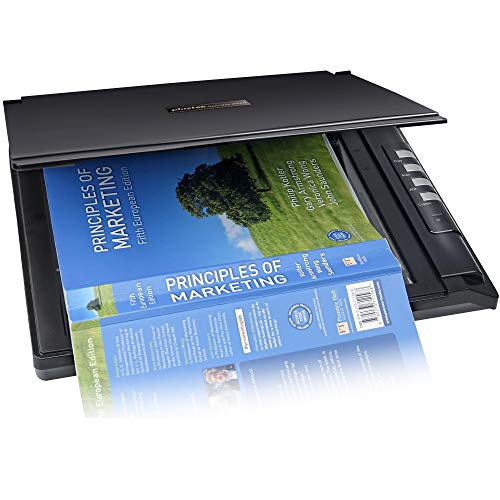
- Scans in about 3 seconds at 300 dpi
- Searchable, editable PDF support
- Auto rotate, deskew, and crop tools
Best For: Windows users who need quick searchable PDFs from a flatbed
Portable Book Scanner
CZUR Shine Ultra Thin Book Scanner

- About 1 second per page scanning
- OCR in 180+ languages
- Foldable, lightweight, height adjustable
Best For: Portable Windows scanning for thin books and document-camera use
Professional Book Scanner
CZUR ET24 Pro 24MP Document Camera

- 24MP camera with A3 support
- ABBYY OCR to editable PDF, Word, Excel
- Works with Windows and Ubuntu Linux
Best For: Premium Windows book scanning with large-format support and OCR
Portable Handheld Choice
IRIScan Book 7 White Portable Wireless Handheld Scanner

- Handheld and rechargeable for on-the-go scanning
- 300/600/1050 dpi options with SD card or USB output
- Includes OCR and PDF editing software
Best For: Traveling users who want a compact Windows-compatible book scanner
Large-Format Speed Pick
VIISAN USB 23MP Document Camera

- A2/A3 coverage for large pages and thick books
- Under 1.5 seconds per page for fast capture
- USB scanner with Windows and macOS support
Best For: Desktop users scanning large books, newspapers, and maps
Premium Flat-Page Pick
CZUR Aura Pro Portable Book Scanner

- Laser lines help flatten curved book pages
- 2-second scans with A3 support and side lights
- OCR supports 180+ languages and Windows
Best For: Desktop book scanning with image correction and fast workflow
Large-Format Book Scanner

- A2/A3 overhead design for oversized books and documents
- Auto-flattening and finger removal for cleaner page scans
- 26MP capture with OCR export to editable formats
Best For: Windows users scanning large-format books and archival documents
Fast All-in-One Scanner

- About 2 seconds per page for fast scanning
- Laser flattening helps with curved book pages
- OCR supports 180+ languages and searchable PDFs
Best For: Windows users who want fast book scanning with easy OCR output
Professional High-Resolution Scanner
CZUR ET MAX High-Detail Book Scanner

- 38MP sensor with 410 DPI for detailed scans
- Curve-flattening tech helps bound books scan cleanly
- About 1.5 seconds per page with OCR and HDMI output
Best For: High-volume Windows scanning where image detail and speed are priorities
Desktop Book Scanner – JOYUSING V320pro 16MP Auto-Flatten Scanner
If you want book scanners for windows that balance speed, OCR, and ease of use, the JOYUSING V320pro is a practical all-in-one choice. It captures A3 and A4 materials, supports automatic continuous shooting, and includes auto-flatten, deskew, finger removal, and paging tools to streamline book scanning on Windows.
Best For: Windows users who want a fast, feature-rich book scanner for mixed document and book digitizing.
Pros:
- Works with Windows XP/7/8/10/11 and supports PDF, Word, Txt, and Excel conversion on Windows.
- 16MP lens with LED auxiliary lighting helps produce clear scans, even in lower light.
- Built-in software features auto-flattening, deskew, finger removal, and smart paging.
- Fast continuous scanning reaches up to 40 pages per minute.
Cons:
- Mac support is more limited, with PDF output only on Mac systems.
- Best suited to books 3 cm thick or less.
Overall, the V320pro is a strong pick if you want a Windows-friendly book scanner with modern cleanup tools and broad output options. It is especially appealing for users who value speed and document conversion in one device.
Flatbed Speed Scanner – Plustek OpticSlim 2700 3-Second Scan
For shoppers comparing book scanners for windows, the Plustek OpticSlim 2700 stands out more as a compact high-speed flatbed for documents and pages that need quick capture. It scans in about 3 seconds at 300 dpi in color mode and includes built-in PDF tools plus image cleanup features like auto rotate, deskew, and crop.
Best For: Windows users who want a fast flatbed scanner for searchable PDFs and basic document cleanup.
Pros:
- Very fast scanning speed, with scans in about 3 seconds at 300 dpi color.
- Built-in PDF button creates editable and searchable PDFs.
- Software can auto rotate, deskew, and crop images.
- Supports TWAIN on Windows 7/8/10/11.
Cons:
- It is a flatbed scanner, so it is less specialized for overhead book scanning than dedicated book scanners.
- Minimum system requirement lists Windows 7.
This is a good fit if your priority is speed and simplicity rather than dedicated book-copy features. It is best viewed as a fast desktop scanner that can still handle many everyday book-related scanning tasks.
Portable Book Scanner – CZUR Shine Ultra Thin Book Scanner
If you need book scanners for windows that are portable and fast, the CZUR Shine Ultra is worth a look. It works with Windows XP/7/8/10/11, scans about 1 second per page, and combines document-scanning features with OCR and flattening tools for thin books and flat papers.
Best For: Portable Windows users scanning thin books, flat documents, and online teaching materials.
Pros:
- Ultra-fast scanning at about 1 second per page.
- Works as both a document scanner and a document camera for Zoom and Google Meet.
- OCR supports 180+ languages, with tools like smart paging and auto cropping.
- Lightweight, foldable, and height adjustable for easier transport and setup.
Cons:
- Only suitable for thinner books; CZUR recommends ET series for thicker books.
- Not compatible with Android or iOS.
The Shine Ultra makes sense if your workflow centers on portability and quick capture. It is a flexible option for Windows users who want scanning and camera functions in one compact device.
Professional Book Scanner – CZUR ET24 Pro 24MP Document Camera
Among book scanners for windows, the CZUR ET24 Pro is the most advanced option in this group for larger-format digitizing and OCR-heavy workflows. It supports Windows XP/7/8/10/11, scans up to A3 size, and adds upgraded flattening, high-resolution capture, and ABBYY-powered OCR for editable outputs.
Best For: Windows users who want a premium book scanner for large pages, OCR, and professional document work.
Pros:
- 24MP camera and 5696 x 4272 resolution deliver high-detail captures.
- Supports Windows and also Ubuntu Linux, giving it wider system compatibility.
- ABBYY OCR converts JPG files into editable PDF, Excel, Word, and more.
- Handles A3-size documents and includes side lights plus a head light for better illumination.
Cons:
- Very glare-prone papers are not recommended.
- Thicker, more demanding scanning setups may still need careful lighting adjustments.
For Windows users who want a top-tier book scanning setup, the ET24 Pro offers the strongest mix of resolution, OCR, and large-format support. It is a solid pick when image quality and workflow flexibility matter most.
Portable Handheld Choice – IRIScan Book 7 White Portable Wireless Handheld Scanner
If you need book scanners for windows that are easy to carry and simple to use on the move, the IRIScan Book 7 is built around portability. It scans directly to an SD card or through USB, works with Windows and Mac, and includes OCR plus PDF tools for turning scans into editable files.
Best For: Travelers, students, and office users who want a lightweight handheld scanner for documents, books, and receipts.
Pros:
- Handheld, battery-powered design makes it easy to scan away from a desk
- Supports 300, 600, and 1050 dpi for flexible scan quality
- Includes Readiris OCR and PDF editing software
- Can save to SD card or connect by USB for Windows use
Cons:
- Does not support Wi‑Fi connectivity
- AC adapter is not provided
- Best suited to portable scanning rather than bulk desktop capture
For buyers focused on convenience, this model stands out as a compact scanner that balances mobility with useful software extras. It is a strong pick when you want quick scans, editable output, and flexible save options without needing a large office machine.
Large-Format Speed Pick – VIISAN USB 23MP Document Camera
Among book scanners for windows, the VIISAN Document Scanner is aimed at large pages and fast capture. Its A2-size coverage, foldable hinge, and USB connection make it practical for oversized documents, newspapers, maps, and thick books when speed matters more than portability.
Best For: Windows users who need to scan large-format pages and books quickly on a desktop setup.
Pros:
- Supports A2 and A3 documents, plus smaller materials
- Very fast scanning at under 1.5 seconds per page
- USB connection and Windows 7/8/10/11 support
- Works with macOS as well for mixed-device environments
Cons:
- Less portable than handheld travel scanners
- Designed for a fixed desktop workflow
- Resolution is listed at 300 dpi
This is a solid choice if your priority is capturing oversized pages efficiently on Windows. It is especially appealing for archive work, reference materials, or book scanning where coverage and speed are more important than a compact footprint.
Premium Flat-Page Pick – CZUR Aura Pro Portable Book Scanner
If you want book scanners for windows with smarter page handling, the CZUR Aura Pro is built for desk scanning of books and documents up to A3 size. It uses laser lines to help flatten curved pages, adds side lights to reduce reflections, and includes OCR support for more than 180 languages.
Best For: Users who want a fast desktop book scanner with page-flattening features and broad Windows compatibility.
Pros:
- Laser-based page flattening helps with curved book pages
- Fast 2-second-per-page scanning for single sheets and double-page books
- Supports Windows XP through 11
- OCR handles 180+ languages for text recognition
Cons:
- Requires a desk setup and is not a portable handheld scanner
- Some OCR languages are not supported, including Thai, Hebrew, and Arabic
- Voice-control features can be affected by noise and distance
For home, office, or archive use, this model offers a strong mix of speed and image-correction tools. It is especially useful when you want cleaner book scans with less page curvature and a more automated workflow.
Large-Format Book Scanner – VIISAN A2/A3 Overhead Scanner
If you need book scanners for windows that can handle oversized pages, the VIISAN S21 is built for A2 and A3 scanning jobs. It combines an overhead design with auto-flattening, fingerprint removal, and OCR tools, making it a practical choice for scanning books, journals, newspapers, and other large documents on a Windows PC.
Best For: Windows users scanning large-format books, journals, manuscripts, and maps.
Pros:
- A2 capture size is ideal for large books, manuscripts, newspapers, and maps.
- Auto-flattening, finger removal, and split-page detection help clean up bound-book scans.
- 26MP capture with software-enhanced up to 600 DPI for detailed results.
- OCR can export to PDF, Word, Excel, EPUB, and text formats.
Cons:
- Bundled OfficeCam software does not support ARM-based Windows devices like Surface Pro X.
- Built-in LED lights are not recommended for bright light settings.
- Very glossy paper is not recommended.
For oversized scanning on Windows, this model stands out for page cleanup and flexible output formats more than portability. It is a strong fit if your workflow centers on books and large documents rather than a compact desktop footprint.
Fast All-in-One Scanner – CZUR Aura Pro for Books
Among book scanners for windows, the CZUR Aura Pro focuses on speed, ease of use, and clean page capture for everyday book and document scanning. It supports Windows and macOS, uses laser-guided flattening for curved pages, and outputs JPG, Word, PDF, and searchable PDF files.
Best For: Fast scanning of books and documents on Windows with simple OCR output.
Pros:
- Scans in about 2 seconds per page for quick turnaround.
- Laser-based flattening technology is designed for curved book pages.
- OCR supports 180+ languages for searchable and editable files.
- Glare-free smart lamp with four color temperature settings.
Cons:
- Thai, Hebrew, and Arabic are not currently supported in OCR.
- Requires compatibility matching for Apple Silicon vs. Intel Mac systems.
This is a good pick if you want a fast, desk-friendly scanner that keeps book pages readable without much setup. It is especially appealing for users who value speed and simple software output over advanced large-format handling.
Professional High-Resolution Scanner – CZUR ET MAX High-Detail Book Scanner
If you are comparing book scanners for windows and want high resolution for heavy-duty work, the CZUR ET MAX is designed for detailed book and document capture. It offers a 38MP sensor, curve-flattening technology, fast scan timing, and broad system support across Windows, macOS, and Ubuntu-based Linux.
Best For: High-volume Windows scanning where detail, speed, and editable OCR output matter.
Pros:
- 38MP sensor and 410 DPI help capture sharp, detailed pages.
- Curve-flattening technology reduces distortion on bound books.
- Scans a page in about 1.5 seconds with practiced operation.
- Supports searchable OCR output and HDMI projection for demos.
Cons:
- Glossy or highly reflective materials are not recommended.
- Arabic OCR support is limited to ET Series scanners on Windows.
- Linux support is limited to Ubuntu 20.04 through 24.04.
The ET MAX is the most feature-rich option here for users who need strong image quality and fast throughput. It makes the most sense when your workflow involves frequent book scanning and you want room to grow across operating systems.
How We Picked the Best Book Scanners for Windows
We prioritized Windows compatibility, scan quality, OCR performance, auto-flatten and deskew tools, capture size, and everyday usability. For Book Scanners for Windows, those features matter more than raw resolution alone because they affect how much editing you need after each scan.
We also looked for practical strengths such as portable designs, large-format capture, and fast workflow software, since the best choice depends on whether you scan books occasionally or process stacks of pages regularly.
Quick Comparison
If you want a simple starting point, think in terms of use case: portable handheld models suit quick scans on the go, slim flatbeds work well for flat pages and photos, and overhead document cameras are better for bound books, fragile materials, and larger-format pages.
Higher megapixels can help with detail, but software features like OCR, auto-cropping, and fingerprint removal often improve the final result more than resolution alone.
Key Buying Factors for Book Scanners for Windows
Scan Type
Overhead and document-camera scanners are usually the most convenient for books because they minimize page stress and handle bindings better. Flatbeds are more traditional and can be ideal for single sheets, while handheld scanners are best when portability matters most.
Image Correction Features
Look for auto-flatten, deskew, and shadow removal if you scan books often. These tools reduce curved page distortion and help produce cleaner files with less manual editing.
OCR and File Workflow
OCR is essential if you want searchable PDFs or editable text. Check that the included software works well on Windows and supports the file formats you use most, such as PDF, JPG, or Word-compatible exports.
Size and Detail
If you scan textbooks, oversized pages, or archival materials, pay attention to capture size and sensor resolution. Larger formats like A3 or A2 are especially useful for reference books and wide layouts.
Speed and Ease of Use
For busy offices or shared workspaces, scan speed, one-touch controls, and stable software matter a lot. A slightly slower scanner may still be the better buy if it delivers cleaner output with less rework.
Who Should Buy Which Book Scanners for Windows?
Choose a portable scanner if you need maximum mobility and only scan occasionally. Choose a flatbed if you want straightforward quality for mixed document and photo use. Choose an overhead book scanner if you regularly digitize bound books, large pages, or delicate originals and want the least physical handling.
For most buyers, the best Book Scanners for Windows are the ones that match your page size, workflow, and editing tolerance. A well-chosen model will save time every time you scan.