A monitor arm with USB hub can free valuable desk space while keeping commonly used ports within easy reach. The right model also improves screen positioning, posture, and cable management.
This roundup compares 10 options across ultrawide, dual-monitor, laptop, RGB, and heavy-duty setups, with attention to compatibility, adjustment range, USB convenience, and installation requirements.
Best 10 Monitor Arm with USB Hub Picks for 2026
Best Ultrawide USB Hub Arm

- Supports up to 49-inch, 44-pound displays
- USB A/C ports and cable management
- C-clamp and grommet installation options
Best For: Heavy ultrawide monitors and organized workstations
Best RGB Dual-Setup USB Hub Arm
Afaloona Monitor and Laptop Stand

- Holds a 13–32-inch monitor and 11–17-inch laptop
- Includes USB-C, two USB-A ports, and RGB lighting
- Removable laptop tray supports flexible configurations
Best For: Gaming, streaming, and laptop-based multitasking
Best Pneumatic USB Hub Arm
VIVO STAND-V100HU Ultrawide Mount

- Supports up to 49-inch, 39.6-pound displays
- Pneumatic height range from 5.9 to 25.5 inches
- Two USB 3.0 ports and broad VESA support
Best For: Single ultrawide monitors needing extensive height adjustment
Best RGB USB Hub Arm
Afaloona 13-27-Inch Monitor Arm

- USB-C and two USB-A ports
- RGB lighting with one-button control
- Full motion with no-drill C-clamp
Best For: RGB gaming and compact single-monitor desks
Best Dual-Monitor USB Stand
VIVO STAND-V102BDU Dual Monitor Mount

- Supports two monitors up to 40 inches
- Two USB 3.0 ports on the base
- Clamp or optional grommet mounting
Best For: Dual-monitor and ultrawide workstations
Best Gas Spring USB Hub Arm
Afaloona 13-32-Inch Gas Spring Arm
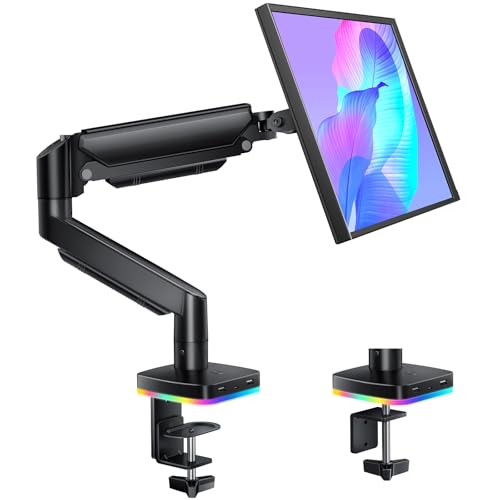
- Two USB-C and one USB-A port
- Gas spring tested beyond 50,000 cycles
- Clamp and grommet mounting options
Best For: Flexible gaming, creator, and productivity setups
Best Ultrawide Pick
ARES WING 49-Inch USB Monitor Arm

- Supports monitors up to 49 inches and 44 pounds
- Integrated USB-A/C ports for charging and data
- Full motion with C-clamp and grommet mounting
Best For: Large ultrawide work and gaming monitors
Best Dual-Monitor Value

- Supports two 13- to 27-inch monitors
- Offers one USB-C and two USB-A ports
- Full-motion arms with cable clips and C-clamp
Best For: Dual-screen gaming, office, and creator desks
Best Ultrawide USB Hub Arm – ARES WING 49-Inch Monitor Arm
If you need a monitor arm with USB hub support for a large curved or flat display, the ARES WING is built for ultrawide setups. It supports screens from 17 to 49 inches and up to 44 pounds, while its USB A/C connectivity helps keep charging and data ports within reach.
Best For: Ultrawide monitor owners who want strong weight support, broad adjustment, and integrated USB connectivity.
Pros:
- Supports 17–49-inch monitors weighing up to 44 pounds.
- Offers tilt, swivel, rotation, height adjustment, and up to 22.4 inches of extension.
- Includes USB 3.0 A/C ports, cable management, and C-clamp or grommet mounting.
Cons:
- VESA mounting is required; a separate adapter may be needed for displays without VESA holes.
- Its 49-inch limit may not suit larger 57-inch ultrawide screens.
The ARES WING is a practical choice when your priority is a sturdy single-arm mount for a wide, heavy display without giving up convenient desktop USB access.
Best RGB Dual-Setup USB Hub Arm – Afaloona Monitor and Laptop Stand
For a gaming or multitasking desk, this monitor arm with USB hub combines a monitor mount and laptop tray in one setup. It supports one 13- to 32-inch monitor and one 11- to 17-inch laptop, with USB-A, USB-C, and RGB lighting built into the stand.
Best For: Gamers, creators, and multitaskers who want a monitor-and-laptop workstation with accessible USB ports.
Pros:
- Supports one monitor and one laptop, with a removable tray for a dual-monitor configuration.
- Provides one USB-C and two USB-A ports for charging and data transfer.
- Offers adjustable positioning, cable management, and RGB lighting with one-button control.
Cons:
- Monitor support is limited to 32 inches and 18 pounds per arm.
- The C-clamp fits desks up to 3.5 inches thick, so thicker desks may not be compatible.
- Its dual-device design is less suited to a single large ultrawide monitor.
The Afaloona stands out for flexible two-device setups rather than maximum monitor size. Its laptop tray and built-in hub make it especially useful for gaming, streaming, and productivity work.
Best Heavy-Duty USB Hub Arm – monTEK 57-Inch Ultrawide Mount
If you are shopping for a monitor arm with USB hub support for an especially large display, the monTEK is rated for monitors up to 57 inches and 59.4 pounds. Its gas-spring arm provides broad tilt, swivel, rotation, and height adjustment for demanding ultrawide work or gaming setups.
Best For: Large, heavy ultrawide monitors such as compatible 57-inch curved displays.
Pros:
- Supports 17–57-inch monitors weighing up to 59.4 pounds.
- Provides USB-A 3.0 and USB-C ports with integrated cable routing.
- Includes C-clamp and grommet mounting plus a quick-release VESA plate.
Cons:
- A monitor without 75×75 or 100×100 VESA holes requires a separate adapter.
- Its larger capacity may be unnecessary for standard-sized displays.
The monTEK is the strongest option in this group for oversized ultrawides. Choose it when screen weight and size are more important than keeping the mount compact.
Best Pneumatic USB Hub Arm – VIVO STAND-V100HU Ultrawide Mount
The VIVO STAND-V100HU is a monitor arm with USB hub functionality designed for one ultrawide screen up to 49 inches and 39.6 pounds. Its pneumatic arm offers a particularly wide height range, while two USB 3.0 ports and cable management help maintain a cleaner desk.
Best For: Users who want a height-flexible single-monitor arm with straightforward USB access and broad VESA compatibility.
Pros:
- Supports ultrawide monitors up to 49 inches and 39.6 pounds.
- Offers 5.9–25.5 inches of height adjustment, plus tilt, swivel, and rotation.
- Includes two USB 3.0 ports, a detachable VESA plate, and a supplied adapter for 200×100 VESA patterns.
Cons:
- It supports one monitor only.
- The USB ports are USB 3.0 rather than USB-C.
- The C-clamp or optional grommet mount is intended for surfaces up to 3.3 inches thick.
VIVO’s mount is a well-rounded choice for a single ultrawide display, particularly when substantial vertical adjustment and established mounting compatibility matter more than newer USB-C ports.
Best RGB USB Hub Arm – Afaloona 13-27-Inch Monitor Arm
If you want a monitor arm with USB hub features for a compact gaming or office setup, this Afaloona model combines accessible connectivity with RGB lighting. It supports one 13- to 27-inch monitor weighing 4.4 to 17.6 pounds and includes a clamp-on installation.
Best For: Gamers, streamers, and home-office users who want RGB lighting and convenient USB access on a single-monitor desk.
Pros:
- Built-in hub provides one USB-C and two USB-A ports for charging and data transfer.
- Full adjustment includes ±45° tilt, ±90° swivel, and 360° rotation.
- Supports VESA 75x75mm and 100x100mm monitors and includes cable management.
- Heavy-duty C-clamp installation requires no drilling.
Cons:
- Limited to one monitor between 13 and 27 inches.
- Maximum supported monitor weight is 17.6 pounds.
This is a practical choice when RGB aesthetics and front-accessible USB ports matter as much as monitor positioning. Check your monitor’s VESA pattern and weight before buying.
Best Dual-Monitor USB Stand – VIVO STAND-V102BDU Dual Monitor Mount
For a dual-screen workstation, the VIVO STAND-V102BDU is a monitor arm with USB hub-style convenience, adding two USB 3.0 ports at the base. Its aluminum spring arms support monitors up to 40 inches and offer drill-free clamp or optional grommet mounting.
Best For: Dual-monitor users and ultrawide setups that need broad adjustment and easy access to two USB 3.0 ports.
Pros:
- Supports two screens, including ultrawide monitors up to 40 inches.
- Offers two USB 3.0 ports for charging or syncing devices.
- Provides ±90° tilt, 180° swivel, and 180° rotation.
- Includes cable management and a three-year warranty.
Cons:
- Per-arm capacity varies by screen type: up to 26.4 pounds for flat screens and 24.2 pounds for curved screens.
- The USB ports are located on the stand base rather than each arm.
The VIVO stands out for larger, two-screen layouts and its flexible mounting choices. Confirm your desk thickness and monitor weights, especially when using curved displays.
Best Gas Spring USB Hub Arm – Afaloona 13-32-Inch Gas Spring Arm
This Afaloona monitor arm with USB hub is designed for smooth single-monitor adjustment, pairing a gas spring mechanism with three accessible ports. It supports 13- to 32-inch monitors up to 19.8 pounds and includes both clamp and grommet mounting options.
Best For: Gamers, creators, and productivity users who want fluid height adjustment, three USB ports, and RGB lighting.
Pros:
- Includes two USB-C ports and one USB-A port for charging and data transfer.
- Gas spring system is tested to over 50,000 cycles for smooth positioning.
- Supports ±45° tilt, ±90° swivel, and 360° rotation.
- Fits 13- to 32-inch VESA 75x75mm or 100x100mm monitors up to 19.8 pounds.
Cons:
- Designed for a single monitor only.
- RGB lighting and the USB hub may be unnecessary for minimalist setups.
Choose this model if effortless adjustment and USB-C connectivity are priorities. Its broader 32-inch size range and two mounting methods give it more setup flexibility than many compact single-monitor arms.
Best Ultrawide Pick – ARES WING 49-Inch USB Monitor Arm
If you need a monitor arm with usb hub functionality for a large display, the ARES WING is built for 17- to 49-inch monitors weighing up to 44 pounds. Its USB ports, broad adjustment range, and dual mounting options make it a practical choice for ultrawide workstations and gaming desks.
Best For: Users with large flat or curved ultrawide monitors who want integrated USB connectivity and substantial weight capacity.
Pros:
- Supports compatible 17- to 49-inch monitors up to 44 pounds.
- Integrated USB-A/C ports support charging and data transfer.
- Offers tilt, swivel, rotation, height adjustment, and 22.4-inch extension.
- Includes C-clamp and grommet mounting options with a detachable VESA plate.
Cons:
- Not designed for TVs.
- Requires a separate VESA adapter for monitors without VESA holes.
- Desk thickness must fall within the specified clamp or grommet ranges.
With its 44-pound capacity and support for screens up to 49 inches, this is a strong fit for demanding single-monitor setups. Check your monitor weight, VESA pattern, and desk thickness before buying.
Best Dual-Monitor Value – Afaloona RGB USB Hub Arm
The Afaloona is a monitor arm with usb hub designed for two smaller displays. It combines three front-accessible USB ports with RGB styling, full-motion adjustment, and cable management for dual-screen work, gaming, streaming, or creator setups.
Best For: Dual-monitor users with compatible 13- to 27-inch screens who want convenient desk-level USB access and RGB accents.
Pros:
- Holds two 13- to 27-inch monitors up to 17.6 pounds per arm.
- Provides one USB-C and two USB-A ports for charging and data transfer.
- Supports tilt, swivel, extension, and 360-degree rotation.
- Includes cable-management clips and a no-drill C-clamp installation.
Cons:
- Each arm is limited to 17.6 pounds.
- Designed for monitors up to 27 inches, not larger ultrawide screens.
- Only C-clamp mounting hardware is specified in the supplied details.
This arm makes the most sense when you need two-screen flexibility rather than heavy-duty single-monitor support. Confirm both monitor weights and their 75x75mm or 100x100mm VESA patterns.
Best Heavy-Duty Option – monTEK 57-Inch Ultrawide USB Arm
For exceptionally large displays, the monTEK is a monitor arm with usb hub support rated for monitors up to 57 inches and 59.4 pounds. Its gas-spring construction, wide tilt range, and USB-A/C ports suit demanding ultrawide work and gaming stations.
Best For: Owners of heavy 17- to 57-inch flat or curved ultrawide monitors, including compatible large-format gaming displays.
Pros:
- Supports compatible monitors up to 57 inches and 59.4 pounds.
- Built-in USB-A 3.0 and USB-C ports support charging and data transfer.
- Offers +75/-75-degree tilt, 180-degree swivel, and 90-degree screen rotation.
- Includes C-clamp and grommet mounting with integrated cable management.
Cons:
- Requires a separate VESA adapter if the monitor lacks compatible mounting holes.
- Its 19.7-inch extension is shorter than the ARES WING’s stated extension.
- Monitor and desk compatibility still depend on VESA pattern and mounting dimensions.
The high weight rating makes this the most capable choice here for massive ultrawide screens. Before purchase, verify the monitor’s weight, VESA pattern, and whether your desk suits the clamp or grommet installation.
How We Picked the Best Monitor Arm with USB Hub
We selected these monitor arms with USB hubs to cover the most common desk setups, from compact single-monitor workstations to large ultrawide and dual-display configurations. We considered stated screen-size and weight limits, VESA compatibility, arm movement, desk-mount design, USB port access, and useful extras such as laptop support, RGB lighting, lift mechanisms, and pole extensions.
Because USB features vary, check the product listing for the exact port types, data-transfer support, charging capability, cable requirements, and whether the hub connects directly to your computer or needs a separate power source.
Quick Comparison
| Setup | Best Match | What to Prioritize |
|---|---|---|
| Single ultrawide | ARES WING, VIVO, or monTEK | Weight capacity, screen reach, and sturdy construction |
| Single standard monitor | Afaloona RGB or RGB gas spring arm | Compact fit, adjustability, and USB accessibility |
| Dual monitors | Afaloona RGB Dual or VIVO dual mount | Combined load rating, independent adjustment, and desk clearance |
| Monitor plus laptop | Afaloona RGB Monitor & Laptop Stand | Laptop-platform stability and hub connectivity |
Key Buying Factors for a Monitor Arm with USB Hub
Screen Size, Weight, and VESA Fit
Do not choose based on screen size alone. Compare each display’s weight without its original stand against the arm’s per-screen capacity. Confirm the VESA pattern—commonly 75 x 75 mm or 100 x 100 mm—and account for curved or unusually deep monitors that may need additional reach.
Movement and Desk Compatibility
Gas-spring arms are useful when you frequently change height, tilt, or viewing distance. Check the available vertical travel and swivel range, then measure your desk thickness and the space behind it. Clamp and grommet mounts may not work with every desktop, cable tray, wall, or rear edge.
USB Ports and Cable Management
A built-in hub is most useful when its ports sit near the monitor and remain easy to access. Look for the combination you need—USB-A, USB-C, charging, or data transfer—and verify the required upstream cable. A USB hub does not automatically provide high-speed charging or display connectivity.
Stability and Installation
Heavy ultrawide displays need a rigid base, well-supported clamp, and careful tightening. Reinforce thin or fragile desktops when necessary, route cables after positioning the arm, and avoid exceeding the stated load rating.
Who Should Buy Which Monitor Arm with USB Hub?
Choose an ultrawide-focused ARES WING, VIVO, or monTEK model if you use a large 34- to 49-inch display and want broad positioning flexibility. The heavy-duty monTEK options are more appropriate for especially large screens, provided the desk and VESA mount are suitable.
For a standard single-monitor workspace, an Afaloona RGB or RGB gas-spring model can add convenient USB access without the footprint of a larger multi-monitor system. Choose the laptop stand when a second portable computer is part of your workflow, and select a dual-monitor mount when you need independent alignment for two displays.