The best wireless smart displays combine touch controls, streaming, video calls, smart-home access, or digital signage in convenient screen-based formats. The right model depends on where you will use it, how often you will move it, and which wireless platforms it supports.
This roundup compares compact smart displays, portable monitors, battery-powered signage, rolling touchscreen TVs, and dedicated home-control panels to help you choose a practical fit for 2026.
Best 10 Wireless Smart Displays Picks for 2026
Best for Big-Screen Mobility
ApoloSign 32-Inch Portable Smart TV

- 32-inch 1080p 10-point touchscreen
- Android 16, Google Play, and 128GB storage
- Up to 6 hours of cordless use
Best For: Large, movable entertainment and work displays
Best Compact Alexa Hub

- Compact 5.5-inch smart display
- Alexa control for compatible smart-home devices
- Camera shutter and privacy controls
Best For: Bedside tables, desks, and small spaces
Best for Wireless Laptop Mirroring

- AirPlay and Miracast screen mirroring
- 4–5 hours of battery-powered use
- 1080p matte IPS display with wired inputs
Best For: Travel, remote work, and portable second-screen setups
Best Family Organization Display

- 15.6-inch Full HD family hub
- Customizable calendars, lists, weather, and smart-home widgets
- Built-in Fire TV and auto-framing video calling
Best For: Kitchens and shared household spaces
Best Portable Signage
15.6-Inch Battery-Powered Smart Display
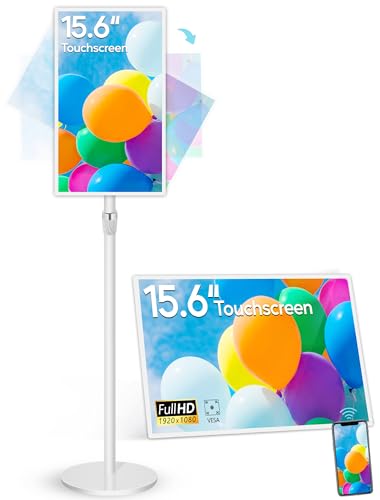
- 10-point touchscreen with Full HD resolution
- 4–6 hours of battery-powered use
- Wireless mirroring and Android app support
Best For: Portable signage, demonstrations, and interactive displays
Best Security Hub

- Automatic alerts with live camera feeds
- Four simultaneous security views
- Local event playback and HomeBase 3 features
Best For: Centralized monitoring of compatible eufy security systems
Best Large-Format Signage
65-Inch 4K Floor-Standing Kiosk

- Large floor-standing format for indoor venues
- Android, Wi-Fi, HDMI, and USB playback
- Split-screen layouts for mixed content
Best For: Retail, hospitality, wayfinding, and promotional signage
Best Rolling Display
32-Inch Portable Smart Touchscreen TV

- Up to 10 hours of cordless use
- Android 15 with 8GB RAM and 128GB storage
- Wireless casting plus HDMI connectivity
Best For: Whole-home viewing, presentations, workouts, and mobile video calls
Best Low-Power Dashboard
reTerminal E1002 Color E Ink Display

- Color E Ink display works well in bright light
- Up to three months in deep-sleep mode
- Supports Home Assistant and no-code dashboards
Best For: Smart-home monitoring, reminders, and maker projects
Best Family Calendar

- 1280x800 touchscreen for family scheduling
- 5MP camera and dual speakers for video calls
- Wall mount and desktop stand included
Best For: Shared calendars, household reminders, and compact video calling
Best for Big-Screen Mobility – ApoloSign 32-Inch Portable Smart TV
For shoppers comparing wireless smart displays, the ApoloSign stands out as a large, mobile option. Its 32-inch 1080p touchscreen, Android 16 platform, rolling stand, and rechargeable battery make it useful for entertainment, video calls, recipes, workouts, presentations, and family activities in different rooms.
Best For: Families, home offices, classrooms, gyms, salons, and anyone who wants a large display that can move around the home or workplace.
Pros:
- Large 32-inch FHD touchscreen with responsive 10-point touch.
- Android 16 with Google Play, 128GB storage, and 8GB RAM plus extended memory.
- Built-in 15,000mAh battery provides up to 6 hours of cordless use.
- Supports wireless mirroring and HDMI connections.
Cons:
- Its rolling-stand design is much larger than a typical countertop smart display.
- Wireless mirroring does not support AirPlay, Google Cast, or streaming casting services.
The ApoloSign is a flexible choice when screen size and room-to-room portability matter more than compactness. Its dashboard also expands its use beyond TV viewing into calendars, chore charts, photo displays, kiosks, and other practical applications.
Best Compact Alexa Hub – Amazon Echo Show 5
The Echo Show 5 is a compact wireless smart display for everyday Alexa tasks. Its 5.5-inch screen provides quick access to news, weather, photos, compatible cameras, video calls, and entertainment without taking much space on a nightstand, desk, or kitchen counter.
Best For: Small spaces, bedside use, basic smart-home control, video calling, and users already invested in Alexa-compatible devices.
Pros:
- Compact 5.5-inch display shows news, weather, photos, and media information.
- Supports compatible smart-home controls, cameras, video calls, and announcements.
- Improved sound with deeper bass and clearer vocals.
- Includes a camera shutter and microphone/camera-off controls.
Cons:
- The small display is less suitable for detailed viewing or shared household organization.
- Video calls and camera features depend on compatible apps or devices.
Choose the Echo Show 5 when you want an unobtrusive Alexa display rather than a large entertainment screen. Its privacy controls, photo slideshow capability, and compact footprint make it a practical command center for a personal space.
Best for Wireless Laptop Mirroring – 15.6-Inch Portable Monitor
This 15.6-inch portable monitor is one of the more work-focused wireless smart displays in the group. AirPlay and Miracast support allow compatible phones, tablets, MacBooks, Windows laptops, and PCs to mirror or extend a screen, while the internal battery supports use away from an outlet.
Best For: Remote work, travel, presentations, coding, document reading, and users who need a portable second screen.
Pros:
- Supports AirPlay and Miracast for wireless screen mirroring.
- Built-in 8,000mAh battery provides approximately 4 to 5 hours of use.
- 15.6-inch 1080p IPS display offers 400-nit brightness and a matte finish.
- Provides two USB-C ports and Mini HDMI for wired connections.
Cons:
- It is not touchscreen-enabled and does not support Bluetooth or Google Cast.
- Streaming services such as Netflix, Hulu, and Prime Video do not support wireless casting.
- Some devices require compatible USB-C DP Alt Mode or a wired connection.
This monitor is best treated as a portable productivity display rather than a standalone streaming device. Its battery, adjustable kickstand, auto-rotation for phones and tablets, and wired backup options make it particularly useful for mobile work setups.
Best Family Organization Display – Amazon Echo Show 15
The Echo Show 15 is a wall-oriented wireless smart display designed to function as a household hub. Its 15.6-inch Full HD screen combines customizable widgets for calendars, lists, weather, and smart-home controls with built-in Fire TV, video calling, photo slideshows, and compatible camera feeds.
Best For: Kitchens and shared living spaces where a family wants organization tools, entertainment, smart-home control, and video calling in one display.
Pros:
- Large 15.6-inch 1080p display provides room for household widgets and media.
- Built-in Fire TV supports apps including Prime Video, Netflix, YouTube, and Apple TV.
- Centered auto-framing camera offers a wide field of view and 3.3x zoom.
- Smart-home dashboard, camera feeds, photo slideshows, and family organization tools are integrated.
Cons:
- Some entertainment content and services may require subscriptions.
- Its larger format is better suited to a kitchen or shared area than a bedside table.
- Video calling and camera features depend on compatible services or devices.
The Echo Show 15 is a strong pick when a wireless smart display needs to serve the whole household. It combines planning, entertainment, and smart-home functions in a single large-format screen, with physical controls for the microphone and camera shutter.
Best Portable Signage – 15.6-Inch Battery-Powered Smart Display
For shoppers comparing wireless smart displays for portable presentations, interactive signage, or home use, this 15.6-inch Android 13 model combines a touchscreen, wireless mirroring, and a built-in battery. Its adjustable stand and multiple mounting options make it flexible for indoor deployments.
Best For: Portable digital signage, interactive demonstrations, retail counters, and home Android smartboard use.
Pros:
- 10-point capacitive touchscreen with 1920 x 1080 resolution and 400 cd/m² brightness.
- Built-in 10,000mAh battery provides approximately 4–6 hours of continuous use.
- Supports wireless screen sharing from iOS, Android, Windows, and macOS through the Eshare app.
- Offers Android app installation, autoplay, split-screen playback, HDMI, USB, microSD, and Ethernet connectivity.
Cons:
- Its 15.6-inch screen is smaller than many dedicated commercial signage displays.
- Battery runtime is limited to roughly 4–6 hours per charge.
- The supplied specifications identify the display resolution as Full HD rather than 2K.
This is a versatile choice when mobility and interaction matter more than maximum screen size. The battery, touch interface, wireless mirroring, and adjustable stand give it broader use than a conventional fixed signage monitor.
Best Security Hub – eufy Smart Display E10
Among wireless smart displays designed for home monitoring, the eufy Smart Display E10 is focused on security rather than general media playback. Its 8-inch touchscreen brings camera feeds, alerts, event history, and monitoring tools into a dedicated control panel.
Best For: Households using compatible eufy security devices that want a centralized, easy-to-view monitoring screen.
Pros:
- Automatically displays live video and voice alerts for doorbell rings, door unlocks, and camera detections.
- Can show four simultaneous live feeds for at-a-glance property monitoring.
- Downloads historical events to local storage for quick replay without buffering.
- Includes facial and package recognition features powered by HomeBase 3, plus a user-friendly 8-inch touchscreen.
Cons:
- Its feature set is centered on eufy security devices rather than general-purpose signage or entertainment.
- The supplied notes do not specify broad third-party smart-home compatibility.
- The 8-inch display is compact for viewing multiple camera feeds.
The E10 makes the most sense as a dedicated security command center. Automatic alerts, four-view monitoring, local event playback, and a simple touchscreen make it practical for everyday household awareness.
Best Large-Format Signage – 65-Inch 4K Floor-Standing Kiosk
For businesses seeking wireless smart displays for prominent indoor messaging, this 65-inch floor-standing kiosk offers a large viewing area, Android playback, Wi-Fi connectivity, and automatic media features. It is built for advertising, wayfinding, announcements, and brand presentations in high-traffic locations.
Best For: Retail stores, restaurants, malls, hospitals, airports, and other indoor venues needing large-format digital signage.
Pros:
- Large 65-inch display with a 178-degree viewing angle for visibility from multiple positions.
- Android system supports app installation, USB plug-and-play, automatic playback, and timed on/off.
- Built-in Wi-Fi, network connectivity, HDMI, and media-player support allow flexible content updates.
- Smart split-screen layouts can combine images, videos, animations, promotions, and branding.
Cons:
- The floor-standing kiosk is intended for indoor placement and is not described as portable.
- Its large footprint may be unsuitable for small counters or space-constrained rooms.
- The supplied notes describe the screen as both 4K in the title and FHD in the feature details, so buyers should verify the exact resolution.
This model is best suited to commercial environments where screen size and visibility are priorities. Its Android platform, wireless networking, split-screen support, and three-year warranty make it a strong option for ongoing indoor signage programs.
Best Rolling Display – 32-Inch Portable Smart Touchscreen TV
This large portable TV is one of the most versatile wireless smart displays for rooms that need a movable screen. Its rechargeable battery, rolling stand, touchscreen, Android 15 platform, and wireless casting support make it suitable for entertainment, video calls, presentations, recipes, and workouts without staying near an outlet.
Best For: Whole-home viewing, mobile presentations, workouts, video calls, and users who want a large touchscreen display on wheels.
Pros:
- 38,400mAh battery provides up to 10 hours of cordless use, depending on usage conditions.
- Android 15 with Google Play, 8GB RAM, and 128GB storage supports apps and multitasking.
- Offers touchscreen, Bluetooth voice remote, wireless casting, HDMI, and Bluetooth keyboard or mouse support.
- Rolling stand includes five caster wheels, height adjustment, and 360-degree screen rotation.
Cons:
- Its approximately 45-pound structure is less convenient to move than a compact display.
- Actual battery life varies with brightness, volume, Wi-Fi, and app usage.
- The large rolling design requires more floor space than a tabletop smart display.
This is the strongest choice when screen size and mobility matter more than compactness. It combines the functions of a portable TV, Android tablet-style display, and rolling monitor, with both wireless and wired connection options.
Best Low-Power Dashboard – reTerminal E1002 Color E Ink Display
The reTerminal E1002 is a specialized option among wireless smart displays, designed for persistent information rather than streaming entertainment. Its color E Ink screen remains readable in bright light and uses very little power, while SenseCraft HMI, Home Assistant, ESPHome, and maker integrations support customizable dashboards.
Best For: Smart-home dashboards, reminders, sensor monitoring, maker projects, and low-maintenance information displays.
Pros:
- 7.3-inch color E Ink Spectra 6 display is designed for clear text and bright-light readability.
- Built-in 2000mAh battery can last up to three months in deep-sleep mode with a six-hour refresh interval.
- SenseCraft HMI enables no-code dashboard creation with templates, drag-and-drop elements, and AI-generated layouts.
- Supports Home Assistant, ESPHome, TRMNL plugins, GPIO, I²C, SPI, and Grove expansion.
Cons:
- E Ink is better suited to dashboards and periodically refreshed information than video or frequent animation.
- Its maker-focused ecosystem may require setup or development work for advanced projects.
- The 7.3-inch screen is much smaller than a conventional TV-style smart display.
Choose this display for efficiency and always-available information rather than general-purpose media. Its long battery life and broad hardware and software compatibility make it particularly appealing for DIY smart-home and productivity setups.
Best Family Calendar – 8-Inch Wireless Smart Display
This 8-inch family calendar focuses on household coordination and communication. As wireless smart displays go, it offers a useful mix of a touch calendar, media casting, video calling, and connectivity for compatible devices, with both a desktop stand and wall mount included.
Best For: Family schedules, shared household reminders, video calls, and compact kitchen or entryway installations.
Pros:
- 1280×800 touchscreen provides a dedicated interface for family scheduling.
- 5MP camera and dual speakers support video calls and communication features.
- Bluetooth 5.0 and media-casting support add flexibility beyond calendar functions.
- Includes both a wall mount and desktop stand for different placement options.
Cons:
- The supplied notes do not specify battery operation, so it may be best suited to a powered location.
- The 8-inch screen is compact for viewing group schedules or shared media.
- Compatibility and software-update details are not fully specified.
This is a practical choice for households that want a dedicated schedule hub with communication features. Its included mounting options make it easier to place where family members will regularly see and use it.
How We Picked These Wireless Smart Displays
We focused on models that offer meaningful wireless functionality rather than ordinary monitors with a screen alone. The selection covers Wi-Fi-enabled smart displays, portable battery-powered screens, touchscreen dashboards, home hubs, and commercial signage. We considered screen size, resolution, operating system, casting support, touch capability, battery operation, speakers, cameras, storage, mounting or stand design, and compatibility with common smart-home or media ecosystems.
Because these products serve different purposes, there is no single winner for every buyer. A compact Alexa display is judged differently from a 65-inch commercial kiosk or a rolling Android TV. Pay attention to the intended use before comparing specifications.
Quick Comparison
- Best for Alexa and compact rooms: Amazon Echo Show 5.
- Best for kitchen organization: Amazon Echo Show 15.
- Best for home security control: eufy Smart Display E10.
- Best for mobile entertainment: the 32-inch or 32-inch-class portable Android displays on wheels.
- Best for wireless laptop and phone mirroring: the 15.6-inch portable monitor with AirPlay and Miracast.
- Best for family scheduling: the 8-inch digital calendar display.
- Best for commercial promotion: the 15.6-inch battery signage display or 65-inch floor-standing kiosk.
- Best for low-power dashboards: the reTerminal E1002 color E Ink display.
Key Buying Factors for Wireless Smart Displays
Screen Size and Placement
Choose the screen around the viewing distance and available space. Small displays suit bedside tables, counters, and desks, while 15.6-inch models work well for schedules, signage, and presentations. Large rolling or floor-standing displays require careful planning for clearance, storage, and viewing angles.
Wireless Compatibility
Check whether the display supports the connection method you actually use. AirPlay and Miracast are useful for phone and laptop mirroring, while Alexa, Google-compatible Android software, proprietary security platforms, or Home Assistant support may determine how easily the display fits into your existing setup. Wireless features can also vary by app, operating system, and network.
Power and Portability
Battery capacity matters when a display will move between rooms or operate at events. Confirm expected runtime, charging time, and whether the screen can work while charging. Wheels, adjustable stands, handles, and a stable base are equally important for larger portable models.
Touch, Audio, Camera, and Storage
Touchscreens are valuable for calendars, dashboards, signage, and interactive presentations. Built-in cameras and speakers support calls and voice control, but privacy controls should be reviewed. More storage helps with local media and apps, while commercial signage may prioritize scheduled playback and reliable operation instead.
Resolution and Software Support
Full HD is generally sufficient for compact displays, while 4K is more useful on large screens viewed up close. Also verify software update support, app availability, warranty coverage, and whether the operating system is certified for the services you plan to use.
Who Should Buy Which Wireless Smart Displays?
Buy a compact smart display if you want voice assistance, quick controls, music, timers, or video calls without dedicating much space. Choose a larger kitchen or family hub when calendars, recipes, entertainment, and household organization are priorities. Portable monitors and rolling Android displays are better for flexible viewing, presentations, and room-to-room use.
For businesses, select battery signage when easy repositioning matters, or a floor-standing 4K kiosk when visibility and continuous promotional playback matter most. Home-automation enthusiasts should prioritize compatibility with their preferred platform, while buyers seeking a low-distraction information panel may prefer the efficient E Ink dashboard design.