Smart displays with large screens can serve as entertainment hubs, collaborative whiteboards, digital signage, or flexible workstations. The right choice depends less on screen size alone and more on the operating system, touch capability, mobility, connectivity, and intended setting.
This roundup compares ten options ranging from compact Alexa displays and portable touchscreen TVs to large interactive boards and 4K smart monitors, helping you match features to your space and workflow.
Best 10 Smart Displays with Large Screens Picks for 2026
Top Pick for Collaboration
COOLHOOD 65-Inch 4K Interactive Whiteboard

- 65-inch 4K touchscreen with 20-point multitouch
- Wireless sharing and real-time annotation tools
- Supports major video-conferencing platforms
Best For: Classrooms, offices, and collaborative presentations
Best Kitchen Hub

- 15.6-inch Full HD display for widgets and video
- Built-in Fire TV and included remote
- Smart-home controls and family organization tools
Best For: Family kitchens and connected-home management
Best Interactive Signage Value

- 4K 10-point capacitive touchscreen
- Screen mirroring, apps, and digital signage support
- Landscape or portrait placement
Best For: Schools, offices, and commercial signage
Best Compact Home Display

- Vibrant 11-inch Full HD touchscreen
- Spatial audio with room-filling sound
- Smart-home hub and auto-framing video calls
Best For: Everyday home assistance and entertainment
Most Flexible
ApoloSign 32-Inch Portable Smart TV

- 32-inch FHD 10-point touchscreen with Android 16
- Rolling stand and battery provide up to six hours of cordless use
- Supports apps, HDMI, wireless mirroring, and interactive dashboards
Best For: Mobile family entertainment, home offices, classrooms, and kiosks
Best for Commercial Use
PWR4GTR 32-Inch Touchscreen Monitor

- 500-nit FHD display with 10-point capacitive touch
- Android 13, 4GB RAM, and 64GB storage for signage apps
- Supports wall or flush mounting in landscape or portrait orientation
Best For: Interactive menus, kiosks, POS systems, and indoor digital signage
Best with Extra Features
LG Smart Monitor Swing 32-Inch 4K Touchscreen

- 32-inch 4K IPS touchscreen
- Wheeled, adjustable stand with portrait mode
- webOS and up to 65W USB-C power
Best For: Mobile home offices and flexible entertainment setups
Best Portable Signage
15.6-Inch Android Touchscreen Display
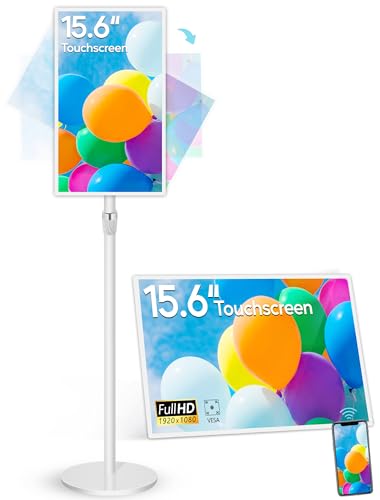
- 10-point capacitive touchscreen
- 10,000mAh battery with 4–6-hour runtime
- Android 13 with autoplay and wireless mirroring
Best For: Portable indoor signage and interactive presentations
Top Pick for Collaboration – COOLHOOD 65-Inch 4K Interactive Whiteboard
For buyers seeking smart displays with large screens for teaching, presentations, or team collaboration, the COOLHOOD delivers a spacious 65-inch 4K touchscreen with 20-point multitouch. Android 13, 128GB of storage, wireless screen sharing, annotation tools, and video-conferencing support make it a versatile wall-mounted workspace.
Best For: Classrooms, offices, training rooms, and collaborative presentations.
Pros:
- Large 65-inch 4K UHD display with responsive 6ms touch performance.
- Supports screen sharing across Mac, Windows, iOS, and Android.
- Works with Zoom, Google Meet, Microsoft Teams, and Webex.
- Includes cloud storage, QR-code file sharing, voting, screenshots, and timer tools.
Cons:
- Stand is sold and shipped separately; the listed package includes a wall mount.
- Only one HDMI port is listed.
This is a strong choice when screen size and interactive collaboration matter more than compact home entertainment features. Confirm your mounting and stand requirements before buying.
Best Kitchen Hub – Amazon Echo Show 15
The Echo Show 15 is a practical pick for shoppers comparing smart displays with large screens for household organization and entertainment. Its 15.6-inch Full HD display provides room for calendars, to-do lists, weather, smart-home controls, photos, video calls, and built-in Fire TV content.
Best For: Families who want a central kitchen command center with entertainment and smart-home controls.
Pros:
- Large 15.6-inch 1080p display with customizable widgets.
- Built-in Fire TV supports services including Prime Video, Netflix, YouTube, and Apple TV.
- Useful family organization features for calendars, lists, weather, and routines.
- Centered auto-framing camera includes 3.3x zoom and a wide field of view.
Cons:
- Some entertainment services may require subscriptions.
- Its kitchen-focused design may be less suitable for professional collaboration.
Choose this model if you want a visible family dashboard rather than an interactive whiteboard. Privacy controls include a camera shutter and a microphone/camera-off button.
Best Interactive Signage Value – JYXOIHUB 55-Inch Smart Board
The JYXOIHUB 55-inch board suits buyers who need smart displays with large screens for classrooms, meetings, live streaming, or digital signage. It combines 4K resolution, 10-point capacitive touch, Android 12, screen mirroring, downloadable apps, and horizontal or vertical installation options.
Best For: Schools, offices, churches, community centers, and signage applications.
Pros:
- 4K capacitive touchscreen with stated ±0.1mm recognition and positioning accuracy.
- Supports multi-person editing, annotation, split-screen viewing, and screen mirroring.
- Open app support includes Google Play, YouTube, Zoom, Microsoft Teams, and more.
- Supports landscape or portrait orientation for video and image display.
Cons:
- Sold as a board-only package, so additional accessories may be needed.
- External cameras and microphones can be connected, but are not listed as included.
- The listed dimensions and mounting information should be verified before installation.
This model offers broad installation and software flexibility for organizations that want one display to handle collaboration and signage. Its two-year replacement warranty is an additional point in its favor.
Best Compact Home Display – Amazon Echo Show 11
The Echo Show 11 is a balanced option for shoppers seeking smart displays with large screens without stepping up to a very large wall display. Its vibrant 11-inch Full HD touchscreen supports entertainment, recipes, calendars, video calls, photo slideshows, and smart-home control, with spatial audio for a fuller listening experience.
Best For: Kitchens, bedrooms, and living spaces that need a versatile everyday assistant.
Pros:
- 11-inch Full HD screen offers more viewing area than the Echo Show 8 (2025 release).
- Spatial audio provides a wider sound stage, crisper vocals, and up to twice the bass versus the Echo Show 8 (2023 release).
- Built-in smart-home hub controls compatible devices without a separate hub.
- Auto-framing video calls include 3.3x zoom and noise reduction.
Cons:
- It has less screen space than the 15.6-inch Echo Show 15 or the 55- to 65-inch whiteboards.
- Some Alexa+ features and entertainment services may depend on availability or subscriptions.
This is a good middle ground for users who want more viewing room than a small smart display while keeping the device practical for everyday home use. Its physical camera and microphone controls add useful privacy flexibility.
Most Flexible – ApoloSign 32-Inch Portable Smart TV
For shoppers comparing smart displays with large screens, the ApoloSign stands out as a mobile, family-friendly option. Its 32-inch 1080p touchscreen runs Android 16, includes Google Play access, and rolls between rooms on a stand. The built-in 15,000mAh battery provides up to six hours of cordless entertainment, while HDMI and wireless mirroring support larger-screen viewing from compatible devices.
Best For: Families, home offices, classrooms, and small businesses that need a movable interactive display.
Pros:
- 32-inch FHD 10-point touchscreen supports streaming, browsing, recipes, workouts, calls, and work.
- Android 16, Google EDLA certification, 8GB RAM, and 128GB storage provide a broad app ecosystem.
- Rolling stand and rechargeable battery allow flexible placement away from an outlet.
- Dashboard features support uses such as photo display, calendars, chore charts, and kiosks.
Cons:
- The 1080p resolution and 300-nit brightness are more modest than those of many larger 4K displays.
- Wireless mirroring does not support AirPlay, Google Cast, or streaming casting services.
- Its rolling form factor requires more floor space than a conventional desk monitor.
The ApoloSign is a practical choice when portability and touch interaction matter more than maximum resolution. It offers a versatile large-screen experience, but buyers should account for its floor-standing design and mirroring limitations.
Best 4K Picture – Samsung M7 43-Inch Smart Monitor
The Samsung M7 is a strong candidate for shoppers seeking smart displays with large screens and detailed picture quality. Its 43-inch 4K UHD panel can stream content directly, access Samsung TV Plus, and connect to computers or other devices through USB-C, HDMI, and USB-A. AI-assisted picture and audio features add convenience for mixed work, entertainment, and gaming use.
Best For: Users who want one large 4K display for streaming, productivity, gaming, and smart-home control.
Pros:
- 43-inch 4K UHD resolution delivers sharper detail than the FHD models in this roundup.
- Built-in streaming access and Samsung TV Plus reduce the need for an external streaming device.
- AI Picture Optimizer and Active Voice Amplifier adapt visuals and dialogue to viewing conditions.
- USB-C, HDMI, USB-A, Wi-Fi, and Bluetooth support versatile device connections.
Cons:
- The 60Hz refresh rate is less suited to high-refresh gaming than specialized gaming monitors.
- Desk mounting may be less flexible than a portable or wall-mounted large-screen display.
- The glossy finish can be less forgiving in brightly lit rooms.
Choose the Samsung M7 if screen detail and built-in smart features are priorities. It is less portable than the ApoloSign and less specialized for commercial signage, but its 43-inch 4K panel makes it the most compelling all-around entertainment and work display here.
Best for Commercial Use – PWR4GTR 32-Inch Touchscreen Monitor
Businesses evaluating smart displays with large screens may prefer this 32-inch touchscreen monitor for signage, menus, kiosks, and interactive control. It combines a 500-nit FHD panel with 10-point capacitive touch, Android 13, 4GB RAM, and 64GB storage. Wall or flush mounting, landscape or portrait orientation, built-in speakers, and wireless screen mirroring make it adaptable to commercial spaces.
Best For: Restaurants, retail stores, hotels, industrial environments, and other indoor commercial installations.
Pros:
- 500-nit brightness is well suited to many indoor signage and menu applications.
- 10-point capacitive touch supports interactive kiosks, POS use, whiteboards, and control systems.
- Android 13 with 4GB RAM and 64GB storage provides an open app ecosystem.
- Supports horizontal or vertical mounting with 400x200mm VESA compatibility and built-in 2 x 5W speakers.
Cons:
- The 32-inch FHD screen has less resolution and screen area than the Samsung M7.
- Touch reverse control requires a USB-A touch connection and is not compatible with Mac OS.
- It is designed for fixed installation rather than battery-powered portable viewing.
This PWR4GTR model is the most purpose-built option for interactive business displays. Its brightness, mounting flexibility, touch functions, and Android platform are useful for commercial workflows, though home users may find its installation-focused design excessive.
Best with Extra Features – LG Smart Monitor Swing 32-Inch 4K Touchscreen
For shoppers comparing smart displays with large screens, the LG Smart Monitor Swing stands out with a 32-inch 4K touchscreen, webOS, and a wheeled, adjustable base. It is designed to move between work and entertainment areas while supporting touch control, screen mirroring, and PC-free access to select services.
Best For: Flexible home offices, shared spaces, and users who want a movable 4K smart display.
Pros:
- 32-inch 4K UHD IPS touchscreen with up to 95% DCI-P3 coverage.
- Wheeled base with tilt, swivel, height, and portrait-mode adjustment.
- webOS, AirPlay 2, Screen Share, and up to 65W USB-C power delivery.
- Three USB-C ports and two HDMI ports support versatile connections.
Cons:
- The rolling, fully adjustable base may require more floor space than a conventional monitor stand.
- Its 350-nit brightness is more suited to typical indoor use than very bright environments.
This is a strong choice when mobility and positioning matter as much as picture quality. The touchscreen and built-in webOS add convenience, while the large 4K panel makes it suitable for both productivity and streaming.
Best Portable Signage – 15.6-Inch Android Touchscreen Display
This 15.6-inch Android 13 display offers a compact alternative among smart displays with large screens, combining a 10-point capacitive touchscreen with a built-in 10,000mAh battery. Its adjustable stand, autoplay support, and wireless screen mirroring make it practical for indoor signage, presentations, and interactive home use.
Best For: Portable indoor signage, small retail displays, presentations, and interactive home projects.
Pros:
- Built-in 10,000mAh battery provides approximately 4–6 hours of continuous use when fully charged.
- Android 13 supports apps, autoplay, wireless mirroring, and reverse device control through EShare.
- 400 cd/m² IPS panel, 10-point touch, and adjustable desktop or floor stand.
- Includes HDMI, USB ports, RJ45 networking, microSD support, speakers, and VESA holes.
Cons:
- Its 15.6-inch Full HD screen is considerably smaller than the other displays in this roundup.
- The listed 4–6-hour battery runtime may require regular charging for extended mobile use.
- Designed for indoor use rather than outdoor viewing.
Choose this model when portability and interactive signage are priorities. It has useful commercial features and broad connectivity, though its smaller screen and battery limitations make it less suitable for large-room viewing.
Largest Desktop Screen – LG 37-Inch 4K Smart Monitor
With a 37-inch 4K UHD IPS panel, this LG model is a compelling option for shoppers seeking smart displays with large screens for both work and entertainment. Its webOS platform provides access to streaming services and LG Channels, while USB-C power delivery, AirPlay 2, and Screen Share simplify everyday connectivity.
Best For: Users who want a spacious desktop display for multitasking, streaming, and laptop connectivity.
Pros:
- Large 37-inch 4K UHD IPS screen with wide 178-degree viewing angles.
- webOS supports streaming apps, LG Channels, cloud gaming, and Remote PC access.
- USB-C delivers up to 65W while two HDMI ports and two USB ports expand connectivity.
- AirPlay 2, Screen Share, HDR10, and automatic brightness control add convenience.
Cons:
- The 60Hz refresh rate is intended for general work and entertainment rather than high-refresh gaming.
- At 25.8 pounds, it is less convenient to reposition than a smaller monitor.
- The 300 cd/m² brightness may be limiting in strongly lit rooms.
This LG is the better fit when screen area is the main priority. Its 37-inch 4K format gives productivity and streaming plenty of room, while webOS and USB-C keep the setup relatively streamlined.
How We Picked These Smart Displays with Large Screens
We selected products across the main categories buyers typically consider: home organization, streaming, classrooms, offices, digital signage, and computer use. We looked at screen size and resolution, touch support, operating system, built-in speakers, wireless casting, ports, mounting or mobility options, and whether each display is designed for consumer or commercial environments.
Because these products serve different purposes, the largest screen is not automatically the best choice. A portable display may be more useful in a small home, while a 55- or 65-inch interactive board makes more sense for group instruction or meetings.
Quick Comparison
- Best for Alexa-powered organization: Amazon Echo Show 15.
- Best smaller smart home display: Amazon Echo Show 11.
- Best for classrooms and collaboration: The 55-inch or 65-inch interactive smart boards.
- Best portable option: ApoloSign 32-inch smart TV on wheels.
- Best for computer-style productivity: Samsung M7 or LG smart monitors.
- Best for signage and menus: The 32-inch industrial monitor or 15.6-inch battery-powered display.
Key Buying Factors for Smart Displays with Large Screens
Screen Size, Resolution, and Viewing Distance
Choose screen size based on how far viewers will sit or stand. Full HD can work well for signage and basic video, but 4K provides sharper text and more usable workspace on larger screens. Check whether the panel is IPS or otherwise designed for wide viewing angles when several people will watch together.
Smart Platform and App Support
Alexa displays are convenient for calendars, recipes, reminders, and voice control. Android-based products generally offer broader app flexibility, while Samsung and LG smart monitors provide their own streaming and productivity ecosystems. Confirm that the apps, casting standards, and services you use are supported before buying.
Touch, Audio, and Connectivity
Touch is essential for interactive lessons, presentations, and kiosk-style use but adds less value for a conventional streaming display. Look for HDMI, USB, Wi-Fi, Bluetooth, screen mirroring, and built-in speakers that fit your setup. For computer work, verify resolution support, refresh rate, and compatibility with your laptop or desktop.
Mobility and Installation
Wheeled bases and built-in batteries make a display easier to move between rooms, although they can increase weight and cost. For a fixed installation, check stand, wall-mount, cable-management, and commercial-use requirements. Battery capacity matters most when the display will operate away from outlets.
Who Should Buy Which Smart Displays with Large Screens?
Choose the Echo Show 15 if your priority is a wall-friendly family dashboard with streaming and Alexa features; select the Echo Show 11 for a smaller footprint. Classrooms, training rooms, and offices should favor the interactive smart boards when annotation and group participation matter.
Buy the ApoloSign or another wheeled model if you need room-to-room flexibility. The Samsung and LG smart monitors are better suited to users who want a large screen for work, streaming, and laptop connectivity without a traditional TV setup. Businesses needing menus, announcements, or portable advertising should focus on the signage-oriented displays and confirm brightness, uptime, mounting, and remote-management needs before purchase.