Managing a television, sound system, air conditioner, lights, and other connected devices can quickly turn into a search for the right remote. The best smart remote controls for home use bring those commands together while reducing clutter and simplifying everyday routines.
This roundup covers compact IR blasters, app-connected universal remotes, hub-based systems, and dedicated wireless controls. Use the buying guide below to match the right option to your devices, room setup, and preferred level of automation.
Best 10 Smart Remote Controls for Home Use Picks for 2026
Best IR Hub for Everyday Entertainment

- Controls 50,000+ IR devices
- Learns commands from original remotes
- Works with Alexa, Google Assistant, and IFTTT
Best For: Centralizing compatible infrared appliances
Best Wireless Outlet Kit for Appliances

- Includes five outlets and two remotes
- Up to 100-foot wireless range
- Programmable and expandable control
Best For: Remote on-off control of multiple plug-in appliances
Best App-Based IR Blaster

- Controls TVs, ACs, fans, and more
- Works through the Smart Life/Tuya app
- Supports Alexa, Google Assistant, and DIY learning
Best For: App and voice control of compatible IR devices
Best Wi-Fi-Free Lighting Remote

- Works without Wi-Fi
- Controls lights up to 50 feet away
- Offers dimming and customizable shortcuts
Best For: Physical control of Connected by WiZ lighting
Best for SwitchBot Homes

- Controls up to 25 IR and Bluetooth devices
- Works with select Bluetooth TV boxes
- Matter support connects with Apple Home via hub
Best For: SwitchBot users and Apple Home households
Best Budget IR Hub
Frankever Smart Home IR Blaster
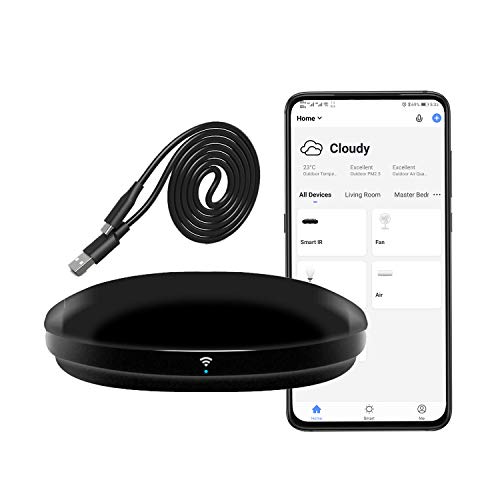
- Supports over 50,000 IR-controlled devices
- Adds app, timer, scene, and voice control
- Can learn buttons for unmatched devices
Best For: Simple IR appliances and budget smart-home upgrades
Best for Mixed IR and Bluetooth Homes
SwitchBot Universal Remote with Hub 3

- Controls up to 25 devices and 10 scenes
- Includes IR learning and Apple Home integration
- Family-friendly design with long battery life
Best For: Households using supported IR appliances and SwitchBot devices
Best Heavy-Duty Pick
SENCKIT WiFi Smart Remote Controller

- Supports over 50,000 38kHz IR devices
- Adds Smart Life app and voice control
- Includes DIY custom IR configuration
Best For: App and voice control of standard IR appliances
Best for Advanced Home Entertainment

- Supports IR, Bluetooth, Wi-Fi, and RF devices
- Launches multi-device activities with one touch
- Hub and blasters extend IR coverage
Best For: Complex home theater and whole-home entertainment setups
Best IR Hub for Everyday Entertainment – BroadLink RM4 Mini
The BroadLink RM4 Mini is a compact option for anyone comparing smart remote controls for home use. It consolidates compatible infrared remotes for TVs, air conditioners, fans, set-top boxes, and other devices, with Alexa, Google Assistant, and IFTTT support.
Best For: Controlling multiple IR appliances from a phone or compatible voice assistant.
Pros:
- Supports a library of more than 50,000 IR-controlled devices.
- Can learn commands from an original remote when a device is not in the library.
- Works with Alexa, Google Assistant, and IFTTT.
- Compact design and no battery required.
Cons:
- Supports IR only; Bluetooth, Zigbee, and RF devices are not compatible.
- IR control requires line of sight.
- Operates on 2.4 GHz Wi-Fi only.
This is a versatile IR-focused hub, but buyers should confirm that their appliances use infrared and that the hub can be positioned within line of sight.
Best Wireless Outlet Kit for Appliances – Syantek Remote Outlets
The Syantek kit takes a straightforward approach to smart remote controls for home use by adding wireless on-off control to plug-in appliances. Its five outlets and two remotes can operate lamps, fans, coffee pots, sound systems, holiday decorations, and other suitable devices.
Best For: Controlling several household appliances remotely, especially where wall access or mobility is a concern.
Pros:
- Includes five outlets and two remote controls.
- Offers up to a 100-foot range and works through doors, walls, and windows.
- One remote can be programmed to control all outlets.
- Compact outlets use only one wall socket each.
Cons:
- Provides on-off control rather than detailed device functions.
- Designed for indoor use.
- Uses non-rechargeable batteries.
For simple remote switching, this expandable kit is more practical than an app-based hub. It is a particularly useful choice for lamps and other devices that turn on when power is supplied.
Best App-Based IR Blaster – MOES Smart IR Controller
The MOES Smart IR Controller is a flexible pick among smart remote controls for home use, combining app-based operation with voice control. Through the Smart Life/Tuya app, it can operate compatible TVs, air conditioners, fans, DVD players, set-top boxes, and other 38 kHz infrared devices.
Best For: Managing compatible IR devices remotely through a smartphone or Alexa and Google Assistant.
Pros:
- Controls multiple types of infrared appliances from one device.
- Supports remote operation through the Smart Life/Tuya app.
- Compatible with Alexa and Google Assistant voice commands.
- Offers a DIY learning function for unsupported IR remotes.
Cons:
- Supports 2.4 GHz Wi-Fi only.
- Does not include RF control.
- Infrared signals do not pass through walls, so one unit per room is recommended.
The MOES model is a good fit for app and voice-driven IR control, provided devices are in the same room and compatible with its infrared system.
Best Wi-Fi-Free Lighting Remote – Philips WiZ Smart Remote
The Philips WiZ Smart Remote is a focused choice among smart remote controls for home use, offering direct control of compatible Connected by WiZ lights without relying on Wi-Fi. It provides on-off switching, dimming, lighting modes, and customizable shortcut buttons.
Best For: Convenient physical control of Connected by WiZ smart lights in a room.
Pros:
- Works even when Wi-Fi is unavailable because it communicates directly with lights.
- Controls lights up to 50 feet away in normal indoor conditions.
- Includes dimming, four light modes, and a night-light function.
- Four numbered buttons can be customized in the WiZ app.
Cons:
- Compatible with Connected by WiZ products, not Philips Hue products.
- Designed for smart lighting rather than general appliances.
- Requires two AAA batteries.
This remote is a sensible companion for WiZ lighting users who want quick physical controls and dependable operation during network interruptions.
Best All-in-One Pick – SofaBaton X1S Universal Remote
The SofaBaton X1S is a strong choice among smart remote controls for home use when you want one handheld remote and hub to manage a complex entertainment setup. It supports IR, Bluetooth, and Wi-Fi devices, with customizable activities that combine several commands into one action.
Best For: Home theaters and households with multiple TVs, streaming devices, receivers, consoles, or smart-home accessories.
Pros:
- Supports more than 500,000 devices across over 6,000 brands.
- One-click activities can power devices on, select inputs, and start entertainment routines.
- The hub provides 360-degree control, two IR blasters, and cabinet-friendly placement.
- Includes Alexa and Google Assistant support, backlighting, raise-to-wake, and remote finding.
Cons:
- Its broad feature set may require more setup than a basic remote.
- Device support is limited to a maximum of 60 devices.
Choose the X1S if you want the most capable option of these three for consolidating a large entertainment system. Its activities and voice integrations are especially useful for reducing multi-step routines.
Best for SwitchBot Homes – SwitchBot Universal Remote
The SwitchBot Universal Remote is a practical pick for smart remote controls for home use if your setup includes SwitchBot products, compatible IR appliances, or select Bluetooth TV boxes. Its app supports customized scenes, while a Matter-enabled hub can connect compatible devices to Apple Home.
Best For: Apple Home users and households combining SwitchBot devices with TVs, air conditioners, fans, projectors, or soundbars.
Pros:
- Controls up to 25 devices, including up to 10 IR and 15 Bluetooth devices.
- Supports select Bluetooth TV boxes such as Apple TV, Fire TV, and Nvidia Shield.
- Large IR code library and multiple learning methods simplify setup.
- Offers a 2000mAh battery rated for up to 150 days per charge.
Cons:
- Does not support RF remotes or most third-party Bluetooth devices.
- Matter integration requires a SwitchBot Hub Mini Matter or Hub 2 and currently works only with Apple Home.
- Requires a 2.4GHz Wi-Fi network, not 5GHz.
This remote makes the most sense when SwitchBot and Apple Home compatibility are priorities. Check your devices before buying, particularly if you rely on RF equipment or unsupported Bluetooth products.
Best Budget IR Hub – Frankever Smart Home IR Blaster
The Frankever Smart Home Hub is a compact alternative for smart remote controls for home use when you primarily need phone or voice control for IR appliances. Through the Smart Life app, it can operate compatible TVs, air conditioners, set-top boxes, DVD players, fans, and audio equipment from home or remotely.
Best For: Simple IR-based setups that need app access, timers, scenes, or Alexa and Google Assistant voice control.
Pros:
- Supports more than 50,000 infrared-controlled devices.
- Can learn buttons when a device is not found in the cloud database.
- Supports Smart Life app control, custom scenes, timers, Alexa, Google Assistant, and Siri.
- Can turn on compatible appliances remotely, including an air conditioner before arriving home.
Cons:
- Controls IR equipment only and does not support RF remotes.
- Requires a secured 2.4GHz Wi-Fi network.
- Its listed maximum range is 10 meters.
Consider the Frankever if you want an inexpensive IR bridge rather than a dedicated universal handheld remote. It is particularly useful for adding app and voice control to older IR appliances, provided your devices are within range.
Best for Mixed IR and Bluetooth Homes – SwitchBot Universal Remote with Hub 3
The SwitchBot Universal Remote with Hub 3 is a strong option for shoppers comparing smart remote controls for home use across TVs, air conditioners, fans, projectors, soundbars, and supported Bluetooth devices. Its 25-device capacity and scene support help consolidate everyday controls, but compatibility should be checked first, especially for RF and third-party Bluetooth products.
Best For: Households that want one family-friendly remote for supported IR appliances, SwitchBot devices, and select Bluetooth TV boxes.
Pros:
- Controls up to 25 devices and supports up to 10 custom scenes.
- Hub 3 adds IR learning, code matching, Matter, and Apple Home integration.
- Simple 19-button layout, touch wheel, and rechargeable battery rated for up to 150 days.
Cons:
- Supports only 2.4GHz Wi-Fi, not 5GHz.
- Does not support RF remotes or most third-party Bluetooth devices.
- Matter control through this remote is currently supported in Apple Home, while Google Home and Alexa may not support this device type via Matter.
Choose this model when broad IR coverage, SwitchBot compatibility, and a physical remote matter more than universal support for every wireless standard. Confirm your devices before purchase for the smoothest setup.
Best Heavy-Duty Pick – SENCKIT WiFi Smart Remote Controller
The SENCKIT WiFi Smart Remote Controller is a compact choice among smart remote controls for home use, turning a phone into an app-based controller for IR appliances. It supports a large device library and voice control through Alexa and Google Home, though it requires line-of-sight between the blaster and the appliance.
Best For: Shoppers who primarily need app and voice control for IR TVs, air conditioners, fans, DVD players, and similar appliances.
Pros:
- Supports more than 50,000 devices using 38kHz infrared signals.
- Works with Tuya Smart Life, Alexa, Google Home, and IFTTT.
- Includes a DIY function for adding compatible custom IR commands.
- Offers a 24-month warranty and remote control through the app.
Cons:
- Controls IR devices only and requires unobstructed placement.
- Uses 2.4GHz Wi-Fi and does not include a power plug, only a USB charging cable.
- It is designed as an app-based IR hub rather than a full physical universal remote.
This is a practical, low-clutter solution if your appliances use standard IR and you are comfortable controlling them from a phone or voice assistant. It is less suitable for Bluetooth, RF, or blocked-cabinet setups.
Best for Advanced Home Entertainment – SofaBaton X2 Universal Remote
The SofaBaton X2 is aimed at shoppers seeking smart remote controls for home use that can manage a complex entertainment setup. Its touchscreen, hub, charging dock, one-touch activities, and support for IR, Bluetooth, Wi-Fi, and RF-compatible devices make it a flexible upgrade for multi-device rooms.
Best For: Home theater users who want touchscreen control, activity macros, extended IR coverage, and smart assistant integration.
Pros:
- Supports IR, Bluetooth, Wi-Fi, and RF-compatible devices across 6,000+ brands and 500,000+ devices.
- One-touch activities can coordinate TV, inputs, sound, and lighting commands.
- Includes a hub with two additional IR blasters for coverage through walls and closed cabinets.
- Works with Alexa, Google Assistant, and Home Assistant integrations.
Cons:
- Its advanced hub, touchscreen, and activity setup may be more than a simple TV setup needs.
- Optional R1 repeater coverage for larger homes is sold separately.
- Some supported-device coverage depends on the regularly updated database and integrations.
The X2 is the most capable fit here for a dedicated media room or whole-home entertainment setup. Select it if activity-based control and broad connectivity justify a more sophisticated system.
How We Picked the Best Smart Remote Controls for Home Use
We focused on compatibility, control methods, setup requirements, range, automation features, and everyday usability. The selection includes simple remote outlet and lighting controls as well as advanced universal remotes with hubs, apps, Bluetooth, Wi-Fi, and infrared support.
We also considered whether each product suits a specific use case. Some are best for controlling hidden devices inside a media cabinet, while others are designed for whole-room entertainment, smart-home scenes, or straightforward physical control without relying on Wi-Fi.
Quick Comparison
| Type | Best For | Connectivity | What to Check |
|---|---|---|---|
| IR blaster | TVs, air conditioners, and media equipment | Usually Wi-Fi and app-based | Device compatibility and 2.4 GHz support |
| Universal remote with hub | Complete entertainment systems | IR, Bluetooth, Wi-Fi, and app | Activity setup, hub placement, and charging |
| Lighting or outlet remote | Lamps and household appliances | Dedicated wireless signal | Range, load limits, and included accessories |
| Smart lighting remote | Dimming and scene control | Proprietary or hub-based | Supported bulbs and wireless range |
Key Buying Factors for Smart Remote Controls
Device Compatibility
Check whether your equipment uses infrared, Bluetooth, Wi-Fi, or a combination of these technologies. IR blasters work well with traditional televisions, receivers, DVD players, set-top boxes, and many air conditioners, but they generally need a clear or strategically placed signal path. Bluetooth devices may require a more advanced hub or universal remote.
Hub and Network Requirements
Many smart remotes depend on a hub or a 2.4 GHz Wi-Fi network. Confirm that your router supports the required band and decide whether you want an always-connected system. A hub can improve device coverage and automation, but it adds another component to install and power.
Activities and Automation
Look for customizable activities if you want one button to turn on several devices, select the correct inputs, and start playback. Alexa, Google Assistant, Matter, scheduling, and scene support can make a remote more useful, especially in homes with multiple smart devices.
Range, Layout, and Ease of Use
Consider room size, cabinet doors, walls, and the location of the hub or IR blaster. Physical buttons are often faster for frequent commands, while touchscreen and app controls offer more customization. A remote that is powerful but difficult to configure may be less useful than a simpler option.
Who Should Buy Which Smart Remote Controls for Home Use?
Choose a compact IR blaster if you primarily want phone or voice control for a TV, air conditioner, or other infrared device. Pick a universal remote with a hub if you want to combine several entertainment components into activities and prefer a single handheld controller.
A dedicated lighting remote is the better choice for dimming or scene changes without opening an app. For lamps and appliances, a wireless outlet kit offers a simpler solution and can be preferable when smart-home integration is not essential. Buyers seeking newer ecosystem compatibility should prioritize models that support Matter or their preferred voice assistant.