The best compact smart home hubs make it easier to connect, automate, and control devices without dedicating valuable space to a large control system. The right choice depends on your preferred ecosystem, wireless standards, local-processing needs, and the devices you already own.
We compared 10 leading options across compatibility, automation features, connectivity, setup requirements, and everyday usability to help you choose a hub that fits your home now and leaves room to grow.
Best 10 Compact Smart Home Hubs Picks for 2026
Best Overall

- Preinstalled Home Assistant OS
- Local data storage and advanced automation
- USB expansion for Zigbee, Z-Wave, and Thread
Best For: Flexible whole-home automation
Best Touchscreen Hub

- 8-inch customizable control panel
- Built-in Wi-Fi, Zigbee, Matter, and Thread support
- Controls devices, cameras, routines, and security
Best For: Alexa-centered homes needing a visible dashboard
Best for Local Automation

- Local automation with Matter bridging
- Zigbee, Thread, IR, Wi-Fi, and PoE support
- Encrypted local storage without a camera or microphone
Best For: Aqara-focused multi-protocol setups
Best for Tapo Security

- Built-in chime and smart alarm
- Supports up to 64 sensors plus four cameras or doorbells
- Optional local microSD storage up to 512GB
Best For: Tapo cameras, sensors, and doorbells
Best for Easy Setup

- Matter, Zigbee, and Z-Wave Plus support
- Wi-Fi or Ethernet connectivity
- SmartThings automation with Alexa and Google Home
Best For: Mixed-brand SmartThings homes
Best for Local Control
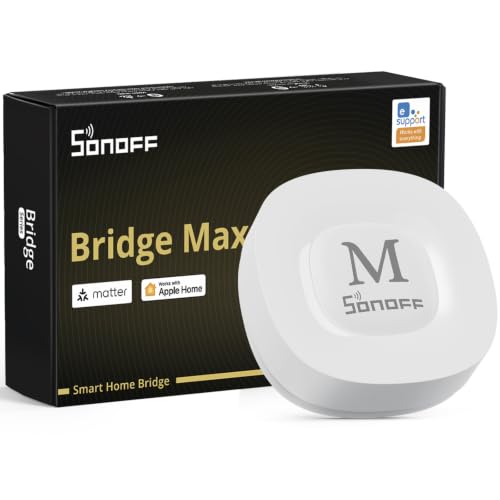
- Local Matter bridging without cloud dependence
- Zigbee gateway with Home Assistant support
- Wi-Fi and Ethernet connectivity
Best For: Privacy-focused Zigbee and Matter setups
Best for Automation

- Zigbee, Matter, Thread, and Ethernet built in
- Local processing and no subscription required
- Homey Flow automations for 1,000+ brands
Best For: Multi-brand automation enthusiasts
Best Multi-Protocol Pick

- Supports Aqara Zigbee and Thread devices
- Bridges Aqara devices to Matter ecosystems
- Runs supported automations locally
Best For: Aqara-focused homes seeking flexible Matter integration
Best for Lutron Lighting

- Controls up to 75 Caseta devices
- Works with major voice and home platforms
- Uses Clear Connect technology for lighting
Best For: Lutron Caseta lighting systems and smart controls
Best All-in-One Control Panel
SwitchBot Hub 3 Smart Home Hub

- Controls infrared appliances and SwitchBot devices
- Includes display, sensors, dial, and scene buttons
- Bridges supported devices to Matter ecosystems
Best For: Homes wanting tactile controls and broad infrared appliance support
Best Overall – Home Assistant Green
Home Assistant Green | Smart Home hub with Advanced Automation | Official Home Assistant Hardware
Check Price On AmazonFor shoppers comparing compact smart home hubs, Home Assistant Green is a straightforward starting point for bringing compatible devices and automations into one local system. Home Assistant is preinstalled, and its fanless 4.41-inch-square design fits neatly into a home network setup.
Best For: Users who want flexible whole-home automation and local data storage.
Pros:
- Home Assistant comes preinstalled for a simple setup using Ethernet and the included power supply.
- Supports broad automation possibilities, including coordinated lighting, media, and heating routines.
- Stores home data locally and offers USB expandability for Zigbee, Z-Wave, and Thread devices.
- Compact, silent, fanless design with 4GB of RAM and 32GB of storage.
Cons:
- Ethernet is the listed network connection, so it is not a wireless-first hub.
- Zigbee, Z-Wave, and Thread connectivity requires compatible USB accessories.
Green is a strong choice when automation flexibility and data ownership matter more than an out-of-the-box wireless radio lineup. It is especially appealing to users prepared to build a system around Home Assistant.
Best Touchscreen Hub – Amazon Echo Hub
The Amazon Echo Hub combines a compact 8-inch touchscreen with Alexa controls, making it one of the more approachable compact smart home hubs for households that want a visible control panel. Its customizable dashboard can organize devices, cameras, routines, and security controls in one place.
Best For: Alexa households that want a dedicated wall-mounted smart home dashboard.
Pros:
- Customizable dashboard lets users arrange device sections and resize controls.
- Built-in hub supports Wi-Fi, Bluetooth, Zigbee, Matter, Sidewalk, and Thread devices.
- Provides on-screen controls for cameras, routines, security systems, and media.
- Can be wall mounted and supports voice control through Alexa.
Cons:
- Wall pass-through hardware, power-over-Ethernet equipment, and tabletop stands are sold separately.
- Some Ring-related features require Alexa+ and a compatible Ring subscription sold separately.
Echo Hub is best when quick visual access matters as much as automation. Its broad protocol support and customizable display make it a practical central panel, particularly for homes already using Alexa-compatible devices.
Best for Local Automation – Aqara Hub M3
Aqara Hub M3 is a compact smart home hub aimed at advanced Aqara users who want local automation, Matter bridging, and multiple connection options. It supports Aqara Zigbee and Thread devices, while its wired Ethernet-over-PoE option and encrypted local storage add installation flexibility.
Best For: Aqara users building local automations with Matter and multi-protocol support.
Pros:
- Supports Aqara Zigbee and Thread devices, plus Matter bridge functionality.
- Prioritizes local control and can migrate Zigbee devices from older Aqara hubs.
- Includes a 360-degree IR blaster with feedback and learning for compatible appliances.
- Offers dual-band Wi-Fi, PoE, USB-C power options, and 8GB of encrypted local storage.
Cons:
- Its Zigbee capacity applies to Aqara Zigbee devices, not third-party Zigbee devices.
- A USB-C power adapter is not included.
- Some cloud-based notifications still require an internet connection.
The M3 stands out for users who want a more infrastructure-oriented hub with local automation and Matter integration. It is less universal than a fully open platform, but its Aqara-focused features are substantial.
Best for Tapo Security – Tapo H200 Hub
The Tapo H200 is a compact smart home hub designed around Tapo sensors, cameras, and video doorbells. Its built-in chime, smart alarm, low-power wireless protocol, and optional local microSD storage make it a practical choice for a Tapo-centered security setup.
Best For: Tapo users connecting sensors, cameras, and doorbells to one hub.
Pros:
- Connects up to 64 switches, sensors, or buttons plus four cameras or doorbells.
- Built-in chime and alarm can respond to visitors or detected motion.
- Supports local camera and doorbell video storage on a microSD card up to 512GB.
- Works with Amazon Alexa and Google Home for voice control.
Cons:
- Designed primarily for compatible Tapo devices rather than a broad multi-brand ecosystem.
- Requires 2.4GHz Wi-Fi.
- microSD storage is sold separately.
H200 makes the most sense as the center of a Tapo security ecosystem. Its built-in chime and local storage support are useful, but shoppers seeking a broadly compatible automation platform should consider a more open hub.
Best for Easy Setup – Aeotec Smart Home Hub
The Aeotec Smart Home Hub is a versatile choice among compact smart home hubs, especially if you want broad protocol support and SmartThings-based automation. It connects through Wi-Fi or Ethernet and works with Matter, Zigbee, Z-Wave Plus, Alexa, and Google Home.
Best For: Homes building a mixed-brand SmartThings setup with Matter, Zigbee, or Z-Wave devices.
Pros:
- Supports Matter, Zigbee, Z-Wave Plus, Wi-Fi, and SmartThings devices.
- Offers wired Ethernet or Wi-Fi setup.
- SmartThings automations can coordinate lights, sensors, switches, and other devices.
- Compatible with Alexa and Google Home voice control.
Cons:
- Z-Wave Plus support is specified for the V3 model.
- Designed for use in North America.
Choose this hub when compatibility breadth matters more than having the smallest possible footprint. Its SmartThings app and multiple wireless protocols make it a flexible foundation for a growing connected home.
Best for Local Control – SONOFF Bridge Max
The SONOFF Bridge Max is one of the most focused compact smart home hubs for bridging Zigbee, BTHome, and eWeLink devices into Matter platforms. Its local web console, Ethernet and Wi-Fi connectivity, and cloud-free management make it appealing for privacy-conscious setups.
Best For: Users who want local Zigbee-to-Matter bridging, Home Assistant support, and minimal cloud dependence.
Pros:
- Bridges Zigbee, BTHome, and eWeLink devices to Matter platforms.
- Local web console works directly over the LAN without requiring an app or cloud service.
- Supports Home Assistant through MQTT or Matter bridging.
- Includes a 90 dB alarm and mobile notifications when paired with Zigbee sensors.
Cons:
- Its listed connectivity centers on Zigbee, Wi-Fi, and Ethernet rather than Z-Wave or Thread.
- Security alarm features require compatible Zigbee sensors.
This is a practical pick for technically inclined users who want local control and cross-platform integration. It is less of an all-protocol hub and more of a capable Zigbee and Matter bridge.
Best for Automation – Homey Pro mini
The Homey Pro mini combines a compact design with local automation, energy monitoring, and support for Zigbee, Matter, Thread, and Ethernet. Among compact smart home hubs, it stands out for its Homey Flow routines and compatibility with more than 1,000 brands.
Best For: Households that want flexible multi-brand automations, local processing, and voice assistant integration without a subscription.
Pros:
- Supports Zigbee, Matter, Thread, and Ethernet out of the box.
- Runs local data processing, including when the internet is unavailable.
- Homey Flow supports simple and advanced custom routines.
- Works with more than 1,000 brands and requires no subscription for listed features.
Cons:
- Z-Wave, Bluetooth, and infrared require the separately sold Homey Bridge.
- Only the Homey Pro mini is included.
Consider the Homey Pro mini if automation flexibility is your priority. Its protocol selection is strong for its size, while the optional Bridge leaves room to expand later into additional device types.
Best Multi-Protocol Pick – Aqara Smart Hub M100
For shoppers comparing compact smart home hubs, the Aqara Smart Hub M100 stands out for combining Aqara Zigbee, Thread, Matter bridging, and local automation in a small, flexible unit. Its adjustable shaft and USB-A power connection make placement straightforward, though a 5V/0.5A power adapter is not included.
Best For: Aqara users who want local automations and broader Matter ecosystem integration.
Pros:
- Supports up to 20 Aqara Zigbee devices and 20 Thread devices.
- Matter Bridge compatibility connects Aqara devices with Apple Home, Alexa, Home Assistant, and other ecosystems.
- Local automation can continue without Wi-Fi or cloud access for supported functions.
- Flexible USB-A power and a 210-degree adjustable shaft simplify placement.
Cons:
- Zigbee support is limited to Aqara Zigbee devices rather than third-party Zigbee products.
- A 5V/0.5A power adapter is required but not included.
- Some features, including cloud push notifications, still require a cloud connection.
The M100 is a strong compact choice when protocol flexibility and local responsiveness matter most. Check device compatibility carefully, especially if your existing Zigbee devices are not from Aqara.
Best for Lutron Lighting – Lutron Caseta Smart Hub
The Lutron Caseta Smart Hub is a focused option among compact smart home hubs, built primarily for Caseta lighting control and integration with popular platforms. It plugs into an outlet, connects to your router, and supports up to 75 Caseta devices without competing with Wi-Fi-connected devices through Lutron’s Clear Connect technology.
Best For: Homes expanding a Lutron Caseta lighting system with voice and app control.
Pros:
- Works with Alexa, Apple HomeKit, Google Assistant, Ring, Serena shades, and Sonos.
- Supports up to 75 Caseta devices.
- Clear Connect technology avoids competing with Wi-Fi-connected devices.
- Setup requires plugging into an outlet, connecting to a router, and using the Lutron app.
Cons:
- Caseta dimmers, switches, and other coordinating accessories are sold separately.
- Its strongest fit is the Lutron Caseta ecosystem rather than a broad multi-protocol setup.
- Requires a wired connection to your Wi-Fi router.
Choose this hub when reliable, expandable Caseta lighting is the priority. It is less suited to shoppers looking for one controller for a wide range of unrelated smart-home protocols.
Best All-in-One Control Panel – SwitchBot Hub 3 Smart Home Hub
The SwitchBot Hub 3 adds more than basic connectivity to the compact smart home hubs category: it combines Matter bridging, infrared appliance control, environmental sensing, and a 2.4-inch IPS display. Its physical dial and scene buttons are useful for household members who prefer hands-on controls over app or voice commands.
Best For: SwitchBot households that want appliance control, room status, and tactile scene controls in one hub.
Pros:
- Controls more than 100,000 infrared appliances, including TVs, lights, and air conditioners.
- Works with SwitchBot devices and Matter-compatible third-party products.
- Displays temperature, humidity, weather, and other home-status information.
- Physical dial and customizable scene buttons offer convenient hands-on control.
Cons:
- Requires a 2.4GHz Wi-Fi connection; 5GHz networks are not supported.
- Infrared control does not support RF devices such as some ceiling fans and garage door openers.
- Some capabilities depend on separately sold SwitchBot devices.
Hub 3 is a versatile choice if you want a visible home-status display and direct controls alongside smart-home integration. Confirm that your appliances use infrared and that your network can provide a stable 2.4GHz connection.
How We Picked the Best Compact Smart Home Hubs
We focused on hubs that deliver substantial smart-home functionality in a relatively small footprint. Our evaluation considered supported standards such as Matter, Thread, Zigbee, and Z-Wave; compatibility with Alexa, Google Home, Apple Home, and other platforms; local versus cloud-dependent automation; network requirements; and the quality of device-management features.
We also looked at practical ownership factors, including setup complexity, expansion potential, remote access, physical controls, and whether a hub is best suited to a specific brand ecosystem or a mixed-device home. Because no single platform is ideal for everyone, the selections cover beginner-friendly controllers, advanced automation systems, and specialized bridges.
Quick Comparison
| Best For | Recommended Type | What to Look For |
|---|---|---|
| Simple voice and touchscreen control | Display-based hub | Clear interface, voice assistant support, and broad device compatibility |
| Advanced local automation | Dedicated automation hub | Local processing, scripting, integrations, and reliable network access |
| Mixed-protocol homes | Multi-standard hub | Matter, Thread, Zigbee, Z-Wave, or Bluetooth support as needed |
| Brand-specific accessories | Device ecosystem bridge | Strong compatibility with the sensors, switches, or remotes you already own |
Key Buying Factors for Compact Smart Home Hubs
Compatibility and Standards
Start with your existing devices. Matter can simplify cross-platform compatibility, while Zigbee and Z-Wave remain important for many sensors, locks, switches, and older accessories. Thread support may be valuable for newer low-power devices, but check whether the hub acts as a Thread border router and whether your chosen platform supports the products you want.
Local Automation and Reliability
Hubs that process automations locally can respond faster and continue working during internet outages. Cloud-connected models may be easier to set up but can depend more heavily on remote services. Review exactly which features remain available if the internet or a vendor account is unavailable.
Network and Placement Requirements
Check whether the hub requires 2.4GHz Wi-Fi, Ethernet, or a particular mobile app. Place it centrally, away from metal obstructions and wireless interference. A compact design is useful only if the hub can still maintain dependable connections throughout your home.
Expansion and Everyday Control
Consider how your system may grow. Support for scenes, schedules, sensors, voice assistants, dashboards, and integrations matters more than the hub’s size. A physical screen, knob, or buttons can also be useful for quick control when reaching for a phone is inconvenient.
Who Should Buy Which Compact Smart Home Hubs?
Choose a display-oriented hub if you want an accessible interface for family members and guests. Pick a dedicated automation platform if you prioritize sophisticated routines, local control, and broad integrations. A multi-protocol model is the safer choice for homes combining devices from several manufacturers.
Brand-focused buyers should select the bridge designed for their existing accessories, especially when it unlocks features unavailable through a generic controller. Before buying, make a list of your current devices and planned additions, then confirm compatibility with the hub, app, voice assistant, and wireless standards you intend to use.