The best smart home hubs without cloud access can keep automations running locally, reduce latency, and give you greater control over connected devices. They range from beginner-friendly systems to advanced platforms for Zigbee, Z-Wave, Matter, Thread, and DIY integrations.
We compared 10 leading hubs across protocol support, local-processing capabilities, setup difficulty, automation depth, and ecosystem compatibility to help you choose a reliable foundation for your smart home.
Best 10 Smart Home Hubs Without Cloud Access Picks for 2026
Best Overall

- Preinstalled Home Assistant OS
- Keeps home data on the hub
- Expandable via USB radios
Best For: Beginners building a local Home Assistant system
Best for IR Devices

- Controls 8,000+ IR brands
- Matter-certified integration
- Built-in 93 dB alarm
Best For: Managing legacy TVs, air conditioners, and fans
Best for Advanced Local Control
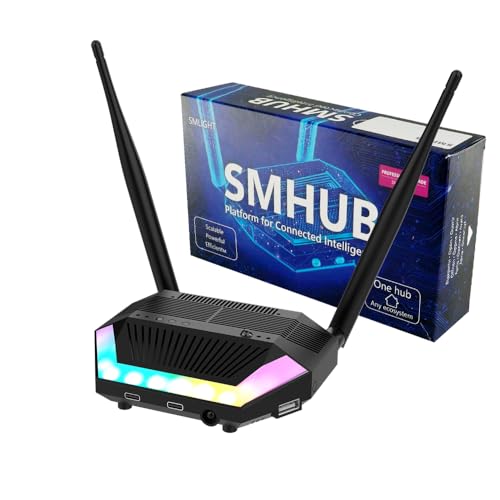
- Runs Linux apps locally
- Built-in Zigbee, Thread, Wi-Fi, and Bluetooth
- Supports MQTT and Matterbridge
Best For: DIY users managing a multi-protocol local network
Best Local Matter Bridge
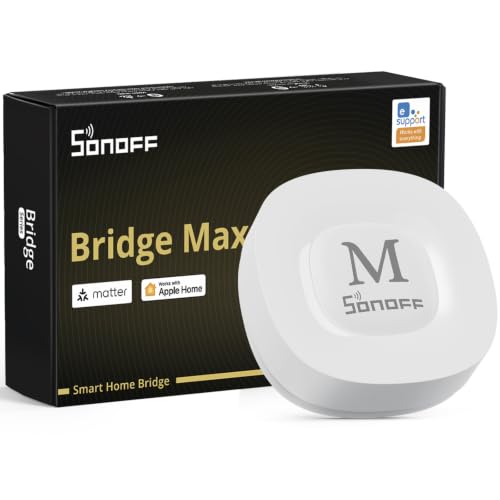
- Local web console
- Bridges Zigbee devices to Matter
- Works with Home Assistant
Best For: Connecting Zigbee devices across Matter platforms locally
Best Local-First Hub

- Runs automations locally during internet outages
- Supports Matter, Z-Wave, Zigbee, and Bluetooth
- No subscription required for full platform functionality
Best For: DIY users prioritizing offline control and broad compatibility
Best for Lutron Lighting

- Supports up to 75 Caseta devices
- Integrates with major voice and smart-home platforms
- Uses Clear Connect Technology alongside Wi-Fi devices
Best For: Homes centered on Lutron Caseta lighting
Best Edge Automation Hub

- Supports local automation through its Edge Hub design
- Bridges Aqara Zigbee and Thread devices to Matter
- Adds IR control, PoE, and encrypted local storage
Best For: Aqara users wanting local scenes and Matter connectivity
Familiar Ecosystem Pick

- Supports Zigbee and Z-Wave devices
- Offers event-based smartphone automation
- Works with Alexa and Google Home
Best For: Users seeking a familiar, app-based smart home hub
Local Automation Value

- Runs Zigbee and Matter automations locally
- Bridges Aqara devices to Matter ecosystems
- Supports Thread and Wi-Fi 6 connectivity
Best For: Aqara users prioritizing local routines and Matter integration
Most Complete Local Platform

- Controls seven major smart home technologies locally
- Supports over 50,000 devices from 1,000+ brands
- Includes Flow and Advanced Flow automation
Best For: Complex, mixed-brand homes seeking local-first control
Best Overall – Home Assistant Green
Home Assistant Green | Smart Home hub with Advanced Automation | Official Home Assistant Hardware
Check Price On AmazonHome Assistant Green is a strong starting point for anyone seeking smart home hubs without cloud access. Home Assistant OS comes preinstalled, and your home data stays on the hub while you build automations across compatible devices.
Best For: Beginners who want a simple, locally focused Home Assistant setup.
Pros:
- Preinstalled Home Assistant OS makes setup straightforward.
- Local data storage supports privacy and control.
- Compact, silent, fanless design with 4GB RAM and 32GB storage.
- USB expansion supports Zigbee, Z-Wave, and Thread devices.
Cons:
- Ethernet is the listed network connection, so it is not a wireless-first hub.
- Z-Wave, Zigbee, and Thread connectivity require compatible USB accessories.
Green is an approachable choice for a centralized, expandable smart home. It offers a polished path into local automation, though adding radios may increase the total setup cost.
Best for IR Devices – Tapo H110 Universal Hub
The Tapo H110 combines an IR universal remote with smart-home features, making it useful for controlling legacy appliances. It supports Matter and app-based remote access, but buyers focused on smart home hubs without cloud access should note that the supplied features emphasize Wi-Fi, app, voice, and remote control rather than fully local operation.
Best For: Homes that need one hub for TVs, air conditioners, fans, and other IR appliances.
Pros:
- Supports more than 8,000 IR brands and 18 appliance types.
- Matter-certified for integration with major smart-home platforms.
- Built-in 93 dB alarm supports sensor alerts.
- Offers schedules, automations, GPS-based control, app access, and voice control.
Cons:
- The supplied information does not establish that all functions work without cloud access.
- IR control requires compatible appliances to be within the hub’s range.
This is a practical consolidation hub for older electronics and Tapo sensors. Choose it for broad IR compatibility and Matter integration, not as the clearest option for a strictly local-only system.
Best for Advanced Local Control – SMLIGHT SMHUB Essential
The SMLIGHT SMHUB Essential is designed for experienced users who want smart home hubs without cloud access. Its Linux-based system can run Zigbee2MQTT, MQTT, Matterbridge, Node-RED, and other services locally, reducing the need for separate servers and bridges.
Best For: Advanced DIY users building a multi-protocol, locally hosted smart-home system.
Pros:
- Runs open-source smart-home services directly on the hub.
- Built-in Zigbee, Thread, Wi-Fi, and Bluetooth radios.
- Supports local MQTT, Matterbridge, WireGuard, Tailscale, and other applications.
- Can expose Zigbee devices to Google Home or Apple Home through Matterbridge.
Cons:
- Linux-based configuration may be more involved than a plug-and-play hub.
- Z-Wave and 4G/LTE require optional expansion modules.
- The supplied notes specify minimum Linux operating-system versions, indicating a technical setup.
SMHUB Essential stands out when flexibility and local hosting matter more than simplicity. It is a capable foundation for integrations, but its professional feature set is best suited to users comfortable managing software and radios.
Best Local Matter Bridge – SONOFF Bridge-M
SONOFF Bridge-M is a focused option for smart home hubs without cloud access, offering a local web console that is accessed directly over the LAN. It bridges Zigbee, BTHome, and eWeLink devices to Matter platforms while also supporting local automations and Home Assistant integration.
Best For: Users who want to connect Zigbee devices with Matter ecosystems through local network management.
Pros:
- Local web interface works without downloading an app or relying on cloud services.
- Bridges devices to Apple Home, Alexa, Google Home, and Home Assistant.
- Supports Zigbee devices from SONOFF and other manufacturers.
- Includes a 90 dB alarm and mobile intrusion notifications when paired with sensors.
Cons:
- Its radio support is centered on Zigbee, Wi-Fi, and Ethernet rather than Thread.
- Some notification features may involve mobile connectivity beyond the local console.
Bridge-M is a sensible pick for buyers who specifically need local Matter bridging and Zigbee gateway functionality. It is less of an all-in-one automation server than Home Assistant Green or SMHUB Essential, but its local console keeps core bridge management simple.
Best Local-First Hub – Hubitat Elevation C-8 Pro
For shoppers comparing smart home hubs without cloud access, the Hubitat Elevation C-8 Pro is a strong local-first option. It runs automations on the hub, so supported lights, locks, thermostats, and routines can continue responding when the internet is unavailable. It also combines Matter, Z-Wave, Zigbee, and Bluetooth support in one compact device.
Best For: DIY homeowners who want broad device compatibility, fast local automations, and no required subscription.
Pros:
- Local processing helps automations continue during internet outages.
- Supports Matter, Z-Wave 800 Series Long Range, Zigbee 3.0, and Bluetooth.
- Works with Alexa, Google Home, Apple HomeKit, and Ring integrations.
- Offers advanced Rule Machine logic and AI-assisted routine building.
Cons:
- Advanced automations may have a learning curve despite the documentation and community support.
- Compatibility is broad, but individual devices may still require specific drivers or integrations.
The C-8 Pro is especially appealing when offline operation and privacy are priorities. Its multi-protocol radios and external antennas make it a flexible foundation for larger or device-dense homes, while the lack of a recurring subscription keeps ongoing costs predictable.
Best for Lutron Lighting – Lutron Caseta Smart Hub
The Lutron Caseta Smart Hub is a focused choice for homes built around Caseta lighting and compatible accessories. It connects to a router and uses Lutron Clear Connect Technology rather than competing with Wi-Fi-connected devices, while also linking supported controls with Alexa, Apple HomeKit, Google Assistant, Ring, Serena shades, and Sonos.
Best For: Lutron Caseta households that want centralized lighting control and integration with popular smart-home ecosystems.
Pros:
- Supports up to 75 Caseta devices.
- Works with Alexa, Apple HomeKit, Google Assistant, Ring, Serena shades, and Sonos.
- Clear Connect Technology does not interfere with Wi-Fi-connected devices.
- Setup involves connecting the hub to a router and following the Lutron app instructions.
Cons:
- It is primarily designed for Lutron Caseta devices rather than broad multi-protocol smart-home coverage.
- The hub requires a router connection, so it is not a fully standalone offline hub.
- Caseta dimmers, switches, and coordinating accessories are sold separately.
Among smart home hubs without cloud access, this model needs a careful distinction: the supplied information emphasizes reliable Lutron device communication, but does not promise that every feature works without internet access. It makes the most sense as the control center for a Caseta lighting system, not as a universal hub.
Best Edge Automation Hub – Aqara Smart Home Hub M3
The Aqara Smart Home Hub M3 is a compelling option for shoppers seeking smart home hubs without cloud access, thanks to its Edge Hub design and local automation support. It handles Aqara Zigbee and Thread devices, bridges supported devices to Matter ecosystems, and adds practical extras such as a learning 360-degree IR blaster, encrypted local storage, and optional Ethernet through PoE.
Best For: Aqara users who want local scenes, Matter integration, Thread support, and flexible wired or wireless connectivity.
Pros:
- Prioritizes local control and moves supported automations to local operation.
- Supports Aqara Zigbee and Thread devices, Matter bridging, and up to 127 devices on each listed protocol.
- Includes a 360-degree IR blaster with feedback and learning capabilities.
- Offers PoE, dual-band Wi-Fi, USB-C power-bank support, and 8GB encrypted local storage.
Cons:
- Some cloud-based notifications still require an internet connection.
- The Zigbee limit applies to Aqara Zigbee devices, not third-party Zigbee devices.
- A 2A USB power adapter is not included.
The M3 stands out for edge-based Aqara automation and Matter bridging, but it is not entirely cloud-independent for every notification or integration. Its PoE option, encrypted storage, and IR control make it a versatile choice for users already invested in the Aqara ecosystem.
Familiar Ecosystem Pick – SmartThings Hub 3rd Gen
The SmartThings Hub 3rd Generation is a straightforward choice for shoppers comparing smart home hubs without cloud access, though its listed features emphasize smartphone control, automation, and cloud-to-cloud protocols rather than fully local operation. It supports compatible Zigbee and Z-Wave devices and works with Alexa and Google Home.
Best For: Users who want broad device compatibility and app-based routines in a familiar SmartThings setup.
Pros:
- Supports Zigbee, Z-Wave, and cloud-to-cloud protocols.
- Can automate devices based on events such as opened doors or people arriving.
- Works with Alexa and Google Home and includes a LAN cable and power adapter.
Cons:
- The supplied information does not establish fully local, cloud-free operation.
- Compatibility depends on supported smartphone-compatible products.
This is a sensible mainstream hub for connected-device control, but buyers specifically seeking dependable operation without cloud access should verify the local-control requirements of their devices and automations before choosing it.
Local Automation Value – Aqara Smart Hub M100
The Aqara Smart Hub M100 stands out among smart home hubs without cloud access because it supports local execution for Zigbee and Matter automations. It also works as a Matter Bridge, connecting Aqara Zigbee products with ecosystems including Apple Home, Amazon Alexa, and Home Assistant.
Best For: Aqara-focused households that want faster local routines and Matter-based ecosystem flexibility.
Pros:
- Runs Zigbee and Matter automations locally, including when Wi-Fi or cloud access is unavailable.
- Supports Matter bridging to Apple Home, Amazon Alexa, and Home Assistant.
- Combines Aqara Zigbee and Thread support in a compact, flexibly positioned hub.
Cons:
- Its Zigbee support is limited to Aqara Zigbee devices rather than third-party Zigbee products.
- Some functions, including cloud push notifications, still require a cloud connection.
- A 5V/0.5A power adapter is required but not included.
The M100 is a strong fit when local automation is the priority, but its Aqara-specific Zigbee compatibility and cloud-dependent notification features are important limitations to check before buying.
Most Complete Local Platform – Homey Pro (2026)
Homey Pro (2026) is designed for shoppers seeking smart home hubs without cloud access, with local processing across seven connectivity technologies. It supports Z-Wave Plus, Zigbee, Wi-Fi, Bluetooth Low Energy, infrared, Matter, and Thread, while storing data on the hub and minimizing cloud dependency.
Best For: Large or mixed-brand smart homes that need extensive protocol support and advanced local automation.
Pros:
- Processes supported technologies locally and stores data on the device.
- Supports more than 50,000 devices from over 1,000 brands, according to the supplied notes.
- Offers Homey Flow and Advanced Flow for customized routines, energy tracking, and sensor alerts.
Cons:
- Cloud dependency is minimized rather than stated to be completely eliminated.
- The breadth of features may be more than needed for a small or simple setup.
- Device compatibility should still be checked against the Homey platform and supported apps.
For households combining devices from many brands, Homey Pro provides the broadest local-first feature set in this group. Its protocol coverage and automation tools make it especially compelling for complex setups, provided each desired device is supported.
How We Picked the Best Smart Home Hubs Without Cloud Access
We focused on hubs that offer meaningful local control, rather than systems that require a vendor’s remote servers for everyday automations. We considered support for major wireless standards, including Zigbee, Z-Wave, Matter, Thread, Wi-Fi, Bluetooth, and infrared, along with compatibility with voice assistants and popular device ecosystems.
We also evaluated automation flexibility, app and interface quality, expandability, privacy controls, hardware reliability, and the likely learning curve. Some products are designed for simple plug-and-play control, while others are better suited to technically confident users who want extensive customization.
Quick Comparison
| Best For | Look For |
|---|---|
| Privacy-focused DIY setups | Local processing, open integrations, and strong automation tools |
| Broad device compatibility | Multiple radio protocols and Matter support |
| Reliable lighting control | Dedicated ecosystem support and local schedules |
| Simple household automation | Clear setup, dependable apps, and voice-assistant compatibility |
| Advanced multi-protocol homes | Zigbee, Z-Wave, Thread, infrared, and flexible scripting |
Key Buying Factors for Smart Home Hubs Without Cloud Access
Local Processing and Offline Operation
Check exactly what works without an internet connection. A hub may support local automations while still requiring cloud access for remote control, account setup, voice assistants, firmware updates, or certain integrations. If offline reliability is essential, prioritize clearly documented local execution and test your most important routines.
Protocol Support
Choose a hub that matches your existing devices and future plans. Zigbee and Z-Wave are useful for established sensor and switch ecosystems, while Matter and Thread can improve cross-platform compatibility. Infrared is valuable for controlling televisions, air conditioners, and other legacy appliances.
Automation Depth and Ease of Use
Basic rule-based routines may be enough for lights and motion sensors, but advanced households may need conditions, schedules, scenes, variables, scripts, and presence detection. More flexibility usually means a steeper setup process.
Resilience, Expansion, and Privacy
Look for dependable hardware, backup options, local data storage, and a clear update policy. Also consider whether the hub locks you into one brand or lets you add devices from several manufacturers over time.
Who Should Buy Which Smart Home Hubs Without Cloud Access?
Choose a beginner-friendly hub if you want straightforward scenes, schedules, and voice control with minimal maintenance. Users building a private, highly customized system should consider an open platform with strong local automation and broad integration support. Homes centered on Z-Wave or Zigbee should choose a hub with the required radio built in, while Matter and Thread shoppers should verify current controller and border-router capabilities.
For lighting-first installations, a dedicated lighting hub can be the most dependable choice. For mixed homes with legacy infrared equipment and several wireless standards, a multi-protocol hub offers greater flexibility. Finally, check whether your preferred devices are supported locally before buying: protocol compatibility alone does not guarantee every feature will work offline.