The best smart home hubs for seniors make everyday technology easier to manage while helping families stay connected. The right choice can combine simple device control with caregiver notifications, emergency buttons, fall detection, or medication and wellness monitoring.
This roundup includes traditional automation hubs, dedicated medical-alert systems, caregiver call buttons, and display-based controllers. Compare the products below by setup requirements, monitoring features, connectivity, and the level of support needed at home.
Best 10 Smart Home Hubs for Seniors Picks for 2026
Best All-Around Hub
SmartThings Hub 3rd Generation

- Controls compatible devices from one app
- Supports Zigbee, Z-Wave, Alexa, and Google Home
- Automates doors, arrivals, and other routines
Best For: Flexible app-based smart-home automation
Best for Dedicated Safety
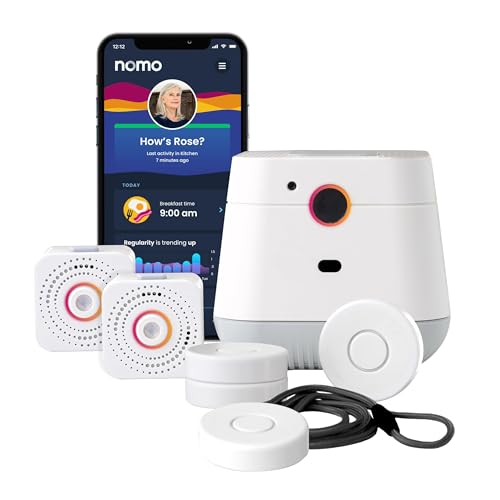
- Includes Hub, two Satellites, and wearable Tags
- Offers fall detection and caregiver alerts
- Provides two-way voice communication and monitoring trial
Best For: Aging-in-place safety and emergency support
Best No-Subscription Alert Kit

- Includes three pre-paired panic buttons
- Identifies the alert button and location
- Offers app alerts without a required subscription
Best For: Simple caregiver calls in homes and care facilities
Best Passive Monitoring

- Detects falls and movement without wearables
- Sends automated caregiver alerts through an app
- Installs with an adhesive strip and supports Ring cameras
Best For: Hands-free monitoring for seniors at home
Best Overall

- Supports Matter, Zigbee, Z-Wave Plus, and SmartThings
- Works with Alexa and Google Assistant
- Wi-Fi or Ethernet connectivity with local automations
Best For: Seniors building a flexible, multi-device smart home
Best for Caregiver Alerts
PILSAMAS WiFi Caregiver Call Button

- Includes three pre-paired call buttons
- Loud alarm, flashing lights, and app notifications
- Buttons can be worn, mounted, or placed on a table
Best For: Simple in-home help requests and caregiver monitoring
Best for Visual Monitoring

- Large 8-inch touchscreen for simple viewing
- Displays up to four live camera feeds
- Provides alerts and local event playback
Best For: Seniors who want an easy visual security-monitoring panel
Advanced Automation Hub

- Supports over 100 smart devices
- Quiet, low-power 24/7 operation
- Expandable with automation add-ons
Best For: Experienced users seeking powerful, expandable automation
Easy Lighting Control
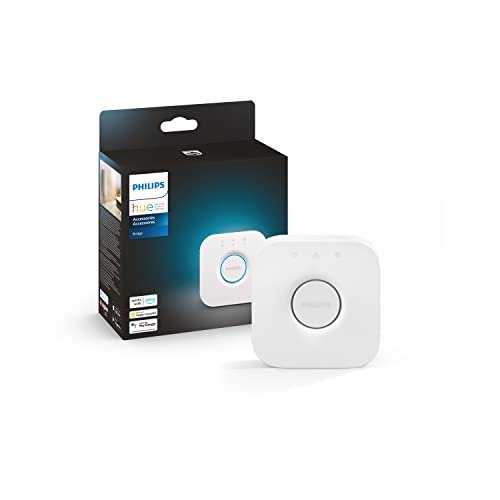
- Controls up to 50 Hue devices
- Reliable Zigbee lighting connection
- Supports remote, voice, and Matter control
Best For: Philips Hue households prioritizing simple lighting control
Dial-Controlled Smart Hub

- Physical dial and scene buttons
- Displays temperature and home status
- Controls infrared, SwitchBot, and Matter devices
Best For: Seniors who prefer tactile controls and visible information
Best All-Around Hub – SmartThings Hub 3rd Generation
For shoppers comparing smart home hubs for seniors, the SmartThings Hub 3rd Generation is a flexible choice for bringing compatible devices into one smartphone app. It supports Zigbee, Z-Wave, cloud-to-cloud protocols, Alexa, and Google Home, making it useful for simple automations and broader home monitoring.
Best For: Seniors and caregivers who want app-based control and customizable automations across compatible smart devices.
Pros:
- Controls compatible devices through one smartphone app.
- Can automate actions when doors open or people come and go.
- Supports Zigbee, Z-Wave, cloud-to-cloud protocols, Alexa, and Google Home.
Cons:
- Requires compatible smart devices to provide its full functionality.
- Its smartphone-based controls may be less direct than a dedicated alert system.
This is a strong general-purpose hub for connected-home routines, but it is not presented as a dedicated fall-detection or emergency-response system. Check device compatibility before buying.
Best for Dedicated Safety – Nomo Medical Alert System
Among smart home hubs for seniors, the Nomo Medical Alert System is designed specifically for aging in place. Its kit combines a Smart Hub, two range extenders, wearable Tags, fall detection, two-way voice communication, and caregiver alerts over Wi-Fi.
Best For: Seniors and families seeking a dedicated home safety system with fall detection, wearable panic buttons, and optional emergency monitoring.
Pros:
- Includes a Hub, two Satellites, and wearable Tags in one kit.
- Provides fall detection, panic buttons, and caregiver notifications.
- Offers two-way voice communication through the Hub.
- Includes a 30-day trial of 24/7 monitoring with RapidSOS emergency services.
Cons:
- A monthly subscription applies after the 30-day monitoring trial.
- Designed for safety monitoring rather than broad smart-home device control.
The included extenders can help provide coverage throughout the home, while the wearable Tags add a direct way to request help. Factor the ongoing monitoring cost into the purchase decision.
Best No-Subscription Alert Kit – PILSAMAS Caregiver Pager
The PILSAMAS caregiver pager is a practical alternative to general smart home hubs for seniors when the priority is fast room-to-room assistance. Its hub connects to 2.4G Wi-Fi for app access, while three pre-paired buttons communicate with the hub over a claimed 328-foot range through walls.
Best For: Homes or care settings where seniors need simple call buttons, clear location identification, and family app alerts without a subscription.
Pros:
- Includes one hub and three wireless panic buttons.
- The hub displays an assigned button number and sounds an alarm.
- Buttons can be worn, wall-mounted, or placed on a table.
- IP65 waterproof buttons are suitable for wet areas such as bathrooms.
Cons:
- The hub requires 2.4G Wi-Fi rather than 5G Wi-Fi.
- SMS, call, and email alerts require an optional plan.
- It is a caregiver pager rather than a broad smart-home automation hub.
With customizable tones, volume settings, device names, alert history, and shared app alerts, this kit focuses on making a help request easy to identify. Its strongest use case is immediate caregiver notification, not automatic fall detection.
Best Passive Monitoring – Senior Fall Monitor
For families considering smart home hubs for seniors without adding wearables or check-ins, this Senior Fall Monitor uses AI-powered passive infrared and motion sensing. It can monitor falls, wandering, bed exits, room exits, sleep patterns, and activity history, then send alerts through its mobile app.
Best For: Caregivers who want passive, room-based monitoring and automated safety insights without requiring the senior to wear a button.
Pros:
- Monitors falls, wandering, nighttime movement, and room or bed exits.
- Sends phone calls, push notifications, and texts through an encrypted app.
- Provides safety scores, activity history, and health trend summaries.
- Installs with an included adhesive strip without drilling.
Cons:
- Requires a subscription.
- Has a listed maximum range of 30 feet.
- Requires corded AC power and does not use a standard battery.
This monitor is particularly useful when wearing a device is impractical. Its Ring camera compatibility may also help existing Ring users avoid additional hardware, but shoppers should confirm subscription terms and room coverage first.
Best Overall – Aeotec Smart Home Hub
For seniors who want one central control point, the Aeotec Smart Home Hub is a versatile choice among smart home hubs for seniors. It connects compatible lighting, comfort, energy, and security-related devices through the SmartThings app, with app and voice control via Alexa or Google Assistant.
Best For: Households building a broad, automated smart home system.
Pros:
- Supports Matter, Zigbee, Z-Wave Plus, Wi-Fi, and SmartThings devices.
- Works with Amazon Alexa and Google Assistant for voice control.
- Supports Wi-Fi or Ethernet setup and many local automations.
- SmartThings app works on Android, iOS, and iPadOS.
Cons:
- Requires compatible devices and the SmartThings app to provide its full value.
- The V3 model’s Z-Wave Plus support is designed for North American use.
This is the strongest all-purpose option for seniors who want to coordinate several types of smart devices, though setup may be more involved than a single-purpose alert system.
Best for Caregiver Alerts – PILSAMAS WiFi Caregiver Call Button
The PILSAMAS 3-Pack is a practical alternative to general smart home hubs for seniors when the main need is an easy way to request help. Three pre-paired call buttons connect to a Wi-Fi hub, trigger audible and visual alerts, and send app notifications to a phone.
Best For: Seniors who need simple in-home caregiver or family alerts.
Pros:
- Includes one hub and three pre-paired call buttons.
- Buttons can be worn, wall-mounted, or placed on a table.
- Offers a stated 230-foot range and can penetrate walls and doors.
- App allows remote monitoring, alarm-history review, and customizable tones and volume.
Cons:
- Supports only 2.4GHz Wi-Fi, not 5GHz.
- SMS, phone, and email notifications require a subscription.
- It is designed for emergency alerts rather than controlling lights or other smart devices.
With no monthly fee for the basic emergency alert setup, this system is easy to deploy in a home, but buyers should confirm their router supports 2.4GHz Wi-Fi and consider the subscription requirement for expanded notifications.
Best for Visual Monitoring – eufy Smart Display E10
The eufy Smart Display E10 takes a screen-centered approach to smart home hubs for seniors. Its 8-inch touchscreen provides a straightforward way to view cameras and doorbell activity, while automatic alerts, live feeds, and local event storage help make household monitoring easier.
Best For: Seniors who prefer a large touchscreen for viewing cameras, doorbells, and household activity.
Pros:
- 8-inch touchscreen is designed to be simple for seniors and children.
- Can show four simultaneous live camera feeds.
- Automatically displays live video and voice alerts for supported doorbell, lock, and camera events.
- Stores historical events locally for quick replay.
Cons:
- Its supplied features focus on eufy security monitoring rather than broad smart-device compatibility.
- The display is relatively substantial at 2.46 pounds.
- Advanced recognition features are powered by HomeBase 3 and may depend on compatible eufy equipment.
This is a good fit when visibility and simple on-screen access matter more than extensive device automation. It is especially appealing for users who benefit from a dedicated display instead of relying solely on a phone.
Advanced Automation Hub – Home Assistant
For seniors who want a capable platform behind their smart home, this Home Assistant hub offers continuous operation, support for more than 100 devices, and compatibility with Wi-Fi devices. It is compact, fanless, and designed to handle advanced automations through add-ons such as Node-RED and ESPHome.
Best For: Technically confident households wanting powerful, expandable smart home automation.
Pros:
- Supports management of over 100 smart devices simultaneously.
- Designed for 24/7 operation with typical power consumption under 10W.
- Compact, fanless design provides quiet operation.
- Includes 4GB SDRAM and 64GB eMMC storage for multitasking and add-ons.
Cons:
- Advanced add-ons and automation features may require more technical setup.
- The supplied notes identify Wi-Fi support but do not list broader protocol compatibility.
This is a strong choice for an experienced caregiver or family member setting up smart home automation for a senior, especially when reliability and expandability matter more than simplicity.
Easy Lighting Control – Philips Hue Bridge
For seniors primarily interested in easier lighting control, the Philips Hue Bridge is a focused hub for Philips Hue lights and accessories. Its Zigbee connection helps keep lighting reliable without placing the same load on Wi-Fi, while the Hue app supports control at home or remotely.
Best For: Seniors and households building a Philips Hue lighting system with app, voice, or Matter control.
Pros:
- Supports up to 50 Hue lights and accessories.
- Zigbee provides a stable connection, and Hue lights can work when Wi-Fi is down.
- Enables out-of-home control, automations, zones, and multi-room lighting.
- Works with voice control and Matter-compatible smart home devices.
Cons:
- It is designed primarily for Philips Hue lighting rather than general smart home devices.
- Movie, music, and game syncing requires the separate HDMI Sync Box.
The Hue Bridge is one of the more approachable smart home hubs for seniors when the goal is dependable, straightforward lighting control rather than broad device automation.
Dial-Controlled Smart Hub – SwitchBot Hub 3
SwitchBot Hub 3 stands out among smart home hubs for seniors because it combines a readable 2.4-inch IPS display with a physical rotary knob and buttons. It can show household conditions at a glance and control compatible infrared appliances, SwitchBot products, and Matter devices through its app, voice assistants, or tactile interface.
Best For: Seniors who prefer physical controls and an at-a-glance view of temperature, humidity, and home status.
Pros:
- Physical dial and scene buttons are designed for easy control by seniors and guests.
- Displays temperature, humidity, weather information, and other home status details.
- Controls more than 100,000 infrared appliances, including TVs and air conditioners.
- Compatible with Alexa, Google Assistant, Apple Home, and Matter devices.
Cons:
- Requires a 2.4GHz Wi-Fi connection; 5GHz networks are not supported for setup.
- Supports infrared devices but not RF products such as some ceiling fans and garage door openers.
- Some status features require separately sold SwitchBot devices.
With its tactile controls and visible status screen, Hub 3 is particularly practical for seniors who may find app-only systems less convenient, provided their devices and network meet its compatibility requirements.
How We Picked the Best Smart Home Hubs for Seniors
We selected products that address the practical needs of older adults and their caregivers rather than treating every device as a general-purpose automation hub. The lineup includes platforms for lights, locks, sensors, and appliances, as well as dedicated systems for emergency communication, fall detection, and passive safety monitoring.
Our comparison emphasizes setup complexity, communication methods, compatibility, alert delivery, accessibility, and ongoing costs. Subscription requirements matter particularly for monitored safety services, while protocol support matters for buyers building a broader smart home over time.
Quick Comparison
- Best for broad compatibility: Aeotec Smart Home Hub or SmartThings Hub.
- Best for dedicated emergency support: Nomo Medical Alert System.
- Best for simple caregiver calling: PILSAMAS WiFi Caregiver Pager systems.
- Best for passive monitoring: the 24/7 Senior Fall Monitor.
- Best for screen-based control: eufy Smart Display E10.
- Best for advanced customization: Home Assistant.
- Best for Philips Hue lighting: Philips Hue Bridge.
- Best for infrared devices and room data: SwitchBot Hub 3.
Key Buying Factors for Smart Home Hubs for Seniors
Ease of Use and Accessibility
Look for large, readable controls, clear voice commands, simple button placement, and routines that reduce the number of daily steps. A system that is powerful but confusing may require frequent caregiver assistance.
Safety and Alert Coverage
Decide whether the priority is automation or urgent assistance. Emergency buttons, fall detection, passive monitoring, and caregiver paging serve different purposes. Confirm who receives alerts, how quickly they arrive, and what happens during an internet or power outage.
Compatibility and Connectivity
Check support for Wi-Fi, Zigbee, Z-Wave, Bluetooth, Matter, infrared, Alexa, Google Assistant, and existing devices. Protocol support can prevent costly replacements as the system expands.
Fees, Privacy, and Reliability
Some monitoring products require subscriptions. Review activation, cellular backup, storage, replacement, and cancellation fees before buying. Also check where health or household data is processed and whether local control is available.
Who Should Buy Which Smart Home Hubs for Seniors?
Choose a conventional hub such as SmartThings or Aeotec when the main goal is unified control of lights, locks, sensors, and routines. Choose Home Assistant when a technically confident family member can manage advanced setup and maintenance. Philips Hue is the straightforward option for homes centered on Hue lighting, while SwitchBot is useful for infrared appliances and environmental readings.
For seniors who need a direct way to call a caregiver, a PILSAMAS button-and-pager kit may be more suitable than a full automation platform. For higher-risk households, consider a dedicated medical-alert or monitored fall-detection system, but verify coverage, subscription terms, and response procedures. The best Smart Home Hubs for Seniors are the ones the resident can use confidently and the caregiver can support consistently.