A cramped desk can make typing uncomfortable and leave little room for a mouse, notebook, or monitor stand. The right keyboard tray moves your input devices below or beyond the desktop, creating usable workspace without replacing the desk.
This roundup compares 10 compact keyboard trays across mounting styles, tray dimensions, adjustability, mouse placement, and storage features so you can choose a practical fit for your setup.
Best 10 Keyboard Trays for Small Desks Picks for 2026
Compact Clamp-On Pick
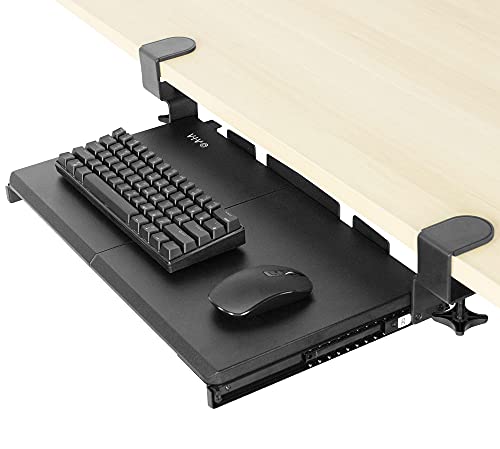
- 20-by-11-inch space-saving platform
- Slides out up to 9.5 inches
- No-drill C-clamp installation
Best For: Small desks needing a compact pull-out tray
Compatibility-Focused Choice
BONTEC Under-Desk Keyboard Tray

- 20-by-11.8-inch keyboard platform
- No-drill clamps support up to 11 pounds
- Requires a flat, unobstructed underside
Best For: Small desks with verified clamp-installation clearance
Wide Tray Option

- 26.8-by-11-inch usable tray
- Slides out up to 8.5 inches
- Fits desks up to 1.25 inches thick
Best For: Wider desks needing room for accessories
Heavy-Duty Screw-Mount Pick
Ciao Stilista Steel Keyboard Tray

- Steel 28-by-11-inch tray
- 360-degree rotating mouse platform
- Three height settings with 1.4 inches of adjustment
Best For: Users seeking a sturdy, adjustable permanent mount
Best Adjustable Under-Desk Tray

- 5-inch height adjustment
- Full side-to-side rotation
- 25-by-10-inch keyboard and mouse surface
Best For: Standard desks needing adjustable ergonomic positioning
Best Feature-Packed Swivel Tray
Klearlook Rotating Keyboard Tray

- 360-degree swivel design
- Built-in drawer and accessory holders
- Adjustable tilt but fixed height
Best For: Compact workspaces needing storage and easy tray stowage
Best Clamp-On Compact Tray

- 20-by-11.8-inch compact surface
- No-drill adjustable C-clamp installation
- Pulls out 7.8 inches and stores under desk
Best For: Flat-bottomed small or medium desks needing a compact tray
Space-Saving Pick
Zontera Under-Desk Keyboard Tray

- 20 x 11.8-inch tray for keyboard, mouse, and accessories
- C-clamps fit desks up to 2.76 inches thick
- Non-drill installation with smooth slide mechanism
Best For: Small desks needing a spacious under-desk work surface
Large-Surface Pick
XINLEI Slide-Out Keyboard Tray

- 25.6 x 11.8-inch platform adds generous workspace
- Smooth metal rail with keyboard-retaining back baffle
- Supports C-clamp or screw installation
Best For: Small desks with enough width for a 30-inch mounting span
Compact Clamp-On Pick – VIVO 20-Inch Keyboard Tray
For shoppers comparing keyboard trays for small desks, the VIVO MOUNT-KB05ES offers a compact clamp-on design that keeps a keyboard and mouse below the desktop. Its 20-by-11-inch tray supports up to 11 pounds and fits desks up to about 2 inches thick.
Best For: Small desks that need a straightforward, no-drill under-desk keyboard solution.
Pros:
- Compact 20-by-11-inch platform helps conserve desktop space.
- Slides out up to 9.5 inches for convenient access.
- Adjustable C-clamps install without drilling and support up to 11 pounds.
Cons:
- Requires a desk edge suitable for clamp installation.
- The notes list slightly different maximum desk-thickness figures, so measure carefully before ordering.
This is a practical choice when desk space is limited and you want a compact tray with simple clamp mounting. Verify the available underside clearance and desk thickness before purchase.
Compatibility-Focused Choice – BONTEC Under-Desk Keyboard Tray
Among keyboard trays for small desks, the BONTEC pull-out platform provides a 20-by-11.8-inch surface for a standard keyboard and mouse. It clamps to desks up to 1.97 inches thick, but its fit depends on having a flat, unobstructed underside with enough width and depth.
Best For: Users who can confirm their desk has a flat edge, at least 25.8 inches of width, and 11.8 inches of underside depth.
Pros:
- Pull-out platform frees desktop room for monitors and accessories.
- Protective C-clamp pads help improve grip and reduce scratching.
- Supports up to 11 pounds without drilling.
Cons:
- Not compatible with curved, beveled, or rounded desk edges.
- Crossbars or support beams underneath can prevent installation.
- Vertical mice, oversized keyboards, and split ergonomic keyboards may require additional clearance checks.
The BONTEC is appealing for compact workstations, but compatibility is the main consideration. Measure the desk carefully and confirm the underside is clear before ordering.
Wide Tray Option – VIVO 27-Inch Keyboard Tray
The VIVO MOUNT-KB05E is a wider option among keyboard trays for small desks, with a 26.8-by-11-inch tray for a keyboard, mouse, and small accessories. It slides beneath the desktop to open up work surface, though the 32.5-inch clamp-to-clamp span requires careful desk measurements.
Best For: Desks with enough width for the larger clamp span and a desktop no thicker than 1.25 inches.
Pros:
- Wide tray accommodates a keyboard, mouse, and small accessories.
- Slides out up to 8.5 inches for access and ergonomic positioning.
- Adjustable C-clamps install without damaging the desk surface.
Cons:
- Requires 32.5 inches of desk space from clamp to clamp.
- Only supports desktops up to 1.25 inches thick.
- Not compatible with beveled desktop edges.
This model can add useful storage beneath a desk, but it is less compact in its mounting footprint than the tray itself suggests. Check both the edge shape and total available width before buying.
Heavy-Duty Screw-Mount Pick – Ciao Stilista Steel Keyboard Tray
For keyboard trays for small desks where sturdiness and adjustability matter, this Ciao Stilista model uses a solid steel 28-by-11-inch tray with a slide-out rail and rotating mouse platform. It mounts with screws, includes three preset height settings, and requires pilot holes for installation.
Best For: Users who want a sturdy, permanently mounted tray with adjustable height and a swiveling mouse platform.
Pros:
- 1 mm steel construction is designed for stability and durability.
- 360-degree mouse platform rotates out for use and tucks away afterward.
- Three height settings provide up to 1.4 inches of adjustment.
- 14-inch galvanized rails are designed for smooth, quiet movement.
Cons:
- Requires screws, pilot holes, and approximately 15 minutes of assembly.
- Not compatible with glass, marble, or desks with drawers.
- Its 28-inch length may be too large for especially narrow desks.
This is the most feature-rich option in the group, but its screw-mounted design is less flexible than clamp-on alternatives. Confirm the desktop material, underside clearance, and available length before installation.
Best Adjustable Under-Desk Tray – VIVO 25-Inch Keyboard Tray
For shoppers comparing keyboard trays for small desks, the VIVO MOUNT-KB03B offers a broad 25-by-10-inch platform that mounts beneath a standard desk. Its rotating tray and height adjustment make it a flexible option, provided your desk has enough clearance and can support the installation hardware.
Best For: Users who want adjustable height and side-to-side rotation for a standard desk setup.
Pros:
- 5-inch height adjustment supports a more personalized typing position.
- Full side-to-side rotation and rubber padding add ergonomic flexibility.
- 25-by-10-inch surface accommodates most keyboards and mice.
- Mounting hardware is included for assembly.
Cons:
- The tray weighs 10 pounds, so the desk must support the added under-mounted weight.
- Installation requires 14.25 inches between the desktop edge and any crossbar.
- Height-adjustable desks may need the separately sold MOUNT-SPACER01 adapter.
This is a strong fit when ergonomic adjustment matters more than having the smallest possible footprint. Check underside clearance, desktop thickness, and desk strength before choosing it.
Best Feature-Packed Swivel Tray – Klearlook Rotating Keyboard Tray
The Klearlook tray combines a 24.4-by-10-inch keyboard platform with a 360-degree swivel, making it useful for reclaiming desktop space in a compact workspace. It attaches with a C-clamp, includes storage features, and offers tilt adjustment, though its height is fixed.
Best For: Small-desk users who want a swiveling tray with built-in organization for accessories.
Pros:
- 360-degree rotation lets the tray move under the desk when not in use.
- Includes a drawer, phone slot, and headphone hanger for workspace organization.
- Built-in mouse pad provides a ready-to-use surface for keyboard and mouse setups.
- Adjustable tilt angle helps users find a more comfortable typing position.
Cons:
- Keyboard tray height is not adjustable.
- Double-sided rotation requires at least 35 inches of table width.
- The plastic construction may not feel as substantial as heavier metal trays.
Choose this model when storage and swivel functionality are priorities. Measure your desk carefully, especially if you want full rotation, and remember that C-clamp compatibility supports desktops up to 2.68 inches thick.
Best Clamp-On Compact Tray – Xyndyx Small Keyboard Tray
The Xyndyx small keyboard tray is designed for keyboard trays for small desks, with a 20-by-11.8-inch platform and a pull-out rail that extends 7.8 inches. Its adjustable C-clamps install without drilling, but the desk underside must be completely flat and unobstructed.
Best For: Small or medium desks with a flat underside and users who prefer no-drill installation.
Pros:
- Compact 20-by-11.8-inch surface accommodates a keyboard and mouse.
- Adjustable C-clamps fit desktops up to 2.76 inches thick.
- Smooth sliding rail tucks the tray away when it is not needed.
- Non-slip pads and a back baffle help keep the setup stable.
Cons:
- It will not work with curved, beveled, rounded, or obstructed desk undersides.
- Installation requires at least 31.5 inches of desk width.
- The tray extends only up to 7.8 inches from the desk edge.
This is a practical choice for a compatible desk when preserving surface area is the main goal. Confirm the underside shape, crossbar clearance, desk width, and clamp thickness range before ordering.
Space-Saving Pick – Zontera Under-Desk Keyboard Tray
For shoppers comparing keyboard trays for small desks, the Zontera offers a generous 20 x 11.8-inch tray while mounting beneath the desktop. Its adjustable C-clamps help conserve surface space without drilling, but measure carefully because the clamp-to-clamp length is 25.9 inches.
Best For: Small-desk users who need room for a keyboard, mouse, and a few accessories.
Pros:
- 20 x 11.8-inch surface accommodates a keyboard, mouse, and small accessories.
- Adjustable C-clamps fit desks up to 2.76 inches thick.
- Smooth slide mechanism, back baffle, and non-slip clamp pads support stable use.
- Installs without drilling using included hardware and instructions.
Cons:
- The 25.9-inch total clamp-to-clamp length requires sufficient desk space.
- Its 7.28-pound weight may be more than some compact setups need.
The Zontera is a practical balance of capacity and adjustability. Check the available width beneath your desk before buying, especially if your workspace has limited side clearance.
Large-Surface Pick – XINLEI Slide-Out Keyboard Tray
The XINLEI is a large slide-out option among keyboard trays for small desks, moving the keyboard and mouse below the desktop to free the main work area. Its 25.6 x 11.8-inch platform is useful for accessories, but the 30-inch total clamp length makes measurement essential.
Best For: Users who want maximum tray space and a choice of clamp or screw installation.
Pros:
- 25.6 x 11.8-inch platform provides ample room for a keyboard, mouse, and accessories.
- Metal sliding rail supports smooth, quiet pull-out operation.
- Back baffle helps keep the keyboard from sliding off.
- Offers C-clamp and screw-mount installation methods.
Cons:
- The 30-inch total length may not fit very small desks.
- C-clamps support desktops up to 1.63 inches thick.
- Thicker desktops reduce keyboard clearance, with a listed total height of 4.45 inches.
This tray prioritizes usable surface area and installation flexibility. It can work well when a small desk has enough width underneath, but verify both the total length and legroom before purchasing.
Most Adjustable – AX WABER Swivel Keyboard Tray
The AX WABER stands out among keyboard trays for small desks with height, swivel, and tilt adjustments. It can rotate horizontally, tilt vertically, and slide out for positioning, though you should confirm desk dimensions, legroom, and edge design before installation.
Best For: Users who want to fine-tune keyboard position for ergonomic comfort.
Pros:
- Adjusts up to 6.5 inches in height.
- Rotates 180 degrees horizontally and tilts 30 degrees vertically.
- Slides out up to 9.8 inches and includes a soft protective pad.
- Supplied with assembly hardware, instructions, and technical support.
Cons:
- Requires a desk over 25 inches long for optimal comfort.
- Desk should be at least 0.61 inches thick and provide adequate legroom.
- Not compatible with desktops that have beveled edges.
The AX WABER is the strongest choice here for personalized positioning rather than maximum simplicity. Its adjustment range is useful for changing posture, provided your desk meets the mounting and clearance requirements.
How We Picked the Best Keyboard Trays for Small Desks
We focused on the features that matter most in compact workstations: overall tray size, mounting method, usable keyboard and mouse space, slide-out clearance, stability, and adjustability. The selection includes clamp-on models for renters or finished desks, screw-mounted trays for a more permanent installation, and designs with rotating or swiveling mouse platforms.
We also considered whether each tray is better suited to a standard keyboard, a compact model, or a keyboard-and-mouse combination. Before buying, verify the product dimensions against your desk thickness, legroom, drawer clearance, and keyboard dimensions.
Quick Comparison
| Best For | Look For | Trade-Off |
|---|---|---|
| Very tight desktops | 20-inch-wide trays or compact platforms | Less room for a mouse and accessories |
| Full-size keyboards | 25- to 27-inch trays with deeper surfaces | Requires more clearance beneath the desk |
| Flexible mouse placement | 360-degree rotating or swiveling platforms | More moving parts and possible wobble |
| No-drill installation | Clamp-on C-clamp designs | Clamp clearance may limit desk placement |
| Extra organization | Integrated storage drawers or accessory areas | Bulkier under-desk profile |
Key Buying Factors for Keyboard Trays for Small Desks
Measure the Desk and Keyboard First
Check the desk’s thickness, underside obstructions, available legroom, and the distance from the front edge to the nearest support. Compare those measurements with the tray’s width, depth, clamp span, and slide-out length. A tray that technically fits can still be uncomfortable if it blocks your knees.
Choose the Right Mounting Style
Clamp-on trays are usually easier to install and reposition, making them useful for rented spaces or desks you do not want to drill. Screw-mounted trays can feel more secure but require a suitable underside and careful placement. Confirm that the mounting hardware is compatible with your desktop material.
Prioritize Typing Comfort and Stability
Look for a platform that supports your keyboard without flexing and places it at a comfortable height. A rotating mouse shelf can improve reach, while a height-adjustable or tilting design offers more ergonomic control. Keep in mind that added movement can reduce rigidity if the mechanism is not locked firmly.
Check Mouse Space and Cable Routing
Measure the mouse area you actually use, especially if you have a high-sensitivity setup or prefer broad arm movement. A tray may fit a keyboard but leave too little room for the mouse. Also check whether the design allows the keyboard cable to reach the computer without catching during sliding.
Who Should Buy Which Keyboard Trays for Small Desks?
Choose a narrow 20-inch-class tray if your priority is reclaiming desktop space and you use a compact keyboard. A 25- to 27-inch model is better for full-size keyboards, wider mouse movement, or a separate number pad. Pick a clamp-on design when installation flexibility matters, and choose an under-desk screw-mounted tray when maximum stability is the priority.
For mixed sit-stand setups, prioritize height adjustment, tilt, and a smooth slide rather than simply choosing the widest platform. If organization is your main concern, a model with a storage drawer may justify its larger footprint. Whichever option you choose, confirm measurements and mounting requirements before ordering; compact desks leave little room for installation errors.