The right gaming gift depends on how she plays: on a PC, console, or handheld, and whether she values comfort, streaming, travel, or a more personal desk setup. These ideas range from small accessories to major workspace upgrades.
Gaming Accessory Gifts to Explore
1. 15.6-Inch Portable Triple-Screen Extender
2. 55L Gaming Laptop Backpack
Carry Her Gaming Setup

- 55L capacity with three compartments and 13+ pockets for gear and essentials.
- Padded laptop compartment fits devices up to 18.4–19 inches, according to the listing.
- 180° lay-flat opening and water-resistant nylon make it suited to travel.
Best For: A gamer who carries a laptop and accessories between home, school, or trips.
3. EasySMX D10 Wireless Gaming Controller
A Controller for Flexible Play
EasySMX D10 Wireless Gaming Controller

- Connects by 2.4G, Bluetooth, or USB-C to supported PC, Switch, Android, and iOS devices.
- Includes two programmable back buttons and mechanical ABXY buttons and D-pad.
- Charging dock and up to 10 hours of listed playtime.
Best For: Someone who enjoys controller-friendly games across supported devices.
4. Kisnt KN85 Wireless Mechanical Keyboard
A Compact Keyboard for Her Desk
Kisnt KN85 Wireless Mechanical Keyboard

- Compact 75% layout retains function keys and arrows while leaving off the number pad.
- Connects through Bluetooth, 2.4GHz wireless, or USB-C.
- Hot-swappable switches and adjustable RGB backlighting allow personalization.
Best For: A PC gamer who wants a compact keyboard with customizable feel and lighting.
5. Streonor S6 Mini Stream Controller
Quick Controls for Streaming
Streonor S6 Mini Stream Controller
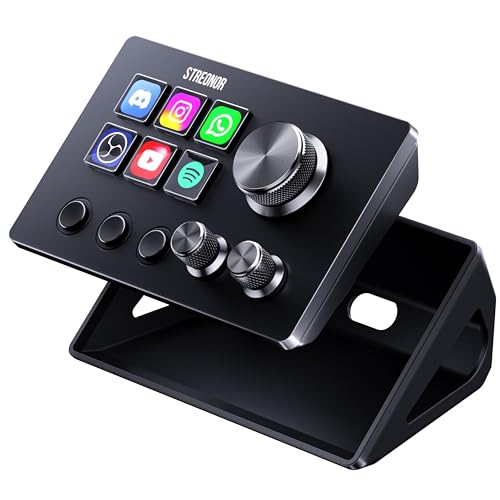
- Six customizable LCD keys, three rotary knobs, and three scene-switching keys.
- Keys can be assigned shortcuts, app launches, media controls, or multi-action sequences.
- Compatible with Windows 10 64-bit or higher and macOS Big Sur 11 or higher; Linux is not supported.
Best For: A streamer or creator who wants compact controls for scenes and apps.
6. ByteWave USB 3.0 HDMI Capture Card
A Starter Tool for Gameplay Capture
ByteWave USB 3.0 HDMI Capture Card

- Captures video at up to 1080p60 and supports 4K30 passthrough, per the listing.
- Works with listed consoles and software including Switch, PS5, Xbox, OBS, and Twitch.
- 1080p60 capture requires a USB 3.0 or faster port.
Best For: A console gamer interested in recording or streaming gameplay.
7. FIFINE AmpliGame AM8 USB/XLR Microphone
Clearer Voice Chat and Streams
FIFINE AmpliGame AM8 USB/XLR Microphone

- Can connect by USB or XLR; an XLR cable and audio interface or mixer are separate requirements.
- USB mode includes tap-to-mute, headphone monitoring, gain control, and RGB lighting.
- The listing describes a cardioid dynamic mic and includes a windscreen cover.
Best For: A streamer, team gamer, or frequent voice-chat participant.
8. SABRENT 10-Port Powered USB 3.0 Hub
More Ports for Wired Gear
SABRENT 10-Port Powered USB 3.0 Hub

- Provides seven USB 3.0 device ports plus three dedicated charging ports.
- Individual port switches and LED indicators make connected gear easy to manage.
- Includes a 60W power adapter and supports Windows, macOS, and Linux.
Best For: A PC gamer with several wired accessories and few available ports.
9. JSAUX ROG Xbox Ally Carrying Case
Handheld Gear, Packed Together
JSAUX ROG Xbox Ally Carrying Case

- Made specifically for ROG Xbox Ally and ROG Xbox Ally X (2025).
- Dual-layer storage fits the console plus space for accessories such as a charger and cables.
- Raised joystick protection, SD and microSD slots, and a shoulder strap are included.
Best For: Someone who takes a compatible ROG Xbox Ally handheld on the go.
10. EPOMAKER Click Lite Wireless Gaming Mouse
Lightweight Mouse for PC Play
EPOMAKER Click Lite Wireless Gaming Mouse

- 59-gram mouse with five programmable buttons and adjustable 800–12,000 DPI.
- Connects over 2.4GHz wireless, Bluetooth, or USB-C.
- Rechargeable 500mAh battery; the listing states up to 78 hours of use.
Best For: A PC gamer who wants a lightweight mouse with adjustable sensitivity.
11. KANTUTOE RGB Monitor Light Bars
Color for Her Gaming Desk
KANTUTOE RGB Monitor Light Bars

- Two USB-powered bars offer color-changing lighting with 16 million colors, per the listing.
- Adjust colors and modes using the app or included remote.
- Music mode can adjust lighting to sound; supplied tape is used for installation.
Best For: A gamer who enjoys adding customizable lighting to her setup.
12. Bluedee Bluetooth and USB Desktop Speakers
Desktop Sound with RGB
Bluedee Bluetooth and USB Desktop Speakers

- 10W desktop soundbar offers USB audio on compatible devices and Bluetooth 5.3.
- Six RGB effects and seven colors add lighting to the desk.
- Wired USB audio needs a port that supports digital audio; some consoles may not.
Best For: A gamer who wants desktop audio for games, music, and videos.
13. 31.5-Inch Extended Gaming Mouse Pad
Room to Move Across the Desk
31.5-Inch Extended Gaming Mouse Pad

- 31.5 by 15.7-inch surface provides space for a mouse and keyboard.
- Non-slip rubber base and stitched edges are described in the listing.
- Water-resistant coating can be wiped clean with a damp cloth.
Best For: A PC gamer who wants a broad mouse surface and coordinated desk space.
14. AOC 27-Inch QHD Gaming Monitor
A Main Display Upgrade
AOC 27-Inch QHD Gaming Monitor

- 27-inch IPS display with 2560 × 1440 QHD resolution.
- Listing specifies a 240Hz refresh rate via DisplayPort and Adaptive-Sync support.
- Includes one DisplayPort 1.4, two HDMI 2.0 ports, and tilt adjustment.
Best For: A PC gamer ready to upgrade her main display; check the device and connection requirements.
15. Veken 55-Inch Electric Standing Desk
A More Flexible Gaming Station
Veken 55-Inch Electric Standing Desk

- 55-inch desktop with electric height adjustment from 28.3 to 46.5 inches.
- Memory presets and built-in cable management are included.
- The listing says the desktop is composed of two boards and recommends two people for assembly.
Best For: A dedicated gamer setting up a height-adjustable home gaming station.
Choosing a Gift for How She Plays
Start with her actual setup and habits. A PC player may appreciate a keyboard, mouse, mouse pad, USB hub, or monitor, while someone who plays on the move may get more use from the backpack or a compatible handheld case. For multiplayer sessions and streaming, consider the microphone, capture card, or compact stream controller. A desk light bar or speakers can personalize a gaming space without requiring a change to the core gaming system.
Think about what she has mentioned wanting to improve. Does she switch between devices, run out of USB ports, want clearer voice chat, or have little room to move a mouse? A gift that addresses one everyday friction point can feel more considered than a bigger accessory chosen without regard for her setup. If you are unsure, a desk mat or lighting accessory may be easier to fit into an existing space than a new display or desk.
Match the Gift to Your Budget
Smaller desk accessories can be thoughtful gifts when they reflect her tastes. The extended mouse pad gives a broad surface, while the RGB light bars add adjustable color. A powered USB hub is useful for a setup with several wired peripherals. The keyboard, mouse, controller, speakers, microphone, capture card, and backpack offer more specialized upgrades; compare the features she would use with the equipment she already owns.
A monitor and electric standing desk are larger changes to a gaming area. Before choosing one, consider available desk or floor space and whether it fits the recipient’s setup. The monitor is a display upgrade, while the standing desk offers a larger workspace with electric height adjustment. Let her preferences guide the scale of the gift, rather than assuming that a higher-cost item is automatically a better fit.
Check Compatibility and Personalization
Compatibility is especially important for gaming accessories. Confirm the exact console, handheld, computer, operating system, and available ports where relevant. The JSAUX case is specifically listed for ROG Xbox Ally and Ally X (2025). The EasySMX controller lists PC, Switch, Android, and iOS support, with some platforms excluded. The laptop screen extender requires suitable video outputs, and its notes describe limitations for some MacBook chips. Check these details against the recipient’s device before buying.
For streaming gear, consider the whole signal chain. The capture card needs USB 3.0 for 1080p60 capture. The microphone supports USB or XLR, but XLR use calls for a separate cable and audio interface or mixer. The stream controller lists Windows and macOS support, and says Linux is not supported. The speakers also require a compatible USB audio port for wired audio, though Bluetooth offers another connection option on supported devices.
Personalization can mean choosing something that suits her setup’s look or play style. RGB lighting, a customizable keyboard, programmable mouse buttons, and a controller with back buttons offer ways to tailor the experience. For practical gifts such as a backpack or hub, prioritize the gear she carries or connects. For a display, confirm that her computer or console can use the resolution, refresh rate, and connection she wants.
Timing and Last-Minute Decisions
Leave time to verify fit, ports, and space before choosing a major device or furniture piece. If Christmas is close, a compact accessory may involve fewer setup decisions, but check the seller’s current shipping details directly rather than relying on assumptions. For gifts that need configuration, such as a controller, keyboard, capture card, or streaming microphone, consider whether she will have time and compatible equipment to set them up.
A simple way to decide is to identify one part of her gaming routine she would enjoy improving, then choose the item here that directly supports it. Keep the receipt and product information accessible in case the recipient needs to confirm compatibility or setup details. A well-matched accessory can make gaming, streaming, or relaxing at her desk feel more personal throughout the year.