A useful computer gift can make a desk more comfortable, help a work setup run smoothly, or support a hobby like streaming and electronics repair. Start with how he uses his computer and what his current setup can connect to.
20 Computer Accessory Christmas Gift Ideas
1. Creality K2 Combo 3D Printer
For the Home Maker

- Includes a CFS unit for multicolor printing, with up to 16 colors when connected to four CFS units.
- Has a 260 × 260 × 260 mm build volume and supports listed materials including PLA, PETG, and ABS.
- Includes auto leveling and an AI camera for monitoring prints.
Best For: A man who enjoys designing and making objects at home
2. AV Access Dual-Monitor KVM Dock
For a Two-Laptop Desk
AV Access Dual-Monitor KVM Dock

- Lets two laptops share a dual-monitor setup, keyboard, mouse, and peripherals.
- Offers 12-in-1 connectivity, including two HDMI outputs, USB ports, Ethernet, and an SD card slot.
- Check that laptops support USB-C DP Alt Mode and DP MST; macOS supports mirrored displays only.
Best For: A man who switches between two laptops at one desk
3. Deco 7 Pro Wi-Fi 7 Mesh System
For Whole-Home Connectivity
Deco 7 Pro Wi-Fi 7 Mesh System

- The three-pack is listed for coverage up to 7,600 square feet and support for over 200 devices.
- Tri-band Wi-Fi 7 and four 2.5G WAN/LAN ports support a connected home setup.
- Requires a separate modem; coverage and performance depend on the home and network conditions.
Best For: A man upgrading the network for a home office or gaming
4. Anker Prime 14-in-1 Docking Station
For a Multi-Display Laptop Setup
Anker Prime 14-in-1 Docking Station

- Combines 14-in-1 connectivity with dual HDMI display outputs and up to 160W total output.
- Supports displays up to 2K at 60Hz with a DP 1.4 laptop or 1080p at 60Hz with DP 1.2.
- Check OS and display needs first: it is not compatible with Linux, and macOS mirrors the two external displays.
Best For: A man connecting a laptop to displays and desk peripherals
5. HUANUO TitanLift Heavy-Duty Monitor Arm
For a More Flexible Desk
HUANUO TitanLift Heavy-Duty Monitor Arm

- Supports compatible 17- to 49-inch monitors weighing 6.6 to 44 pounds with 75 × 75 or 100 × 100 mm VESA holes.
- Adjusts by tilt, swivel, rotation, and extension for different screen positions.
- Check desk conditions before gifting: the listing recommends a wooden desk 0.8 to 3.5 inches thick with no obstructing underside beams.
Best For: A man who wants to reposition a compatible monitor
6. MechLands Feker Alice98 Mechanical Keyboard
7. MAONO PD200XS USB/XLR Microphone Kit
For Calls, Streaming, and Recording
MAONO PD200XS USB/XLR Microphone Kit

- Connects by USB or XLR; the listing says software features are available in USB mode.
- Includes a boom arm, shock mount, and a 3.5 mm headphone jack for monitoring.
- An XLR cable is not included; the USB cable is listed as 8.2 feet long.
Best For: A man who records audio, streams, or joins frequent calls
8. Wireless ANC Headset with Flip-to-Mute Mic
For Clearer Work Calls
Wireless ANC Headset with Flip-to-Mute Mic

- Includes a USB-A dongle for PC or Mac and Bluetooth 5.4 for wireless connections.
- The boom microphone flips up to mute, and the headset can connect to two devices at once.
- The listing states up to 35 hours of talk time; it is not compatible with landlines or desk phones.
Best For: A man who takes calls in a home office or busy workspace
9. AsperX 20,000mAh Laptop Power Bank
For Work Away from Outlets
AsperX 20,000mAh Laptop Power Bank

- Lists 20,000mAh capacity and up to 165W total output across two USB-C ports.
- A color TFT display shows battery percentage, runtime, and input and output wattage.
- Confirm his laptop charges over USB-C; the bank's own maximum recharge rate is listed as 65W.
Best For: A man who works or travels away from a power outlet
10. fifine D6 RGB Macro Keypad
For One-Touch Desktop Controls
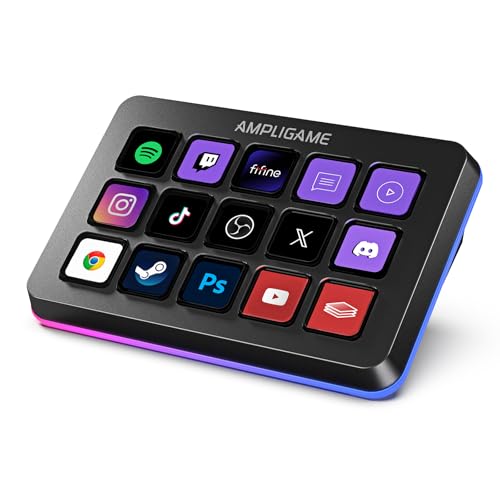
- Has 15 customizable LCD macro keys for launching apps and assigning controls.
- The listing names OBS Studio, Streamlabs, Twitch, and YouTube among supported software and services.
- Offers nine controllable RGB lighting modes and supports profiles for different tasks.
Best For: A man who streams or wants shortcut controls for desktop tasks
11. Acer A640 4K Webcam
For a Sharper Video Setup

- Supports 4K at 30fps and 2K or 1080p at 60fps, with phase-detection autofocus.
- Includes a physical privacy shutter and an AI noise-canceling microphone.
- Connects by USB and works with listed platforms including Teams, Zoom, and Twitch; speakers are not built in.
Best For: A man who works remotely or frequently video chats
12. Univivi 36-Inch Under-Desk Cable Tray
For a Tidier Workstation
Univivi 36-Inch Under-Desk Cable Tray

- Measures 36 × 5.5 × 5.5 inches for organizing power adapters and cables under a desk.
- Can be installed with clamps or screws and unfolds for adding or removing items.
- Check desk clearance: the listing calls for at least 5.3 inches along the edge if drawers or a back rod are present.
Best For: A man who wants to organize cables beneath his desk
13. Yodoit 15.6-Inch Portable Monitor
For a Second Screen on the Go
Yodoit 15.6-Inch Portable Monitor

- Has a 1920 × 1080 IPS display with a matte finish and built-in speakers.
- Connects by USB-C or Mini HDMI, with the latter option using USB-A for power.
- The listing gives a weight of about 1.5 pounds and includes a smart cover.
Best For: A man who travels with a laptop and wants a portable second screen
14. Nulea M501 Wireless Trackball Mouse
For Thumb-Controlled Navigation
Nulea M501 Wireless Trackball Mouse

- Uses a thumb-operated trackball, with four DPI levels and six buttons.
- Connects to up to three devices by Bluetooth or USB dongle.
- Has a rechargeable battery; the listing says the buttons are not programmable.
Best For: A man curious about a trackball for everyday computer use
15. HOTO 25-in-1 Precision Screwdriver Set
For Small Electronics Repairs
HOTO 25-in-1 Precision Screwdriver Set

- Includes an electric screwdriver, magnetic case, USB-C cable, and 25 precision bits.
- Offers electric and manual modes for small screws and delicate assembly work.
- The listing names phones, laptops, cameras, watches, and game consoles among possible repair projects.
Best For: A man who maintains computers or small electronics
16. ProtoArc EM11 NL Vertical Mouse
For a Different Mouse Grip
ProtoArc EM11 NL Vertical Mouse

- Has a vertical shape designed for hands under 7.5 inches long; the listing recommends measuring first.
- Connects by Bluetooth or the included USB-A receiver and can pair with up to three devices.
- Rechargeable and offers 1000, 1600, and 2400 DPI settings; the Type-C cable is for charging only.
Best For: A man who wants to try a vertical mouse for daily computer use
17. YEELIGHT USB Monitor Light Bar
For Evening Desk Work
YEELIGHT USB Monitor Light Bar

- Clips onto flat or curved monitors listed as 0.3 to 1.1 inches thick.
- Provides stepless dimming and color temperature adjustment from 2700K to 6500K.
- USB-powered with a 1.5-meter cable and a low-profile design intended to avoid blocking a webcam.
Best For: A man who spends evenings working or gaming at a computer
18. Redragon GS550 Desktop Speakers
For Desk Audio Without Headphones
Redragon GS550 Desktop Speakers

- Compact 2.0 stereo speakers can stand on either side of a monitor or sit together beneath it.
- USB-powered with 3.5 mm audio and microphone cables for listed PC, TV, and laptop use.
- Includes a combined volume and power knob and red LED lighting.
Best For: A man who wants speakers for everyday desk listening
19. BENFEI 10-in-1 USB-C Hub
For More Laptop Ports
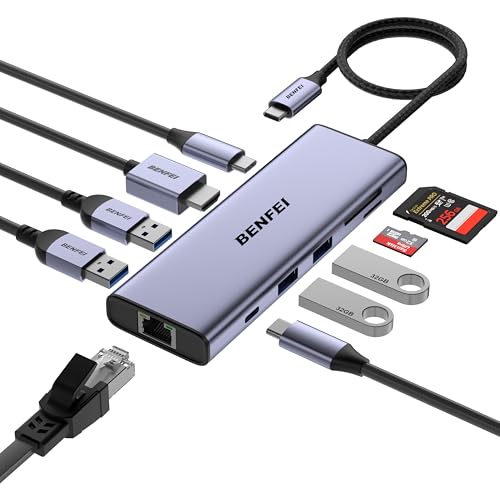
- Adds HDMI, Gigabit Ethernet, four USB-A ports, USB-C data, SD/TF readers, and USB-C power pass-through.
- Supports HDMI output up to 4K at 60Hz when the host USB-C port supports DisplayPort Alt Mode.
- The charging port supports power pass-through only, not data or video.
Best For: A man whose laptop has limited ports
20. LG 34-Inch UltraWide Curved Monitor
For a Wider View of Work and Play
LG 34-Inch UltraWide Curved Monitor

- The 34-inch curved display has a 3440 × 1440 resolution and 21:9 aspect ratio.
- Includes USB-C with up to 65W power delivery, two HDMI ports, DisplayPort, and a headphone jack.
- Offers a height- and tilt-adjustable stand, 100Hz refresh rate, and HDR10.
Best For: A man who wants more screen space for work or gaming
Choosing for His Setup
Start with the daily routine behind the gift. Someone who spends most of the day in documents and browser tabs may appreciate a keyboard, mouse, monitor arm, or light bar. A remote worker who moves between rooms or travels may get more use from a portable monitor or laptop power bank. For a creator, consider the microphone, webcam, or macro keypad. A home network upgrade can be a shared household gift, especially when work, gaming, and streaming all depend on reliable coverage.
Think about what he already owns before choosing a larger accessory. A dock or hub is useful only if its ports match the computer and screens. A monitor arm needs the right VESA pattern, screen weight, and desk. A printer or microphone can invite a new hobby, but also needs space and setup time. When uncertain, smaller desk additions such as speakers or a cable tray can be easier to fit into an existing workspace.
Pick a Budget That Matches the Upgrade
For a modest gift, focus on one specific friction point: cable clutter, limited laptop ports, dim desk lighting, or a mouse that feels unfamiliar. A hub, cable tray, light bar, trackball, or compact speakers can address a clear need without rebuilding the desk. Check measurements and connection requirements even for small accessories; a tray needs edge clearance, and a hub’s video output depends on the host port.
For a larger budget, ask whether he has space and compatible equipment for a more substantial change. A portable monitor is useful for travel, while a wide desktop display suits someone who keeps a computer in one place. A docking station can simplify a permanent multi-screen setup. The 3D printer, mesh network, and recording gear make more sense when he has an ongoing interest in making, networking, or content creation. Consider pairing a main gift with a practical accessory only when the supplied setup details confirm it will work.
Check Compatibility and Personalization
Computer accessory Christmas gift ideas for men are easiest to get right when you check the exact model and ports. USB-C alone does not guarantee that a computer supports display output or charging. Look for details such as DisplayPort Alt Mode, Power Delivery, USB4, or Thunderbolt when relevant. For multiple displays, check the computer’s operating system and whether it can extend to each screen; some products mirror displays on macOS. Confirm the number and type of monitor inputs, and note restrictions such as unsupported resolutions.
Ergonomic gifts are personal. Measure hand length for the vertical mouse and consider whether he is open to a learning period with a new grip. For the keyboard, think about whether an angled Alice layout and numpad suit his typing habits. Monitor mounts require a compatible VESA pattern and a suitable desk. These small checks make a gift feel considered and reduce the chance that it stays unused.
Personalization can come from matching the gift to his routines rather than adding decoration. Choose controls for the software he uses, lighting he can adjust, or a workspace item that solves an annoyance he has mentioned. Ordinary computer gear can be a thoughtful Christmas present when it supports a hobby or makes a familiar task more pleasant.
Timing and Last-Minute Decisions
For a confident choice, note the computer model, operating system, monitor size, and desk layout before ordering. If those details are unknown, favor an accessory whose fit is easy to verify or one that serves a visible need. Avoid assuming that any USB-C dock will support his setup. A few minutes checking port and display requirements can matter more than adding features he may never use.
Leave time for setup with devices that need configuration, mounting, or software. A monitor arm may require desk preparation; a macro keypad needs key assignments; a 3D printer can take space and experimentation. If the holiday is close, choose something straightforward to connect or organize, and make sure the product’s stated compatibility matches his equipment. A practical gift that works with his current routine is a stronger choice than a complicated upgrade chosen at the last minute.