A useful desk gift can make daily work feel more comfortable, organized, or personal. These picks range from lighting and storage to practical tools for calls and focused work.
Desk Accessory Christmas Gifts for 2026
1. Mount-It! Standing Desk Converter
A Sit-Stand Workspace Upgrade
Mount-It! Standing Desk Converter
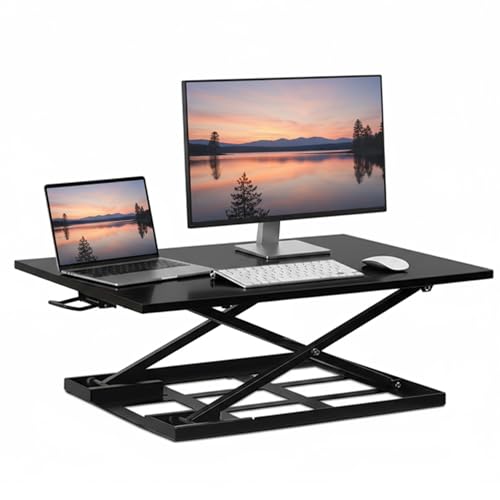
- Raises a monitor, laptop, and accessories to open desk space for writing.
- Gas-spring lift adjusts from 2.5 to 16.9 inches.
- Arrives preassembled and fits on an existing tabletop.
Best For: Desk workers who want to alternate between sitting and standing.
2. Univivi Under-Desk Cable Management Tray
A Tidy Cable Station
Univivi Under-Desk Cable Management Tray

- 36-inch fabric tray holds adapters and power strips beneath a desk.
- Can be installed with clamps or screws, depending on the desk.
- Unfolds for easier access when adding or removing items.
Best For: Someone looking to corral visible cords and power strips.
3. HUANUO Adjustable Single Monitor Arm
A Flexible Screen Positioner
HUANUO Adjustable Single Monitor Arm

- Fits compatible 13-to-32-inch monitors weighing 4.4 to 19.8 pounds.
- Offers tilt, swivel, and rotation adjustments.
- Uses either a C-clamp or grommet mount.
Best For: A monitor user who wants flexible screen positioning and more desk space.
4. FIFINE AmpliGame AM8 USB/XLR Microphone
A Clearer Desk Setup for Calls and Recording
FIFINE AmpliGame AM8 USB/XLR Microphone

- Connects by USB or XLR; the XLR cable is sold separately.
- USB mode includes tap-to-mute and a headphone jack.
- RGB lighting and function keys are available in USB mode.
Best For: A streamer, podcaster, or frequent caller with a desk setup.
5. Acer 9-in-1 USB-C Docking Station
A Laptop Connection Hub
Acer 9-in-1 USB-C Docking Station

- Includes two HDMI ports, USB-A and USB-C ports, and SD and MicroSD slots.
- Supports up to 100W input and delivers up to 90W to a laptop.
- Laptop USB-C port must support video output; power delivery requires support and a 100W-or-higher adapter.
Best For: A laptop user connecting screens and peripherals at a desk.
6. LYMAX Monitor Light Bar with Wireless Controller
A Space-Saving Task Light
LYMAX Monitor Light Bar with Wireless Controller

- Lights the keyboard and desktop while aiming light away from the screen.
- Offers four color modes with touch and remote controls.
- Fits monitors from 0.2 to 1.8 inches thick and charges by USB-C.
Best For: Someone who works, studies, or games at a desk in the evening.
7. VOOPNU Compact Desktop Air Purifier
A Small Addition to a Home Office
VOOPNU Compact Desktop Air Purifier

- Compact unit measures 6.69 by 6.69 by 9.84 inches.
- Uses a 360-degree air intake and a three-layer filtration system.
- Includes an essential-oil tray for adding a few drops.
Best For: A home-office worker who wants a compact air purifier nearby.
8. Redragon K668 Hot-Swap RGB Keyboard
A Customizable Typing Upgrade
Redragon K668 Hot-Swap RGB Keyboard

- Full-size 108-key wired keyboard includes four shortcut keys.
- Hot-swap sockets accept many 3-pin or 5-pin switches.
- Includes two keycap sets and adjustable feet.
Best For: A writer, programmer, or keyboard enthusiast who enjoys customization.
9. Warmco D3 Rechargeable Desk Fan
Personal Airflow for the Desk
Warmco D3 Rechargeable Desk Fan

- Four speeds and a foldable stand allow adjustable positioning.
- A digital display shows battery percentage and current speed.
- USB-C supports charging the fan and powering another device.
Best For: Someone who prefers personal airflow while working.
10. ProtoArc EM11 NL Vertical Wireless Mouse
A Different Mouse Grip
ProtoArc EM11 NL Vertical Wireless Mouse

- Vertical design positions the hand in a different grip than a standard mouse.
- Connects to up to three devices using Bluetooth or a USB-A receiver.
- Designed for small to medium hands under 7.5 inches long.
Best For: A computer user interested in trying a vertical mouse.
11. Meudeen Mini Computer Vacuum and Air Duster
A Handy Desk-Cleaning Tool
Meudeen Mini Computer Vacuum and Air Duster

- Combines a small vacuum, air duster, and blower in one device.
- Three speeds and attachments suit keyboards, desk crevices, and car interiors.
- Rechargeable battery and washable filter are included.
Best For: Someone who wants a tool for cleaning crumbs and dust around a workstation.
12. LED Desk Lamp with Wireless Charging
A Light and Charging Spot
LED Desk Lamp with Wireless Charging

- Built-in wireless charger is described as 10W for compatible phones.
- Offers three color modes and dimming from 5% to 100%.
- Adjustable tube folds down for compact storage.
Best For: A student or professional who wants task lighting and phone charging.
13. Aothia PU Leather Desk Pad, 36 x 17 Inches
A Broad Desk Surface
Aothia PU Leather Desk Pad, 36 x 17 Inches

- 36-by-17-inch pad fits a laptop, keyboard, and mouse.
- Water-resistant PU leather surface wipes clean with a damp cloth.
- Suede-style backing is designed to resist slipping.
Best For: Someone who wants a unified surface for a keyboard and mouse.
14. Aothia PU Leather Desk Pad, 31.5 x 15.7 Inches
A Refined Desk Blotter
Aothia PU Leather Desk Pad, 31.5 x 15.7 Inches

- 31.5-by-15.7-inch surface can serve as a writing pad or mouse pad.
- Water-resistant PU leather helps protect a desk from spills and marks.
- Suede-style backing is designed for grip on the desktop.
Best For: A professional who appreciates a polished desk surface.
15. ZOOFOX Expandable Bamboo Desktop Bookshelf
A Shelf for Desk Essentials
ZOOFOX Expandable Bamboo Desktop Bookshelf

- Expandable width adjusts from about 13.4 to 24.8 inches.
- Bamboo shelf can hold books, files, electronics, or office supplies.
- Includes assembly accessories and an instruction manual.
Best For: A reader or remote worker who wants supplies within reach.
16. EMEET C950 1080p Webcam
A Camera with a Privacy Cover
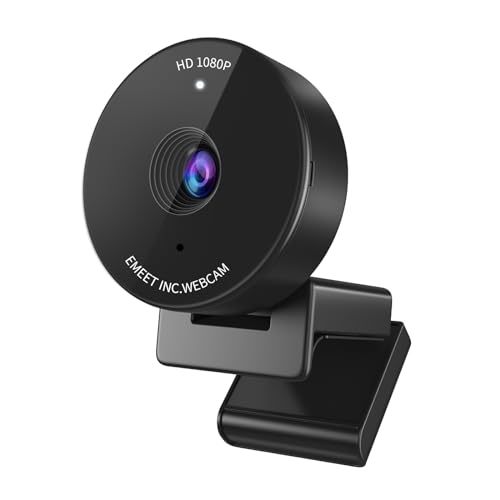
- 1080p webcam includes a physical sliding privacy cover.
- Built-in microphone supports online calls and meetings.
- Its 70-degree view is intended for personal video calls.
Best For: A remote worker or student who regularly joins video calls.
17. ARCOBIS Magnetic Desktop Whiteboard
A Reusable Reminder Board
ARCOBIS Magnetic Desktop Whiteboard

- Compact 10-by-10-inch board has two writable sides.
- Includes two magnetic dry-erase markers and an eraser.
- Adjustable stand can also be laid flat or used as a wall-mounted board.
Best For: A planner, student, or note-taker who likes visible reminders.
18. Anker Nano Desk-Clamp Power Strip
Charging Ports Within Reach
Anker Nano Desk-Clamp Power Strip

- Provides six AC outlets, two USB-C ports, and two USB-A ports.
- Adjustable clamp fits desk edges 0.6 to 1.8 inches thick.
- USB-C charging supports up to 70W; power cord is five feet long.
Best For: Someone with several devices to plug in or charge at a workstation.
19. Aurora Compact Micro-Cut Paper Shredder
A Discreet Home-Office Helper
Aurora Compact Micro-Cut Paper Shredder

- Micro-cut shredder handles up to 12 sheets and selected media including CDs and credit cards.
- Pullout bin has a 1.8-gallon capacity and status indicator lights.
- Compact desktop-style unit measures about 11.8 by 13.2 by 9.9 inches.
Best For: A home-office worker who handles private paperwork.
Choosing Desk Accessory Christmas Gifts
Start with the recipient’s everyday routine. Notice what interrupts their work: a screen that sits too low, cords spread across the desktop, dim evening lighting, or notes that disappear among open windows. A useful desk accessory Christmas gift addresses one of those recurring annoyances. For someone changing posture during the day, consider the desk converter; for a cluttered work area, look at cable management, a power strip, a bookshelf, or a desk mat. People who spend time on calls may value a webcam or microphone, while writers and programmers might enjoy a customizable keyboard.
Think about the space available before choosing a large item. The desk converter, 36-inch cable tray, and wide desk pads need room to fit. A lamp, whiteboard, fan, or compact purifier takes less tabletop space, though it still needs a suitable spot and, for some items, access to power. A shelf can make use of an unused corner, and a monitor light bar attaches to the display rather than occupying much of the desk surface.
Match the Gift to the Budget
A small accessory can still feel thoughtful when it solves a clear problem. A desk mat, whiteboard, cable tray, or cleaning tool is a practical gesture for someone who already has their main equipment. A lamp, webcam, mouse, fan, or microphone adds a new tool to a routine. Larger upgrades, including the desk converter, monitor arm, docking station, bookshelf, and shredder, suit recipients who have mentioned a specific workspace need.
Set a budget based on the role the gift will play. A modest item can complement an existing setup; a more substantial purchase makes sense when you know the recipient wants that particular change. Avoid treating a higher cost as proof of a better fit. A monitor arm, for example, is useful only if it works with both the display and desk, and a docking station’s ports matter only if they suit the laptop and peripherals.
Check Compatibility and Personalization
For tech accessories, check connections and dimensions before buying. The docking station needs a full-featured USB-C port that supports video output; charging also depends on USB-C Power Delivery support and a separate 100W-or-higher adapter. Confirm the monitor arm’s supported screen size, weight, VESA pattern, and desk mounting space. The vertical mouse is intended for small to medium hands, and the webcam lists operating system requirements. For the microphone, decide whether the recipient is likely to use USB or XLR; XLR requires a separate cable and audio interface or mixer.
Desk fit matters for non-electronic gifts too. Measure the tabletop before selecting the cable tray, desk pad, or clamp-mounted power strip. The tray needs clear space along the desk edge, while the power strip clamp fits a defined edge thickness and does not suit every curved or sloped desk. Personalization can be as simple as matching the recipient’s work habits: choose a whiteboard for visible planning, a bamboo shelf for books and papers, or adjustable light for late study sessions. Favor neutral, versatile accessories if you are unsure about their color preferences or setup style.
Timing and Last-Minute Decisions
Order early when the gift depends on measurements, a particular device, or a change to the desk setup. That gives you time to confirm fit and lets the recipient decide where to install it. For a late decision, choose an item with straightforward everyday use that does not depend on a precise device match, such as a desk mat, whiteboard, mini vacuum, or small desk fan. Check the current seller listing for availability and delivery dates before counting on it for Christmas; those details can change. If the recipient’s setup is hard to assess, a compact accessory that complements their existing routine is usually easier to place and enjoy.