Remote access should not stop at the operating system. The best KVM over IP switches let you view and control a computer’s screen, keyboard, and mouse across a network—even when the system is stuck in BIOS, restarting, or offline.
This roundup covers compact single-computer devices, PoE and Wi-Fi models, rackmount systems, and multi-port enterprise hardware. Use the guide below to match video requirements, network setup, security features, and port capacity to your environment.
Best 10 Kvm Over Ip Switches Picks for 2026
Best BIOS Access
GL.iNet Comet GL-RM1 Remote KVM

- 4K 30Hz remote video with H.264 encoding
- BIOS-level control without host software
- Remote audio and file transfer included
Best For: Remote PC, server, and home-lab maintenance
Best Open-Source Option

- 1080p at 60fps with 30–60ms latency
- LAN, WebRTC cloud, and Wake-on-LAN access
- Linux-based open-source firmware
Best For: Home labs and customizable server troubleshooting
Best Wireless 4K Model

- Dual-band Wi-Fi 6 plus wired connectivity
- 4K 30fps passthrough with two-way audio
- Built-in Tailscale and touchscreen controls
Best For: Wireless remote support and home-lab installations
Best Flexible Power Setup

- 1080p 60fps streaming with low latency
- Local, cloud, and Wake-on-LAN access
- Supports multiple power and expansion options
Best For: Remote recovery and customizable computer control
Best Compact Remote KVM

- 4K streaming at 30 fps
- PoE and USB-C power
- Remote BIOS reinstall support
Best For: Single-server remote administration and compact installations
Best Long-Distance KVM Extender

- Up to 390 feet over Cat5e
- 4K at 30Hz video support
- Three receiver-side USB ports
Best For: Distributed workstations and control-room installations
Best Rackmount Multi-Server KVM
NetCommander 8-Port KVM Over IP

- Eight server ports with cascading to 128
- One remote and one local user
- IPv4, IPv6, RADIUS, and LDAP/S support
Best For: Rackmount server rooms and centralized infrastructure management
Best with Extra Features

- Open-source software
- Low-latency HDMI and USB connectivity
- Optional remote access; microSD card included
Best For: DIY users and flexible remote server management
Best Enterprise-Grade Option
Raritan Dominion KX IV-101 4K KVM
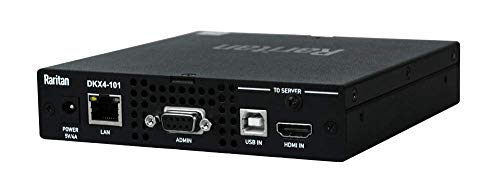
- Ultra-high-performance 4K KVM-over-IP
- Rack-mountable single-port design
- Ethernet remote control with 2-year warranty description
Best For: Professional single-server rack management
Best Ultra-Compact DIY Pick

- 23 x 37mm RISC-V design
- Remote BIOS, OS, and USB storage control
- Open-source with 100Mbps Ethernet
Best For: Compact headless systems, labs, and developer projects
Best BIOS Access – GL.iNet Comet GL-RM1 Remote KVM
The GL.iNet Comet GL-RM1 is a compact choice among kvm over ip switches for remote PC and server management. It provides browser or app-based access without requiring software on the controlled computer, including BIOS-level control for maintenance and recovery tasks.
Best For: IT professionals, remote workers, home labs, and users who need reliable BIOS access over a network.
Pros:
- Supports remote rebooting, OS installation, BIOS access, and power-on functions.
- Provides 4K resolution at 30Hz with low-latency H.264 hardware encoding.
- Includes remote audio and file transfer capabilities.
- Works with computers, laptops, servers, routers, and other compatible devices without host software.
Cons:
- Power Delivery adapters cannot be used.
- The device has one USB port.
- Power-control capabilities may depend on the connected hardware and setup.
Choose the GL-RM1 when BIOS-level access and high-resolution remote viewing matter more than having multiple KVM ports. Its small enclosure and software-free host operation suit both home and professional installations.
Best Open-Source Option – JetKVM Open-Source IP KVM
The JetKVM is a practical pick among kvm over ip switches for browser-based LAN and remote access. It combines 1080p video streaming, responsive keyboard and mouse control, Wake-on-LAN, and open-source firmware in a compact network KVM.
Best For: Home labs, server troubleshooting, developers, and users who value open-source customization.
Pros:
- Offers local browser access, optional WebRTC cloud access, and Wake-on-LAN.
- Streams 1080p at 60fps with stated latency of 30–60ms.
- Provides BIOS-level recovery, crash-screen viewing, rebooting, and OS reinstallation.
- Linux-based open-source firmware supports SSH customization and expansion options.
Cons:
- The standard unit does not transfer audio.
- The non-PoE model is powered through USB-C and does not control fully powered-off targets by itself.
- ATX or DC power-control modules are sold separately.
The JetKVM stands out for flexible access and tinkering potential rather than 4K output. It is especially compelling if you want open-source software, low-latency 1080p control, and an upgrade path for power or serial-console functions.
Best Wireless 4K Model – GL.iNet Comet Pro GL-RM10
The GL.iNet Comet Pro GL-RM10 adds dual-band Wi-Fi 6 to the kvm over ip switch category, giving installations a wireless alternative to a fully wired setup. It also supports 4K video passthrough, two-way audio, Tailscale, touchscreen controls, and optional self-hosted remote access.
Best For: Offices, home labs, and support setups that need wireless connectivity, 4K passthrough, and two-way audio.
Pros:
- Supports both 2.4GHz and 5GHz Wi-Fi 6, along with wired networking.
- Provides 4K at 30fps video passthrough without interrupting the local display.
- Includes two-way audio for remote meetings and technical support.
- Offers built-in Tailscale, app and web access, and a touchscreen interface.
Cons:
- ATX Board and Fingerbot accessories for power control are sold separately.
- 4K operation is limited to 30fps.
- Wireless performance depends on the surrounding network environment.
The GL-RM10 is the most connectivity-focused option in this group. Its Wi-Fi 6 support and two-way audio make it a strong fit where cabling is inconvenient, while Tailscale and self-hosting provide added control over remote access.
Best Flexible Power Setup – JetKVM Ethernet IP KVM
This JetKVM is a compact Ethernet choice among kvm over ip switches for controlling a computer through a browser. It supports local and cloud access, Wake-on-LAN, 1080p 60fps streaming, and several power-supply methods for more adaptable installations.
Best For: Remote troubleshooting, computer recovery, home labs, and users who want expansion options for power control.
Pros:
- Sets up through HDMI, USB-C, and Ethernet with no stated host software requirement.
- Supports local browser access, optional cloud access, and Wake-on-LAN.
- Delivers 1080p at 60fps with 30–60ms latency and adjustable video quality.
- Can be powered by the controlled device, a separate 5V source, or optional DC/ATX extensions.
Cons:
- Remote power control requires compatible extension hardware.
- Video output is limited to 1080p according to the supplied specifications.
- Cloud access is optional and depends on the network connection.
The Ethernet JetKVM is a sensible choice for users who want straightforward remote access with a flexible power strategy. Its expansion port and open-source Linux foundation also make it suitable for customized monitoring, serial-console, or hardware-control projects.
Best Compact Remote KVM – Comet PoE Remote KVM
The GL.iNet Comet GL-RM1PE is a compact choice for buyers comparing kvm over ip switches for one computer or server. It supports remote access over Ethernet, Tailscale-based 4K streaming at 30 fps, and flexible PoE or USB-C power.
Best For: Single-server remote administration, BIOS access, and space-conscious setups.
Pros:
- Supports 4K streaming at 30 fps.
- PoE and Type-C dual power options simplify installation.
- Includes remote BIOS reinstall support and 32GB built-in eMMC.
Cons:
- Supports only one device.
- Its feature set is focused on remote KVM rather than multi-server switching.
Choose this model when a small footprint and single-machine remote management matter more than port density. The USB interface also supports ATX and Fingerbot applications.
Best Long-Distance KVM Extender – 4K HDMI USB KVM Extender
This AV Access extender suits buyers seeking kvm over ip switches for distributed workstations, control rooms, or AV systems. It carries HDMI, audio, and USB over existing Ethernet infrastructure, reaching up to 390 feet over Cat5e and up to 492 feet over Cat6/6A/7 cable.
Best For: Long-distance control of a PC, server, or game console across a wired network.
Pros:
- Supports 4K at 30Hz and 1080p at 120Hz.
- Provides remote keyboard, mouse, and peripheral control with three USB ports on the receiver.
- Supports up to 16 extender sets through DIP-switch pairing.
- Works with Windows, macOS, and Linux without drivers.
Cons:
- Video is limited to 4K at 30Hz.
- Requires separate transmitter and receiver units plus network cabling.
Its compatibility with existing Ethernet infrastructure makes it practical for installations where dedicated long HDMI runs would be inconvenient. Locking power connectors and ESD protection add useful installation safeguards.
Best Rackmount Multi-Server KVM – NetCommander 8-Port KVM Over IP
The Tripp Lite NetCommander is a strong option for buyers evaluating kvm over ip switches for a rack-based server environment. Its eight-port design supports simultaneous local and remote users, while cascading can expand control to as many as 128 servers.
Best For: Rackmount server management requiring local access and one remote IP session.
Pros:
- Controls eight connected servers and can cascade to 128 servers.
- Supports one local and one remote user simultaneously.
- Provides IPv4 and IPv6 support with RADIUS and LDAP/S remote authentication.
- Uses a 1U rackmount design and CAT5 cabling to reduce cable clutter.
Cons:
- Remote browser control uses a Java-based application.
- Only one remote user is supported at a time.
- The listed warranty details vary between the product title and specifications.
This model is best suited to structured server rooms rather than small desktop setups. Its security features, optional PDU control, and cascading capability make it a practical choice for centralized infrastructure management.
Best with Extra Features – JetKVM Remote Server Manager
For buyers comparing kvm over ip switches, this JetKVM model stands out for its open-source approach, HDMI and USB connectivity, and optional remote access. It also includes a microSD card and is designed for low-latency control.
Best For: DIY users and administrators who want an open-source remote-management device with full-size HDMI connectivity.
Pros:
- Open-source software supports customization.
- Offers free and optional remote-access options.
- Includes a microSD card and is designed for ultra-low latency.
- Compact 5.31 x 5.2 x 2.01-inch enclosure.
Cons:
- PoE is optional rather than included.
- Its feature set may require more hands-on setup than a conventional enterprise appliance.
JetKVM is a practical choice when openness and flexible remote access matter more than a traditional rack-mounted design. Verify your preferred PoE configuration before buying.
Best Enterprise-Grade Option – Raritan Dominion KX IV-101 4K KVM
Raritan Dominion KX IV-101 Ultra High Performance 1-Port 4K KVM-Over-IP Switch
Check Price On AmazonAmong kvm over ip switches, the Raritan Dominion KX IV-101 is aimed at buyers seeking a high-performance, rack-mountable solution with 4K capability and Ethernet-based remote control. Its single-port design suits focused server-management setups.
Best For: Professional environments that need a rack-mounted, 1-port KVM-over-IP switch for remote access to an Ethernet-connected computer or server.
Pros:
- Supports 4K KVM-over-IP operation.
- Rack-mountable design with a compact 5.7 x 5.5 x 1.2-inch footprint.
- Remote control uses Ethernet connectivity.
- Includes a 2-year warranty description.
Cons:
- Provides one KVM port.
- At 1.4 pounds listed item weight, it is less lightweight than mini DIY alternatives.
- Its enterprise-oriented design may be more than basic home setups require.
The KX IV-101 makes the most sense for buyers prioritizing 4K performance and rack integration over multi-port expansion. Confirm that a single-port configuration matches your equipment plan.
Best Ultra-Compact DIY Pick – Sipeed NanoKVM Lite
The Sipeed NanoKVM Lite is one of the most compact kvm over ip switches for remote BIOS and operating-system access. Its RISC-V-based board combines HDMI capture, USB HID simulation, storage simulation, and 100Mbps Ethernet in a 23 x 37mm form factor.
Best For: Developers, home-server owners, lab operators, and deployments that need compact remote control without relying on a host operating system.
Pros:
- Ultra-compact 23 x 37mm design fits tight spaces.
- Supports remote BIOS/UEFI access, OS installation, and boot control.
- Open-source firmware and hardware support customization.
- Works with Wake-on-LAN, Tailscale, and SSH tools.
Cons:
- Networking is limited to 100Mbps Ethernet.
- Provides one USB port.
- Its DIY-focused design may require more technical involvement.
NanoKVM Lite is a strong fit where size, low power use, and open-source flexibility are priorities. It is especially attractive for headless systems and edge deployments, provided its single USB port and 100Mbps network are sufficient.
How We Picked These Kvm Over Ip Switches
We evaluated these models by looking at the features that matter during real remote-management tasks: BIOS and pre-boot control, video resolution and refresh rate, USB responsiveness, network connectivity, remote-access options, installation complexity, and physical design. We also considered whether a device is better suited to one desktop, a small lab, or a rack of servers.
Product types vary considerably. Some are compact IP KVM appliances designed for a single computer, while others are traditional multi-port switches with local console access and rackmount hardware. The right choice depends less on headline resolution than on how often you need dependable out-of-band access.
Quick Comparison
- Best for compact remote access: Single-port models such as the GL.iNet Comet, JetKVM, open-source devices, and Sipeed NanoKVM Lite.
- Best for flexible installation: Wi-Fi 6 and PoE models when cabling or power placement is limited.
- Best for long cable runs: The AV Access extender, which sends KVM signals over structured Cat cable.
- Best for server racks: Tripp Lite and Raritan options with rack-oriented designs, local access, and enterprise management features.
- Best for experimentation: Open-source and RISC-V-based devices that provide greater customization and community-driven development.
Key Buying Factors for Kvm Over Ip Switches
Video Quality and Passthrough
Check the supported resolution, refresh rate, compression behavior, and whether local video passthrough is available. A 4K-capable model can be useful for modern workstations, but remote viewing may still be limited by bandwidth and encoding latency.
Pre-Boot and USB Control
For troubleshooting, keyboard and mouse control must work before an operating system loads. Look for BIOS access, reliable USB emulation, virtual media, and storage simulation if you need to mount installer images or recovery tools remotely.
Network, Power, and Security
Ethernet is usually the most dependable choice for servers. Wi-Fi can simplify desktop installations, while PoE reduces the number of power cables. Review VPN, Tailscale, HTTPS, user authentication, firmware support, and whether the device can be isolated on a management VLAN.
Port Count and Administration
A single-port unit is efficient for one computer, but a multi-port KVM can reduce hardware and simplify rack management. Consider simultaneous local and remote users, IPv4 and IPv6 support, rack depth, remote session limits, and compatibility with your existing console infrastructure.
Who Should Buy Which Kvm Over Ip Switches?
Choose a compact single-port KVM for a home lab, workstation, small office PC, or remote development machine. These models are generally easier to install and more affordable than rackmount systems.
Choose a PoE or Wi-Fi model when the target computer is difficult to reach or you want a cleaner deployment. Confirm that your switch, wireless network, and security policies support the chosen connection.
Choose a rackmount multi-port KVM for several servers, a network closet, or a professional IT environment. Paying more for centralized management, stronger administration tools, and local console access can save time during outages.
Choose an open-source or enthusiast model if customization, repairability, and community support matter more than turnkey enterprise management. Before buying, verify current firmware, remote-access security, and compatibility with your video and USB hardware.