The best Thunderbolt cables for travel combine high-speed data, dependable charging, and a compact design that fits easily into a laptop bag. The right cable can also reduce the number of chargers and adapters you need to carry.
We selected 10 USB-C cables spanning Thunderbolt 3, Thunderbolt 4, and Thunderbolt 5 compatibility, with options for short setups, longer reach, multi-device charging, and everyday portability.
Best 10 Thunderbolt Cables for Travel Picks for 2026
Maximum-Bandwidth Pick
UGREEN 240W Thunderbolt 5 Cable

- 80Gbps USB4 Gen4 data transfer
- 240W PD 3.1 charging
- Up to 16K display output
Best For: High-performance travel kits with laptops, SSDs, and displays
Premium Thunderbolt Choice
Anker Prime Thunderbolt 5 Cable

- 80Gbps Thunderbolt 5 transfers
- 240W USB-C charging
- Dual 8K display support
Best For: Power users traveling with laptops, docks, and multiple displays
Best Two-Pack Value
Maxonar USB4 Thunderbolt 4 Cables

- Two 3.3-foot cables included
- 40Gbps data transfer
- 240W charging and 8K video
Best For: Travelers who want a spare cable for home or office
Reliable Everyday Pick

- USB-IF-certified compatibility
- 40Gbps data and 240W charging
- Supports up to 8K video
Best For: General travel bags with mixed USB-C devices
Best Compact Pick

- 40Gbps data transfers
- Up to 240W charging
- 3.3-foot travel-friendly length
Best For: Travelers seeking a compact cable for laptops, displays, and fast file transfers
Best Long-Cable Pick

- 80Gbps data transfer
- Up to 120Gbps display bandwidth
- 5-foot braided construction
Best For: Power users needing extra reach for high-speed storage, displays, and laptops
Best Certified Option
Anker Prime Thunderbolt 4 Cable

- Thunderbolt 4-certified
- 40Gbps data and 240W charging
- Supports single 8K or dual 4K displays
Best For: Travelers wanting certified performance for laptops, fast storage, and displays
Best Overall
Silkland USB4 40Gbps 4ft Cable

- 40Gbps data and up to 240W charging
- Supports single 8K or dual 4K displays
- USB-IF certified with braided protection
Best For: Full-featured laptop and dock travel kits
Best Durable Standard Length

- 40Gbps transfers and 8K video support
- Up to 240W PD 3.1 charging
- Braided design rated for 10,000 bends
Best For: Frequent travelers transferring large files
Best Simple Pick
VAFOTON 6-Inch USB4 Keychain Cable
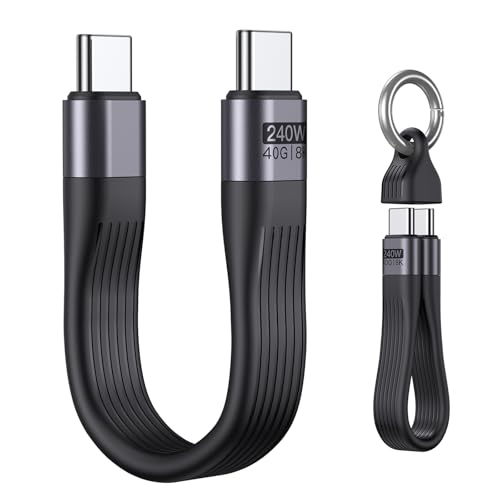
- Keychain-sized design for easy carrying
- Supports up to 40Gbps and 240W charging
- Handles up to 8K at 60Hz video
Best For: Minimalist travel and emergency carry
Maximum-Bandwidth Pick – UGREEN 240W Thunderbolt 5 Cable
For travelers who want one cable for charging, high-speed storage, and demanding displays, this UGREEN model is a future-ready choice among thunderbolt cables for travel. Its 3.3-foot length is easy to pack, while USB4 Gen4 support reaches 80Gbps and charging goes up to 240W.
Best For: Photographers, developers, gamers, and laptop users carrying high-performance USB-C devices.
Pros:
- 240W PD 3.1 charging supports compatible laptops and accessories.
- 80Gbps data transfer is suited to large files and external SSDs.
- Supports up to 16K video output and broad Thunderbolt, USB4, and USB compatibility.
- Nylon braiding and reinforced connectors are rated for up to 10,000 bends.
Cons:
- Its advanced capabilities require compatible devices, chargers, and displays.
- At 3.3 feet, it may be short for some desk or dock setups.
This is the strongest performance-oriented option in the group, especially if your travel kit includes fast storage or high-resolution displays. For ordinary phone charging, its extra bandwidth may be more than you need.
Premium Thunderbolt Choice – Anker Prime Thunderbolt 5 Cable
Anker’s Prime cable is a compact premium option for travelers who need Thunderbolt 5 performance without carrying separate charging and data cables. It combines 80Gbps transfers, 240W USB-C charging, and support for dual 8K displays in a portable cable.
Best For: MacBook users, mobile professionals, and travelers connecting powerful laptops to docks, drives, or multiple monitors.
Pros:
- Thunderbolt 5 specification supports 80Gbps data transfers.
- 240W charging can power compatible high-performance laptops.
- Supports dual 8K displays at 60Hz with compatible equipment.
- Anker includes an 18-month warranty and customer service.
Cons:
- Its premium Thunderbolt 5 features may be unnecessary for basic charging.
- Supplied details list a short 1.7-foot unit count, so verify the selected length before ordering.
This is a compelling premium pick when your travel workflow involves fast file movement and multi-display setups. Check your laptop, dock, and monitor specifications first to make sure they can use its top speeds.
Best Two-Pack Value – Maxonar USB4 Thunderbolt 4 Cables
This Maxonar two-pack is practical for travel because you can keep one 3.3-foot cable in your bag and another at home or in the office. Each cable supports 40Gbps transfers, 240W power delivery, and high-resolution video through compatible Thunderbolt 4 and USB4 devices.
Best For: Travelers who want a spare cable or separate cables for a travel bag and permanent workspace.
Pros:
- Two cables provide useful backup and location flexibility.
- 40Gbps performance handles external SSDs and large files.
- Supports 240W charging and single 8K or dual 4K displays.
- Braided nylon jackets resist tangling and daily wear.
Cons:
- 40Gbps is slower than the 80Gbps Thunderbolt 5 options here.
- The 3.3-foot length may not suit distant docks or monitors.
For most travelers, the extra cable is the main advantage: one can stay packed while the other remains connected at home. It offers a strong balance of capability and convenience if your devices use Thunderbolt 4 or USB4.
Reliable Everyday Pick – Amazon Basics USB-C 4 Cable
For everyday travel charging and connectivity, this USB-IF-certified Amazon Basics cable covers the essentials without focusing on the newest Thunderbolt 5 speeds. It supports up to 240W charging, 40Gbps data, and 8K video while remaining compatible with Thunderbolt 4, Thunderbolt 3, USB4, and older USB standards.
Best For: Travelers seeking one broadly compatible USB-C cable for phones, tablets, laptops, storage, and displays.
Pros:
- USB-IF certification and backward compatibility support a wide range of devices.
- Handles up to 240W charging and 40Gbps data transfer with compatible equipment.
- Supports single 8K, 4K at 120Hz, or dual 4K displays.
- TPE construction was tested for 5,000 bends and includes a one-year warranty.
Cons:
- It does not match the 80Gbps performance of the Thunderbolt 5 choices.
- Full 240W charging requires compatible 48V/5A equipment throughout the setup.
This is a sensible general-purpose choice when compatibility and straightforward travel use matter more than maximum bandwidth. It is particularly appealing for mixed-device bags containing phones, tablets, laptops, and USB-C accessories.
Best Compact Pick – Anker 240W USB-C Cable
For travelers who want dependable performance without extra cable length, this 3.3-foot Anker cable is a practical choice among Thunderbolt cables for travel. It supports 40Gbps transfers, high-resolution displays, and up to 240W charging in a compact format.
Best For: Travelers carrying a laptop, portable monitor, SSD, or USB-C accessories who want one short, versatile cable.
Pros:
- 40Gbps data transfer supports moving large files quickly.
- Supports up to 8K at 60Hz or 4K at 144Hz displays.
- Up to 240W charging support covers compatible laptops and other USB-C devices.
- Tested to withstand up to 5,000 bends.
Cons:
- The 3.3-foot length may be limiting for some desk or hotel-room setups.
- Actual charging and display performance depends on the connected devices and charger.
This is a well-balanced travel cable when portability matters more than extra reach. Its short length reduces packing bulk while still providing high-speed data, display, and charging capabilities.
Best Long-Cable Pick – Silkland USB4 80Gbps Cable
The 5-foot Silkland cable gives travelers more flexibility when a charger, dock, or monitor is not close to the laptop. As one of the more capable Thunderbolt cables for travel, it supports USB4 Version 2.0, 80Gbps data, up to 240W charging, and advanced multi-display configurations.
Best For: Power users, mobile editors, designers, and travelers who need extra reach for high-performance USB-C setups.
Pros:
- 80Gbps bidirectional data transfer supports very fast file movement.
- Supports up to 120Gbps display bandwidth, including up to 16K resolution and multi-monitor setups.
- 240W PD 3.1 charging with an E-Marker chip and safety protections.
- Braided nylon, aluminum housing, and triple shielding are designed for durability and signal stability.
Cons:
- Its advanced capabilities may exceed the needs of basic charging and phone use.
- Actual speed and display performance depend on compatible devices.
- The 5-foot length takes more room than a compact travel cable.
This is the strongest fit for demanding travel workflows, especially when transferring large files or connecting multiple displays. It offers substantial performance headroom, though your devices must support the advertised standards to use it fully.
Best Certified Option – Anker Prime Thunderbolt 4 Cable
This Anker Prime cable combines Thunderbolt 4 certification with a compact 3.3-foot design, making it a dependable option among Thunderbolt cables for travel. It supports 40Gbps transfers, 240W charging, and single 8K or dual 4K display connections.
Best For: Travelers who prioritize certified Thunderbolt performance for fast charging, file transfers, and display connectivity.
Pros:
- Thunderbolt 4-certified and USB4-compliant.
- Supports 40Gbps data transfers and fast movement of large files.
- 240W charging can power compatible laptops quickly.
- Supports a single 8K or dual 4K displays with suitable equipment.
Cons:
- The 3.3-foot length may not provide enough reach in every workspace.
- Dual-display daisy-chaining requires compatible USB-C or Thunderbolt ports with DisplayPort Alternate Mode.
- Advertised charging and display results require compatible devices and accessories.
Choose this model when certification and broad connectivity are more important than maximum cable length. Its compact format is easy to pack, while its Thunderbolt 4 specifications cover demanding laptop and display setups.
Best Overall – Silkland USB4 40Gbps 4ft Cable
For travelers who need one dependable cable for charging, fast file transfers, and external displays, the Silkland is a versatile pick among thunderbolt cables for travel. Its 4-foot length is practical for laptops, docks, monitors, and portable SSDs without taking up much room in a bag.
Best For: Travelers carrying laptops, docks, external SSDs, or high-resolution displays who want one certified, full-featured cable.
Pros:
- Supports up to 40Gbps data transfer and 240W PD 3.1 charging with compatible equipment.
- Handles up to 8K at 60Hz, 5K at 60Hz, or dual 4K at 60Hz video output.
- USB-IF certified, backward compatible with Thunderbolt 3 and USB standards, and reinforced with braided construction.
Cons:
- Its maximum performance depends on the connected devices, charger, and display.
- The manufacturer recommends cables shorter than 5 feet for stable docking performance.
This is the most balanced option here for travel setups that combine charging, storage, and display connectivity. The 4-foot length offers useful reach while remaining manageable, though it may be more cable than needed for simple phone charging.
Best Durable Standard Length – UGREEN 240W 3.3ft USB-C Cable
The UGREEN 3.3-foot cable is a compact, durable choice for travelers who want high performance without carrying excess length. It combines Thunderbolt 4/3 compatibility, USB4 transfer speeds, fast charging, and high-resolution video in a travel-friendly size.
Best For: Travelers who regularly move large files between laptops, SSDs, NAS devices, or monitors and want a robust everyday cable.
Pros:
- Offers up to 40Gbps data transfer, 240W PD 3.1 charging, and 8K at 60Hz video output.
- Nylon-braided construction is rated for up to 10,000 bends.
- Compatible with USB-C laptops, phones, tablets, monitors, and Thunderbolt 4/3 devices.
Cons:
- At 3.3 feet, it may be short for some hotel-room or conference-table setups.
- Actual charging, data, and display speeds depend on the connected hardware.
Choose this model when durability and a tidy cable length matter more than maximum reach. It is particularly well suited to frequent file transfers and compact mobile workstations, while its braided exterior should withstand repeated packing and unpacking.
Best Simple Pick – VAFOTON 6-Inch USB4 Keychain Cable
When bag space is the priority, the VAFOTON is one of the most travel-focused thunderbolt cables for travel. Its approximately 6-inch design can attach to a keychain and provides USB4-class charging, data, and video capabilities for short connections between nearby devices.
Best For: Minimalist travelers who need an emergency or short connection for phones, tablets, laptops, portable drives, and USB-C accessories.
Pros:
- Compact keychain-style design is easy to carry and helps avoid cable clutter.
- Supports up to 40Gbps data transfer, 240W charging, and 8K at 60Hz video with compatible devices.
- Useful for short connections to USB-C laptops, tablets, smartphones, displays, and external drives.
Cons:
- The 6-inch length is too short for many desk, hotel, or display arrangements.
- Fast charging and maximum transfer speeds require compatible chargers and devices.
This is the standout choice for keeping a capable cable attached to a travel bag or keyring. Its short length minimizes tangles and storage space, but it works best when the connected ports are already close together rather than as a general-purpose replacement for a longer cable.
How We Picked the Best Thunderbolt Cables for Travel
We focused on cables that balance travel-friendly size with meaningful performance. Key criteria included supported data rates, charging capacity, display support, connector compatibility, certification claims, cable length, and portability. The lineup includes 40Gbps USB4 and Thunderbolt 4 options, as well as newer 80Gbps cables designed for Thunderbolt 5 systems.
We also considered whether each cable makes sense in a travel kit. A short cable can reduce clutter beside a power bank or dock, while a 3.3- to 5-foot cable provides more flexibility at a hotel desk or shared workspace.
Quick Comparison
- For Thunderbolt 5: Choose an 80Gbps model such as the UGREEN, Anker Prime, or Silkland Thunderbolt 5 cable.
- For most laptops and docks: A 40Gbps Thunderbolt 4 or USB4 cable offers excellent everyday performance.
- For charging: Look for 240W support, but confirm that your laptop, charger, and power source can actually deliver that wattage.
- For minimal packing: Short 1.7-foot or compact cables are convenient for power banks and close-range connections.
- For extra reach: Four- and five-foot options are more comfortable for desks, monitors, and hotel-room setups.
Key Buying Factors for Thunderbolt Cables for Travel
Speed and Compatibility
Thunderbolt 4 cables generally support up to 40Gbps, while Thunderbolt 5 cables can support up to 80Gbps with compatible hardware. USB-C connectors do not guarantee Thunderbolt performance, so check the cable specification and your device ports before buying. A faster cable remains backward compatible in many setups, but the connection runs at the capability of the slowest component.
Charging and Power Delivery
240W-rated cables are useful for high-power laptops, portable monitors, and multi-device chargers. They do not create extra power by themselves: the charger and connected device must support the required USB Power Delivery profile. For phones and tablets, a lower-cost cable may be sufficient unless you also want high-speed data or display support.
Length, Flexibility, and Packing
Short cables are easiest to store and help keep a power bank setup tidy. Longer cables are better when outlets, docks, or monitors are positioned farther away. For frequent travel, prioritize a cable with a durable jacket, strain relief, and a design that resists tangling without being excessively stiff.
Display and Certification Claims
If you connect an external monitor, verify the advertised resolution and refresh-rate support. USB-IF certification can provide additional confidence in standards compliance, although real-world performance still depends on the host device, dock, display, and operating system.
Who Should Buy Which Thunderbolt Cables for Travel?
Frequent business travelers should choose a compact 40Gbps Thunderbolt 4 or USB4 cable with 100W- or 240W-class charging support. Thunderbolt 5 laptop owners should select an 80Gbps cable to preserve newer systems’ bandwidth potential. Desk-to-desk travelers may prefer a 3.3- to 5-foot cable for easier monitor and dock placement. Minimalist packers should consider a short cable, while value-focused buyers can choose a certified USB4 model if they do not need the newest Thunderbolt features.