Finding the right remote can make everyday TV watching much easier for older adults, especially when small buttons, crowded layouts, or complicated setup instructions create frustration.
These 10 universal remote controls for seniors focus on practical usability, including oversized controls, clear labeling, simplified functions, and compatibility with common TVs, cable boxes, and streaming devices.
Best 10 Universal Remote Controls for Seniors Picks for 2026
Caregiver-Friendly Pick

- Large color-coded tactile buttons
- Controls TV and cable or satellite box
- Up to 40-foot infrared range
Best For: Traditional TV-and-cable setups needing simpler controls
Most Versatile Jumbo Option

- Controls up to eight devices
- Glow-in-the-dark jumbo buttons
- Streaming-service shortcut buttons
Best For: Multi-device entertainment systems needing larger controls
Best Simple Two-Device Value
GE Big Button Universal Remote

- Large, readable ergonomic buttons
- Controls up to two compatible devices
- Automatic code search and direct code entry
Best For: Basic TV and cable-box or soundbar setups
Best Backlit Option
GE BigEZ OneTouch Big Button Remote
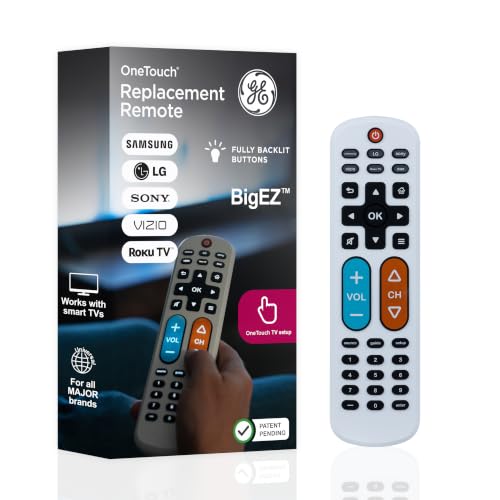
- Fully backlit, oversized buttons
- Preset support for five TV brands
- Controls a TV plus one additional device
Best For: Low-light viewing and users who benefit from high-visibility controls
Flexible Three-Device Pick
RCA Big Button Universal Remote

- Controls up to three devices
- Supports major TV and streaming brands
- Offers multiple setup methods
Best For: Consolidating several compatible remotes
Caregiver-Friendly Pick – Flipper Big Button TV Remote
For shoppers comparing universal remote controls for seniors, this Flipper-style remote emphasizes large, color-coded tactile buttons and simplified control. It can operate a TV and cable or satellite box, supporting up to two devices with an infrared connection and a stated range of up to 40 feet.
Best For: Seniors or caregivers who want one clearly labeled remote for a traditional TV-and-cable setup.
Pros:
- Large, color-coded tactile buttons are designed for easier use.
- Controls both a compatible TV and cable or satellite box.
- Lists compatibility with major TV brands and providers.
- Includes a stated two-year warranty and 90-day replacement support.
Cons:
- Requires direct line of sight for Xfinity boxes; an IR extender may be needed if the box is hidden.
- Uses infrared and supports a maximum of two devices.
This is a practical choice when accessibility and reduced remote clutter matter more than controlling a large entertainment system.
Most Versatile Jumbo Option – QFX REM-115 8-in-1 Remote
The QFX REM-115 is a jumbo universal remote for shoppers who need to consolidate several entertainment devices. It supports up to eight devices, includes glow-in-the-dark buttons, and the newer edition adds shortcut buttons for Netflix, Prime Video, YouTube, Hulu, and Disney+.
Best For: Users who want oversized controls for multiple compatible devices, including a TV, soundbar, Blu-ray player, or cable equipment.
Pros:
- Controls up to eight devices from one remote.
- Jumbo, glow-in-the-dark buttons improve visibility in dim rooms.
- Newer model adds five streaming-service shortcut buttons.
- Designed to replace a tableful of remotes with one larger interface.
Cons:
- Compatibility details should be checked carefully, especially for the specific television model.
- The supplied information lists a 30-foot range and two required AA batteries.
- Streaming shortcuts and smart-TV features require compatible internet-capable equipment.
Choose this model when device count and button visibility are priorities, but verify compatibility before buying for a specific setup.
Simplest TV-Only Pick – EZclicker Big Button Remote
For a straightforward TV-only solution, the EZclicker focuses on large buttons, tactile feedback, and a simple programming process. It works with major TV brands, uses infrared control, and has a stated range of up to 45 feet.
Best For: Seniors who need a lightweight, simplified remote for a compatible television without cable-box or streaming-device controls.
Pros:
- Large buttons and tactile feedback support users with limited dexterity or vision.
- Programming requires holding Mute and Volume+ while pointing at the TV.
- Compact 6-by-2-by-1-inch design is easy to handle and store.
- Lists a five-year warranty.
Cons:
- Does not control cable boxes, Fire TV sticks, Roku sticks, or streaming devices.
- Works with one TV only.
- Two AAA batteries are required and not included.
This remote keeps the interface intentionally narrow, making it suitable when fewer functions are preferable and the television is the only device to control.
Best No-Setup Choice – Gvirtue Big Button TV Remote
The Gvirtue remote is aimed at shoppers seeking universal remote controls for seniors with minimal setup. It has large tactile controls, an extra-large Enter button, and is described as ready to use with compatible Samsung TVs after inserting two AAA batteries.
Best For: Seniors who want a basic remote for a compatible TV and prefer not to program or pair it.
Pros:
- No programming or pairing is required for the stated Samsung-TV use case.
- Large buttons and tactile feedback support easier handling.
- Works with listed brands including Samsung, LG, VIZIO, Sony, Hisense, Philips, Panasonic, and Sharp.
- Includes 39 buttons and a stated range of up to 10 meters.
Cons:
- Does not control streaming devices, cable boxes, or unrelated TV platforms.
- Supports one device only.
- The supplied warranty information lists only three days.
This is a focused option for a single compatible television, particularly when immediate, no-programming operation is more important than broader device control.
Best for Dementia-Friendly Simplicity – Flipper Big Button TV Remote
For shoppers comparing universal remote controls for seniors, the Flipper focuses on the everyday TV functions that matter most. Its oversized, color-coded buttons control compatible TVs and cable or satellite boxes, while a simplified layout helps reduce confusion.
Best For: Seniors, people with low vision or dementia, and traditional cable or satellite setups.
Pros:
- Large, tactile, color-coded controls for power, volume, channels, and mute.
- Can control a TV and cable or satellite box with one remote.
- Supports programming up to 25 favorite channels.
- Hidden buttons allow additional customization without cluttering the main face.
Cons:
- Does not navigate Netflix, YouTube, Roku, Fire TV, or other streaming apps.
- Two AA batteries are required and not included.
The Flipper is a strong choice when simplicity and tactile feedback take priority. It is best suited to traditional TV viewing rather than streaming-focused systems.
Best Simple Two-Device Value – GE Big Button Universal Remote
This GE model is a practical pick among universal remote controls for seniors who want a straightforward replacement for a basic entertainment setup. Its large buttons support control of up to two compatible devices, such as a TV and cable box or soundbar.
Best For: Seniors and users with impaired vision who need simple control of two infrared devices.
Pros:
- Large, easy-to-read buttons and an ergonomic design.
- Controls up to two compatible devices.
- Offers automatic code search and direct code entry programming.
- Includes master volume control and U.S.-based technical support.
Cons:
- Two AA batteries are required and not included.
- Its two-device limit may be restrictive for larger setups.
With broad compatibility across major TV brands and a simple programming process, this GE remote fits uncomplicated home, assisted-living, nursing-home, and hotel setups.
Best Backlit Option – GE BigEZ OneTouch Big Button Remote
The GE BigEZ OneTouch is one of the more visibility-focused universal remote controls for seniors. Its large white body, fully backlit buttons, and color-coded volume and channel controls make it easier to identify in dim rooms.
Best For: Seniors and visually impaired users who want a backlit remote for a TV plus one additional device.
Pros:
- Fully backlit buttons improve visibility in low light.
- Large white design is easy to see and locate.
- Preset support for Samsung, LG, Vizio, Sony, and Roku TVs.
- Can operate one additional device, such as a cable box, soundbar, or streaming player.
Cons:
- Supports two devices maximum.
- Two AA batteries are required and not included.
This remote is a good fit when backlighting and quick setup matter more than controlling several components. The directional pad also provides basic navigation for compatible TV and streaming-device setups.
Flexible Three-Device Pick – RCA Big Button Universal Remote
For shoppers comparing universal remote controls for seniors, the RCA RCR313BE is a practical choice when one remote needs to operate several entertainment devices. Its big-button layout supports up to three devices, including a TV, DVD or VCR player, and cable, satellite, or digital TV equipment.
Best For: Households that want to consolidate up to three compatible devices into one remote.
Pros:
- Controls up to three devices with long-range infrared operation.
- Works with many major brands, including Samsung, Vizio, TCL, LG, Sony, and Hisense.
- Supports streaming boxes such as Roku and Apple TV.
- Offers automatic, brand, manual, and direct code-search setup methods.
Cons:
- Requires two AA batteries.
- Its listed maximum range is 10 feet.
- Setup may require code searching for some devices.
The RCA is the most versatile option here for a mixed-device setup. It is especially useful when simplifying several remotes matters more than having a TV-only design.
Accessibility-Focused Choice – EZClicker Big Button TV Remote
The EZClicker is designed for shoppers seeking universal remote controls for seniors with a simplified, tactile layout. Its large buttons, extra-large Enter key, and straightforward programming are intended to make everyday TV control easier for users with limited dexterity or vision.
Best For: Seniors who need a simple remote for a compatible television, without controls for cable boxes or streaming sticks.
Pros:
- Features large buttons and tactile feedback.
- Works with major TV brands listed by the manufacturer.
- Simple programming uses the Mute and Volume+ buttons.
- Offers a listed range of up to 45 feet.
Cons:
- Controls TVs only, not cable boxes, Firesticks, or Roku sticks.
- Two AAA batteries are required but not included.
- Compatibility should be checked against the TV model before purchase.
This remote prioritizes accessibility and simplicity over broad device control. Confirming TV compatibility is important, but its large controls may be helpful for seniors who find standard remotes difficult to use.
Lowest-Setup Option – LuckyStar Big Button TV Remote
The LuckyStar A-TV2 is a straightforward option among universal remote controls for seniors, particularly for users who want minimal setup. It supports several TV modes and is designed to work after inserting batteries, while an automatic search function expands compatibility across many U.S. TV brands.
Best For: Users who want a basic TV-only remote with no initial programming for supported brands.
Pros:
- Requires no programming for its initial supported TV settings.
- Includes three modes for LG, Vizio, Sharp, Zenith, Panasonic, and RCA TVs.
- Automatic search can support more than 1,000 U.S. TV brands.
- Has a comfortable-to-hold design and a one-year manufacturer warranty.
Cons:
- Controls one TV rather than multiple devices.
- May not control the newest models for some brands.
- Two AAA batteries are required and not included.
The LuckyStar is appealing when simple installation is the priority. Its TV-only design keeps operation uncomplicated, though owners of newer televisions should verify compatibility before buying.
How We Picked These Universal Remote Controls for Seniors
We focused on remotes designed to reduce confusion and make routine TV controls easier to see, identify, and press. Key considerations included button size, color contrast, tactile design, layout simplicity, setup requirements, and compatibility with popular television brands.
We also included models with different strengths: some are built for basic TV and volume control, while others operate multiple devices or support cable boxes and streaming equipment. Because accessibility needs vary, the best choice depends on the user’s eyesight, dexterity, comfort with setup, and number of devices.
Quick Comparison
| Feature | What to look for |
|---|---|
| Button design | Large, well-spaced controls with readable labels and useful color coding |
| Device support | TV-only simplicity or multi-device control for a television, cable box, DVD player, or streaming device |
| Setup | Brand presets, automatic code search, or straightforward manual programming |
| Daily controls | Clearly marked power, volume, channel, input, mute, and navigation buttons |
Key Buying Factors for Universal Remote Controls for Seniors
Prioritize a Simple, Readable Layout
A remote with fewer buttons is often easier to use than a feature-heavy model. Look for large labels, strong contrast, separated button groups, and a layout that keeps power, volume, and channel controls easy to find. Tactile or raised buttons can help users operate the remote without looking closely.
Check Compatibility Before Buying
Confirm that the remote supports the television brand and any other device the user needs to control. Some models work with one TV, while others support multiple devices, cable boxes, or selected streaming platforms. Compatibility listings are helpful, but advanced functions may not work on every device.
Consider Setup and Programming
Preset programming can be convenient for common brands, but automatic code search may be useful when the exact code is unknown. If a caregiver will handle setup, a broader multi-device model may be worthwhile. For independent use, simpler programming and fewer controls are usually preferable.
Match the Remote to Physical Needs
Consider vision, hand strength, tremors, and memory. Oversized buttons and clear color coding may improve visibility, while a lightweight body can be easier to hold. A model that covers only essential functions may be safer than one with numerous rarely used controls.
Who Should Buy Which Universal Remote Controls for Seniors?
Choose a basic big-button TV remote for someone who mainly needs power, volume, channel, mute, and input controls. These are often the easiest options for independent daily use.
Choose a multi-device remote when one handset needs to operate a TV plus a cable box, DVD player, or another component. Verify that the required devices are supported before purchasing.
Choose a color-coded or tactile model for users who benefit from visual grouping or locating buttons by touch. These features can make common commands faster to identify.
Choose a caregiver-friendly option when another person will handle programming or troubleshooting. In that situation, broader compatibility may matter more than having the simplest possible button layout.