The best soundbars for desktop setups add fuller, clearer audio without taking up the space of traditional left-and-right speakers. This roundup focuses on compact models suited to gaming, work, streaming, and everyday computer use.
We’ve included USB-powered, Bluetooth, AUX, RGB-lit, monitor-mounted, and rechargeable designs so you can match your soundbar to your desk layout, connectivity needs, and listening habits.
Best 10 Soundbars for Desktop Setups Picks for 2026
RGB Desktop Pick
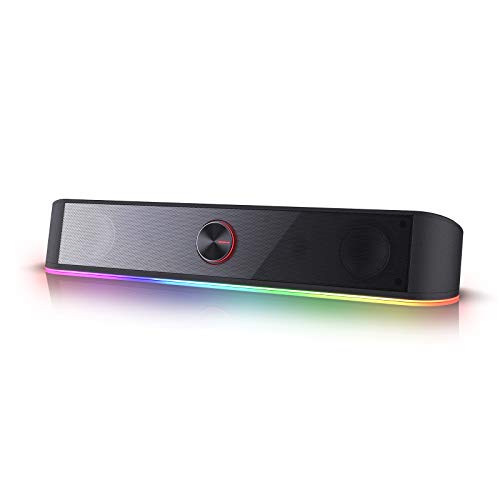
- Compact 16-inch stereo soundbar
- Four RGB lighting modes
- USB power with 3.5mm audio
Best For: Gaming and RGB-focused desks
Gaming Ecosystem Pick

- Compact beneath-monitor design
- USB-C audio and power
- Bluetooth 5.0 plus Chroma RGB
Best For: Razer-equipped gaming desktops
Flexible Connectivity Pick

- Bluetooth 5.0 and 3.5mm AUX
- Four speaker units with bass diaphragms
- USB-powered one-knob operation
Best For: Multi-device home-office desks
Monitor-Mount Value Pick

- Clips onto monitors up to 1 inch thick
- Single-cable USB setup
- Volume, mute, and playback controls
Best For: Clutter-free monitor workstations
Best Compact Bluetooth Pick
Bluedee SK010 Computer Soundbar
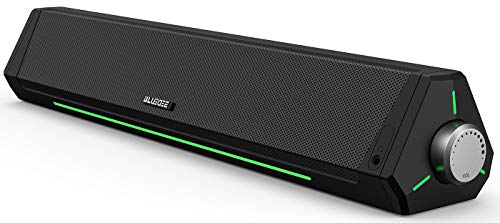
- Bluetooth 5.0 and 3.5mm connectivity
- USB-powered plug-and-play setup
- Slim design with light strips
Best For: Compact workstations and gaming desks
Best Space-Saving USB Pick
XKX115A Clip-On Computer Soundbar

- Clips to the top, side, or bottom of monitors
- USB-C adapter included
- Touch controls and channel switching sensor
Best For: Small desks and USB-equipped computers
Best Wireless Freedom Pick
Bluedee BD-SK020 Rechargeable Soundbar

- Up to 13 hours of cordless playback
- Bluetooth 5.3, AUX, USB, and TF playback
- Compact design for desks and other rooms
Best For: Cable-conscious desks and portable listening
Compact RGB Pick
LENRUE G11 USB-C Desktop Speakers

- Compact under-monitor stereo design
- USB power plus 3.5mm AUX input
- Touch lighting and top volume knob
Best For: Wired desktop users who value a tidy setup and accent lighting
Wireless Connectivity Pick
ICOREBEI USB-C Bluetooth Soundbar
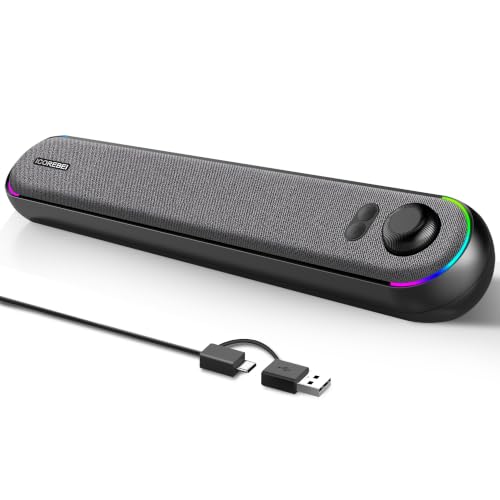
- USB-C digital audio and power
- Bluetooth 5.3 for compatible devices
- Three RGB modes with slim angled design
Best For: Desktop users who switch between computers and Bluetooth devices
Simple USB Pick
LENRUE E-1103 Desktop Soundbar

- Single USB connection for power and audio
- Slim under-monitor soundbar design
- Touch lighting with driver-free setup
Best For: Computer users who want minimal-cable plug-and-play audio
RGB Desktop Pick – Redragon GS560
The Redragon GS560 is a practical choice for soundbars for desktop setups when you want compact stereo audio with prominent RGB lighting. Its USB-powered design, 3.5mm connection, and front volume knob make it easy to add to a PC, laptop, TV, or phone.
Best For: Gaming and office desks that benefit from customizable lighting and simple physical controls.
Pros:
- Compact 16-inch tabletop design fits beneath many displays.
- Four backlight modes include dynamic and static effects.
- USB power, 3.5mm audio, and a combined volume/on-off knob simplify setup.
Cons:
- Its 4-watt maximum output is better suited to personal desktop listening than room-filling audio.
- It requires a wired power and audio connection.
The GS560 stands out for its lighting-focused design and straightforward controls. Choose it when visual customization matters as much as compact stereo sound.
Gaming Ecosystem Pick – Razer Leviathan V2 X
The Razer Leviathan V2 X is a strong option among soundbars for desktop setups built around a gaming PC. Two full-range drivers, passive radiators, USB-C audio and power, Bluetooth 5.0, and Chroma RGB give it a tidy, flexible setup beneath a monitor.
Best For: PC gamers who want integrated RGB effects and the convenience of switching between wired computer audio and Bluetooth devices.
Pros:
- Compact form factor is designed to fit beneath a monitor.
- USB-C carries power and audio through one cable.
- Bluetooth 5.0 supports low-latency wireless playback from paired mobile devices.
- Razer Chroma RGB, Synapse, and Audio App controls provide extensive customization.
Cons:
- It is not waterproof.
- The feature set and software controls are most useful for users already invested in the Razer ecosystem.
The Leviathan V2 X is especially appealing when desk space and cable simplicity are priorities. Its gaming-oriented software and lighting make it less of a basic plug-and-play speaker and more of a customizable PC accessory.
Flexible Connectivity Pick – Nylavee SK100
The Nylavee SK100 suits soundbars for desktop setups that need both wired and wireless connectivity. Its four speaker units, two bass diaphragms, Bluetooth 5.0, 3.5mm AUX input, and side control knob make it a versatile option for computers, consoles, phones, and tablets.
Best For: Home-office or bedroom desks shared between a computer and Bluetooth-enabled devices.
Pros:
- Supports Bluetooth 5.0 and 3.5mm AUX connections.
- Four speaker units and two bass diaphragms are designed for fuller stereo sound.
- USB power and one side knob keep operation simple.
- Includes an 18-month warranty.
Cons:
- It has no built-in battery and must remain connected to USB power.
- At 16 inches wide and 2 pounds, it may take more desk space than smaller bars.
The SK100 is a sensible middle ground for users who do not want to choose between AUX and Bluetooth. Its multi-device compatibility makes it particularly useful on desks that serve both work and entertainment needs.
Monitor-Mount Value Pick – Cyber Acoustics CA-2890
The Cyber Acoustics CA-2890 is a convenient choice among soundbars for desktop setups where clutter reduction matters. It clips onto most monitors up to 1 inch thick, connects through a single USB cable, and includes an adapter for laptops with USB-C ports.
Best For: Compact monitor-centered workstations that need simple USB audio without separate power and audio cables.
Pros:
- Clip-on design keeps the speaker off the desktop.
- Single-cable USB plug-and-play setup works with PCs, Macs, and Chromebooks.
- Built-in volume, mute, and play/pause controls are easy to access.
- USB-A to USB-C adapter is included.
Cons:
- The clip fits screens up to 1 inch thick, so monitor compatibility should be checked.
- USB connectivity limits it to wired use.
The CA-2890 prioritizes convenience over extensive connectivity features. Its monitor mount and single USB connection make it a good fit for clean, uncomplicated computer setups.
Best Compact Bluetooth Pick – Bluedee SK010 Computer Soundbar
The Bluedee SK010 is a practical choice among soundbars for desktop setups when you want stereo sound, flexible connections, and a slim bar that fits below a monitor. It uses USB power, while Bluetooth 5.0 and a 3.5mm connection handle audio.
Best For: Compact workstations, gaming desks, and users who want Bluetooth plus wired connectivity.
Pros:
- Dual drivers and diaphragms provide stereo sound with highs and bass.
- Supports Bluetooth 5.0 and 3.5mm audio connections.
- USB-powered design requires no additional drivers or software.
- Slim 16.4-inch profile and integrated light strips suit modern desks.
Cons:
- It is not waterproof or water resistant.
- USB power and the audio connection may still require cable management.
Choose this model if you want a straightforward desktop soundbar with a compact footprint, ambient lighting, and more than one way to connect.
Best Space-Saving USB Pick – XKX115A Clip-On Computer Soundbar
The XKX115A is one of the most space-efficient soundbars for desktop setups, using a clip-on mount to attach to the top, side, or bottom of a monitor. Its wired USB design supports Windows, macOS, ChromeOS, Linux, and USB-C devices with the included adapter.
Best For: Small desks and users who prefer a monitor-mounted USB speaker with simple touch controls.
Pros:
- Clip-on mounting helps preserve valuable desktop space.
- USB and USB-C connectivity covers a wide range of computers and mobile devices.
- Dual drivers and passive radiators are designed for loud sound and deep bass.
- G-sensor keeps left and right channels correctly positioned when mounted differently.
Cons:
- It is wired and has no wireless communication.
- The product is incompatible with monitors, TVs, and projectors as audio devices.
- Correct computer audio settings and an operational USB port are required.
This is a strong fit when monitor mounting matters more than wireless freedom, particularly for compact desks using USB or USB-C computers.
Best Wireless Freedom Pick – Bluedee BD-SK020 Rechargeable Soundbar
The Bluedee BD-SK020 stands out among soundbars for desktop setups with rechargeable operation and multiple playback options. Bluetooth 5.3, AUX, USB flash-drive playback, and TF-card support make it useful for both computer audio and standalone listening.
Best For: Cable-conscious desks, flexible home-office setups, and users who want a portable desktop speaker.
Pros:
- Rechargeable battery provides up to 13 hours of cordless playback at moderate volume.
- Supports Bluetooth 5.3, 3.5mm AUX, USB flash drives, and TF cards.
- Dual full-range drivers and tweeters target clear vocals, highs, and bass.
- Side-mounted controls make volume and playback-mode adjustments convenient.
Cons:
- The USB port supports flash-drive playback only.
- Battery life varies with volume and use.
- It is not waterproof or water resistant.
Select this soundbar if you want to reduce cable clutter and move the speaker around, while retaining the option to use USB-C power for continuous listening.
Compact RGB Pick – LENRUE G11 USB-C Desktop Speakers
For shoppers comparing soundbars for desktop setups, the LENRUE G11 is a compact wired option designed to sit beneath a monitor. It uses USB power and a 3.5mm AUX connection, with a top volume knob and touch-controlled lighting for straightforward everyday use.
Best For: Desktop users who want compact stereo sound, simple wired connectivity, and touch-controlled accent lighting.
Pros:
- Compact design fits beneath a monitor and helps limit desk clutter.
- USB-powered stereo system includes a USB-C adapter and requires no drivers.
- Touch-controlled angular lighting and a top-mounted volume knob add convenience.
- Designed for movies, videos, games, and music with stated noiseless, distortion-free sound.
Cons:
- No Bluetooth, headphone port, or microphone.
- Requires both USB power and a 3.5mm audio connection.
- Not designed for TVs or headphone use.
The G11 is a practical choice when desk space and plug-and-play setup matter more than wireless flexibility. Its wired-only design is best suited to a computer or laptop workstation with an available AUX output.
Wireless Connectivity Pick – ICOREBEI USB-C Bluetooth Soundbar
Among soundbars for desktop setups, this ICOREBEI model stands out for combining USB-C audio and power with Bluetooth 5.3. Its slim angled profile is aimed at near-field listening, while dual full-range drivers, a bass radiator, and three RGB modes cover everyday office, gaming, movie, and music use.
Best For: Users who want a slim desktop soundbar with Bluetooth flexibility and USB-C one-cable operation.
Pros:
- Supports USB-C digital audio and power through the included USB-C-to-USB-A cable.
- Bluetooth 5.3 pairing works with compatible computers, mobile devices, TVs, and consoles.
- Dual full-range drivers and a bass radiator are designed for clear dialogue and fuller bass.
- Three RGB modes can be switched or turned off, and the angled design directs sound toward the listener.
Cons:
- USB power is required during use; the soundbar has no built-in battery.
- Bluetooth audio still requires a separate USB power connection.
- Bluetooth range is listed as up to 10 meters in open conditions, so performance can vary by environment.
This is the most flexible option of the three for switching between wired computer audio and Bluetooth sources. It is especially convenient for desks where a slim profile, wireless pairing, and optional lighting are useful.
Simple USB Pick – LENRUE E-1103 Desktop Soundbar
The LENRUE E-1103 keeps soundbars for desktop setups simple with a single USB connection for power and stereo sound. Its slim profile fits under monitors or laptops, while touch-controlled breathing lights and plug-and-play operation add convenience without requiring drivers or software.
Best For: Users seeking a straightforward USB soundbar for a computer or laptop with minimal cables.
Pros:
- Single-USB setup provides power and audio, with a USB-C adapter included.
- Space-saving 15-inch soundbar design fits beneath monitors and laptops.
- Plug-and-play operation requires no drivers or software.
- Touch-sensitive controls manage the colorful breathing light effects.
Cons:
- USB connectivity only; no Bluetooth or AUX input is listed.
- Monitor use depends on having a USB port that supports both power delivery and audio output.
- Not compatible with Xbox gaming systems or projectors.
The E-1103 is a good fit for a clean, uncomplicated computer desk where one USB cable is preferable. Check your monitor’s USB capabilities before connecting it directly, especially if you plan to use the monitor as the audio source.
How We Picked the Best Soundbars for Desktop Setups
We selected these 10 models based on the features that matter most at a computer: compact size, simple setup, useful connectivity, volume control, power requirements, and suitability for near-field listening. The list includes affordable wired speaker bars as well as more feature-rich options with Bluetooth, RGB lighting, touch controls, or rechargeable batteries.
Because desktop audio needs vary, we did not treat the most powerful soundbar as automatically the best choice. A monitor-mounted speaker may be ideal for a compact workstation, while a Bluetooth model can be more flexible in a shared office or gaming room.
Quick Comparison
| Type | Best For | Key Advantage |
|---|---|---|
| USB-powered wired bars | Workstations and everyday use | Simple plug-and-play setup |
| Bluetooth and AUX models | Flexible computer and phone audio | Multiple connection options |
| RGB desktop soundbars | Gaming desks | Lighting and visual customization |
| Monitor-mounted designs | Small desks | Preserves usable desktop space |
| Rechargeable soundbars | Portable or cable-light setups | Less dependence on a power cable |
Key Buying Factors for Soundbars for Desktop Setups
Connectivity and Power
USB-powered models are convenient because they can draw power directly from a computer, monitor, dock, or USB adapter. Check whether USB carries audio or only power; some models still require AUX for sound. Bluetooth is useful for switching between a PC, phone, and tablet, while AUX can provide a straightforward wired connection with broad compatibility.
Desk Size and Mounting
Measure the space beneath your monitor before buying. A long bar may block a monitor stand or compete with a keyboard. Clip-on or monitor-mounted designs help preserve desk room, but confirm that the mounting method fits your display and does not obstruct controls or the screen.
Sound and Controls
Look for easy-to-reach volume controls, especially if the soundbar will sit under a monitor. Stereo drivers are generally preferable for games, music, and video, while a compact 2.0 bar is often sufficient for calls and general office audio. RGB lighting is cosmetic, so prioritize driver quality and connection reliability first.
Portability and Extras
Rechargeable batteries can make a soundbar easier to move, but battery life and charging requirements matter. Touch controls, lighting synchronization, and adaptive channel features may be useful conveniences, though they should not outweigh basic audio performance.
Who Should Buy Which Soundbars for Desktop Setups?
Choose a USB-powered wired model if you want the simplest, most reliable desktop setup. Pick Bluetooth and AUX connectivity if you regularly switch devices. RGB-equipped options suit gaming desks, while a monitor-mounted bar is best when surface space is limited. A rechargeable model makes the most sense for users who move their speaker between rooms or want a cleaner, less-cabled workspace.