Accurate color starts with dependable references. The right calibration tool can help artists match paint, evaluate digital work, and keep colors consistent from capture to final display.
This roundup covers monitor colorimeters, portable color-matching devices, camera targets, gray cards, and hands-on color theory tools for different creative workflows and budgets.
Best 10 Color Calibration Tools for Artists Picks for 2026
Portable Surface Matching

- Scans color and sheen together
- Works with many physical materials
- Connects to iOS and Android apps
Best For: Artists matching paint, textiles, finishes, and other physical surfaces
Hands-On Color Theory

- Shows mixing and color relationships
- Includes three sizes for studio or travel
- Covers tints, tones, and grayscale values
Best For: Artists and students learning or planning paint color combinations
Capture-to-Edit Reference
Portable Camera Color Calibration Kit
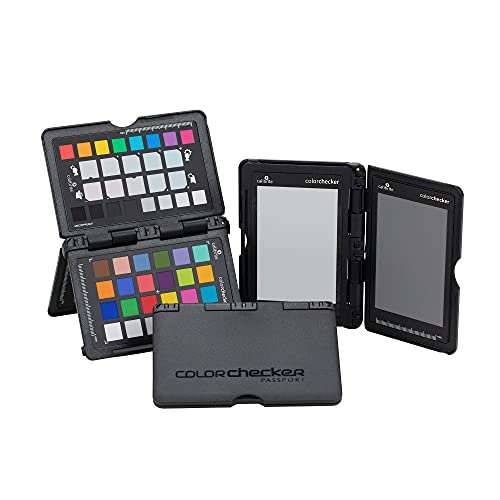
- Four targets for white balance, exposure, and profiling
- Supports DNG and ICC camera-profile workflows
- Folding case and lanyard suit location work
Best For: Traveling photographers, videographers, and artists calibrating color at capture
Screen-Side Precision
SpyderExpress Monitor Calibrator

- Guided three-step calibration in about 90 seconds
- Supports up to three displays per workstation
- Compatible with current Liquid Retina XDR displays
Best For: Digital artists and editors calibrating laptop or monitor screens
Simple Shoot Reference

- Includes 12% and 18% gray references
- Combines colorbar and grayscale targets
- Portable set includes stand and user guide
Best For: Video creators and photographers needing a basic on-location reference
Portable Paint Matching

- Wireless scanning with a free mobile app
- Matches paint across a large product library
- Displays RGB, CMYK, LAB, HEX, and more
Best For: Artists matching physical paint colors and organizing palettes
Simple Monitor Calibration

- Guided Easy 1 2 3 calibration workflow
- Supports up to two displays
- Includes a before-and-after comparison check
Best For: Creators wanting approachable calibration for photo and digital editing
Advanced Display Calibration

- Supports modern displays and unlimited monitors
- Includes deeper calibration and display analysis
- Exports 3D LUTs for compatible video monitors
Best For: Professional multi-display, design, photography, and video workflows
High-Luminance Precision – Display Pro HL Colorimeter
For artists who need dependable screen output, the Calibrite Display Pro HL is one of the more advanced color calibration tools for artists. Its high-luminance sensor supports modern LCD, mini-LED, OLED, Apple XDR displays, and compatible projectors while the PROFILER software provides both guided and advanced controls.
Best For: Digital artists, photographers, designers, and studios working with bright, HDR-capable, or multiple displays.
Pros:
- Measures displays up to 3000 nits, including modern high-brightness panels.
- Supports custom white point, luminance, contrast, gamma, and patch-set settings.
- Includes validation, uniformity, flare-correction, and multi-display workflow tools.
- Works with Mac and Windows and includes a USB-C to USB-A adapter.
Cons:
- Its advanced controls may be more than casual users need.
- Requires software and a computer-based setup rather than a quick mobile scan.
Choose this model when display accuracy and repeatable studio workflows matter more than simplicity. The high-luminance support makes it especially suitable for artists using newer bright or HDR displays.
Portable Surface Matching – Color Muse 3
The Color Muse 3 takes a different approach to color calibration tools for artists by scanning physical materials rather than calibrating a monitor. It measures color and sheen, then connects to an iOS or Android app for matching, saving, and organizing colors across paints, textiles, plastics, print, and other surfaces.
Best For: Artists, decorators, and makers matching physical paint, fabric, leather, printed media, or coatings.
Pros:
- Measures both surface color and sheen in a single scan.
- Works across paints, textiles, plastics, leather, printed media, and coatings.
- Pairs wirelessly with iOS and Android and supports custom color libraries.
- Offers over one year of standby battery life according to the supplied notes.
Cons:
- It is a surface color-matching device, not a monitor calibration tool.
- Access to RAL and Pantone libraries is subscription-based in the app.
- It is not waterproof.
This is a practical choice when your color decisions involve real-world materials. Its sheen measurement and mobile workflow can help artists match finishes as well as hues, but digital-display calibration requires a different type of device.
Fast Display Confidence – Datacolor Spyder Monitor Calibrator
The Datacolor Spyder is a straightforward option among color calibration tools for artists who want a dependable starting point for digital editing. Its software supports laptop and desktop displays, including OLED, mini-LED, and Apple Liquid Retina XDR, and the supplied notes indicate calibration can take about 90 seconds.
Best For: Digital artists and photographers who want fast, approachable calibration with room for manual customization.
Pros:
- Offers a preset calibration option for beginners and customizable settings for experienced users.
- Supports current laptop and desktop display types, including OLED and mini-LED.
- Ambient light monitoring can help adjust display brightness and contrast.
- DevicePreview Beta simulates how photos may appear on other devices.
Cons:
- DevicePreview is identified as a beta feature.
- Ambient-light-based automation may not suit artists who prefer fully manual control.
- The supplied notes provide fewer connection and included-accessory details than some competing models.
Spyder is a sensible fit for artists who value speed and an easy learning curve. It combines guided setup with useful ambient-light features, while still allowing more experienced users to adjust the calibration approach.
Hands-On Color Theory – Spinning Color Wheel Set
This three-piece color wheel set is a hands-on alternative to electronic color calibration tools for artists. It does not measure or calibrate displays or physical samples, but its spinning guide helps painters and students explore color mixing, relationships, tints, tones, and grayscale values before committing paint to a project.
Best For: Painters, art students, teachers, makeup artists, tattoo designers, and other creatives learning or planning color combinations.
Pros:
- Spinning front wheel shows primary, secondary, and tertiary mixing results.
- Reverse side covers complementary and triadic schemes, tints, tones, and grayscale values.
- Includes two large wheels and one pocket-sized wheel for studio, classroom, or travel use.
- Glossy coated surfaces are designed to spin smoothly and wipe clean.
Cons:
- It is a printed reference tool, not an electronic color measurement device.
- Results are educational guides rather than readings from a specific paint, screen, or material.
- The cardboard construction may be less durable than a rigid professional color instrument.
For artists building color intuition, this set is inexpensive, portable, and easy to use at the worktable. Select it for planning and education rather than precise digital or surface color matching.
Capture-to-Edit Reference – Portable Camera Color Calibration Kit
For artists who need color calibration tools for artists that work at the camera or on location, the Calibrite ColorChecker Passport Photo 2 combines white-balance, exposure, and camera-profiling targets in a compact folding case. It is designed to reduce corrective work across consistent image sets.
Best For: Photographers, videographers, and traveling artists who need a portable reference for repeatable color and exposure.
Pros:
- Four targets cover exposure, custom white balance, camera profiling, and enhancement.
- Supports DNG and ICC profiling workflows through Calibrite PROFILER software.
- Folding case and included lanyard make it convenient for location work.
Cons:
- Its camera-profiling workflow may be more involved than a simple gray card.
- Designed primarily for capture-stage calibration rather than direct monitor calibration.
This is a versatile choice when your main challenge is keeping color consistent from capture through editing and output. The compact 4.9-ounce design also suits mobile production.
Screen-Side Precision – SpyderExpress Monitor Calibrator
For digital artists, color calibration tools for artists should make the display itself trustworthy. The Datacolor SpyderExpress is a monitor calibrator intended to help creators view colors more accurately, with a guided setup and a stated 90-second calibration time.
Best For: Artists, photographers, and designers who edit on laptops or monitors and want a straightforward screen-calibration process.
Pros:
- Three-step setup is designed to be quick and easy.
- Supports up to three connected displays per workstation.
- Supports the latest Liquid Retina XDR displays, with software upgrade options for OLED and advanced mini-LED support.
Cons:
- Some advanced capabilities require a software upgrade.
- It calibrates displays rather than camera capture color.
SpyderExpress is the most direct fit here for artists whose priority is reliable on-screen color during editing. Its saved profiles and recalibration workflow can help maintain consistency across connected displays.
Simple Shoot Reference – 5×7 White Balance Charts
If you need affordable, physical color calibration tools for artists working with cameras or video, this DKK two-chart set provides white-balance, exposure, colorbar, and grayscale references. Its compact 5-by-7-inch format is easy to carry to shoots.
Best For: Video creators and photographers who want a simple portable reference for white balance and exposure.
Pros:
- Includes two charts with 12% and 18% gray references.
- Combines a colorbar and grayscale reference for balancing color and exposure.
- Includes a frame stand and user guide for straightforward setup.
Cons:
- Provides reference charts rather than dedicated profiling software.
- Its 5-by-7-inch format offers less target area than larger calibration charts.
This set is a practical option for creators who prefer a low-complexity, camera-side reference. The included stand makes positioning easier, while the lightweight design supports frequent transport.
Portable Paint Matching – Color Muse Colorimeter
Color Muse is a compact option for artists who need color calibration tools for artists that can identify paint colors away from the studio. It scans smooth, flat surfaces and pairs wirelessly with the free Color Muse app, which provides matches, comparisons, and multiple digital color values.
Best For: Artists matching physical paint colors, coordinating palettes, or translating scanned colors into RGB, CMYK, LAB, HEX, and related values.
Pros:
- Small, portable 27.22-gram design for scanning on location.
- App includes a large library of paint and product brands.
- Offers color coordination, saved scans, sharing, and side-by-side comparisons.
Cons:
- Best results require a smooth, flat surface.
- Scanned colors can differ from how they appear on a phone screen.
- It is designed for paint and surface matching rather than monitor profiling.
Choose Color Muse when your workflow starts with a real-world painted surface. Its broad app features make it useful for palette organization and matching, but artists seeking screen accuracy should consider a dedicated monitor calibrator instead.
Simple Monitor Calibration – Calibrite Display 123
The Calibrite Display 123 provides an approachable entry point for color calibration tools for artists working on screen. Its guided Easy 1 2 3 software workflow helps correct common monitor color shifts, while USB-C connectivity and support for two displays suit compact creative workstations.
Best For: Photographers, digital artists, and creators who want straightforward monitor calibration and more consistent color across one or two displays.
Pros:
- Guided workflow is designed to make calibration fast and accessible.
- Supports up to two monitors for a matched dual-screen setup.
- Before-and-after checking helps verify the visible calibration change.
- Includes brightness targets such as Native and Photo.
Cons:
- Its software workflow may offer less control than more advanced calibration systems.
- USB-C connection may require an adapter on computers without a compatible port.
- The supplied specifications focus on monitor calibration rather than physical paint matching.
This is a practical choice when ease of use matters more than extensive customization. It can improve consistency between displays, making it a sensible starting point for artists editing photos or digital artwork.
Advanced Display Calibration – SpyderPro Monitor Calibrator
SpyderPro is the most feature-rich option here for color calibration tools for artists who need detailed control over demanding display workflows. It supports modern backlights, unlimited displays per computer capability, deeper grayscale measurement, display analysis, projector calibration, and 3D LUT export for compatible video monitors.
Best For: Professional artists, photographers, designers, and video creators managing multiple displays or advanced color-critical workflows.
Pros:
- Offers standard and deeper calibration modes, with the latter measuring more grayscale points.
- Supports Wide LED, OLED, QD-OLED, Mini LED, and other listed display types.
- Provides display analysis, uniformity checks, gamut and tone-response assessment, and CheckCal verification.
- Supports multi-monitor matching, projector calibration, and 3D LUT export for compatible video monitors.
Cons:
- The extensive controls may be more than casual artists need.
- Some advanced features depend on compatible displays or video equipment.
- Ambient-light adaptation can add setup considerations to a simple calibration routine.
SpyderPro is a strong fit for studios where display consistency and measurement depth justify a more advanced tool. Its broad compatibility and analysis features make it better suited to professional, multi-display, and video-oriented work than basic calibration needs.
How We Picked the Best Color Calibration Tools for Artists
We grouped these Color Calibration Tools for Artists by the problem they solve: calibrating a monitor, matching physical colors, setting camera white balance and exposure, or learning color relationships. We also considered portability, software simplicity, display compatibility, measurement range, included targets, connection requirements, and suitability for beginners versus experienced creators.
A monitor colorimeter is not interchangeable with a paint scanner or a gray card. The best choice depends on whether your main concern is screen accuracy, physical color matching, photography, video, or foundational color mixing.
Quick Comparison
| Tool type | Best for | Key advantage |
|---|---|---|
| Monitor colorimeter | Digital art and photo editing | Creates a display profile for more consistent on-screen color |
| Paint scanner or mobile colorimeter | Matching real-world colors | Provides portable color references and matches |
| Color calibration chart | Photography and video | Supports white balance, exposure, and color correction |
| Gray card | Camera exposure and white balance | Simple, low-cost reference for controlled capture |
| Color wheel | Painting, makeup, and theory practice | Explains relationships between hues without electronics |
Key Buying Factors for Color Calibration Tools for Artists
Match the Tool to Your Workflow
Choose a display colorimeter if you edit digital paintings, photographs, or video on a monitor. For physical artwork, a portable color-matching device may be more useful. If you photograph artwork or products, prioritize a chart or gray card that supports repeatable white balance and exposure.
Check Display and Software Compatibility
Before buying a monitor calibrator, verify compatibility with your operating system, monitor type, connection ports, and preferred editing setup. OLED, Mini LED, high-brightness, and wide-gamut displays may require newer hardware or software. USB-C connectivity can simplify setup on modern laptops.
Consider Measurement Range and Accuracy
Higher-brightness displays need a calibrator designed to measure their output range. For camera targets, neutral gray and color patches are valuable because they give editing software a consistent reference. A color wheel does not measure color, but it can improve practical mixing decisions.
Prioritize Ease of Use and Portability
Beginners may benefit from guided software and a straightforward workflow, while professionals may want advanced controls and repeatable profiles. Portable devices are useful for studio visits, shopping for materials, or checking colors away from a workstation.
Who Should Buy Which Color Calibration Tools for Artists?
Digital artists and photo editors: Choose a monitor colorimeter that supports your display and includes clear profiling software.
Traditional painters and makers: Consider a portable color-matching tool if you regularly need to identify or reproduce real-world colors. Add a color wheel if you want a simple reference for mixing complements, values, and harmonies.
Photographers and videographers: Select a color chart for color correction and a gray card when dependable exposure or white balance is the priority.
Beginners: Favor simple guided tools and avoid paying for advanced features you will not use. Professionals: Look for broader display support, higher brightness capability, repeatable measurements, and software controls that fit your established color-managed workflow.