Switching a keyboard, mouse, printer, scanner, or other USB peripheral between two Windows computers is easier with the right USB switch box. These devices reduce cable swapping and help keep shared workstations organized.
Our roundup covers 10 options with different port layouts, USB speeds, connection types, and control methods. Use the guide below to match the switch to your computers, peripherals, and daily workflow.
Best 10 USB Switch Boxes for Windows Picks for 2026
Best Overall
BENFEI 2-Computer USB 3.0 Switch

- Shares four USB devices between two computers
- Up to 5Gbps USB 3.0 transfer speed
- Windows, Mac, Linux, and Chrome OS compatible
Best For: Two-computer workstations with multiple shared peripherals
Best High-Speed Pick

- Shares seven USB-A and USB-C devices
- Up to 10Gbps USB 3.2 transfer speeds
- Power adapter included for high-power peripherals
Best For: Modern mixed USB-A and USB-C workstations
Best Budget Option
OLLGEN 4-Port USB 2.0 Manual Switch

- Lets four computers share one USB device
- Individual push buttons for each connection
- Compact USB 1.1 and USB 2.0 design
Best For: Older computers sharing a printer or other single USB peripheral
Best Simple USB 3.0 Switch
2-Computer 4-Port USB 3.0 Switcher

- Shares four USB devices between two computers
- Includes two 59-inch USB 3.0 cables
- Plug-and-play support for Windows, Mac, and Linux
Best For: Everyday shared peripherals and USB 3.0 storage devices
Best for Easy Setup

- Shares four USB devices between two PCs
- Up to 5Gbps USB 3.0 data transfer
- Button and remote-controller switching
Best For: Two-computer setups needing USB-C and USB-A peripheral sharing
Best Remote-Controlled Option

- Remote or button switching with LED status
- Three USB 3.0 ports plus one USB-C port
- Includes an 18-month warranty
Best For: Users wanting convenient remote control for shared USB peripherals
Best Budget USB 2.0 Pick

- Shares four peripherals between two PCs
- One-button switching with LED indicator
- Broad Windows and cross-platform compatibility
Best For: Simple office peripheral sharing when USB 2.0 is enough
Best Bi-Directional Pick

- Bidirectional 2-in-1-out or 1-in-2-out switching
- Up to 5Gbps USB 3.0 data transfer
- Includes two USB 3.0 A-to-A cables
Best For: Flexible single-device or dual-device switching
Best for Multiple Peripherals
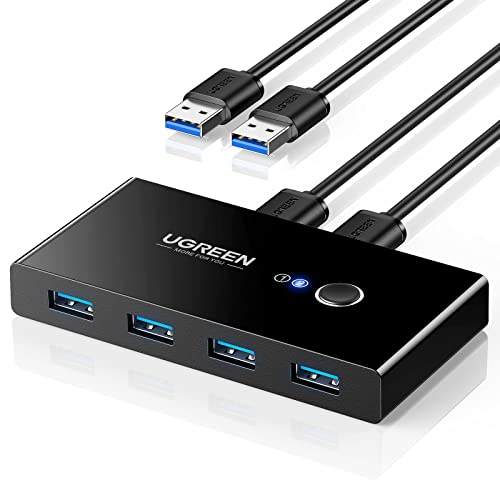
- Shares four USB devices between two computers
- Up to 5Gbps USB 3.0 transfer speeds
- Optional USB-C power input for demanding devices
Best For: Windows desks with several shared USB peripherals
Best Compact Two-Device Option

- Two computers share two USB devices
- One-button switching with LED status indicator
- Includes two 5-foot USB 3.0 cables
Best For: Small Windows setups with two shared peripherals
Best Overall – BENFEI 2-Computer USB 3.0 Switch
For shoppers comparing usb switch boxes for windows, the BENFEI is a practical choice when two computers need to share several peripherals. It connects up to four USB devices, offers USB 3.0 data speeds, and works with Windows along with macOS, Linux, and Chrome OS.
Best For: Home offices or workstations sharing a keyboard, mouse, printer, scanner, or other USB devices between two computers.
Pros:
- Lets two computers share up to four USB devices.
- USB 3.0 supports data transfer speeds up to 5Gbps and remains backward compatible with USB 2.0.
- Push-button switching and LED indicators make the active computer easy to identify.
- Includes an extra USB-C power input for higher-power devices.
Cons:
- Requires BENFEI USB-A-to-USB-A cables for operation.
- The power adapter for the optional power input is not included.
The BENFEI balances useful capacity, broad operating-system compatibility, and straightforward controls. It is especially appealing if you need four shared USB connections, though high-power peripherals may require an additional adapter.
Best High-Speed Pick – UGREEN 7-Port USB 3.2 Switch
The UGREEN stands out among usb switch boxes for windows when fast transfers and mixed USB connections matter. It allows two computers to share seven peripherals, combining USB-A and USB-C ports with up to 10Gbps USB 3.2 speeds.
Best For: Users with modern USB-C and USB-A computers who need many shared data peripherals and faster file transfers.
Pros:
- Provides seven shared ports: four USB-A and three USB-C.
- USB 3.2 supports transfer speeds up to 10Gbps.
- Includes a USB-C-to-USB-A cable for mixed computer setups.
- Included power adapter supports high-power devices such as external hard drives and printers.
Cons:
- It is not a KVM switch and does not provide video output.
- Audio device connections are not recommended.
- Requires Windows 10 or macOS 10.15 Catalina or later according to the listed requirements.
With the highest port count and transfer rating in this roundup, the UGREEN is the most capable option for data-focused setups. Its limitations are important, however: it handles USB peripherals only and is not designed to switch displays.
Best Budget Option – OLLGEN 4-Port USB 2.0 Manual Switch
If you need a simple usb switch box for windows and do not require modern high-speed performance, the OLLGEN offers a basic manual design. It lets four computers share one USB device, such as a printer, scanner, camera, or keyboard, through individual push buttons.
Best For: Basic printer or peripheral sharing across several older computers.
Pros:
- Allows up to four computers to share one USB device.
- Individual front-panel buttons provide direct manual control.
- Supports USB 1.1 and USB 2.0 devices.
- Compact design measures approximately 4.4 by 2.6 by 0.9 inches.
Cons:
- USB 2.0 limits transfer speeds to 480Mbps.
- It shares one USB device rather than multiple devices between two computers.
- Listed operating-system support centers on older Windows versions and Mac OS.
The OLLGEN is best viewed as a low-cost, single-device sharing box rather than a modern multi-peripheral switch. Its simple buttons and four-computer support make sense for legacy setups, but newer users may prefer USB 3.0 or USB 3.2 alternatives.
Best Simple USB 3.0 Switch – 2-Computer 4-Port USB 3.0 Switcher
This two-computer USB switch is a straightforward option for usb switch boxes for windows, allowing shared peripherals to move between two systems with one button. Its four front USB 3.0 ports can handle input devices, storage, printers, cameras, and other compatible USB equipment.
Best For: Users who want a plug-and-play USB 3.0 switch with included connection cables and support for varied peripherals.
Pros:
- Two computers can share four USB devices simultaneously.
- USB 3.0 offers theoretical speeds up to 500MB/s.
- Includes two USB 3.0 cables, each listed at 59 inches long.
- Supports Windows, macOS, Linux, and a broad range of USB peripherals without requiring a switch driver.
Cons:
- High-power devices such as large hard drives, SSDs, or digital video cameras may require an external 5V adapter.
- Switching takes approximately one to two seconds.
- The listed warranty is six months.
This model offers a useful middle ground: four shared USB 3.0 ports, broad compatibility, and the necessary computer cables in the package. It is a sensible fit for everyday peripherals, provided you account for the optional power requirement with demanding devices.
Best for Easy Setup – UGREEN USB 3.0 USB-C/A Switch
If you need usb switch boxes for windows that can share several peripherals between a work PC and a personal computer, this UGREEN model offers four ports, USB 3.0 speeds, and both USB-C and USB-A connectivity. It switches through either a desktop button or included controller, but it does not handle monitors or video transmission.
Best For: Windows users sharing keyboards, mice, printers, scanners, cameras, or other USB peripherals between two computers.
Pros:
- Shares four USB devices between two computers.
- Supports USB 3.0 data transfer up to 5Gbps and USB 2.0 backward compatibility.
- Includes one USB-C and three USB-A device ports.
- Offers button and remote-controller switching.
Cons:
- Does not support displays or video transmission.
- Optional USB-C power may be needed for multiple or high-power devices.
- USB-C computer inputs may require a USB-C-to-USB adapter.
Choose this model if faster transfers and flexible USB-C/A peripheral support matter more than video switching. Its optional power input can also help maintain stability with demanding accessories.
Best Remote-Controlled Option – BENFEI USB 3.0 USB-C Switch
For shoppers comparing usb switch boxes for windows, the BENFEI USB 3.0 switch combines four peripheral ports with remote control and LED status indication. It supports two computers, reaches up to 5Gbps, and works across Windows, macOS, Linux, and Chrome OS without drivers.
Best For: Users who want remote switching for keyboards, mice, storage devices, printers, scanners, cameras, or headphones.
Pros:
- Lets two computers share three USB 3.0 ports and one USB-C port.
- Supports data transfer speeds up to 5Gbps.
- Provides both switch-button and remote-control operation.
- Includes LED indicators and an 18-month warranty.
Cons:
- Requires the specified USB-A-to-USB-A cables when connected.
- Optional USB-C power is recommended for high-consumption devices.
- It switches USB peripherals rather than monitor video.
The BENFEI stands out when convenient remote access and clear status feedback are priorities. Its mixed USB-A and USB-C port layout also suits a varied peripheral collection.
Best Budget USB 2.0 Pick – UGREEN 4-Port USB 2.0 Switch
This UGREEN model is a straightforward option for anyone seeking usb switch boxes for windows to share common peripherals between two computers. Its four USB 2.0 ports, one-button switching, and broad operating-system compatibility make it practical for keyboards, mice, printers, scanners, and similar devices.
Best For: Basic two-computer peripheral sharing where USB 2.0 performance is sufficient.
Pros:
- Shares four USB devices between two computers.
- Uses a simple one-button switch with an LED activity indicator.
- Works with Windows, macOS, Linux, and Chrome OS without drivers.
- Includes two USB-A-to-A cables and a 24-month warranty service.
Cons:
- Uses USB 2.0 rather than USB 3.0 for data transfer.
- Does not support monitors or video transmission.
- Optional power cable and charger are not included.
This is a sensible choice for everyday input devices and office peripherals when top transfer speeds are not essential. Consider a powered connection when using several devices or storage hardware.
Best Bi-Directional Pick – Aluminum USB 3.0 Switch
This compact option stands out among usb switch boxes for windows when you want flexible switching rather than a traditional multi-port selector. It can let two computers share one USB peripheral or let one computer switch between two USB devices, with a push-button control and USB 3.0 transfer speeds up to 5Gbps.
Best For: Windows users who need a bidirectional switch for a printer, keyboard, mouse, scanner, or similar USB device.
Pros:
- Supports both two-computers-to-one-device and one-computer-to-two-devices setups.
- USB 3.0 supports transfer speeds up to 5Gbps and remains backward compatible with USB 2.0 and 1.1.
- Plug-and-play compatibility with Windows, macOS, Linux, and Chrome OS.
- Includes two USB 3.0 A-to-A cables and has an aluminum housing.
Cons:
- Switches between connections independently; it does not provide simultaneous A+B output.
- Does not support HDMI or video output.
Its bidirectional design makes this a versatile choice for a simple Windows workspace, especially if you occasionally need to redirect one device or alternate between two peripherals. The lack of video support means it should not be treated as a KVM switch.
Best for Multiple Peripherals – UGREEN 4-Port USB Switch
For shoppers comparing usb switch boxes for windows, this UGREEN model is designed for sharing several peripherals between two computers. It provides four USB 3.0 output ports, one-button switching, and an optional USB-C power input for setups that use devices requiring additional power.
Best For: Windows workstations that share a keyboard, mouse, printer, scanner, storage device, or other USB peripherals between two computers.
Pros:
- Two computers can share up to four USB devices.
- USB 3.0 supports up to 5Gbps transfer speeds and is backward compatible with USB 2.0.
- Includes two USB 3.0 cables and offers plug-and-play compatibility with Windows and other major operating systems.
- Extra USB-C 5V/2A power input can help stabilize high-power devices.
Cons:
- It is not a KVM switch and does not support monitor or video transmission.
- The optional power adapter is not included.
- Additional power may be needed when several or high-power devices are connected.
This is the most practical pick here for a multi-device desk because its four USB ports reduce the need to reconnect peripherals individually. Plan for an extra power source if your setup includes storage drives, cameras, microphones, or other power-hungry accessories.
Best Compact Two-Device Option – UGREEN 2-Port USB Switch
This compact UGREEN selector is a straightforward choice among usb switch boxes for windows when two computers need access to two shared USB devices. Its one-button control, LED indicator, and included USB 3.0 cables make it suitable for switching common accessories without installing drivers.
Best For: Windows users sharing a keyboard, mouse, printer, scanner, or webcam between a work computer and a personal computer.
Pros:
- Supports two computers sharing two USB devices.
- USB 3.0 provides data transfer speeds up to 5Gbps and supports USB 2.0 compatibility.
- Driver-free setup works with Windows, macOS, Chrome OS, and Linux.
- Includes two 5-foot USB 3.0 A-to-A cables.
Cons:
- It is not a KVM switch and cannot transmit monitor or video signals.
- The USB output ports are for data transfer, not video.
- It offers two shared USB ports, fewer than the four-port UGREEN model.
Choose this model when you want a clean, uncomplicated way to share a small set of peripherals between two Windows computers. Its two-port layout keeps the unit focused and compact, but users with more accessories may prefer a four-port switch.
How We Picked These USB Switch Boxes for Windows
We focused on practical compatibility rather than appearance alone. The selected models support two-computer sharing, with options ranging from USB 2.0 to USB 3.2 and from traditional USB-A connections to USB-C combinations. We also considered the number of shared ports, device compatibility, switching methods, bidirectional designs, and whether a model is suited to printers, scanners, input devices, storage, or webcams.
Because USB switches vary considerably, check the product specifications carefully before buying. A switch intended for basic keyboard and mouse sharing may not be the best choice for high-speed storage or bandwidth-heavy devices.
Quick Comparison
| Best For | Features to Look For |
|---|---|
| Keyboard and mouse | USB 2.0 or USB 3.0, simple button switching |
| Printers and scanners | Reliable two-computer peripheral sharing and broad compatibility |
| Fast data devices | USB 3.0 or USB 3.2, with suitable cables included or available |
| Modern laptops | USB-C support or the correct USB-C adapter setup |
| Hard-to-reach desktops | Remote control or a conveniently positioned switch button |
| Flexible routing | Bidirectional one-in/two-out or two-in/one-out operation |
Key Buying Factors for USB Switch Boxes for Windows
Port Type and Speed
USB 2.0 is generally adequate for keyboards, mice, printers, and many scanners. Choose USB 3.0 or USB 3.2 when transferring files, using fast storage, connecting a webcam, or sharing devices that benefit from higher throughput. USB-C ports can simplify connections to newer computers, but verify whether they carry data and whether the included cables match your setup.
Number and Layout of Ports
Four shared ports suit a typical desk with a keyboard, mouse, printer, and scanner. Models with a mix of USB-A and USB-C ports are more flexible, while a simpler two-port design may be easier to place and operate. Confirm which ports are shared and which are used for connecting the computers.
Power and Device Compatibility
Most basic peripherals can run through a standard USB switch, but some bus-powered drives, webcams, or several connected devices may require more power than the switch or computer can provide. Look for an externally powered model when your setup includes demanding devices, and do not assume that a USB switch provides charging or display switching.
Switching Method and Cable Distance
A physical button is dependable and inexpensive. A wired remote can be more convenient when the switch sits behind a monitor or under a desk. Measure the distance between the computers, switch, and peripherals, and allow for the cables required on both sides.
Who Should Buy Which USB Switch Boxes for Windows?
Choose a basic USB 2.0 switch if you mainly share a keyboard, mouse, printer, or scanner and want the simplest budget-friendly setup. A four-port USB 3.0 model is the better all-purpose choice for a home office or dual-computer desk. Select a USB 3.2 or USB-C-equipped switch when newer laptops, high-speed peripherals, or mixed connector types are central to your workflow.
A remote-control model makes sense for a switch placed out of reach, while a bidirectional design is useful when you need more flexible input and output routing. Before ordering, confirm Windows compatibility, port standards, cable requirements, and whether your particular peripheral is supported.