A laptop mount can reclaim valuable desk space while raising your screen to a more comfortable viewing height. The best options for compact workstations combine a stable clamp or under-desk installation with easy adjustment and broad device compatibility.
We selected 10 laptop mounts for small desks that suit different setups, from single-laptop workstations to dual laptop-and-monitor arrangements. Use the guide below to compare fit, mounting style, adjustability, and everyday practicality before choosing.
Best 10 Laptop Mounts for Small Desks Picks for 2026
Best Adjustable 2-in-1
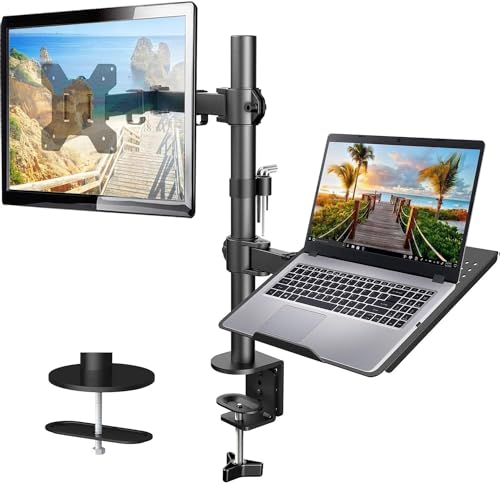
- Ventilated 14 x 12-inch laptop tray
- Supports 13-32-inch VESA monitors up to 22 pounds
- C-clamp and grommet mounting options
Best For: Small desks needing a flexible laptop-or-monitor mount
Best Under-Desk Space Saver
Mount-It! Under-Desk Laptop Holder
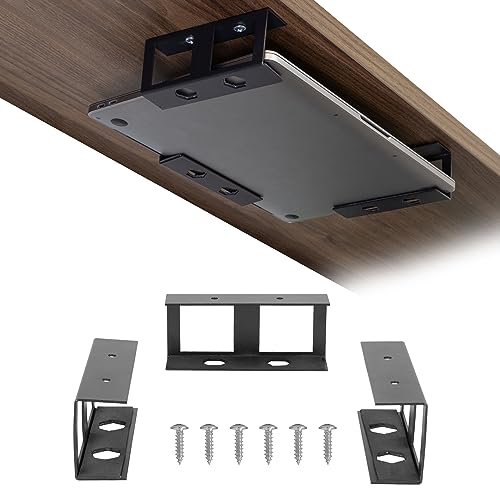
- Stores devices beneath desks, shelves, or on walls
- Fits devices up to 1.7 inches high and 11 pounds
- Includes foam pads, screws, tape, and lifetime warranty
Best For: Removing a slim laptop or device from a crowded desktop
Best Cooling Tray
HUANUO 2-in-1 Laptop Desk Mount

- Ventilated tray fits laptops up to 17 inches
- 240 ventilation holes promote airflow
- Converts to a VESA monitor arm
Best For: Laptop users who want cooling and monitor flexibility
Best Wide-Range Adjustment

- Ventilated tray fits laptops up to 17 inches
- C-clamp supports surfaces up to 3.4 inches thick
- Arm tilts, swivels, rotates, and extends 16.5 inches
Best For: Flexible, drill-free laptop positioning on thicker desks
Best Flexible Dual-Mount Option
WALI Adjustable Laptop Desk Mount

- Supports laptops up to 17 inches and 22 pounds
- C-clamp and grommet installation options
- Ventilated tray with broad arm adjustment
Best For: Small desks needing flexible laptop or monitor mounting
Best Full-Motion Upgrade

- Supports laptops up to 17 inches or monitors up to 34 inches
- Full-motion arm extends up to 18.1 inches
- Secure ventilated tray with anti-slip features
Best For: Compact workstations that may switch between laptop and monitor use
Best Simple Side Clamp
IRENPORU Adjustable Laptop Mount

- Tool-free clamp fits desks up to 1.96 inches
- Metal holder with silicone scratch protection
- Side-mounted design frees space for peripherals
Best For: Very small desks needing a basic hanging laptop holder
Best Compact Workstation Value

- Detachable tray supports laptops up to 15.6 inches
- Adjustable arm with 400mm height range
- Clamp and grommet bases included
Best For: Compact desks and users who may switch between laptop and monitor modes
Best Heavy-Duty Capacity

- Fits laptops up to 17 inches and monitors up to 32 inches
- Supports up to 19.8 pounds in the stated range
- Ventilated tray with anti-slip pads and straps
Best For: Convertible setups needing higher monitor capacity
Best Adjustable 2-in-1 – HUANUO Laptop and Monitor Arm
If you need laptop mounts for small desks, this HUANUO arm combines a ventilated laptop tray with monitor-mount compatibility. Its articulating design helps lift the laptop off the work surface while keeping adjustment and cable management within reach.
Best For: Small-desk users who want one mount that can hold a laptop or a VESA monitor.
Pros:
- 14 x 12-inch ventilated tray supports laptops and helps promote airflow.
- Supports 13-32-inch VESA monitors weighing up to 22 pounds.
- Offers tilt, swivel, rotation, height adjustment, and cable management.
- Includes C-clamp and grommet mounting options for compatible wood desks.
Cons:
- Mounting hardware is limited to compatible wooden desks.
- Installation requires careful tightening and following the included instructions.
This is a flexible choice when your setup may change between laptop and monitor use. Check your desk material, thickness, and device specifications before buying.
Best Under-Desk Space Saver – Mount-It! Under-Desk Laptop Holder
For small desks where every inch matters, this Mount-It! bracket system stores a laptop or slim device beneath the tabletop, shelf, or even on a wall. Its separate steel brackets can be positioned to match the device’s width and depth.
Best For: Clearing the desktop completely while storing a slim laptop, keyboard, Mac mini, tablet, or similar device underneath.
Pros:
- Moves compatible devices under a desk or shelf to free valuable surface space.
- Adjustable three-bracket layout fits devices up to 1.7 inches high and 11 pounds.
- Foam pads help protect devices from scratches.
- Includes screws, double-sided tape, and a lifetime warranty.
Cons:
- The 1.7-inch height and 11-pound limit exclude thicker or heavier laptops.
- Bracket placement requires measuring the device before installation.
- Tape installation is available, but screw mounting provides the secure installation method described.
This is a practical space-saving option for compact workstations, provided your device fits the height and weight limits. Its open bracket design offers more placement flexibility than a fixed-size tray.
Best Cooling Tray – HUANUO 2-in-1 Laptop Desk Mount
Among laptop mounts for small desks, this HUANUO model stands out for its ventilated tray and convertible design. It supports laptops up to 17 inches, or the tray can be removed to create a VESA monitor arm for a different workspace arrangement.
Best For: Users who want airflow-focused laptop support and the option to switch to a monitor later.
Pros:
- 13.8 x 11.8-inch tray fits laptops up to 17 inches.
- Tray has 240 ventilation holes to promote airflow.
- Supports 15-32-inch VESA monitors up to 22 pounds when the tray is removed.
- Provides tilt, swivel, rotation, cable management, and C-clamp or grommet mounting.
Cons:
- Mounting options are specified for compatible wood desks.
- The tray dimensions may not suit unusually large laptops or accessories.
- Desk thickness must fall within the listed C-clamp or grommet ranges.
This mount is a strong fit for a small desk that needs both laptop cooling and future setup flexibility. Confirm your desk material, thickness, and laptop dimensions before installation.
Best Wide-Range Adjustment – VIVO Single Laptop Desk Mount
This VIVO stand is a capable option for laptop mounts for small desks when you need broad positioning control. Its ventilated tray supports laptops up to 17 inches, while the adjustable arm can also accommodate a compatible monitor.
Best For: Users who want a drill-free, highly adjustable laptop tray with generous arm movement.
Pros:
- 14 x 11.8-inch ventilated tray supports laptops up to 17 inches and 22 pounds.
- C-clamp fits surfaces up to 3.4 inches thick, with a grommet option up to 3 inches.
- Offers tilt, swivel, rotation, height adjustment, and extension up to 16.5 inches.
- Includes cable clips and can also hold a monitor up to 32 inches.
Cons:
- The tray and arm require adequate clearance for their extended movement.
- Monitor use depends on compatible monitor mounting requirements.
- Its larger adjustment range may be more than necessary for a fixed laptop setup.
Choose this model when positioning flexibility is more important than the smallest possible hardware footprint. The substantial clamp range also makes it useful for desks that are thicker than average.
Best Flexible Dual-Mount Option – WALI Adjustable Laptop Desk Mount
If you need laptop mounts for small desks, the WALI Adjustable Laptop Desk Mount combines a ventilated laptop tray with flexible positioning. It supports laptops up to 17 inches and 22 pounds, while its C-clamp and grommet options accommodate several desk styles.
Best For: Small-desk users who want a height-adjustable laptop arm that can also hold a VESA monitor.
Pros:
- Supports laptops up to 17 inches and 22 pounds.
- Offers C-clamp and grommet installation options.
- Provides height adjustment, tilt, swivel, rotation, extension, and retraction.
- Ventilated 14-by-11-inch tray helps promote airflow.
Cons:
- The C-clamp and grommet mounts support different desk-thickness ranges, so compatibility should be checked before installation.
- The tray’s 0.6-inch bottom lip may not suit every laptop design.
This is a versatile choice when you want to reclaim desk surface while keeping the option to switch between a laptop and a compatible VESA monitor. Its broad adjustment range also makes it useful for ergonomic positioning.
Best Full-Motion Upgrade – HUANUO 2-in-1 Laptop Mount
For laptop mounts for small desks that can adapt as your setup changes, the HUANUO 2-in-1 mount supports either a laptop or a VESA monitor. Its articulated arm reaches up to 18.1 inches and offers extensive height and angle adjustment without taking up the main work surface.
Best For: Users who want a full-motion mount for a laptop today and a 13- to 34-inch monitor later.
Pros:
- Holds notebooks up to 17 inches or compatible 13- to 34-inch monitors.
- Includes C-clamp and grommet mounting options for different desks.
- Offers ±45-degree tilt, ±90-degree swivel, and 360-degree rotation.
- Ventilated tray includes anti-slip pads, a bottom guard, and Velcro straps.
Cons:
- The arm can rise when the laptop is removed because of its counterbalance mechanism.
- Monitor weight capacity varies by configuration, from 4.85 to 19.8 pounds.
The HUANUO stands out for flexibility and reach. It is especially practical for a compact workstation where the ability to change between laptop and monitor modes can extend the mount’s usefulness.
Best Simple Side Clamp – IRENPORU Adjustable Laptop Mount
If your small desk cannot spare room for a base or articulated arm, the IRENPORU side mount offers a compact alternative. This clamp-on laptop holder attaches without drilling, hangs the device beside the desk, and uses silicone protection to help prevent scratches.
Best For: Small desks that need a straightforward, tool-free side-mounted holder for a laptop, tablet, or documents.
Pros:
- Clamp-on design fits desks up to 1.96 inches thick.
- Requires no drilling or complex hardware.
- Metal construction and a high-tension spring provide a firm hold.
- Silicone pads help protect the desk and device from scratches.
Cons:
- It is a side holder rather than a height-adjustable monitor arm.
- Its listed dimensions are compact, so larger devices should be checked against the adjustable clamp before purchase.
- The warranty description is limited to three months.
This mount is a space-saving pick for basic organization rather than full ergonomic positioning. Its punch-free installation and small footprint make it well suited to renters, counters, and tightly packed home-office setups.
Best Flexible Fit – UPGRAVITY Laptop Desk Mount
If you need laptop mounts for small desks, the UPGRAVITY mount is a versatile option that raises a laptop or monitor off the desktop while preserving usable workspace. Its detachable tray, broad compatibility, and two mounting choices make it practical for changing setups.
Best For: Users who want one adjustable mount for laptops up to 17 inches or monitors up to 32 inches.
Pros:
- Supports laptops up to 17 inches and monitors up to 32 inches with 75x75mm or 100x100mm VESA mounting.
- Offers 90° tilt, 180° swivel, 360° rotation, and height adjustment.
- Includes a ventilated, detachable tray plus cable clips for tidier routing.
- Supports clamp or grommet installation.
Cons:
- Its 17.6-pound capacity may not suit heavier equipment.
- The tray and arm take up some vertical and rear desk space.
With a 0.39- to 1.97-inch clamp range and a grommet option for holes up to 2.36 inches, this mount accommodates many compact work surfaces. It is a strong pick if flexibility matters more than having a permanently dedicated laptop stand.
Best Compact Workstation Value – Suptek Laptop Desk Mount
For laptop mounts for small desks, the Suptek single-arm stand combines a detachable notebook tray with monitor-mounting capability. It helps clear the desktop and provides independent adjustment for positioning a screen or laptop at a more comfortable height.
Best For: Small-desk users with a laptop up to 15.6 inches who may later switch to a monitor.
Pros:
- Detachable tray supports notebooks up to 15.6 inches and leaves the arm available for a monitor.
- Provides 180° arm swiveling, 360° monitor rotation, ±90° tilt, and 400mm height adjustment.
- Ventilation holes and a front lip help with airflow and laptop stability.
- Includes both C-clamp and grommet bases for desks 10-80mm thick.
Cons:
- The laptop tray is limited to notebooks up to 15.6 inches.
- The monitor side supports screens only from 13 to 27 inches.
The Suptek is a practical choice when you want a relatively compact, adaptable arm rather than a laptop-only platform. Its included cable and slot management also helps keep a small work surface less cluttered.
Best Heavy-Duty Capacity – MOUNT PRO Laptop Arm Mount
The MOUNT PRO is designed for shoppers comparing laptop mounts for small desks and wanting extra capacity. Its 2-in-1 arm can hold a laptop up to 17 inches or a 13- to 32-inch VESA monitor, while the ventilated tray and cable guides help maintain a cleaner setup.
Best For: Users who want a sturdy, convertible mount with a higher stated monitor capacity.
Pros:
- Supports laptops up to 17 inches and monitors from 13 to 32 inches.
- Offers a stated load range up to 19.8 pounds, depending on the setup.
- Provides -45° to +90° tilt, 180° swivel, 360° rotation, and up to 16.9 inches of lift.
- Ventilated tray includes anti-slip pads and Velcro straps; cable guides help organize wires.
Cons:
- The tray should not be rotated to a vertical position.
- It requires checking desk thickness and grommet-hole dimensions before installation.
Clamp mounting suits desks 0.39 to 2.76 inches thick, while the grommet base accommodates holes from 0.39 to 2.36 inches. This makes the MOUNT PRO a compelling option for a compact desk that needs a convertible arm and more headroom for monitor weight.
How We Picked the Best Laptop Mounts for Small Desks
We focused on mounts that address the main challenge of a compact workspace: limited usable surface area. Each selected model was evaluated for its installation method, laptop-size compatibility, weight support, adjustability, desk-space savings, and ability to work alongside a monitor.
Clamp-on arms received particular attention because they typically install without drilling and can move a laptop off the main work surface. Under-desk shelves and side-clamp holders were also included for buyers who want a lower-profile setup. Because product specifications can vary by configuration, confirm the listed weight and size limits before ordering.
Quick Comparison
| Mount type | Best for | Main advantage | Potential limitation |
|---|---|---|---|
| Monitor arm with laptop tray | Laptop-and-monitor setups | Combines screen positioning with desk clearance | May require a VESA-compatible monitor |
| Single laptop arm | Flexible everyday use | Offers height, tilt, and swivel adjustment | Needs adequate clamp space |
| Under-desk holder | Maximum surface clearance | Keeps the laptop below the desktop | Usually provides less viewing-height adjustment |
| Side-clamp holder | Very narrow desks | Uses the desk edge rather than tabletop space | May have fewer positioning options |
Key Buying Factors for Laptop Mounts for Small Desks
Mounting Method and Clearance
Measure the desk thickness, rear clearance, and available edge space before buying. C-clamps are convenient for most desks, while under-desk brackets work best when there is enough unobstructed space beneath the surface. Check for drawers, crossbars, cable trays, and wall proximity that could restrict movement.
Size and Weight Capacity
Match the tray dimensions and stated capacity to your laptop. A 17-inch notebook may need a larger tray than a compact 13-inch model, and heavier gaming or workstation laptops require extra margin below the mount’s maximum rating. A secure retaining lip or strap can also help prevent sliding.
Adjustment and Stability
Look for height, tilt, swivel, and rotation controls if you frequently alternate between sitting and standing or share the desk. Gas-spring arms offer convenient repositioning, but a sturdy base and properly tightened joints matter more than movement alone. Test the mount at the position you use most often, not only when fully retracted.
Monitor Compatibility and Cable Management
If you want to mount a laptop beside a display, verify the monitor’s VESA pattern, size range, and weight. Built-in cable clips or channels can prevent cords from consuming the little workspace you have gained.
Who Should Buy Which Laptop Mounts for Small Desks?
Choose a monitor arm with a laptop tray if you want a coordinated dual-screen setup and already use, or plan to add, a VESA monitor. Pick a standard adjustable laptop arm for the best balance of flexibility and ergonomic positioning. An under-desk holder is the better choice when clearing the desktop is the top priority and you mainly access the laptop as a secondary device. For exceptionally narrow desks, a side-clamp mount can provide useful clearance with a smaller footprint.
Whichever style you choose, measure first, verify the laptop dimensions and weight, and leave enough room for the clamp and cable routing. Those checks will help ensure your new mount saves space without making the workstation harder to use.