A laptop that sits too low can force your neck and shoulders into an uncomfortable position, especially at a standing desk or a taller-than-average workstation. The right mount raises the screen, improves viewing angles, and helps you build a more comfortable laptop setup.
We compared 10 laptop mounts for tall people by height adjustment, stability, compatibility, desk mounting options, and useful features such as full-motion arms and VESA support. The picks below cover compact home offices, standing desks, and multi-monitor workstations.
Best 10 Laptop Mounts for Tall People Picks for 2026
Best Single-Arm Mount

- Raises laptops up to 16.9 inches
- Fits laptops up to 17 inches
- Clamp or grommet installation
Best For: Tall, space-saving home office setups
Best Triple-Screen Setup
Tall Laptop and Dual Monitor Mount

- Holds a laptop plus two monitors
- Supports laptops up to 17 inches
- Tall center pole with adjustable arms
Best For: Multitasking and multi-monitor workstations
Best Pole Mount
Universal Full-Motion Laptop Tray

- Clamps to 1.1–2.4-inch poles
- Supports laptops up to 15.4 pounds
- Rotates around the pole for flexible positioning
Best For: Compatible pole-based workstations
Flexible Height Pick
WALI Adjustable Laptop Desk Mount

- 16 inches of height adjustment
- Supports laptops up to 17 inches and 22 pounds
- Clamp and grommet mounting options
Best For: Tall users who need flexible laptop or monitor positioning
Premium Tall-Desk Upgrade
Mount-It! Proflex Laptop Mount

- Height adjusts from 5.1 to 28.1 inches
- Gas-spring arm with full-motion adjustment
- Built-in USB 3.0 and USB-C ports
Best For: Tall users seeking broad height range and premium desk features
Simple Desktop Riser
Mount-It! Adjustable Laptop Stand

- Raises laptops 4.6 to 6.5 inches
- Supports up to 33 pounds
- No clamp or drilling required
Best For: Tall users wanting a stable seated-work laptop riser
Best Adjustable Monitor-and-Laptop Mount
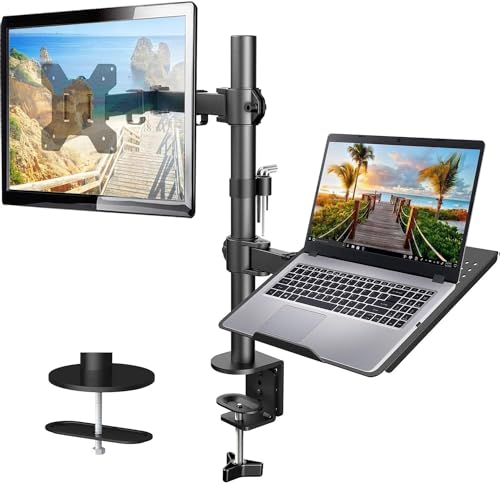
- Adjusts up to 17 inches tall
- Ventilated 14 x 12-inch laptop tray
- Supports laptops or VESA monitors up to 22 pounds
Best For: Tall users wanting one mount for a laptop or monitor
Best Large-Laptop Mount

- Fits laptops up to 17 inches
- 17-inch center-pole height adjustment
- Drill-free C-clamp or grommet mounting
Best For: Large-laptop users needing flexible height adjustment
Best Height-Reaching 2-in-1 Mount

- Reaches 17.5 inches high
- Extends up to 18.1 inches
- Switches between a laptop tray and VESA monitor mount
Best For: Tall users wanting maximum reach and 2-in-1 flexibility
Best Tall Adjustable Stand – Strong Sit-Stand Laptop Riser
If you need laptop mounts for tall people without committing to a permanent desk mount, this adjustable VECOFO stand offers a practical way to raise a laptop for sitting or standing work. Its height range and quick-adjust latch make it useful for finding a more comfortable screen and camera position.
Best For: Tall users who want a portable, freestanding laptop stand for alternating between sitting and standing.
Pros:
- Adjusts from 8.7 to 15 inches for flexible screen elevation.
- Supports laptops from 13.3 to 17.3 inches and uses a reinforced metal design.
- Quick-adjust latch lets you change height without removing the laptop.
- Helps position the camera closer to eye level for video calls.
Cons:
- It is a tabletop stand rather than a clamp-on desk mount.
- The laptop may extend beyond the sides of the platform with larger models.
This is a strong choice when maximum height and easy repositioning matter more than saving desk space. Its freestanding design also makes it easier to move between work areas.
Best Single-Arm Mount – Full-Motion Laptop Desk Arm
For tall users who want a laptop lifted off the desk, the MOUNT PRO arm provides a flexible alternative to a basic riser. It can raise a laptop up to 16.9 inches, while its articulated movement helps you fine-tune the viewing angle and position.
Best For: Home offices that need a height-adjustable laptop arm with the option to switch to a monitor mount.
Pros:
- Raises the screen up to 16.9 inches for a higher viewing position.
- Supports laptops up to 17 inches and up to 19.8 pounds.
- Offers tilt, swivel, and rotation adjustments for flexible positioning.
- Includes a ventilated tray, anti-slip pads, straps, and cable management.
Cons:
- Requires desk installation using a clamp or grommet mount.
- The tray should not be rotated to a vertical position.
This mount is especially useful if you want a tall laptop setup that can later accommodate a monitor. Check your desk thickness and mounting space before ordering.
Best Triple-Screen Setup – Tall Laptop and Dual Monitor Mount
If your tall-person workstation needs more than a single elevated laptop, this VIVO desk mount combines a laptop tray with two monitor arms. The tall center pole and adjustable screen positions make it suitable for building a higher, productivity-focused multi-screen setup.
Best For: Tall users who want an elevated laptop plus two-monitor workstation for multitasking.
Pros:
- Creates a three-screen setup with a laptop tray and two monitor mounts.
- Holds laptops up to 17 inches and monitors from 13 to 27 inches.
- Offers tilt, swivel, rotation, and height adjustment along the center pole.
- Uses a heavy-duty C-clamp or optional grommet mount on desks up to 3.25 inches thick.
Cons:
- It is a larger, 14-pound system that needs substantial desk space.
- Monitor compatibility depends on 75x75mm or 100x100mm VESA patterns.
This is the most capable option here for a tall, multi-display desk. It makes sense when screen count and adjustable monitor positioning are more important than a compact footprint.
Best Pole Mount – Universal Full-Motion Laptop Tray
For desks or workstations built around a vertical pole, the PUTORSEN tray offers a specialized way to position a laptop higher and farther from the work surface. Its rotating pole clamp and full-motion arm provide useful flexibility for tall users and shared work areas.
Best For: Pole-based workstations using a compatible 1.1- to 2.4-inch-diameter pole.
Pros:
- Fits poles from 1.1 to 2.4 inches in diameter.
- Supports 12- to 18-inch laptops up to 15.4 pounds.
- Provides tilt, swivel, and rotation adjustments, including rotation around the pole.
- Includes cable management clips and a removable VESA plate.
Cons:
- It cannot mount directly to a standard tabletop without a compatible pole.
- Its 15.4-pound capacity is lower than some larger desk-arm options.
This is a focused solution rather than a general-purpose laptop mount. If you already have a compatible pole, its rotational range can make screen sharing and ergonomic positioning much easier.
Flexible Height Pick – WALI Adjustable Laptop Desk Mount
For tall users comparing laptop mounts for tall people, the WALI Adjustable Laptop Desk Mount offers up to 16 inches of height adjustment, helping bring a laptop or monitor closer to eye level while keeping the desk more open.
Best For: Tall users who want a flexible, space-saving mount for a laptop or VESA-compatible monitor.
Pros:
- Supports laptops up to 17 inches and 22 pounds.
- Provides 16 inches of height adjustment, plus tilt, swivel, and rotation.
- Includes both C-clamp and grommet mounting options.
- Ventilated tray includes cooling holes and a retaining lip.
Cons:
- The laptop tray measures 14 by 11 inches, so larger devices may be a tight fit.
- Desk compatibility depends on the specified clamp or grommet thickness range.
Its generous vertical range and 22-pound capacity make this a practical choice when you need more elevation than a basic laptop riser, while the detachable tray adds monitor flexibility.
Premium Tall-Desk Upgrade – Mount-It! Proflex Laptop Mount
Among laptop mounts for tall people, the Mount-It! Proflex stands out for its gas-spring height range, reaching from 5.1 to 28.1 inches. That broad adjustment can help taller users position the screen comfortably for seated work or a higher workstation setup.
Best For: Tall users who want maximum height range, smooth adjustment, and built-in connectivity.
Pros:
- Adjusts from 5.1 to 28.1 inches and extends up to 16.7 inches.
- Fits laptops from 11.6 to 17.3 inches weighing up to 19.8 pounds.
- Gas-spring arm supports full-motion tilt and swivel adjustment.
- Includes built-in USB 3.0 and USB-C ports.
Cons:
- Its laptop weight limit is lower than the WALI model in this roundup.
- Clamp and grommet mounting require compatible desk dimensions.
The unusually tall adjustment range is the main reason to choose this model. Steel and aluminum construction, cable management, and a lifetime warranty further suit demanding home-office or professional setups.
Simple Desktop Riser – Mount-It! Adjustable Laptop Stand
For shoppers considering laptop mounts for tall people but who prefer a freestanding solution, this Mount-It! stand raises a laptop 4.6 to 6.5 inches without clamps or drilling. It is a straightforward way to improve screen height on a seated desk.
Best For: Tall users who want a stable, no-installation desktop riser for an 11- to 15-inch laptop.
Pros:
- Adjusts between 4.6 and 6.5 inches.
- Supports up to 33 pounds.
- Freestanding design requires no clamp or desk holes.
- Anti-slip padding helps secure the device and protect the desktop.
Cons:
- It is not designed to bring a laptop to standing height.
- It holds one device at a time.
- It fits laptops with screens from 11 to 15 inches.
This is the simplest option in the group and offers the highest stated weight capacity. Its limited 4.6- to 6.5-inch range makes it better for seated ergonomic improvement than for users needing a very high lift.
Best Adjustable Monitor-and-Laptop Mount – HUANUO Single Arm
If you are comparing laptop mounts for tall people, this HUANUO model offers up to 17 inches of height adjustment and an arm that extends up to 16 inches. Its ventilated tray supports laptops while the 2-in-1 design can also hold a compatible VESA monitor.
Best For: Tall users who want a flexible laptop mount that can also accommodate a monitor.
Pros:
- Height adjusts up to 17 inches for a higher screen position.
- 14 x 12-inch ventilated tray includes a protruding bottom lip.
- Supports laptops or 13- to 32-inch VESA monitors up to 22 pounds.
- Includes C-clamp and grommet mounting options plus cable management.
Cons:
- Mounting hardware is intended for wooden desks.
- Users must tighten the screws securely when adjusting the angle.
This is a practical choice when vertical adjustment is the priority, especially if you may switch between a laptop and monitor later. Check your desk material and device measurements before installation.
Best Large-Laptop Mount – VIVO Adjustable Desk Stand
For shoppers seeking laptop mounts for tall people, the VIVO STAND-V001L combines a height-adjustable center pole with an arm that extends up to 16.5 inches. The ventilated tray fits laptops up to 17 inches and mounts without drilling through a C-clamp or grommet.
Best For: Users with larger laptops who want substantial adjustment and drill-free desk mounting.
Pros:
- Fits laptops up to 17 inches and supports up to 22 pounds.
- Height adjusts along a 17-inch center pole.
- Arm and tray extend up to 16.5 inches for flexible positioning.
- Offers tilt, swivel, rotation, cable clips, and dual mounting options.
Cons:
- The tray is designed for laptops rather than a broad range of monitor sizes.
- Its C-clamp and grommet mounts have specific desk-thickness limits.
With its large tray and generous vertical adjustment, this VIVO mount is well suited to taller workstations and bigger notebooks. Confirm your desk thickness and available surface space before choosing the mounting method.
Best Height-Reaching 2-in-1 Mount – HUANUO Full-Motion Arm
This HUANUO arm is a strong contender among laptop mounts for tall people, reaching up to 17.5 inches high with an 18.1-inch arm extension. It supports notebooks up to 17 inches and converts to a VESA monitor mount when the tray is removed.
Best For: Tall users who want maximum reach and the ability to alternate between a laptop and monitor.
Pros:
- Reaches up to 17.5 inches high and extends up to 18.1 inches.
- Fits laptops up to 17 inches on a ventilated, padded tray.
- Converts to support 13- to 34-inch VESA monitors.
- Provides tilt, swivel, and 360-degree rotation with C-clamp or grommet mounting.
Cons:
- Monitor weight capacity varies from 4.85 to 19.8 pounds.
- The arm may rise when the laptop is removed, so it should be held securely.
- Desk thickness limits differ between the C-clamp and grommet mounts.
The extended reach makes this the most height-oriented option in this group, while the removable tray adds flexibility for monitor setups. Its counterbalance behavior means careful handling is important when changing modes.
How We Picked the Best Laptop Mounts for Tall People
We focused on mounts that can place a laptop substantially higher than a standard desk surface while remaining stable during everyday typing and viewing. We considered stated laptop-size and weight limits, height range, arm or pole adjustability, tilt and swivel control, base design, and compatibility with desks and monitors.
Because taller users have different desk heights and seating positions, no single mount is ideal for everyone. Clamp-mounted arms are often the most flexible, while pole and riser designs can provide strong vertical adjustment with fewer moving parts.
Quick Comparison
| Mount type | Best for | What to check |
|---|---|---|
| Gas-spring arm | Frequent height and angle changes | Weight capacity and clamp depth |
| Pole mount | Stable vertical positioning | Pole height and tray dimensions |
| Fixed or adjustable riser | Simple desk elevation | Maximum lift and footprint |
| Monitor-and-laptop arm | Multi-screen workstations | VESA compatibility and total load |
Key Buying Factors for Laptop Mounts for Tall People
Height Range and Positioning
Look beyond the product’s maximum height. Your laptop should sit close to eye level without forcing you to tilt your head back. Measure from the desk or clamp surface to your preferred screen center, then compare that measurement with the mount’s usable adjustment range.
Weight and Size Compatibility
Check both laptop dimensions and weight, including a protective case if you use one. A mount rated for a 17-inch notebook may not have a tray wide or deep enough for every large laptop. Retaining lips, adjustable tabs, and ventilation openings are useful for secure placement and cooling.
Desk Fit and Stability
Confirm that the clamp opens wide enough for your desk and that the mounting surface is sturdy. Heavy laptops and extended arms create leverage, so a reinforced clamp or broad base is preferable for standing desks and frequent repositioning.
Movement, Cables, and Ergonomics
Full-motion arms are convenient for switching between sitting and standing, while simpler risers may be steadier and easier to adjust. Look for cable-management features and leave room for charging connections. If you type directly on the elevated laptop, an external keyboard and mouse can help preserve a neutral posture.
Who Should Buy Which Laptop Mounts for Tall People?
Choose a gas-spring arm if you regularly alternate between sitting and standing or need to share the screen. A pole mount suits users who prioritize firm vertical support and a clean workstation. Pick an adjustable riser for a straightforward height increase without complex installation. For a laptop-plus-monitor setup, a dual-function or monitor-arm mount can save desk space and align both displays more easily.
Before buying, measure your desk thickness, laptop footprint, and desired screen height. Those three checks will narrow the field quickly and help ensure your chosen mount is comfortable, stable, and compatible with your workspace.