Heavy laptops need more than a basic stand. The right mount should support the device securely while keeping your workspace, vehicle, or workstation comfortable and usable.
We compared 10 laptop mounts for heavy devices across desk, wall, monitor-arm, and mobile setups, focusing on weight capacity, adjustability, ventilation, installation, and compatibility.
Best 10 Laptop Mounts for Heavy Devices Picks for 2026
Best Desk-and-Monitor Combo
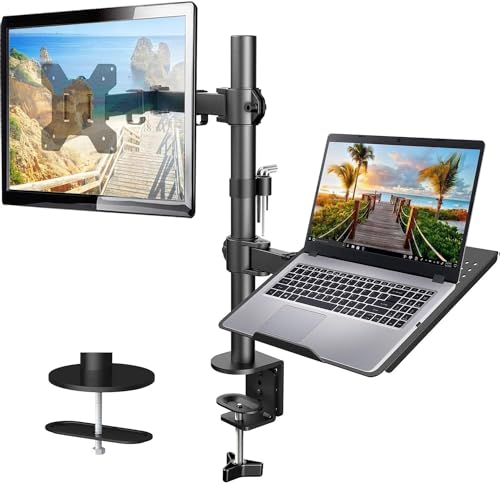
- 14-by-12-inch ventilated laptop tray
- Supports monitors up to 22 pounds
- C-clamp and grommet mounting options
Best For: Home offices combining a laptop and monitor
Best Heavy-Duty Vehicle Mount
MELIPRON No-Drill Truck Laptop Mount

- Heavy-duty aluminum-and-steel construction
- No-drill seat-rail installation
- Dual USB cooling fans and 360-degree swivel
Best For: Vehicle-based technicians and contractors
Best Wall-Mounted Heavy Laptop Tray

- Supports laptops up to 22 pounds
- Folds upward to save space
- Fits walls or 75/100 VESA patterns
Best For: Compact floating workstations
Best Convertible Desk Mount

- Holds laptops up to 17 inches
- Converts to a monitor arm up to 19.8 pounds
- Ventilated tray with straps and anti-slip pads
Best For: Flexible laptop-or-monitor desk setups
Shock-Resistant Tray
RAM Tough-Tray Universal Laptop Tray

- Adjustable spring-loaded arms fit varied laptop widths
- Rubber grips help secure the device
- Ball-and-socket system dampens shock and vibration
Best For: Mobile or vibration-prone laptop mounting setups
Heavy-Duty Desk Mount
VIVO Adjustable Laptop Stand with C-Clamp

- Supports up to 22 pounds and 17-inch laptops
- Uses a C-clamp or grommet mount
- Provides extensive tilt, swivel, rotation, and height adjustment
Best For: Adjustable, drill-free desktop laptop mounting
Best Wall-Mount Option
MOUNT PRO 2-in-1 Laptop Wall Mount

- Supports up to 19.8 pounds
- Fits 11- to 17-inch laptops
- Wall-mount design frees desk space
Best For: Secure wall-mounted laptop or monitor setups
Best Desk-Mount Option

- Supports up to 19.8 pounds
- Fits laptops up to 17 inches
- Uses clamp or grommet mounting
Best For: Flexible desk-mounted laptop and monitor setups
Best Add-On Tray

- Converts a VESA arm for laptop use
- Fits laptops up to 16.5 inches wide
- Ventilated steel tray with adjustable clips
Best For: Upgrading an existing monitor arm
Best Desk-and-Monitor Combo – HUANUO Adjustable Laptop Arm
For shoppers comparing laptop mounts for heavy devices, the HUANUO combines a ventilated 14-by-12-inch tray with a monitor arm rated for up to 22 pounds. Its desk-mounted design provides adjustable positioning while keeping cables organized.
Best For: Home offices that need a laptop tray and monitor mount in one setup.
Pros:
- Supports laptops on a ventilated tray with a raised front lip.
- Monitor arm fits 13- to 32-inch VESA displays and supports up to 22 pounds.
- Offers tilt, swivel, rotation, height adjustment, and cable management.
- Includes C-clamp and grommet mounting options for compatible wooden desks.
Cons:
- Mounting hardware is specified for wooden desks only.
- Installation and angle adjustments require careful tightening and adherence to the instructions.
This is a versatile choice when a heavy laptop needs elevated desk placement alongside an external monitor. Confirm your desk material and the monitor’s VESA pattern, size, and weight before buying.
Best Heavy-Duty Vehicle Mount – MELIPRON No-Drill Truck Laptop Mount
For mobile professionals seeking laptop mounts for heavy devices, the MELIPRON uses a heavy-duty aluminum-and-steel construction and attaches to passenger-seat rail bolts without drilling. Its adjustable platform and built-in cooling fans are suited to laptop work inside a vehicle.
Best For: Technicians, contractors, and fleet users who work from a vehicle.
Pros:
- No-drill installation uses the passenger seat rail bolts.
- Heavy-duty aluminum and steel construction is designed for stability on rough roads.
- Provides height, tilt, and 360-degree swivel adjustment.
- Dual USB cooling fans and a quick-release telescopic pole add practical flexibility.
Cons:
- The 12-pound mount is a substantial piece of equipment.
- Fitment depends on the vehicle’s seat-rail configuration and should be confirmed before purchase.
- Its vehicle-specific design is not intended for ordinary desk use.
The MELIPRON stands out for demanding mobile work where stability and cooling matter more than portability. The included two-year warranty and replacement-parts support may also appeal to frequent professional users.
Best Wall-Mounted Heavy Laptop Tray – VIVO Flip Down Laptop Holder
The VIVO Flip Down is a space-saving option among laptop mounts for heavy devices, supporting laptops from 13 to 17 inches and up to 22 pounds. It can attach directly to a wall or to a compatible VESA monitor arm, creating a floating workstation.
Best For: Small workspaces that need a sturdy laptop surface that folds away.
Pros:
- Solid-steel tray supports up to 22 pounds.
- Works with wood studs, drywall, concrete, brick, and standard 75-by-75 or 100-by-100 VESA patterns.
- Flip-up storage design clears desk space when the laptop is not in use.
- Ventilation slots, padding, and safety stoppers help protect and secure the laptop.
Cons:
- Wall installation requires selecting appropriate hardware for the surface.
- The tray is limited to laptops from 13 to 17 inches.
- Its fixed wall or VESA format offers less desk-level repositioning than an articulating arm.
This tray is a strong fit for a permanent or semi-permanent workstation where reclaiming desk space is important. Its broad mounting compatibility and 22-pound capacity make it suitable for heavier notebooks, provided the wall or VESA installation is secure.
Best Convertible Desk Mount – MOUNT PRO Laptop Arm Mount
The MOUNT PRO is a practical choice for laptop mounts for heavy devices when you want a convertible desk setup. Its tray holds notebooks up to 17 inches, while removing the tray allows the arm to support a compatible 13- to 32-inch monitor weighing up to 19.8 pounds.
Best For: Users who want to switch between a laptop tray and an external monitor.
Pros:
- Two-in-one design supports a laptop or a VESA monitor.
- Tray includes ventilation, anti-slip pads, and Velcro straps.
- Offers tilt, swivel, rotation, and up to 16.9 inches of height adjustment.
- Includes clamp and grommet mounting options plus integrated cable management.
Cons:
- Monitor capacity varies by configuration and tops out at 19.8 pounds.
- The tray should not be rotated to a vertical position.
- Desk thickness and grommet-hole requirements must match the installation specifications.
This arm balances flexibility and support for a home office, gaming station, or study area. Choose it when switching between laptop and monitor modes matters, and verify your desk dimensions before installation.
Shock-Resistant Tray – RAM Tough-Tray Universal Laptop Tray
For laptop mounts for heavy devices, the RAM Tough-Tray is a strong option when secure retention and vibration control matter. Its spring-loaded side arms adjust vertically and horizontally to fit laptops from 10 to 16 inches, with the notes also indicating compatibility with laptops having 17-inch screens.
Best For: Vehicle, industrial, or mobile setups that need an adjustable tray with shock- and vibration-dampening support.
Pros:
- Spring-loaded tray accommodates a broad range of laptop widths.
- Four rubber-grip clamping arms can be repositioned to clear ports and drives.
- Patented ball-and-socket system helps isolate and dampen shock and vibration.
- Includes perimeter mounting holes and a lifetime warranty.
Cons:
- The tray is a specialized mounting component rather than a complete desk stand.
- Its listed tray depth is 10 inches, so unusually deep devices may require careful fit checking.
Choose this model when adaptable clamping and vibration management are more important than a minimalist desktop design. The adjustable arms make it practical for varied laptop shapes and accessory layouts.
Heavy-Duty Desk Mount – VIVO Adjustable Laptop Stand with C-Clamp
Among laptop mounts for heavy devices, the VIVO STAND-V001L stands out for its stated 22-pound capacity and flexible desk positioning. It supports laptops up to 17 inches and attaches without drilling using either a C-clamp or grommet mount.
Best For: Workstations needing a sturdy, highly adjustable laptop tray with a drill-free desk installation.
Pros:
- Supports laptops up to 17 inches and weights up to 22 pounds.
- Offers tilt, swivel, rotation, height adjustment, and tray extension.
- Includes C-clamp and grommet mounting options for different desks.
- Detachable cable clips help organize power and AV cords.
Cons:
- Desk mounting is limited to surfaces up to 3.4 inches thick for the C-clamp or 3 inches for the grommet.
- The larger adjustable arm and center pole may take more workspace than a fixed tray.
This is a practical pick for heavier laptops that need frequent repositioning. Its broad adjustment range and dual mounting options make it especially useful for ergonomic desk layouts.
Ventilated VESA Tray – VIVO Steel Laptop Tray for VESA Mounts
If you need laptop mounts for heavy devices built around an existing monitor arm, the VIVO STAND-LAP2 provides a steel tray with VESA compatibility. It fits laptops up to 17 inches, adds ventilation holes for airflow, and connects to 100 x 100 mm VESA mounting plates.
Best For: Users who already have a compatible VESA arm and want to convert it into a ventilated laptop platform.
Pros:
- Steel tray fits laptops and notebooks up to 17 inches.
- Compatible with VESA 100 x 100 mm mounting plates.
- Extra ventilation holes improve airflow around the laptop.
- Raised bottom lip helps prevent the device from sliding.
Cons:
- This purchase includes the tray only; the VESA arm must be purchased separately.
- Compatibility depends on having a suitable 100 x 100 mm VESA mount.
The STAND-LAP2 is best viewed as a robust add-on rather than a complete mounting system. It makes sense when your workspace already uses VESA hardware and you want a metal, ventilated laptop platform.
Best Wall-Mount Option – MOUNT PRO 2-in-1 Laptop Wall Mount
For laptop mounts for heavy devices, the MOUNT PRO stands out with a stated 4.4- to 19.8-pound capacity. Its wall-mounted design supports laptops or compatible monitors while helping clear desk space.
Best For: Wall-mounted workstations, standing/sitting setups, and users who want one mount for a laptop or monitor.
Pros:
- Supports devices weighing up to 19.8 pounds.
- Fits most 11- to 17-inch laptops and converts for 13- to 32-inch VESA monitors.
- Offers tilt, swivel, and height adjustment, plus cable management.
- Ventilated tray includes adjustable straps to help secure the laptop.
Cons:
- Requires secure installation into a wood stud, masonry, or concrete wall; drywall alone is not recommended.
- Wall mounting is less portable than a desk-mounted design.
With its metal construction, broad capacity range, and flexible arm, this is a strong choice when stability and a clear desktop matter more than portability.
Best Desk-Mount Option – HUANUO 2-in-1 Laptop Arm
The HUANUO is a practical pick among laptop mounts for heavy devices, supporting a stated 4.85- to 19.8-pound load range. Its desk clamp or grommet installation makes it easier to add to an existing workstation without wall drilling.
Best For: Desk users who want a heavy-duty laptop or monitor arm with flexible positioning and multiple installation options.
Pros:
- Supports laptops up to 17 inches and monitors from 13 to 34 inches.
- Handles up to 19.8 pounds and offers tilt, swivel, and rotation.
- Extends up to 18.1 inches with a maximum height of 17.5 inches.
- Ventilated tray has anti-slip pads, a bottom guard, and Velcro straps.
Cons:
- Removing the laptop can cause the counterbalanced arm to rise, so it should be held securely.
- Desk compatibility depends on the specified clamp or grommet thickness limits.
This model combines a high stated capacity with broad adjustment and convenient desk installation, making it a versatile choice for a compact, ergonomic workspace.
Best Add-On Tray – Mount-It! VESA Laptop Tray
If you already own a compatible monitor arm, the Mount-It! tray is a straightforward way to support a heavier laptop setup. It attaches to 75×75 or 100×100 VESA patterns and uses adjustable clips to hold laptops up to 16.5 inches wide.
Best For: Adding laptop support to an existing VESA monitor arm or creating a dual-screen workstation.
Pros:
- Works with existing 75×75 or 100×100 VESA monitor arms.
- Adjustable clips fit laptops from 9.5 to 16.5 inches wide.
- Steel tray includes ventilation, traction pads, side clips, and bottom lips.
- Includes a stated lifetime warranty and US-based technical support.
Cons:
- Requires a compatible monitor arm or stand, which is not included.
- Its compatibility is specified by laptop width rather than a stated weight capacity.
This is best viewed as a durable conversion tray rather than a complete mount. It makes sense for shoppers who already have a VESA arm and want to add a laptop without replacing their current setup.
How We Picked the Best Laptop Mounts for Heavy Devices
We evaluated these mounts by the factors that matter most when supporting a larger or heavier notebook: stated weight capacity, tray dimensions, device-size range, mounting method, adjustment range, and overall stability. We also considered ventilation, VESA compatibility, cable access, and whether each design suits a fixed desk, wall, vehicle, or mobile work environment.
Because “heavy” varies by laptop, always compare your device’s weight and dimensions with the manufacturer’s specifications. A mount rated for a certain screen size may not safely support every laptop within that range.
Quick Comparison
| Mount type | Best for | Key advantage | Check before buying |
|---|---|---|---|
| Desk clamp | Home offices and workstations | Flexible positioning without drilling | Desk thickness and clamp clearance |
| Monitor-arm tray | Dual-screen setups | Raises the laptop beside a monitor | VESA pattern and arm weight capacity |
| Wall mount | Permanent or space-saving installations | Frees up desk space | Wall structure and mounting hardware |
| Vehicle or truck mount | Mobile professionals | Built for use on the road | Vehicle fit, vibration, and installation |
| Standalone or flip-down tray | Compact work areas | Simple access and storage | Available clearance and support angle |
Key Buying Factors for Laptop Mounts for Heavy Devices
Weight Capacity and Stability
Choose a mount with a capacity comfortably above your laptop’s weight, especially if you use accessories, a docking cable, or an external drive. A broad tray, reinforced steel construction, and a secure clamp or wall attachment can reduce movement.
Fit and Ventilation
Measure the laptop’s actual width and depth rather than relying only on its advertised screen size. Vented steel trays can improve airflow, while retaining lips, side supports, or adjustable grips help prevent sliding.
Mounting Method and Adjustability
Desk clamps are convenient for renters and shared workspaces. VESA-compatible trays work well with existing monitor arms, but the arm must be rated for the combined tray and laptop weight. Wall mounts save space but require careful anchoring. For vehicle use, prioritize a purpose-built base and hardware designed to handle vibration.
Ergonomics and Daily Access
Look for height, tilt, swivel, and extension adjustments that place the screen near eye level. Confirm that the mount leaves room for charging ports, ventilation openings, and keyboard or mouse use.
Who Should Buy Which Laptop Mounts for Heavy Devices?
- For a dual-monitor desk: Choose a VESA laptop tray or adjustable monitor arm that can support the combined load.
- For maximum desk space: A wall-mounted tray is a practical choice when drilling and secure anchoring are acceptable.
- For a renter or flexible workspace: A C-clamp desk mount avoids permanent installation and can be repositioned.
- For a truck or mobile workstation: Select the dedicated vehicle mount and verify cabin fit before installation.
- For a large, heavy gaming or professional laptop: Favor a wide, ventilated steel tray with a generous weight rating and minimal arm extension.