A well-chosen laptop mount can free desk space, improve screen positioning, and make switching between sitting and standing more comfortable. The best options support different laptop sizes while staying stable as the desk moves.
We compared these 10 laptop mounts for standing desks by adjustability, mounting style, compatibility, weight capacity, and everyday usability.
Best 10 Laptop Mounts for Standing Desks Picks for 2026
Best Versatile 2-in-1 Mount
HUANUO Laptop Tray and Monitor Arm
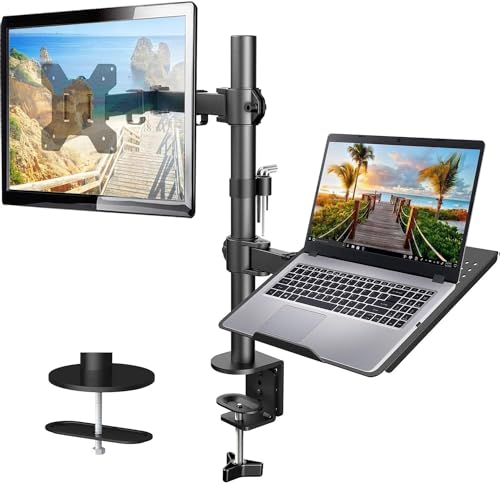
- Ventilated 14-by-12-inch laptop tray
- Supports VESA monitors up to 22 pounds
- Up to 17 inches of height adjustment
Best For: Flexible laptop-and-monitor setups on compatible wood desks
Best Space-Saving Under-Desk Tray

- 360-degree rotating platform
- Supports laptops up to 17 inches and 11 pounds
- Stores beneath the desk when unused
Best For: Reclaiming desk space with a simple clamp-on tray
Best Height-Adjustable Choice

- 16 inches of height adjustment
- Supports laptops up to 17 inches and 22 pounds
- Detachable tray for VESA monitor use
Best For: Ergonomic setups needing flexible height and device compatibility
Best Cooling-Focused Mount

- 240-hole ventilated laptop tray
- Fits laptops up to 17 inches
- Converts to a VESA monitor mount
Best For: Adaptable setups that prioritize laptop airflow and cable organization
Best Adjustable C-Clamp Mount

- Fits laptops up to 17 inches and supports 22 pounds
- Includes C-clamp and grommet mounting options
- Provides full positioning adjustment and cable clips
Best For: Flexible laptop or monitor positioning at a standing desk
Best 2-in-1 Arm
WALI Laptop and Monitor Desk Mount

- Works with laptops up to 17 inches or supported monitors
- Offers clamp and grommet installation
- Full-motion arm extends up to 19.3 inches
Best For: Multitasking setups that switch between laptop and monitor use
Best Versatile Pick

- Supports laptops up to 17 inches or monitors up to 32 inches
- Full-motion adjustment with tilt, swivel, and rotation
- Ventilated tray with straps plus clamp and grommet mounting
Best For: Flexible laptop-or-monitor desk setups
Best Compact Option
Suptek Adjustable Laptop Desk Arm

- Supports notebooks up to 15.6 inches
- Fits 13- to 27-inch VESA monitors
- Includes height adjustment and two mounting options
Best For: Smaller laptop and monitor workstations
Best Large-Monitor Range

- Supports laptops up to 17 inches or monitors up to 34 inches
- Reaches 17.5 inches high with full-motion adjustment
- Ventilated, secured tray and pre-assembled mounting components
Best For: Flexible setups with larger external monitors
Best Versatile 2-in-1 Mount – HUANUO Laptop Tray and Monitor Arm
If you want laptop mounts for standing desks that can also hold a display, this HUANUO model combines a ventilated laptop tray with an adjustable monitor arm. Its height range, articulated movement, and dual mounting options make it a flexible choice for a wood standing desk.
Best For: Users who want one mount for a laptop or a VESA monitor and need broad positioning flexibility.
Pros:
- 14-by-12-inch ventilated tray fits laptops and includes a 0.8-inch retaining lip.
- Supports 13- to 32-inch VESA monitors weighing up to 22 pounds.
- Offers up to 17 inches of height adjustment, plus tilt, swivel, and rotation.
- Includes C-clamp and grommet installation hardware for compatible wood desks.
Cons:
- Mounting hardware is intended for wooden desks only.
- Installation requires careful tightening and following the included instructions.
With its strong weight rating and monitor-or-laptop versatility, this is a practical option when your standing-desk setup may change over time. Check your desk material, thickness, and device specifications before ordering.
Best Space-Saving Under-Desk Tray – VIVO Rotating Laptop Tray
For laptop mounts for standing desks focused on reclaiming surface area, this VIVO tray clamps to the desk and rotates beneath it when not in use. It is a straightforward solution for keeping a laptop off the main work surface while maintaining easy access.
Best For: Standing-desk users who prioritize desk space and want a rotating laptop platform rather than a monitor arm.
Pros:
- Supports laptops up to 17 inches and 11 pounds.
- 360-degree rotation allows flexible placement and under-desk storage.
- Single C-clamp installs on desks up to 2 inches thick.
- Powder-coated alloy-steel construction and included installation hardware.
Cons:
- The tray does not lock in place because it is designed for fluid rotation.
- Requires 31 inches of clearance for the full rotation.
- Not compatible with lipped or beveled desk edges.
This mount is particularly useful when you want a simple way to move a laptop out of the way. Measure the desk thickness, edge shape, tray clearance, and laptop depth before buying.
Best Height-Adjustable Choice – WALI Laptop Desk Mount
This WALI is among the more adjustable laptop mounts for standing desks, with a detachable tray that can be replaced by a VESA monitor. Its broad clamp compatibility and 16-inch height adjustment suit setups where viewing height is a major priority.
Best For: Users who want substantial height adjustment and the option to switch between a laptop and monitor.
Pros:
- Holds laptops up to 17 inches and 22 pounds.
- Detachable tray supports either a laptop or a 75-by-75/100-by-100mm VESA monitor.
- Provides 16 inches of height adjustment with tilt, swivel, and rotation.
- Includes C-clamp and grommet options for different desk thicknesses.
Cons:
- Its ventilated tray measures 14 by 11 inches, so oversized laptops may not fit.
- The mounting options are intended for compatible desk surfaces and thicknesses.
Choose this model if you expect to fine-tune laptop height frequently or may transition to a monitor later. Confirm your laptop dimensions, VESA pattern, and desk measurements before installation.
Best Cooling-Focused Mount – HUANUO 240-Hole Laptop Mount
If airflow is a key consideration when comparing laptop mounts for standing desks, this HUANUO model uses a 240-hole ventilated tray designed to improve cooling. The tray can also be removed for use with a VESA monitor, making the mount adaptable beyond laptop-only setups.
Best For: Users who want a ventilated laptop tray, cable routing, and the option to convert the mount for monitor use.
Pros:
- 13.8-by-11.8-inch tray fits laptops up to 17 inches.
- 240 ventilation holes are designed to improve airflow.
- Supports 15- to 32-inch VESA monitors up to 22 pounds when the tray is removed.
- Offers tilt, swivel, 360-degree rotation, and cable-management clips.
Cons:
- The laptop tray size may not suit larger or unusually deep laptops.
- C-clamp and grommet installation options are specified for wood desks.
This is a strong fit for a clean, adaptable workspace where laptop cooling and future monitor use both matter. Verify the tray dimensions, VESA pattern, desk material, and desk thickness before purchase.
Best Adjustable C-Clamp Mount – VIVO Single Laptop Desk Mount
For shoppers comparing laptop mounts for standing desks, the VIVO STAND-V001L offers broad adjustability and two mounting methods. Its ventilated tray fits laptops up to 17 inches and supports up to 22 pounds, while the adjustable arm helps position the screen at a more comfortable height.
Best For: Users who want a flexible laptop or monitor mount with clamp and grommet installation options.
Pros:
- Fits laptops up to 17 inches and supports up to 22 pounds.
- Offers tilt, swivel, rotation, height adjustment, and tray extension.
- Includes both C-clamp and grommet mounting options without drilling.
- Detachable cable clips help keep cords organized.
Cons:
- The tray and arm require available desk space for mounting and adjustment.
- Its 22-pound capacity may not suit heavier devices or equipment.
This is a versatile choice when ergonomic positioning matters and you may want to switch between a laptop and a compatible monitor. The ventilated tray and generous range of movement make it especially adaptable for changing standing-desk setups.
Best 2-in-1 Arm – WALI Laptop and Monitor Desk Mount
The WALI GSMP001NLP is a practical option among laptop mounts for standing desks if you want one arm that can handle either a laptop or monitor. Its detachable tray supports laptops up to 17 inches, while the VESA-compatible arm also accommodates supported monitors.
Best For: Multitaskers who want to alternate between a laptop tray and an external monitor while freeing desk space.
Pros:
- Supports laptops up to 17 inches and monitors from 17 to 32 inches.
- Offers tilt, swivel, rotation, height adjustment, and up to 19.3 inches of extension.
- Uses clamp or grommet mounting on desks from 0.39 to 2.76 inches thick.
- Perforated tray promotes airflow around the laptop.
Cons:
- The laptop capacity is limited to 22 pounds, while monitor capacity is 26.4 pounds.
- Its mounting range may not fit desks outside the stated thickness limits.
Choose this mount when flexibility between laptop and monitor modes is more important than a laptop-only design. The full-motion arm and space-saving setup support ergonomic repositioning in a changing workspace.
Best Under-Desk Storage – VIVO Clamp-On Pegboard Laptop Holder
Unlike elevated laptop mounts for standing desks, the VIVO MOUNT-LHS1 stores your device under the work surface or along a desk leg. Its steel sleeve supports laptops, tablets, and notebooks while the built-in pegboard adds a way to organize compatible accessories.
Best For: Standing-desk users who want to clear the desktop and keep a laptop stored vertically when it is not in use.
Pros:
- Stores 15.6- to 17.3-inch laptops vertically and laptops up to 14 inches horizontally.
- Supports up to 22 pounds with a durable steel design.
- Dual C-clamps install without drilling on supports from 0.4 to 3.3 inches thick.
- Pegboard front provides additional organization for compatible accessories.
Cons:
- It stores a laptop rather than elevating it for active use.
- Pegboard accessories are not included.
- Its fit depends on the dimensions and orientation of your laptop.
This holder is a strong space-saving pick for a clean standing-desk setup, especially when your laptop is usually connected elsewhere or used intermittently. The clamp-on design also avoids drilling into the desk or support structure.
Best Versatile Pick – MOUNT PRO 2-in-1 Laptop Arm
If you want laptop mounts for standing desks that can adapt to changing setups, the MOUNT PRO combines a ventilated laptop tray with a removable monitor mount. It supports notebooks up to 17 inches or VESA monitors from 13 to 32 inches, while the adjustable arm helps position the screen higher for a more comfortable workstation.
Best For: Users who want one mount for either a laptop or a single monitor, with flexible mounting and broad adjustment.
Pros:
- 2-in-1 design supports laptops up to 17 inches or VESA monitors from 13 to 32 inches.
- Full-motion adjustment includes -45° to +90° tilt, 180° swivel, and 360° rotation.
- Ventilated tray, anti-slip pads, and Velcro straps help secure and cool a laptop.
- Includes clamp and grommet mounting options for desks from 0.39 to 2.76 inches thick.
Cons:
- The laptop tray should not be rotated to a vertical position.
- Its 19.8-pound capacity applies to supported monitor configurations; laptop fit is limited to 17 inches.
The MOUNT PRO is a flexible choice for a tidy, adjustable desk, especially if you alternate between laptop and monitor use. Built-in cable guidance also helps keep the workspace organized.
Best Compact Option – Suptek Adjustable Laptop Desk Arm
For shoppers comparing laptop mounts for standing desks, the Suptek offers a straightforward laptop-and-monitor setup with a detachable tray. Its height-adjustable arm, broad tilt range, and two mounting methods make it practical for positioning a notebook or compatible monitor without taking up the center of the desk.
Best For: Home-office users who need a simple adjustable arm for a laptop up to 15.6 inches or a monitor up to 27 inches.
Pros:
- Detachable tray lets the arm support a notebook or a VESA monitor.
- Fits most 13- to 27-inch monitors with 75x75mm or 100x100mm VESA patterns.
- Provides 400mm of height adjustment, 180° arm swiveling, 360° monitor rotation, and ±90° tilt.
- Includes C-clamp and grommet bases for desks 10 to 80mm thick.
Cons:
- The laptop tray is sized for notebooks up to 15.6 inches, not larger 17-inch models.
- Its listed maximum arm capacity is 10kg, or about 22 pounds, while the product title specifies up to 15.6 pounds.
The Suptek is a practical, compact arm for smaller laptops and monitors. Choose it when its 27-inch monitor limit and 15.6-inch tray size match your equipment.
Best Large-Monitor Range – HUANUO 2-in-1 Laptop Mount
If your standing-desk setup may grow to a larger display, the HUANUO is one of the more versatile laptop mounts for standing desks. It holds a notebook up to 17 inches with the tray attached, or a 13- to 34-inch VESA monitor after removing it, and the arm reaches up to 17.5 inches high.
Best For: Users who want a laptop mount that can accommodate larger monitors and provide substantial height adjustment.
Pros:
- 2-in-1 design supports laptops up to 17 inches or monitors from 13 to 34 inches.
- Offers ±45° tilt, ±90° swivel, 360° rotation, and an arm extension up to 18.1 inches.
- Ventilated 11.8-by-10.4-inch tray includes six anti-slip pads, a bottom guard, and Velcro straps.
- Pre-assembled arm and VESA plate simplify installation, with C-clamp and grommet options.
Cons:
- The counterbalance may cause the arm to rise when the laptop is removed, so it must be controlled carefully.
- Monitor compatibility requires a 75x75mm or 100x100mm VESA pattern.
The HUANUO stands out when you need room for a larger monitor without giving up laptop support. Its reach and height range are useful for eye-level positioning, while the tray is designed to keep a notebook secure and ventilated.
How We Picked the Best Laptop Mounts for Standing Desks
We focused on the features that matter most when a laptop is attached to a sit-stand workstation: secure mounting, useful adjustment range, dependable weight support, and compatibility with common notebooks and monitors. We also considered whether each design uses a C-clamp, a monitor-arm mount, or a specialized desk-leg or pegboard attachment.
Because standing desks move, stability is especially important. A mount should resist wobbling during typing and remain balanced when the desktop rises or lowers. Tray dimensions, ventilation, cable clearance, and the ability to position the screen at a comfortable height also influenced the selection.
Quick Comparison
| Mount type | Best for | What to check |
|---|---|---|
| Monitor arm with laptop tray | Dual-screen and ergonomic setups | VESA compatibility, arm capacity, tray size |
| Clamp-on laptop tray | Simple, space-saving installations | Desk thickness, clamp clearance, platform dimensions |
| Single laptop arm | Dedicated laptop positioning | Weight rating, reach, tilt adjustment |
| Desk-leg or pegboard mount | Specialty workstations | Leg or accessory compatibility and rigidity |
Key Buying Factors for Laptop Mounts for Standing Desks
Mounting Method
A C-clamp is usually the easiest choice for a conventional desk edge and can be repositioned without drilling. Monitor-arm designs are better if you want to add or align a VESA monitor. Specialized pegboard or desk-leg mounts can save surface space, but they require closer compatibility checks.
Size and Weight Support
Confirm both the maximum laptop size and the mount’s weight capacity. A 17-inch notebook may fit within the stated dimensions but still be too heavy for a lighter arm. Leave some capacity in reserve, particularly if you type directly on the laptop.
Adjustment and Stability
Look for height, tilt, swivel, and extension adjustments that match your standing posture. The arm should hold its position without excessive sagging. Wider trays and stronger clamps generally provide better stability, while long extension arms may introduce more movement.
Desk and Cable Compatibility
Measure desktop thickness before buying, and check whether the clamp needs open space beneath the rear edge. Cable routing, ventilation openings, and a tray lip or retention feature can make daily use more convenient and secure.
Who Should Buy Which Laptop Mounts for Standing Desks?
Choose a monitor-arm laptop tray if you want a laptop-and-monitor workstation with flexible screen alignment. A compact clamp-on platform is a practical choice for smaller desks or occasional standing use. Dedicated laptop arms suit users who want maximum height and angle adjustment without adding a monitor.
For heavy 15- or 17-inch laptops, prioritize the higher-capacity WALI, HUANUO, MOUNT PRO, or Suptek-style options after confirming the exact specifications. If you have a specialized desk-leg or pegboard setup, the VIVO holder may be the best fit. Whichever design you choose, set the laptop near eye level, keep the keyboard and mouse at a comfortable height, and test the desk through its full travel before relying on the mount.