The best webcams for classrooms do more than transmit a teacher’s face. They can make remote lessons clearer, show books and worksheets, and help students follow demonstrations without distracting setup or complicated software.
This roundup compares 10 classroom-friendly options, from dependable 1080p conference cameras to flexible document-camera hybrids with overhead viewing, built-in lights, and microphones.
Best 10 Webcams for Classrooms Picks for 2026
Best All-Around Pick

- Full HD 1080p video at 30 fps
- Autofocus and automatic lighting adjustment
- Dual microphones and broad app compatibility
Best For: Everyday classroom video calls and recorded lessons
Best for Document Demonstrations

- 8MP capture up to 2448P at 30 fps
- A3-size coverage with flexible positioning
- LED lights, brightness controls, and dual microphones
Best For: Live worksheets, objects, and hands-on teaching demonstrations
Best Privacy Features

- 2K QHD video with a Sony sensor
- Sliding privacy shutter and noise-reduction mic
- Tilt, swivel, and monitor or tripod mounting
Best For: Sharper classroom calls with built-in privacy protection
Best Foldable Visualiser

- 8MP 2448P video at 30 fps
- Foldable, multi-joint design for A3 materials
- USB-C, adjustable lighting, and dual microphones
Best For: Flexible document and object demonstrations in class
Best for Easy Setup

- 1080p video with autofocus and light correction
- Dual microphones capture audio up to one meter away
- Flip-up privacy screen and flexible mounting
Best For: Online classes and hybrid instruction
Best for Demonstrations

- 8MP camera with 30 fps video streaming
- Autofocus and macro capture for close-up materials
- Includes lighting, anti-glare, and annotation tools
Best For: Document sharing and live classroom demonstrations
Best Budget Pick
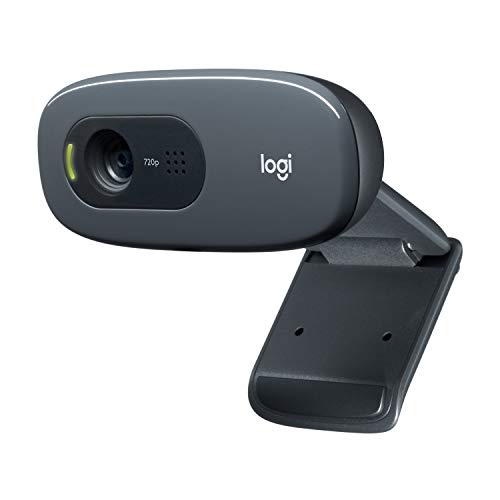
- 720p video at 30 fps for everyday calls
- Noise-reducing microphone reaches up to 1.5 meters
- Plug-and-play design with automatic light correction
Best For: Basic student and teacher video calls
Best Classroom Document Camera

- A3 document capture with flexible positioning
- Autofocus, mirroring, and adjustable LED lighting
- Works with major classroom video platforms
Best For: Teachers demonstrating worksheets, books, and objects online
Best Simple Classroom Webcam

- 1080p video at 30 fps with HDR
- Dual noise-reducing microphones
- Privacy cover and plug-and-play USB setup
Best For: Routine video calls and online classroom meetings
Best Manual-Focus Classroom Camera

- Manual focus for controlled demonstrations
- Foldable design with 360-degree rotation
- Up to 1080p at 30 fps with built-in microphone
Best For: Teachers presenting physical materials with precise focus control
Best All-Around Pick – Logitech C920x HD Pro
For classrooms that need a dependable everyday camera, the Logitech C920x HD Pro is a practical choice among webcams for classrooms. It records and streams Full HD 1080p video at 30 fps, uses autofocus and automatic lighting adjustment, and connects over USB for broad computer compatibility.
Best For: Teachers and students who primarily need clear video calls, online lessons, and recorded presentations.
Pros:
- Full HD 1080p video at 30 fps with autofocus.
- Automatic lighting adjustment helps in low-light settings.
- Dual microphones capture stereo audio for calls and recordings.
- Works with Windows 11, macOS, Zoom, Teams, Skype, Google Meet, and OBS.
Cons:
- It does not include a privacy shutter.
- Video resolution is limited to 1080p rather than 2K or 4K.
The C920x is a straightforward classroom webcam with reliable compatibility and balanced video and audio features. Its lack of a physical privacy shutter is the main consideration for shared or student-facing computers.
Best for Document Demonstrations – THUSTAR 4K Document Camera
The THUSTAR 8MP document camera stands apart from conventional webcams for classrooms by focusing on live demonstrations. Its adjustable arm, A3-size coverage, built-in lights, and image-reversal controls make it suited to showing worksheets, books, objects, and other teaching materials.
Best For: Teachers who need to display documents, small objects, or hands-on demonstrations during distance learning.
Pros:
- Captures up to 2448P video at 30 fps with 8MP resolution.
- Adjustable multi-joint design covers an A3-sized area.
- Three-level LED lighting and manual brightness controls help with uneven lighting.
- Dual microphones include noise reduction and support Windows, macOS, and Chrome OS.
Cons:
- Its document-camera design is less compact than a standard monitor webcam.
- The listed video resolution is 2448P, so the 4K title should not be treated as native 4K output.
Choose this model when showing classroom materials matters more than a traditional teacher-facing video view. The foldable structure helps with storage, while autofocus and manual image controls support varied demonstrations.
Best Privacy Features – Dell WB3023 2K QHD Webcam
The Dell WB3023 is a strong option for webcams for classrooms when image detail and privacy are priorities. It combines a Sony image sensor with 2K QHD video, a noise-reduction microphone, and a sliding privacy shutter for use in shared teaching spaces.
Best For: Instructors and school staff who want sharper-than-1080p video, clearer communication, and a physical privacy control.
Pros:
- 2K QHD resolution with a Sony image sensor.
- Built-in noise-reduction microphone supports clearer communication.
- Sliding privacy shutter covers the lens when the camera is not in use.
- Monitor, notebook, and tripod mounting with tilt and swivel adjustment.
Cons:
- It uses USB-A, which may require an adapter with some newer devices.
- Its 71.5-degree viewing angle is narrower than some classroom-focused setups may require.
The WB3023 offers a useful middle ground between basic 1080p webcams and more specialized classroom cameras. Dell Peripheral Manager adds customization, while Teams and Zoom certification simplifies common lesson and meeting workflows.
Best Foldable Visualiser – Kitchbai 8MP Document Camera
The Kitchbai 8MP visualiser is designed for teachers who need more than a standard face-to-face webcam. It can display A3-size materials, capture objects from close range, and fold down for storage, making it a flexible addition to a classroom or distance-learning setup.
Best For: Educators who regularly switch between presenting themselves and showing documents, objects, or classroom projects.
Pros:
- 8MP sensor records 2448P video at 30 fps.
- Multi-joint arm rotates to capture 2D and 3D subjects.
- Manual image reversal, brightness adjustment, and three-level lighting support demonstrations.
- USB-C plug-and-play connection works with Windows, macOS, and Chrome OS.
Cons:
- It is a visualiser rather than a compact, fixed monitor webcam.
- The listed output is 2448P, not confirmed native 4K resolution.
For lessons built around books, diagrams, or physical objects, the Kitchbai provides more flexibility than a conventional webcam. Its foldable construction and USB-C connection are particularly useful when classroom equipment must be moved or stored regularly.
Best for Easy Setup – Logitech C920e 1080p Webcam
For classrooms that need dependable video quality and clear audio, the Logitech C920e is a strong choice among webcams for classrooms. Its 1080p video, autofocus, automatic light correction, and 78-degree field of view keep individual teachers or students framed clearly while leaving some room to show projects.
Best For: Online classes, video meetings, and hybrid instruction where clear video, audio, and privacy features matter.
Pros:
- 1080p video with HD autofocus and automatic light correction.
- Two integrated omnidirectional microphones capture audio from up to one meter away.
- Includes a flip-up privacy screen and an adjustable clip with tripod threads.
- Certified for Zoom and compatible with Microsoft Teams and other popular calling apps.
Cons:
- The 78-degree field of view is designed for an individual user rather than a large group.
- Its microphones are specified for pickup up to one meter away.
The C920e offers a practical balance of classroom-ready image quality, audio capture, flexible mounting, and privacy control. It is especially well suited to instructors or students who want a polished setup without adding separate microphones or lighting.
Best for Demonstrations – INSWAN INS-1 Document Camera
The INSWAN INS-1 stands apart from typical webcams for classrooms by combining webcam functionality with document-camera features. Its 8MP Sony camera, autofocus, LED light, anti-glare sheet, and macro capability make it useful for showing worksheets, books, objects, and close-up demonstrations during online teaching.
Best For: Teachers who need to display documents, physical materials, experiments, or detailed objects during remote and hybrid lessons.
Pros:
- 8MP imaging captures up to 3264 × 2448 pixels and supports 30 fps streaming.
- Autofocus and macro capability can capture objects as close as 3.9 inches.
- Built-in LED lighting, anti-glare sheet, and seven-segment brightness control help with varied lighting.
- Bundled software supports annotation, rotation, digital zoom, snapshots, and recording.
Cons:
- Its 0.8 kg weight and document-camera design are less compact than a standard monitor webcam.
- The included connection is USB-A, so devices without that port may require an adapter.
Choose the INS-1 when teaching involves more than a talking head. Its adjustable design, close-focus capability, and included annotation tools provide a more specialized setup for visual instruction and live demonstrations.
Best Budget Pick – Logitech C270 720p Webcam
The Logitech C270 is a straightforward, plug-and-play option for classrooms that need basic video calling without advanced features. It records at 720p and includes automatic light correction, a noise-reducing microphone, and a universal clip for laptops, monitors, or shelf placement.
Best For: Students, teachers, and classrooms seeking an uncomplicated webcam for everyday Zoom, Skype, or compatible video calls.
Pros:
- 720p video at 30 fps provides suitable resolution for standard video calls.
- Noise-reducing microphone captures voice from up to 1.5 meters away.
- RightLight 2 adjusts to lighting conditions for brighter, more contrasted images.
- Universal adjustable clip supports laptop, monitor, or shelf placement.
Cons:
- 720p resolution is lower than the 1080p video offered by the C920e.
- Its 55-degree field of view is relatively narrow for showing multiple people or large materials.
- Fixed focus provides fewer framing options than an autofocus model.
The C270 is a sensible entry-level choice for routine classroom calls. It covers the essentials—video, audio, light adjustment, and easy mounting—while keeping the setup simple, though it is less suited to detailed demonstrations or group framing.
Best Classroom Document Camera – 5MP A3 USB Visualizer
For classrooms that need more than a standard video feed, this 3-in-1 document camera works as a webcam, visualizer, and presentation camera. Its flexible design, A3 capture area, autofocus, and adjustable lighting make it a versatile choice among webcams for classrooms, especially for remote lessons and live demonstrations.
Best For: Teachers who need to show worksheets, books, objects, and live presentations during online or hybrid classes.
Pros:
- Captures documents up to A3 size and can be adjusted to different angles.
- Offers 5MP imaging, 1080p video at up to 30 fps, autofocus, and macro capture from about 3.94 inches.
- Includes three-level LED fill lighting, exposure adjustment, image mirroring, and dual microphones.
- Works with Windows, Mac, Chromebooks, Zoom, Google Meet, Skype, Microsoft Teams, TikTok, and OBS.
Cons:
- It is not fully plug and play; users must select the USB camera in their computer settings.
- It connects through USB 2.0 and does not include HDMI output.
This is the most presentation-focused option in the group. The A3 workspace and flexible hose structure are useful for teaching with physical materials, while the lighting and exposure controls help in less-than-ideal classroom environments.
Best Simple Classroom Webcam – 1080p USB Camera with Mic
If your classroom setup mainly requires a clear face-to-face video feed, this compact 1080p webcam keeps things straightforward. It combines Full HD video, dual noise-reducing microphones, automatic light correction, and a physical privacy cover, making it a practical pick among webcams for classrooms.
Best For: Teachers and students who need an easy webcam for video calls, online meetings, and remote instruction.
Pros:
- Records Full HD 1080p video at 30 frames per second with HDR support.
- Built-in dual noise-canceling microphones help reduce background noise.
- Includes a sliding privacy cover and adjustable monitor clip.
- Supports Windows, Mac, Linux, and Android, along with Zoom, Skype, Twitch, and YouTube.
Cons:
- Fixed focus offers less control than a manual- or autofocus document camera.
- It is designed as a standard webcam rather than a document camera for showing large physical materials.
This model is the simplest choice for conventional video teaching. Its plug-and-play USB connection and privacy shutter reduce setup and security concerns, while the built-in microphones provide a more complete call-ready package.
Best Manual-Focus Classroom Camera – 2MP Foldable Visualizer
This foldable 3-in-1 visualizer is built for teachers who want precise control over live demonstrations. Its manual focus, 360-degree rotation, tall adjustable structure, and built-in microphone give it a useful role in classrooms, tutoring, and home instruction, making it a flexible alternative among webcams for classrooms.
Best For: Educators who want to manually fine-tune focus while presenting physical materials or recording demonstrations.
Pros:
- Functions as a document camera, visualizer, and webcam with a flexible, foldable design.
- Manual focus helps maintain control over the sharpness of real objects and demonstrations.
- Supports up to 1080p video at 30 fps, with a camera height of up to 20.4 inches and 360-degree rotation.
- Includes a sealed silicon microphone and works with Windows, Mac, Chromebooks, Zoom, Google Meet, and Skype.
Cons:
- It is not compatible with iPads, mobile phones, or other portable devices.
- Manual focusing requires more adjustment than an autofocus webcam.
- Some systems require selecting the USB camera in the operating system or app.
The manual-focus control is its defining advantage for demonstrations where autofocus may shift repeatedly. It is also easy to fold and carry, but buyers should confirm they have a compatible computer because mobile-device support is limited.
How We Picked the Best Webcams for Classrooms
We focused on features that matter in real teaching environments: image resolution, microphone performance, field of view, ease of setup, compatibility with common meeting platforms, and flexibility for showing physical materials. The selection includes standard webcams for video calls as well as document-camera designs that can capture books, worksheets, experiments, and demonstrations.
We also considered practical details such as plug-and-play USB connectivity, autofocus or manual focus, low-light assistance, privacy covers, foldable designs, and whether a camera is likely to suit a desk, lectern, or shared classroom workstation.
Quick Comparison
| Type | Best suited to | Typical strengths |
|---|---|---|
| Standard 720p webcam | Basic remote lessons | Low cost and simple setup |
| Standard 1080p webcam | Video calls and hybrid teaching | Clearer face detail and broad compatibility |
| 2K or 4K webcam | Detailed instruction and larger displays | Sharper image with more cropping flexibility |
| Document-camera webcam | Worksheets, books, and demonstrations | Overhead viewing, lighting, and image rotation |
Key Buying Factors for Webcams for Classrooms
Resolution and Framing
For ordinary video lessons, 1080p is a useful balance of clarity, bandwidth, and price. A 2K or 4K model can reveal finer detail and allow some digital cropping, but the benefit depends on your computer, internet connection, lighting, and meeting platform. Check the camera’s frame rate too: 30fps is generally adequate for teaching and conferencing.
Document Capture and Flexibility
If you regularly display handwritten work, textbooks, diagrams, or small objects, choose a document-camera model rather than a conventional webcam. A foldable arm, A3-size coverage, image inversion, manual focus, and adjustable LED lighting can make overhead teaching much easier.
Audio, Compatibility, and Setup
Built-in microphones are convenient, but classroom noise can still make a dedicated headset or microphone preferable. Look for USB plug-and-play support and compatibility with the software your school uses, such as Zoom, Microsoft Teams, Google Meet, or browser-based learning platforms. A privacy cover is a useful extra for standard front-facing cameras.
Lighting and Placement
Even a high-resolution camera performs poorly against a bright window or in a dim room. Position the camera at eye level for calls, avoid strong backlighting, and use built-in LEDs when capturing documents. Confirm that the mount, cable length, and desk footprint work with your teaching setup.
Who Should Buy Which Webcams for Classrooms?
Choose a basic 720p webcam if affordability and occasional video calls are the priorities. A dependable 1080p model is the best all-round choice for most teachers who mainly appear on screen. Consider a 2K or 4K webcam when students need to see finer detail or when you want extra cropping flexibility.
Teachers who demonstrate physical materials should prioritize a USB document camera with an adjustable arm, built-in lighting, and image rotation. If you teach both live video lessons and hands-on subjects, a foldable document-camera webcam offers the most versatility. Finally, schools buying in quantity should favor simple USB installation, broad software compatibility, durable construction, and consistent controls across classrooms.