Leaving a laptop unattended in a library, residence hall, classroom, or shared study space can create an avoidable security risk. A laptop locking cable adds a visible physical barrier and can help secure compatible devices to a fixed object.
This roundup compares 10 laptop locking cables for students, including resettable combination locks, keyed models, universal designs, and kits for devices without a built-in security slot.
Best 10 Laptop Locking Cables for Students Picks for 2026
Best All-Around Standard-Slot Pick
Kensington Combination T-Bar Standard Lock

- Resettable four-digit combination
- Six-foot carbon-steel cable
- Designed for standard Kensington slots
Best For: Students with standard Kensington-compatible laptops
Most Flexible Compatibility
Laptop Combination Cable Lock Kit

- Works with built-in slots or included adhesive plate
- Six-foot-plus braided cable
- Four-digit keyless combination
Best For: Students with devices that may lack a security slot
Best for Thin Laptops
Kensington Nano Combination Laptop Lock

- Slim head for Nano security slots
- Five-foot carbon-steel cable
- Pivoting hardware supports port access
Best For: Students with thin Nano-slot laptops
Best Keyed Security Option
Kensington T-Bar Standard Keyed Lock
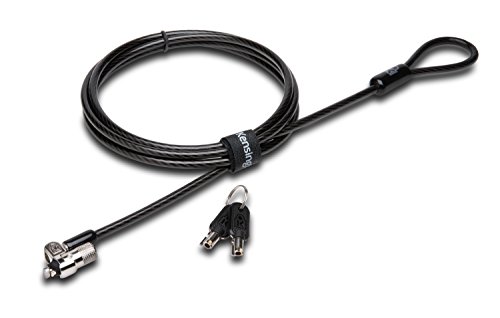
- Six-foot carbon-steel cable
- Small pivoting 10mm lock head
- Tubular keyed lock with hidden-pin technology
Best For: Students preferring a key-operated standard-slot lock
Most Versatile
Hardware Laptop Cable Lock with Keys

- Works with standard laptop slots and many mobile devices
- Includes a 6.5-foot coated steel cable
- Keyed lock head rotates 360 degrees
Best For: Students securing several types of personal electronics
Best Keyless Option
Kensington Combination Ultra Cable Lock

- Resettable four-wheel combination lock
- Offers 10,000 possible combinations
- Push-button, one-hand installation design
Best For: Students who prefer not to carry a lock key
Best Multi-Device Kit
AboveTEK Laptop and Tablet Lock

- Includes two adhesive anchor sets and two keys
- Six-foot cut-resistant galvanized steel cable
- Compatible with laptops, tablets, phones, and monitors
Best For: Students securing multiple personal devices
Flexible Fit

- Fits many standard, nano, and wedge-style slots
- Push-to-lock design with two keys
- Six-foot cut-resistant cable
Best For: Students needing broad slot compatibility with keyed access
Dell-Focused Security
Kensington N17 Combination Lock

- Made for Dell and Alienware wedge slots
- Resettable four-wheel combination
- Six-foot carbon steel cable
Best For: Students with compatible Dell or Alienware laptops
Future-Ready Choice
Universal 3-in-1 Combination Lock

- Fits standard, nano, and wedge slots
- Interchangeable tethered lock tips
- Resettable 10,000-combination dial
Best For: Students using laptops with varied security-slot designs
Best All-Around Standard-Slot Pick – Kensington Combination T-Bar Standard Lock
For students shopping for laptop locking cables for students, this Kensington combination lock is a practical choice when a device has a standard Kensington security slot. Its resettable four-digit code avoids carrying a key, while the six-foot carbon-steel cable provides flexibility for securing equipment to a desk or other fixed structure.
Best For: Students using HP, Lenovo, Acer, Asus, or other devices with a standard Kensington slot.
Pros:
- Resettable four-wheel combination with 10,000 possible codes.
- Push-button design supports one-handed engagement.
- Six-foot cut-resistant carbon-steel cable works with laptops and other compatible electronics.
- Independently tested for multiple security and durability standards.
Cons:
- Not compatible with Dell and Alienware devices using a different lock slot.
- Device compatibility should be checked before purchase, especially for newer Dell models.
This is a versatile, key-free option for shared study spaces, offices, or classrooms, provided the laptop has the correct standard slot.
Most Flexible Compatibility – Laptop Combination Cable Lock Kit
This laptop lock kit stands out among laptop locking cables for students because it can be used with devices that have a built-in security slot or devices without one. The included adhesive lock-slot plate broadens compatibility, while the six-foot-plus cable gives students room to anchor a laptop around a desk or other fixed object.
Best For: Students securing laptops or tablets with or without built-in security lock holes.
Pros:
- Includes an adhesive lock-slot plate for compatible devices without security holes.
- Four-digit customizable combination offers over 10,000 possible codes.
- One-hand push-button operation with a 360-degree rotating design.
- Includes spacers and a cable measuring approximately 6.23 feet.
Cons:
- Adhesive plate installation is required for devices without a built-in slot.
- The notes do not specify compatibility with every laptop or tablet surface.
The included plate makes this a useful choice when a student’s device lacks a standard slot, but the attachment surface and installation should be considered carefully.
Best for Thin Laptops – Kensington Nano Combination Laptop Lock
Thin laptops often need a smaller lock head, and this Kensington model is designed for devices with a Nano-sized security slot. For students comparing laptop locking cables for students, its five-foot carbon-steel cable, resettable combination, and pivoting hardware offer a compact setup for shared spaces, cafes, and travel.
Best For: Students with thin laptops that use a Nano-sized security slot.
Pros:
- Slim lock head is designed for Nano-sized slots and helps the laptop lie flat.
- Resettable four-wheel code provides 10,000 possible combinations.
- Pivoting head and rotating anchor improve access to nearby ports.
- Five-foot carbon-steel cable includes an anti-shearing plastic sleeve.
Cons:
- Only compatible with laptops that have the appropriate Nano-sized slot.
- Its five-foot cable is shorter than some six-foot alternatives.
This is a focused option for newer, thin devices, but students should confirm that their laptop uses a Nano slot rather than a standard or wedge-style connection.
Best Keyed Security Option – Kensington T-Bar Standard Keyed Lock
Students who prefer a physical key can choose this Kensington keyed cable lock for devices with a standard Kensington security slot. It combines a six-foot carbon-steel cable with a smaller pivoting lock head and hidden-pin tubular locking technology, making it suitable for securing compatible electronics to a desk or other fixed structure.
Best For: Students who prefer keyed access and have a laptop with a standard Kensington security slot.
Pros:
- Six-foot carbon-steel cable resists cutting attempts and supports mobility.
- Pivoting 10mm lock head is designed for thinner laptops and easier access.
- Patented hidden-pin technology supports the anti-pick tubular lock.
- Includes an eight-year and lifetime technical support offering in the supplied notes.
Cons:
- Requires keeping track of a physical key.
- Does not work with newer Dell devices using the wedge lock slot.
- Some HP models and Chromebooks use a Nano slot instead.
This is a solid keyed alternative to combination locks, especially for students who want standard-slot compatibility and do not mind carrying a key.
Most Versatile – Hardware Laptop Cable Lock with Keys
Students who need laptop locking cables for students with broad device compatibility may appreciate this keyed cable lock. It works with laptops that have standard security slots and can also secure compatible tablets and phones using the included adhesive anchor plate.
Best For: Students securing a mix of laptops, tablets, phones, monitors, or projectors.
Pros:
- Supports standard laptop lock slots and devices without standard slots through an adhesive anchor plate.
- Includes a 6.5-foot cut-resistant twisted-steel cable with PVC coating.
- Uses a stainless-steel lock head that rotates 360 degrees.
Cons:
- Some devices require the separate I3C adhesive security plate.
- Key operation means carrying or storing the keys.
This is a flexible choice for students who share security needs across several device types. Check your device compatibility and whether an anchor plate is needed before buying.
Best Keyless Option – Kensington Combination Ultra Cable Lock
Kensington Combination Ultra Cable Lock for Laptops and Other Devices (K64675US),Silver
Check Price On AmazonFor students looking for laptop locking cables for students without another key to carry, the Kensington Ultra Cable Lock uses a resettable four-wheel combination. Its push-button design is intended for one-hand installation at a desk, table, or other fixed surface.
Best For: Students who prefer combination access for laptops and other portable devices.
Pros:
- Provides 10,000 possible resettable combinations.
- Push-button design supports one-hand operation.
- Features a tamper-resistant lock head and a two-year limited warranty.
Cons:
- Only one lock is included.
- Requires remembering a combination rather than using a key.
This model is a straightforward option for campus, office, and public-space use when keyless convenience matters. Its combination system is especially practical for students who move between study locations.
Best Multi-Device Kit – AboveTEK Laptop and Tablet Lock
Students comparing laptop locking cables for students may find this AboveTEK kit useful when more than one device needs protection. It includes two adhesive sticker-and-anchor sets, two keys, and a six-foot galvanized steel cable for laptops, tablets, smartphones, and other devices.
Best For: Students securing multiple flat-surface devices at libraries, cafés, classrooms, or retail-style display areas.
Pros:
- Includes two adhesive sticker-and-anchor sets for use with multiple devices.
- Uses industrial-grade 3M adhesive on compatible flat surfaces.
- Provides a six-foot cut-resistant galvanized steel cable and stainless-steel lock.
- Works with laptops, tablets, smartphones, notebooks, monitors, and MacBooks.
Cons:
- Adhesive anchors are intended for flat surfaces and may not suit every device.
- Keyed operation requires keeping track of the included keys.
This kit stands out for students protecting multiple gadgets rather than just one laptop. Confirm that each device has a suitable flat attachment area before applying the adhesive anchors.
Flexible Fit – Universal Keyed Laptop Lock
For students comparing laptop locking cables for students, this Sendt model is a practical keyed option when devices may use different security-slot formats. Its universal fit, push-to-lock design, and six-foot cable make it convenient for shared spaces, libraries, classrooms, and study areas.
Best For: Students who want one keyed lock compatible with many laptop security slots.
Pros:
- Works with Kensington, Nano, Mini Saver, Noble Wedge, Samsung, and most other security slots.
- Push-to-lock design makes installation straightforward.
- Includes two keys, a hook-and-loop cable tie, and instructions.
- Six-foot cut-resistant cable helps anchor a laptop to a fixed structure.
Cons:
- Uses a physical key, so the key must be carried and stored securely.
- The supplied notes do not specify compatibility with a particular laptop model; check the device slot before buying.
This is a versatile choice for students using different laptops or sharing security equipment. The keyed mechanism is simple, while the broad slot compatibility helps reduce concerns about connector type.
Dell-Focused Security – Kensington N17 Combination Lock
Kensington N17 Dell Laptop Computer Lock, Combination Security Locking Cable (K68008WW) Black
Check Price On AmazonAmong laptop locking cables for students, the Kensington N17 is designed specifically for Dell and Alienware laptops with wedge-shaped lock slots. Its resettable four-wheel combination avoids carrying a key and provides 10,000 possible codes for use in educational institutions, homes, or offices.
Best For: Students with compatible Dell or Alienware laptops and wedge lock slots.
Pros:
- Designed to fit Dell and Alienware wedge-type lock slots.
- Resettable four-wheel combination offers 10,000 possible codes.
- Push-button design supports one-handed attachment.
- Six-foot carbon steel cable is cut-resistant and can anchor to a fixed structure.
Cons:
- Compatibility is limited to laptops with the specified Dell-style wedge slot.
- A combination lock requires remembering the selected code.
This model is a focused pick rather than a universal one. If your Dell or Alienware laptop has the matching wedge slot, its combination access and push-button engagement offer convenient everyday protection.
Future-Ready Choice – Universal 3-in-1 Combination Lock
Students comparing laptop locking cables for students may appreciate this Kensington model’s three interchangeable lock tips. It is built to fit standard, nano, or wedge-shaped security slots, while the resettable four-number dial removes the need to carry a key.
Best For: Students who need one combination lock for laptops with different slot styles.
Pros:
- Compatible with standard, nano, and wedge-shaped laptop security slots.
- Interchangeable tips can be changed as needed, with a tether for unused tips.
- Resettable four-number dial provides 10,000 possible combinations.
- Six-foot carbon steel cable offers cut and theft resistance.
Cons:
- Combination access requires remembering the reset code.
- Its interchangeable-tip design may be more involved than a lock made for one specific slot.
This is the most adaptable option of the three for households, classrooms, or student groups using multiple laptop generations. Its universal tip system helps accommodate changing devices without switching to a different lock.
How We Picked the Best Laptop Locking Cables for Students
We focused on practical campus use rather than treating every cable as interchangeable. The selection covers common laptop security-slot formats, including standard T-Bar, Nano, Wedge, and universal designs, along with adhesive-anchor kits for compatible flat surfaces. We also considered cable length, locking method, resettable combinations, keyed convenience, construction materials, and compatibility with laptops, tablets, monitors, and other electronics.
Because a cable lock is only useful when it fits both the device and the object being secured, compatibility is weighted heavily. Students should verify the slot type and follow the manufacturer’s installation guidance before buying.
Quick Comparison
- Best for combination convenience: Resettable four-digit locks eliminate the need to carry a key.
- Best for simple daily use: Keyed locks can be quick to operate when the key is kept accessible.
- Best for newer thin laptops: Nano- or Wedge-compatible models may fit devices that lack a standard T-Bar slot.
- Best for devices without a slot: Adhesive-anchor systems provide an alternative, provided the mounting surface is suitable.
- Best for flexibility: Universal and 3-in-1 locks can support several security-slot standards.
Key Buying Factors for Laptop Locking Cables for Students
Security-Slot Compatibility
Check whether your laptop uses a standard T-Bar, Kensington Nano, Dell Wedge, or another format. A lock that appears sturdy will not help if its head cannot engage the device securely.
Combination Versus Key
Combination locks are convenient for shared workspaces and reduce the chance of losing a key. Keyed models can be faster when you use the same lock frequently, but keep the key somewhere secure and accessible.
Cable Length and Construction
A six-foot cable is common and generally provides useful reach around a desk leg or other fixed anchor. Steel cable construction improves resistance to casual tampering, but no portable cable lock is intended to defeat determined theft with unlimited time and tools.
Anchor and Installation
Secure the cable to a genuinely fixed, sturdy object. For adhesive-anchor products, clean and prepare the surface carefully, allow the adhesive to cure as directed, and avoid relying on the anchor until it has fully set.
Everyday Portability
Students who move between classes may prefer a compact lock with a resettable combination and a flexible cable. Consider whether the lock adds noticeable weight to a laptop bag and whether its head interferes with nearby ports.
Who Should Buy Which Laptop Locking Cables for Students?
Choose a standard T-Bar combination lock if your laptop has a conventional Kensington slot and you want straightforward, key-free protection. Pick a Nano- or Dell-compatible model when your thinner laptop uses one of those specific slot formats. A keyed lock makes sense for students who prioritize fast locking and do not mind carrying a key.
Universal or 3-in-1 designs are useful for households, classrooms, or students who may secure more than one device with different slot standards. If your tablet or laptop has no built-in slot, consider an adhesive-anchor kit only after confirming that the device surface and mounting location are appropriate. Whichever option you choose, pair it with good habits: lock the device to a fixed anchor, avoid leaving it unattended for long periods, and keep combinations or spare keys private.