A laptop left on a home-office desk can be easy to grab, especially in shared spaces, apartments, or rooms with frequent visitors. The right locking cable adds a practical layer of physical security without making everyday work difficult.
This roundup compares 10 laptop locking cables for home offices, covering standard T-Bar locks, slimmer Nano-compatible designs, universal cables, and kits for devices without a built-in security slot.
Best 10 Laptop Locking Cables for Home Offices Picks for 2026
Best Standard-Slot Combination Lock
Kensington T-Bar Combination Cable Lock

- Resettable four-digit combination
- Six-foot cut-resistant carbon-steel cable
- Push-button engagement for easy attachment
Best For: Home-office devices with a standard Kensington security slot
Best Desktop and Peripheral Kit
- Eight-foot carbon-steel cable
- Includes adapters and cable trap
- Anchor plate supports devices without a slot
Best For: Desktop PCs and multiple home-office peripherals
Best Universal Compatibility
StarTech 3-in-1 Laptop Cable Lock

- Supports K-Slot, Nano, and Noble Wedge slots
- Resettable four-digit combination
- 6.6-foot cable tested to 88 pounds of force
Best For: Multi-brand offices with different laptop slot types
Best Keyed Standard-Slot Lock
Kensington T-Bar Keyed Laptop Lock
- Six-foot carbon-steel cable
- Compact pivoting 10mm lock head
- Hidden Pin Technology and tubular lock
Best For: Users who prefer keyed protection for standard Kensington slots
Most Versatile Kit
Laptop and Tablet Security Cable

- Includes lock, two keys, and two adhesive anchor plates
- Supports slot-equipped and non-slot devices
- 6.6-foot, 5 mm steel cable for flexible routing
Best For: Mixed-device home offices and shared work areas
Best Slim-Laptop Fit
StarTech Nano Slot Combination Lock

- Off-center tip helps slim laptops lie flat
- Resettable four-digit combination needs no key
- 6.6-foot cable with rotating lock head
Best For: Ultrabooks and Nano-slot notebooks
Best Keyless Flexibility

- Works with slot-equipped and non-slot devices
- Resettable four-digit combination avoids lost keys
- Includes adhesive plate and 6.23-foot braided cable
Best For: Mixed laptop and tablet setups needing keyless access
Best Slim-Laptop Pick
Kensington Nano Combination Lock

- Five-foot carbon-steel cable
- Resettable four-digit combination
- Slim head supports Nano slots
Best For: Thin laptops with Nano-sized security slots
Best Adhesive-Anchor Kit

- Two adhesive anchor sets included
- Six-foot galvanized steel cable
- Works with many device types
Best For: Multiple devices without built-in security slots
Best Universal Fit
Kensington 3-in-1 Combination Lock

- Fits standard, Nano, and wedge slots
- Six-foot carbon-steel cable
- Resettable four-number dial
Best For: Mixed-device home offices needing broad slot compatibility
Best Standard-Slot Combination Lock – Kensington T-Bar Combination Cable Lock
For home offices using laptops or other equipment with a standard Kensington security slot, this combination lock offers straightforward, keyless protection. Its resettable four-wheel code, push-button engagement, and six-foot carbon-steel cable make it practical for anchoring devices to a desk or other fixed structure.
Best For: Home-office laptops and peripherals with a standard Kensington security slot, excluding many newer Dell devices with Noble or wedge slots.
Pros:
- Resettable four-digit combination provides up to 10,000 possible codes.
- Push-button design supports one-handed attachment.
- Six-foot cut-resistant carbon-steel cable reaches desks, tables, and other fixed anchors.
- Works with compatible laptops, monitors, desktops, TVs, docking stations, projectors, and hard drives.
Cons:
- Not compatible with Dell and Alienware devices that use a Noble lock slot.
- Requires a compatible Kensington standard-size security slot.
This is a sensible pick when you want laptop locking cables for home offices without keeping track of a key. Confirm the slot type before buying, particularly for newer Dell and Alienware equipment.
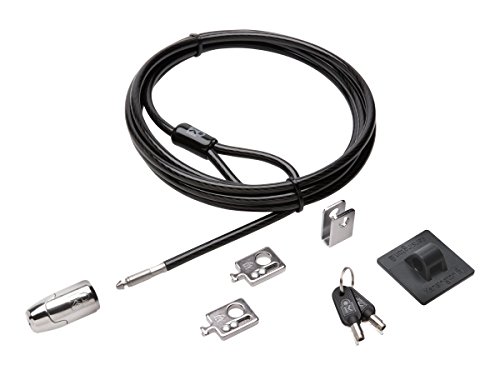
Best Desktop and Peripheral Kit – Kensington Locking Kit 2.0
Rather than securing only a laptop, this Kensington kit is designed for desktop PCs and related accessories. It combines an eight-foot carbon-steel cable with adapters, a cable trap, and an anchor plate for devices that lack a built-in Kensington security slot.
Best For: Home offices that need to secure a desktop computer and multiple peripheral accessories together.
Pros:
- Eight-foot cut-resistant cable provides flexible reach around a desk.
- Includes two K-Slot adapters and a cable trap for peripheral accessories.
- Anchor plate can secure devices without a Kensington security slot.
- Keyed lock head uses a 5mm system with patented anti-pick Hidden Pin Technology.
Cons:
- Uses keys rather than a resettable combination.
- Its desktop-focused design may be more equipment than needed for a single laptop.
This is one of the more versatile laptop locking cables for home offices with monitors, desktops, and accessories to protect. Choose it when broad equipment coverage matters more than a compact, laptop-only setup.
Best Universal Compatibility – StarTech 3-in-1 Laptop Cable Lock
If your home office includes laptops with different lock-slot standards, this StarTech model is a flexible option. Its interchangeable tips support Kensington-style K-Slot, Nano, and Noble Wedge slots, while the resettable four-digit lock and 6.6-foot vinyl-coated steel cable keep the setup keyless.
Best For: Multi-brand home offices with standard K-Slot, Nano, and Noble Wedge-compatible laptops.
Pros:
- Three interchangeable lock tips cover K-Slot, Nano, and Noble Wedge slots.
- Resettable four-digit combination offers up to 10,000 combinations.
- 6.6-foot cut-resistant cable is tested to 88 pounds of force.
- Rotating ball-joint lock head supports positioning on thin devices.
Cons:
- Compatibility still depends on the laptop having one of the supported slot types.
- The universal design may be unnecessary if all your devices use the same standard slot.
Among laptop locking cables for home offices, this is the strongest choice for varied equipment because it includes three lock-tip formats. It is especially useful when standard-slot, Nano, and wedge-slot devices share the same workspace.
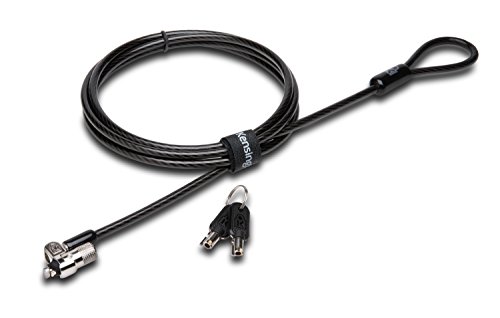
Best Keyed Standard-Slot Lock – Kensington T-Bar Keyed Laptop Lock
For a traditional keyed approach, this Kensington T-Bar lock pairs a six-foot carbon-steel cable with a compact pivoting lock head. It is built for laptops and other equipment featuring a standard Kensington security slot, with a tubular lock and hinge intended to make access easier on thin devices.
Best For: Home-office users who prefer a keyed lock for standard Kensington security slots.
Pros:
- Six-foot carbon-steel cable with plastic sheath resists cutting attempts.
- Pivoting 10mm lock head is designed for thin laptops and devices.
- Patented Hidden Pin Technology supports the anti-pick tubular lock.
- Special hinge helps reduce awkward locking and unlocking angles.
Cons:
- Requires carrying and managing keys.
- Does not work with newer Dell devices using a wedge lock slot.
- Some HP EliteBook, X2 tablet, and Chromebook models use a Nano slot instead.
This keyed model is a good fit when dependable standard-slot compatibility and a compact lock head are priorities. Check your device specifications first, since Dell wedge-slot and some HP Nano-slot systems need a different lock type.
Most Versatile Kit – Laptop and Tablet Security Cable
For home offices that need to secure more than a standard laptop, this kit is a flexible choice among laptop locking cables for home offices. It includes a keyed lock, two keys, and two adhesive anchor plates, supporting devices with standard security slots as well as tablets, phones, POS equipment, and other smooth-surface electronics.
Best For: Home offices with mixed devices, shared work areas, and equipment without built-in security slots.
Pros:
- Includes two keys and two self-adhesive anchor plates.
- Works with standard 3 x 7 mm security slots or compatible non-slot devices.
- Its 6.6-foot, 5 mm steel cable can loop around desks, table legs, shelves, and monitor arms.
Cons:
- Adhesive plates require clean, dry surfaces and waiting time before use.
- Keyed operation means keeping track of the included keys.
This is a practical all-in-one option when a home office includes laptops alongside tablets, phones, monitors, or other shared electronics. The included anchors add flexibility, while the long cable helps accommodate different desk layouts.
Best Slim-Laptop Fit – StarTech Nano Slot Combination Lock
For an ultrathin notebook, this StarTech model stands out among laptop locking cables for home offices because its off-center lock tip is designed to let slim laptops lie flat. The resettable four-digit combination and rotating lock head provide keyless, flexible desk security for compatible devices.
Best For: Ultrabooks, slim notebooks, and 2-in-1 laptops with a compatible Nano security slot.
Pros:
- Off-center Nano lock tip accommodates ultra-slim laptops.
- Resettable four-digit combination offers 10,000 possible combinations without keys.
- 360-degree rotating lock head and 6.6-foot cut-resistant cable support flexible positioning.
Cons:
- Requires a compatible Nano security slot.
- Optional anchor locks for flat-surface equipment are sold separately.
This is a focused choice for home-office users who want a low-profile lock for a slim laptop and prefer a combination over keys. Verify that the computer has a Nano slot before buying.
Best Keyless Flexibility – Laptop Combination Cable Lock
This combination cable is a flexible pick among laptop locking cables for home offices, especially when some devices have security slots and others do not. It combines a 4-digit resettable code with an adhesive slot plate, a 5 mm braided cable, and a one-hand push-button lock head.
Best For: Home offices securing laptops, tablets, and other devices with or without built-in lock holes.
Pros:
- Supports both built-in security slots and devices using the included adhesive plate.
- Resettable four-digit combination provides more than 10,000 possible codes.
- 6.23-foot, 5 mm braided cable and 360-degree rotating push-button lock head offer flexible handling.
Cons:
- The adhesive plate is intended for attachment to a hard device surface.
- Combination locks require remembering the chosen code.
Choose this model when keyless access and compatibility with different device types matter most. Its included plate expands usefulness beyond slot-equipped laptops, while the cable length suits typical desk and fixed-object setups.
Best Slim-Laptop Pick – Kensington Nano Combination Lock
For thin laptops with a Nano security slot, this Kensington model is a practical choice among laptop locking cables for home offices. Its slim lock head is designed to let the computer sit flat, while the resettable combination avoids the need to keep track of a key.
Best For: Thin laptops with Nano-sized security slots that need a combination lock for a home-office desk or shared workspace.
Pros:
- Five-foot carbon-steel cable provides useful reach for anchoring to desks and tables.
- Resettable four-wheel combination offers 10,000 possible codes.
- Pivoting lock head and rotating cable help preserve access to nearby ports.
- Plastic sleeve helps protect the anchored surface from contact with the cable.
Cons:
- Designed specifically for Nano-sized slots, so slot compatibility should be checked first.
- Combination locks require you to remember the selected code.
This is a focused option rather than a universal one. If your laptop has the supported Nano slot, its slim profile, adjustable combination, and flexible cable movement make it well suited to securing a home-office laptop without adding much bulk.
Best Adhesive-Anchor Kit – AboveTEK Keyed Laptop Lock
The AboveTEK kit takes a flexible approach to laptop locking cables for home offices, using adhesive anchor plates for devices without a built-in security slot. It includes two anchor sets, making it useful when securing more than one tablet, phone, laptop, or other compatible device.
Best For: Households or small workspaces securing multiple mobile devices with flat surfaces suitable for the included adhesive anchors.
Pros:
- Includes two adhesive sticker-and-anchor sets for use with multiple devices.
- Six-foot galvanized steel cable allows movement while the device remains secured.
- Keyed lock design is straightforward to install and operate.
- Works with tablets, smartphones, laptops, notebooks, monitors, and similar devices.
Cons:
- Adhesive anchors require a suitable flat surface and proper placement.
- Key operation means the keys must be stored securely and kept available.
- The notes do not specify compatibility with every device surface or finish.
Its main advantage is versatility: the adhesive-anchor system can extend basic theft protection to devices that lack a dedicated lock slot. For a home office with several gadgets, the two-anchor package and six-foot cable offer practical coverage.
Best Universal Fit – Kensington 3-in-1 Combination Lock
For mixed-device home offices, this Kensington lock stands out among laptop locking cables for home offices because its interchangeable tips fit standard, Nano, and wedge-shaped security slots. The resettable combination and six-foot cable add convenience when securing laptops from different brands or generations.
Best For: Home offices with laptops that use different security-slot shapes or where future device compatibility matters.
Pros:
- Three interchangeable lock tips support standard, Nano, and wedge-shaped slots.
- Six-foot carbon-steel cable offers added reach for desk anchoring.
- Resettable four-number dial provides 10,000 possible combinations.
- Tethered unused tips are kept with the lock, reducing the chance of misplacing them.
Cons:
- Its universal design involves changing lock tips to match the device slot.
- Combination retrieval depends on registering with Kensington’s online program if the code is forgotten.
This is the most adaptable choice of the three for a shared or evolving workspace. The interchangeable tips reduce concerns about slot shape, while the longer cable and resettable dial make routine desk use convenient.
How We Picked the Best Laptop Locking Cables for Home Offices
We focused on the features that matter most in a residential workspace: slot compatibility, cable length, locking method, anchor flexibility, ease of daily use, and the types of devices each kit can secure. The selection includes established Kensington and StarTech options alongside adhesive-anchor kits for laptops, tablets, and other equipment without a native lock slot.
Because laptop security slots are not universal, compatibility received particular attention. A strong cable is only useful if its locking head fits the device and its anchor can attach securely to a desk or other fixed surface.
Quick Comparison
| Best for | Recommended type | What to look for |
|---|---|---|
| Most standard laptops | T-Bar keyed or combination lock | Matching standard security slot and 6-foot cable |
| Modern thin laptops | Nano-compatible lock | Nano security slot compatibility and compact head |
| Mixed devices | Universal 3-in-1 cable | Support for standard, Nano, and wedge-style slots |
| Desktops and accessories | Peripheral locking kit | Multiple attachment options and included anchors |
| Devices without a slot | Adhesive-anchor kit | Strong mounting surface, proper preparation, and two keys |
Key Buying Factors for Laptop Locking Cables for Home Offices
Security-Slot Compatibility
Check your laptop’s security-slot type before buying. Standard T-Bar, Kensington Nano, and Noble-style wedge openings differ in shape and size. Universal models are useful when several household devices use different slots, but verify the manufacturer’s compatibility list whenever possible.
Keyed Versus Combination Locks
Keyed locks are straightforward and can be convenient when multiple cables use the same key system. Combination locks eliminate the need to store a key, making them useful for shared workspaces, but choose a resettable model and keep the combination private.
Cable Length and Construction
A 5- or 6-foot steel cable usually provides enough reach around a desk leg or fixed furniture. Measure the intended anchor point first. Look for a sturdy cable, a smooth locking mechanism, and a design that resists easy cutting or tampering.
Anchoring and Installation
A cable is only as effective as the object securing it. Attach it to a heavy, fixed desk component rather than a lightweight accessory. Adhesive plates can expand compatibility, but they require a clean, suitable surface and adequate curing time before use.
Who Should Buy Which Laptop Locking Cables for Home Offices?
Choose a standard Kensington T-Bar model if your laptop has a conventional security slot and you want a simple daily deterrent. Pick a Nano-compatible lock for a newer slim laptop with a smaller security opening. A universal 3-in-1 combination cable is the most flexible choice for households with multiple laptops or changing equipment.
For monitors, keyboards, docking stations, and other peripherals, a dedicated locking kit is more practical than a single laptop cable. If your laptop or tablet has no built-in slot, select an adhesive-anchor kit and treat installation as carefully as the lock itself. No cable makes a device theft-proof, but the right setup can discourage opportunistic removal and keep valuable equipment attached to a fixed point.