Finding the right monitor height can be difficult when standard desk mounts leave the screen too low. The best monitor wall mounts for tall people provide greater vertical adjustment, longer reach, and a stable way to position one or more displays at eye level.
We selected 10 options covering compact monitors, dual-screen workstations, ultrawide displays, and sit-stand setups. Use the comparison and buying advice below to match your monitor size, weight, wall type, and preferred range of motion.
Best 10 Monitor Wall Mounts for Tall People Picks for 2026
Best Ultrawide Choice
VIVO Single Ultrawide Wall Mount

- Fits most ultrawide screens up to 49 inches
- Supports up to 44 pounds
- Extends 10.5 inches with tilt and swivel
Best For: Tall users with heavy ultrawide monitors
Best Dual-Monitor Pick
HUANUO Height-Adjustable Dual Wall Mount

- Holds two screens up to 32 inches each
- Supports 17.6 pounds per arm
- Designed for sitting or standing height adjustment
Best For: Tall users building a two-monitor workstation
Best Desk-Saving Reach
ErgoFocus Extra-Long Monitor Wall Mount
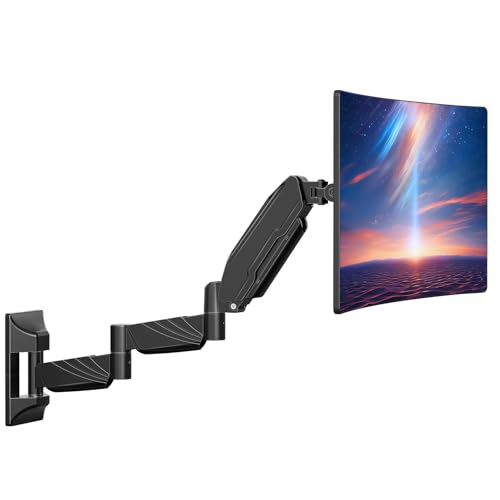
- 27.97-inch arm reaches well beyond the wall
- Supports 17–32-inch screens up to 17.6 lb
- Full motion with hidden cable management
Best For: Tall users with compact desks and extended reach needs
Best Heavy-Duty Ultrawide Pick
Premium Aluminum Single Monitor Arm
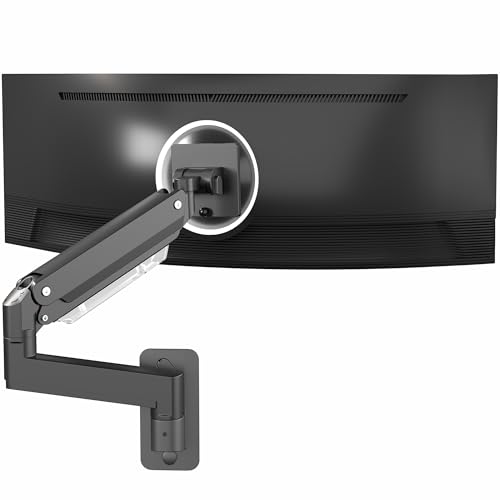
- Supports screens up to 49 inches and 44 pounds
- Provides 13 inches of smooth height adjustment
- Includes quick-release VESA plate and wall hardware
Best For: Tall users with large or heavy ultrawide monitors
Best Dual-Screen Reach
Extra-Long Dual Monitor Wall Mount

- Supports two monitors up to 32 inches each
- Arms extend up to 27.1 inches
- Offers tilt, swivel, and 360-degree rotation
Best For: Tall users needing two adjustable monitors with extra reach
Best Compact Single-Arm Option
Full-Motion 34-Inch Wall Mount

- Supports 13- to 34-inch monitors up to 19.8 pounds
- Offers 12.2 inches of height adjustment
- Retracts to 3.54 inches and extends to 20.47 inches
Best For: Tall users with compact desks or tight corner workspaces
Ultrawide Height-Range Pick
ARES WING 49-Inch Wall Mount Arm

- Supports 17-49-inch screens up to 44 pounds
- 10-inch height range with full motion adjustment
- Best suited to ultrawide and curved monitors
Best For: Tall users with large ultrawide or curved monitors
Complete Sit-Stand Workstation
Mount-It! Monitor Arm with Tray

- Offers 19.9 inches of monitor height movement
- Includes keyboard tray and adjustable CPU holder
- Supports up to 26-inch, 17.6-pound monitors
Best For: Tall users building a complete wall-mounted workstation
Compact Full-Motion Choice

- Fits 13-32-inch monitors up to 14.3 pounds
- 17.1-inch extension with gas-spring adjustment
- Offers tilt, swivel, and 360-degree rotation
Best For: Tall users with lighter standard-size monitors
Best Extra-Long Single-Arm Pick – MOUNT PRO Extra-Long Monitor Wall Mount
For tall users searching for monitor wall mounts for tall people, this MOUNT PRO model offers substantial reach and flexible positioning. Its arm extends up to 25.67 inches from the wall, while pneumatic height adjustment, tilt, swivel, and rotation help you set a comfortable viewing position.
Best For: Tall users who need a single monitor mount with maximum reach for flexible desk, corner, or room placement.
Pros:
- Extends 25.67 inches and retracts to 3.17 inches.
- Supports 13- to 32-inch monitors weighing 4.4 to 17.6 pounds.
- Offers 360° rotation, ±90° swivel, and +90°/-45° tilt.
- Includes cable management and hardware for wood studs, concrete, or brick.
Cons:
- Must not be installed into drywall alone.
- Not compatible with 1000R, 1500R, or 1800R curved screens.
This is a strong choice when reach matters most. Verify your wall construction, monitor weight, VESA pattern, and screen curvature before installation.
Best Ultrawide Choice – VIVO Single Ultrawide Wall Mount
The VIVO MOUNT-VW01M is a practical option among monitor wall mounts for tall people who use a large ultrawide display. It supports screens up to 49 inches and extends 10.5 inches from the wall, giving you some positioning flexibility without taking up desk space.
Best For: Tall users with a single ultrawide monitor who want a sturdy wall mount and a low-profile design.
Pros:
- Supports most ultrawide monitors up to 49 inches.
- Holds up to 44 pounds with a high-grade steel construction.
- Offers +5°/-12° tilt, ±45° swivel, and screen leveling.
- Collapses flat against the wall and includes cable management.
Cons:
- Maximum extension is 10.5 inches, less than the extra-long single-arm options.
- VESA compatibility is limited to 75×75 and 100x100mm patterns.
Choose this model when screen size and weight capacity take priority over maximum arm reach. Confirm your ultrawide’s VESA pattern and mounting weight before buying.
Best Dual-Monitor Pick – HUANUO Height-Adjustable Dual Wall Mount
For tall users comparing monitor wall mounts for tall people, the HUANUO dual mount makes it easier to raise two screens to a comfortable working or gaming height. Each arm supports a monitor up to 32 inches and 17.6 pounds, with broad adjustment for sitting or standing setups.
Best For: Tall users who want two wall-mounted monitors with adjustable height and independent positioning.
Pros:
- Supports two 17- to 32-inch monitors up to 17.6 pounds per arm.
- Provides 360° rotation, ±90° swivel, and +35°/-35° tilt.
- Compatible with VESA 75×75 and 100x100mm patterns.
- Includes cable management and mounting hardware for studs, concrete, and brick.
Cons:
- Requires suitable wall construction; drywall alone is not listed as an installation option.
- Each monitor must stay within the 32-inch and 17.6-pound limits.
This mount is well suited to dual-screen productivity or gaming stations where ergonomic height is important. Check both monitors’ VESA patterns, weights, and available wall space before installation.
Best Desk-Saving Reach – ErgoFocus Extra-Long Monitor Wall Mount
The ErgoFocus extra-long arm is a useful choice among monitor wall mounts for tall people who need to pull a screen closer or position it over a compact desk. Its 27.97-inch reach is designed to expand placement options while keeping the desktop clear.
Best For: Tall users with small desks who want a single monitor mount that reaches far from the wall.
Pros:
- Uses a 27.97-inch arm to support flexible monitor placement.
- Fits 17- to 32-inch screens weighing 4.4 to 17.6 pounds.
- Provides 360° rotation, ±90° swivel, and +90°/-45° tilt.
- Includes hidden cable channels and installation tools.
Cons:
- Cannot be installed into drywall alone.
- Does not support ultra-curved 1000R, 1500R, or 1800R screens.
Its standout feature is reach, making it particularly practical for small workspaces and unusual viewing positions. Confirm the wall type and your monitor’s weight, size, VESA pattern, and curvature before installation.
Best Heavy-Duty Ultrawide Pick – Premium Aluminum Single Monitor Arm
For tall users who need more height and a larger display, this VIVO arm is a strong option among monitor wall mounts for tall people. Its pneumatic arm supports screens up to 49 inches and provides 13 inches of smooth height adjustment, while the wall-mounted design keeps the desktop clear.
Best For: Tall users with ultrawide or heavier monitors who want substantial adjustment range and strong wall-mounted support.
Pros:
- Supports ultrawide monitors up to 49 inches and screens weighing up to 44 pounds.
- Offers 13 inches of height adjustment, plus tilt, swivel, and rotation.
- Includes a quick-release VESA plate and cable management.
- Hardware is included for wood and concrete/brick walls.
Cons:
- Limited to 75x75mm and 100x100mm VESA patterns.
- Non-VESA monitors require a separate adapter.
This is the most capable choice here for large, heavy, or curved displays. Its 13-inch height range can help taller users position the screen more comfortably, although wall construction and VESA compatibility should be confirmed before installation.
Best Dual-Screen Reach – Extra-Long Dual Monitor Wall Mount
This MOUNT PRO model stands out among monitor wall mounts for tall people because its three-jointed arms extend up to 27.1 inches. The extra reach makes it easier to bring two monitors forward or position them higher, while full-motion adjustment supports work, gaming, and screen sharing.
Best For: Tall users who need two monitors and extra forward reach in a home office, gaming area, meeting room, or streaming setup.
Pros:
- Supports two 17- to 32-inch monitors weighing 4.4 to 17.6 pounds each.
- 27.1-inch arm extension offers more positioning flexibility than shorter arms.
- Provides tilt, swivel, and 360-degree rotation for portrait or landscape viewing.
- Installs on wood studs, solid concrete, or brick with labeled hardware.
Cons:
- Not compatible with 1000R, 1500R, or 1800R curved screens.
- Must not be installed into drywall alone.
- Supports screens only up to 32 inches and 17.6 pounds.
The long arms are the key advantage for taller users and flexible room layouts, especially when monitors need to move closer to eye level or toward the user. Check each monitor’s weight, size, curvature, and VESA pattern before buying.
Best Compact Single-Arm Option – Full-Motion 34-Inch Wall Mount
For a smaller desk or corner setup, this ErGear arm is a practical entry among monitor wall mounts for tall people. It offers 12.2 inches of height adjustment and extends 20.47 inches, letting you pull the display closer for detail work or move it back to free workspace.
Best For: Tall users with compact or wall-side workspaces who need a single monitor arm without desk clamps.
Pros:
- Supports 13- to 34-inch monitors weighing up to 19.8 pounds.
- Provides 12.2 inches of height adjustment and 20.47 inches of extension.
- Offers tilt, swivel, and 360-degree rotation.
- Works with wood studs, concrete, or brick and avoids desktop thickness limits.
Cons:
- Not designed for monitors over 34 inches or 19.8 pounds.
- Drywall-alone installation is not supported.
- Uses 75x75mm and 100x100mm VESA patterns only.
This arm balances useful height range with a compact footprint. It is a good fit when a tall user wants a single adjustable screen and a clamp-free desk, but the lighter capacity makes it better suited to standard monitors than especially large displays.
Ultrawide Height-Range Pick – ARES WING 49-Inch Wall Mount Arm
For shoppers comparing monitor wall mounts for tall people, the ARES WING stands out for its broad screen compatibility and 10-inch adjustable height range. It supports 17- to 49-inch displays weighing up to 44 pounds, including 1000R curved ultrawide monitors, while its gas-spring arm helps you position the screen for a more comfortable posture.
Best For: Tall users with large ultrawide or curved monitors who want substantial height and viewing-angle adjustment.
Pros:
- Supports monitors from 17 to 49 inches and up to 44 pounds.
- Offers 10 inches of height adjustment, 180-degree swivel, 360-degree rotation, and +50°/-20° tilt.
- Extends up to 23.9 inches and retracts to about 5 inches to save desk space.
- Includes cable management and uses steel and aluminum construction with a tested gas spring.
Cons:
- Must be secured to a wood stud, solid concrete, or brick; the included anchor should not be used in drywall or wood alone.
- Monitors without VESA holes require a separate VESA adapter.
This is the strongest option here for heavy ultrawide displays and users who need meaningful vertical repositioning. Confirm your wall structure and VESA compatibility before installation.
Complete Sit-Stand Workstation – Mount-It! Monitor Arm with Tray
Among monitor wall mounts for tall people, this Mount-It! system is designed for users who want a broader sit-stand workstation rather than a monitor arm alone. Its gas-spring lift provides 19.9 inches of height movement, while the keyboard tray and CPU holder help create a complete wall-mounted setup for shared offices or home workspaces.
Best For: Tall users who need extensive height adjustment plus a keyboard tray and wall-mounted CPU holder.
Pros:
- Provides 19.9 inches of monitor height movement for sit-stand use.
- Includes a 26-inch keyboard tray with flat and 10-degree tilt settings.
- Integrated CPU holder fits towers from 4.8 to 8.3 inches wide.
- Supports 75x75mm and 100x100mm VESA monitors weighing 4.4 to 17.6 pounds.
Cons:
- Monitor support is limited to 17.6 pounds and screens up to 26 inches.
- Requires a wood stud or solid concrete wall; it is not intended for drywall alone.
- The complete unit weighs 28.9 pounds, which may make installation more involved.
The unusually large height range makes this the most workstation-oriented choice for taller users. Its narrower monitor size and weight limits are important checks before purchase, especially with larger displays.
Compact Full-Motion Choice – Mount-It! MI-765 Wall Arm
The MI-765 is a practical option when you want one of the more compact monitor wall mounts for tall people. Its gas-spring arm extends up to 17.1 inches and allows height repositioning, while tilt, swivel, and rotation help you set a comfortable viewing angle for work, study, or gaming.
Best For: Tall users with standard-size monitors who want flexible positioning without a larger workstation assembly.
Pros:
- Fits most 13- to 32-inch monitors weighing up to 14.3 pounds.
- Provides +90°/-45° tilt, 180-degree swivel, and 360-degree rotation.
- Extends up to 17.1 inches and uses a gas spring for smooth adjustment.
- Includes cable management, installation hardware, and step-by-step instructions.
Cons:
- Its 14.3-pound capacity is lower than the ARES WING’s limit.
- Requires a single wood stud or solid concrete wall and is not for drywall-only installation.
- It is a single-monitor arm without the keyboard tray or CPU holder included with the larger Mount-It! system.
This arm balances useful reach and broad movement with a more compact design. It is a sensible match for lighter 13- to 32-inch screens, provided your wall offers a secure stud or masonry mounting point.
How We Picked the Best Monitor Wall Mounts for Tall People
We focused on the features that matter most for taller users: vertical height adjustment, arm reach, full-motion positioning, weight capacity, VESA compatibility, and support for larger or multiple displays. The lineup includes single and dual arms, extra-long designs, ultrawide-compatible mounts, gas-spring models, and a sit-stand option with added workstation accessories.
We also considered practical installation factors, including the wall attachment, cable management, screen-size limits, and whether the mount is designed for a fixed viewing position or frequent repositioning. Always verify the manufacturer’s weight rating and mounting instructions before installation.
Quick Comparison
| Best for | Look for | Important check |
|---|---|---|
| Single standard monitor | Long arm and broad height adjustment | Screen size, weight, and VESA pattern |
| Dual-monitor setup | Independent arm adjustment | Per-arm weight capacity |
| Ultrawide display | Wide VESA support and high capacity | Monitor width, curvature, and total weight |
| Sit-stand workstation | Extended vertical range and flexible reach | Wall construction and clearance |
Key Buying Factors for Monitor Wall Mounts for Tall People
Height Range and Arm Length
Height adjustment is the first priority. A mount with a long vertical track or extended arm can place the display higher without forcing you to lean forward. Check the mount’s actual adjustment range rather than relying only on the phrase “extra long.” Wall height and desk position also affect the usable range.
Weight and VESA Compatibility
Confirm that your monitor’s weight falls below the mount’s capacity, especially for ultrawides and dual-monitor arms. The most common VESA patterns are 75×75 and 100×100 mm, but larger displays may use different spacing. Include the monitor stand or adapter weight when necessary.
Motion, Stability, and Wall Type
Tilt, swivel, rotation, and extension are useful when you change seating positions or share a screen. However, longer arms create more leverage against the wall, so solid attachment is essential. Install into suitable studs or use hardware rated for your specific wall construction; do not rely on unsuitable drywall anchors for a heavy display.
Monitor Size and Workspace Clearance
Measure the monitor’s width, depth, and rear clearance. Dual arms need enough space to align screens without collisions, while ultrawide models need a mount rated for both their size and center of gravity. Check whether the extended arm will hit shelves, cabinets, or the desk.
Who Should Buy Which Monitor Wall Mounts for Tall People?
Choose a single extra-long arm if you use one standard monitor and mainly need more height and reach. A dual-monitor mount is better for productivity or gaming setups, provided each arm supports the individual display. Ultrawide owners should prioritize high-capacity models explicitly rated for large screens. If you frequently alternate between sitting and standing, a sit-stand design offers the broadest positioning flexibility. For frequent adjustments, a gas-spring arm can make repositioning smoother, while a simpler fixed-joint model may be preferable when stability and value matter most.