High-end PCs generate serious heat, especially when pairing powerful processors and graphics cards with compact cases, restrictive filters, or overclocked settings. The right fans can improve airflow, reduce component temperatures, and keep noise under control.
This roundup compares 10 strong 120mm options, including high-static-pressure fans for radiators and heatsinks, affordable multi-packs, and RGB models with ecosystem-focused controls. Use the guide below to match fan performance, connectivity, acoustics, and aesthetics to your build.
Best 10 Computer Cooling Fans for High End PCs Picks for 2026
Premium Quiet Pick
Noctua NF-A12x25 G2 chromax.Black 2-Pack

- Speed-offset dual-fan design
- High airflow and static pressure
- Six-year warranty and premium bearing
Best For: Quiet radiator cooling and premium black builds
Best Value Multi-Pack
Thermalright TL-C12C-S ARGB 5-Pack

- Five 120mm PWM fans
- ARGB lighting with motherboard sync
- S-FDB bearings and 55cm cables
Best For: Affordable whole-case fan upgrades
Best Smart RGB System
CORSAIR iCUE LINK RX120 Triple Pack

- 4.38mm-H2O static pressure
- LINK connectors simplify wiring
- Eight RGB LEDs per fan
Best For: RGB radiator builds using iCUE LINK
Best High-Speed Value
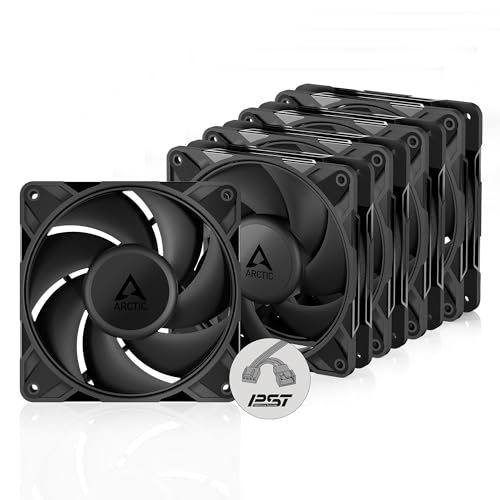
- Up to 3000 RPM
- High static pressure for radiators
- 0 RPM mode below 5% PWM
Best For: High-performance radiator and mesh cooling
Best RGB Daisy-Chain Option
Lian Li UNI Fan SL-Infinity 120 Triple Pack

- 2,100 RPM airflow performance
- Infinity-mirror RGB with 40 LEDs per fan
- Controller supports up to 16 fans
Best For: Showcase PCs needing clean cabling and expandable RGB control
Best Quiet Performance Value
Noctua NF-P12 redux-1700 PWM Triple Pack

- Pressure-optimized for coolers and radiators
- Up to 1,700 RPM with PWM control
- Low rated noise of 25.1 dB(A)
Best For: Quiet high-performance systems and radiator ventilation
Best High-Airflow ARGB Choice
CORSAIR RS120 ARGB Triple Pack
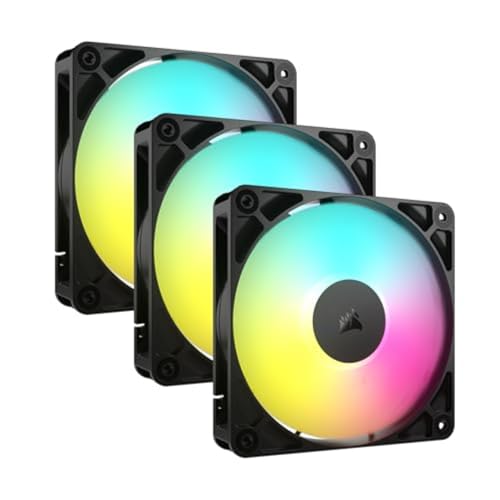
- Up to 72.8 CFM at 2,100 RPM
- 2.8 mm-H2O static pressure for radiators
- Daisy-chain PWM and 5V ARGB connections
Best For: High-airflow gaming PCs and radiator-focused builds
Best Value Pressure Performer

- Pressure-optimised for radiators and heatsinks
- Five 120mm fans for multi-fan builds
- Fluid Dynamic Bearing for quiet, durable operation
Best For: Radiator, heatsink, and multi-fan case cooling
Best Budget ARGB Kit
Cooler Master MF120 Lite 3-Pack

- PWM range from 650 to 1,750 RPM
- Frosted blades provide customizable ARGB lighting
- Includes an ARGB header extender
Best For: ARGB gaming PCs needing three PWM fans
Best Premium RGB Performance
CORSAIR iCUE Link LX120 Triple Pack
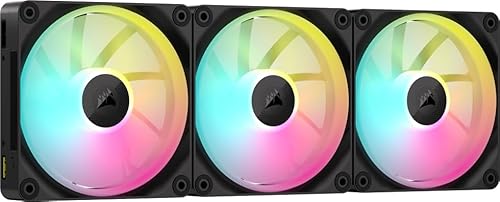
- Up to 2,400 RPM and 69.9 CFM airflow
- 5.22 mmH₂O static pressure for radiators
- Linked dual-loop RGB with AirGuide technology
Best For: Premium CORSAIR iCUE LINK gaming and workstation builds
Premium Quiet Pick – Noctua NF-A12x25 G2 chromax.Black 2-Pack
For high-end PCs where acoustics matter as much as cooling, the Noctua NF-A12x25 G2 PWM Sx2-PP is a premium two-fan option. Its 1800 RPM PWM control, high airflow, static-pressure design, and speed-offset pairing make it suitable for radiators, push-pull setups, and case airflow.
Best For: Quiet radiator cooling, push-pull configurations, and premium black PC builds.
Pros:
- Two 120mm fans are speed-offset to help reduce unwanted acoustic interaction.
- High airflow and static pressure support radiators, coolers, and case ventilation.
- Includes anti-vibration mounts, radiator gasket, LNA, extension, and splitter cables.
- Premium SSO2 bearing, six-year warranty, and protective electrical features.
Cons:
- Premium positioning may make it less attractive for large, budget-focused fan installations.
- Its 1800 RPM maximum is lower than some performance-oriented alternatives.
This is a strong choice when refined acoustics, build quality, and radiator versatility are more important than lighting or maximum RPM. The two-fan configuration and included accessories also simplify common high-end cooling layouts.
Best Value Multi-Pack – Thermalright TL-C12C-S ARGB 5-Pack
The Thermalright TL-C12C-S five-pack is a practical way to equip a high-end PC with multiple computer cooling fans for high end pcs without buying each fan separately. These 120mm PWM fans offer 1550 RPM control, ARGB lighting, and a 55cm cable for linking fans across a case or cooler.
Best For: Budget-conscious builders who need five coordinated case, radiator, or CPU-cooler fans.
Pros:
- Five-fan package provides broad coverage for larger cases and cooling layouts.
- 4-pin PWM control adjusts fan speed according to motherboard temperature.
- S-FDB bearings are designed to reduce noise and improve service life.
- ARGB blades support up to 17 lighting modes and motherboard synchronization.
Cons:
- 1550 RPM and 66.17 CFM are more moderate than the fastest performance fans.
- ARGB functionality requires compatible motherboard or control hardware.
Choose this pack when quantity, coordinated lighting, and straightforward PWM control are priorities. It is especially useful for filling several case positions or combining intake, exhaust, and CPU-cooler airflow on one build.
Best Smart RGB System – CORSAIR iCUE LINK RX120 Triple Pack
The CORSAIR iCUE LINK RX120 triple pack targets high-end PCs that need strong radiator performance and streamlined RGB installation. With speeds up to 2100 RPM, 74.2 CFM airflow, 4.38mm-H2O static pressure, and LINK connectors, it combines cooling capability with a tidy connected-fan setup.
Best For: RGB-focused builds using high-density radiators and the CORSAIR iCUE LINK ecosystem.
Pros:
- High static pressure helps push air through dense radiators and other obstructions.
- PWM control provides speeds up to 2100 RPM.
- Fans connect directly together for cleaner cable management through the LINK system.
- Eight RGB LEDs and AirGuide vanes add lighting and concentrated airflow.
Cons:
- Specified noise level reaches 36 dB at maximum operation.
- The feature set is most useful within the CORSAIR iCUE LINK ecosystem.
This pack is a compelling fit for performance-oriented RGB systems, especially when radiator resistance and simplified fan wiring matter. Its higher rated noise level makes it better suited to users willing to trade some quiet for speed, pressure, and lighting control.
Best High-Speed Value – ARCTIC P12 Pro PST 5-Pack
The ARCTIC P12 Pro PST five-pack is built for demanding airflow setups where a wide PWM range and high static pressure are useful. These 120mm computer cooling fans for high end pcs can reach 3000 RPM, stop below 5% PWM, and use a splitter arrangement for coordinated control.
Best For: High-performance radiator and mesh-panel cooling with adjustable low-speed operation.
Pros:
- 3000 RPM maximum provides substantial speed headroom for demanding cooling loads.
- High static pressure suits dense radiators, mesh, and narrow perforated panels.
- 0 RPM mode below 5% PWM can support near-silent idle operation.
- Five-pack includes PWM PST fans with a Y-cable splitter for coordinated control.
Cons:
- Maximum-speed operation may be less suitable for noise-sensitive users.
- The pack is intended for 120mm mounting positions and may not fit every case layout.
For builders who want aggressive cooling when needed without giving up PWM range, the P12 Pro PST is a versatile value pick. Its five-fan format works well for outfitting multiple positions, while the FDB and precision manufacturing support smoother operation across the speed range.
Best RGB Daisy-Chain Option – Lian Li UNI Fan SL-Infinity 120 Triple Pack
For builders choosing computer cooling fans for high end pcs, the Lian Li UNI Fan SL-Infinity 120 triple pack combines strong 2,100 RPM performance with an organized interlocking design and extensive lighting customization. The included controller supports up to 16 fans, making it useful for larger builds.
Best For: High-end gaming PCs where coordinated RGB lighting, clean cable management, and expandable fan control matter.
Pros:
- Infinity-mirror lighting with 40 LEDs per fan and individually customizable effects.
- Interlocking connections help reduce cable clutter.
- Included controller supports up to 16 fans and two SM-type devices.
- Removable keylock and reversible cable module improve radiator compatibility.
Cons:
- Its 29 dB noise rating is higher than the supplied Noctua alternative.
- Lighting and controller features may be unnecessary for understated builds.
Choose this pack when presentation and simplified expansion are as important as airflow. It is a particularly appealing option for showcase systems with multiple synchronized fans.
Best Quiet Performance Value – Noctua NF-P12 redux-1700 PWM Triple Pack
The Noctua NF-P12 redux-1700 PWM triple pack is a practical choice among computer cooling fans for high end pcs when dependable airflow and low operating noise are priorities. Its pressure-optimized design suits CPU coolers, radiators, and chassis ventilation, while PWM control allows automatic speed adjustment.
Best For: Quiet performance builds, radiator cooling, and users who want a proven 120 mm fan design without built-in lighting.
Pros:
- Pressure-optimized blades provide strong airflow and static pressure.
- 1700 RPM PWM control can deliver airflow when needed and quieter operation at idle.
- Rated at up to 25.1 dB(A), making it the quietest option in this comparison by supplied specifications.
- Includes a six-year manufacturer’s warranty and a stated MTTF above 150,000 hours.
Cons:
- It lacks integrated RGB lighting and an included controller.
- Its 1,700 RPM maximum is lower than the 2,100 RPM maximum of the other two packs.
This is the sensible performance-first pick for systems where acoustics matter more than visual effects. PWM motherboard control and radiator suitability give it broad cooling-use flexibility.
Best High-Airflow ARGB Choice – CORSAIR RS120 ARGB Triple Pack
The CORSAIR RS120 ARGB triple pack stands out among computer cooling fans for high end pcs with up to 72.8 CFM airflow, 2,100 RPM PWM control, and 2.8 mm-H2O static pressure. Daisy-chain connections simplify installation, while AirGuide vanes focus airflow toward hot components, radiators, or heatsinks.
Best For: High-airflow gaming systems and radiator setups using a compatible motherboard with 5V ARGB control.
Pros:
- Provides up to 72.8 CFM airflow at speeds up to 2,100 RPM.
- 2.8 mm-H2O static pressure supports radiator and heatsink use.
- Daisy-chaining reduces the number of PWM and ARGB connections required.
- AirGuide vanes concentrate airflow toward targeted components.
Cons:
- Its listed 36 dB noise level is higher than the other supplied options.
- Customizable lighting requires a compatible motherboard with built-in ARGB control.
- The pack’s supplied specifications list a 5V voltage, so system compatibility should be checked before installation.
Pick the RS120 when raw airflow and radiator capability take priority over quiet operation. Its connection design is also useful for builds with several fans and limited motherboard headers.
Best Value Pressure Performer – ARCTIC P12 5-Pack
For builders comparing computer cooling fans for high end pcs, the ARCTIC P12 5-pack is a practical option for filling multiple 120mm mounts. Its pressure-optimised design, 1800 RPM speed, and 2.2 mmH₂O static pressure make it particularly suitable for heatsinks and radiators, while the Fluid Dynamic Bearing is designed for quiet, long-term operation.
Best For: High-end PC builders who need five 120mm fans for radiators, heatsinks, or case ventilation without built-in lighting.
Pros:
- Pressure-optimised performance suits heatsinks and radiators.
- Five-fan pack helps equip a multi-fan build.
- Fluid Dynamic Bearing is designed for quiet operation and long service life.
- Provides up to 56.3 CFM of airflow at 1800 RPM.
Cons:
- Uses a 3-pin connector rather than PWM speed control.
- No RGB lighting or lighting-control features are listed.
- Its 120mm size requires compatible mounting positions.
The P12 is a strong utility-focused choice when cooling performance and quantity matter more than lighting. Its static-pressure focus makes it especially well suited to radiator-based systems and restricted airflow paths.
Best Budget ARGB Kit – Cooler Master MF120 Lite 3-Pack
The Cooler Master MF120 Lite ARGB 3-pack combines adjustable PWM control with customizable lighting, making it a useful choice among computer cooling fans for high end pcs where appearance and airflow both matter. Its 650–1,750 RPM range lets you balance cooling and noise, while the included extender supports daisy-chain connections.
Best For: Gaming PC builders seeking three 120mm PWM fans with ARGB lighting for a CPU cooler, liquid cooler, or case.
Pros:
- 4-pin PWM control adjusts speeds from 650 to 1,750 RPM.
- Curved blades and a hybrid frame are designed to improve airflow and stability.
- Frosted blades enhance ARGB light dispersion.
- Included ARGB header extender supports daisy-chain connections.
Cons:
- Listed noise level is up to 30 dB.
- Maximum speed is lower than some performance-focused alternatives.
- Lighting requires compatible ARGB connections and control hardware.
This kit is a balanced pick for a modern gaming build that needs straightforward PWM control and coordinated ARGB lighting. It offers useful installation flexibility without moving into the higher speed and static-pressure specifications of premium models.
Best Premium RGB Performance – CORSAIR iCUE Link LX120 Triple Pack
For demanding computer cooling fans for high end pcs, the CORSAIR iCUE Link LX120 offers high airflow, strong static pressure, and a streamlined connection system. PWM speeds reach 2,400 RPM, airflow is rated at 69.9 CFM, and AirGuide vanes help direct air toward hot components or through a radiator.
Best For: High-performance RGB systems using CORSAIR iCUE LINK components and requiring powerful radiator or case airflow.
Pros:
- Delivers up to 69.9 CFM of airflow at 2,400 RPM.
- 5.22 mmH₂O static pressure supports radiator mounting.
- iCUE LINK bridge connectors connect fans into a streamlined system.
- Dual light loops and 18 LEDs per fan provide customizable RGB effects.
Cons:
- Listed noise level reaches 36 dB.
- iCUE LINK features are most useful within the CORSAIR ecosystem.
- Premium features may be unnecessary for basic case ventilation.
The LX120 is the most performance-oriented and feature-rich option in this selection. Its high static pressure and AirGuide design suit radiators, while the magnetic dome bearing and linked RGB system add refinement for a premium build.
How We Picked the Best Computer Cooling Fans for High End PCs
We focused on 120mm PWM fans that suit demanding gaming, workstation, and enthusiast systems. Selection criteria included airflow potential, static pressure for radiators and dense mesh, speed control, bearing design, noise-management features, included controllers or splitters, software and lighting compatibility, and overall value in single- or multi-fan configurations.
Premium models such as the Noctua options prioritize dependable acoustics and long-term performance, while ARCTIC and Thermalright packs offer strong cooling per dollar. Corsair and Lian Li models add coordinated lighting and simplified cable management for compatible ecosystems.
Quick Comparison
| Best For | Recommended Direction | What to Prioritize |
|---|---|---|
| Radiators and tower coolers | High static pressure | Pressure rating, PWM range, low motor noise |
| Case intake and exhaust | Balanced airflow | Airflow, acoustic profile, dust-filter compatibility |
| RGB showcase builds | Lighting ecosystem | Controller support, daisy chaining, software compatibility |
| Multi-fan upgrades | Five-pack or triple-pack | Per-fan cost, splitters, headers, included accessories |
Key Buying Factors for Computer Cooling Fans for High-End PCs
Airflow and Static Pressure
Airflow is important for open case positions, while static pressure matters when air must pass through a radiator, heatsink fins, dust filter, or restrictive front panel. A balanced fan can work in either role, but radiator installations benefit from pressure-focused designs.
PWM Control and Speed Range
Four-pin PWM fans allow the motherboard or controller to adjust speed according to temperature. A broad operating range, including a low or zero-RPM mode, can make a system quieter at idle while preserving cooling headroom under load. Confirm that your motherboard headers and fan hub can supply the required power.
Noise, Bearings, and Reliability
Maximum RPM alone does not determine the best fan. Motor tone, blade turbulence, mounting vibration, and bearing quality affect perceived noise. Fluid-dynamic and magnetic-bearing designs are common in quieter premium models, while rubber corners or padded mounts can reduce chassis vibration.
RGB, Wiring, and Compatibility
RGB fans may use standard 5V addressable lighting or a proprietary controller and ecosystem. Check connector types before buying, especially when mixing brands. Daisy-chain systems can simplify cable management, but they may require a compatible hub or controller.
Who Should Buy Which Computer Cooling Fans for High End PCs?
Choose Noctua if quiet, dependable cooling is more important than lighting. Choose ARCTIC or Thermalright multi-packs for cost-effective airflow across several case positions. Corsair and Lian Li are better suited to coordinated RGB builds where controller integration and cleaner wiring justify the added cost. For a high-performance radiator or CPU heatsink, prioritize pressure and acoustics over decorative features; for front intake, compare airflow, filter resistance, and the number of fans your case supports.