Compact PC cases make it possible to build a powerful desktop without giving up valuable desk space. The right enclosure balances motherboard support, graphics card clearance, cooling capacity, cable management, and upgrade room.
We selected 10 cases spanning Mini-ITX, Micro-ATX, and compact ATX formats, including budget-friendly towers, airflow-focused designs, panoramic glass models, and options suited to liquid cooling.
Best 10 Computer Cases for Compact Builds Picks for 2026
Smallest Footprint
SilverStone SG13B Mini-ITX Case
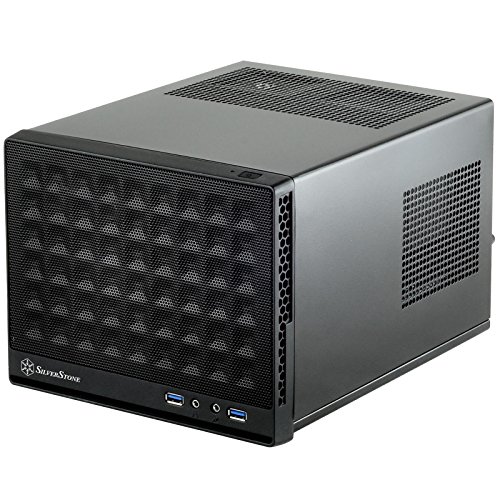
- Compact 11.5-liter design
- ATX PSU and standard-length card support
- Supports 120mm or 140mm AIO cooling
Best For: Space-conscious Mini-ITX systems
Portable Style
Thermaltake TR200 WS Micro Chassis

- Wood front trim and compact design
- Supports mATX and Mini-ITX boards
- Fits 360mm radiators and 365mm GPUs
Best For: Portable, expandable compact builds
Expandable Airflow

- Supports ATX, mATX, and Mini-ITX
- Up to eight 120mm fans or a 360mm radiator
- Mesh front and magnetic dust filters
Best For: Airflow-focused systems needing ATX support
Sturdy Small-Form-Factor Value
Zalman CUBIX Compact mATX Case

- 17.1-liter steel mini-tower design
- Supports ATX PSUs and 260mm GPUs
- Includes perforated front and 80mm fan
Best For: Simple, durable mATX or Mini-ITX desktops
Balanced Airflow Pick

- ATX and Micro-ATX support
- Two included 120mm fans
- Front support for up to a 360mm radiator
Best For: Compact ATX or Micro-ATX airflow builds
Smallest Flexible Build

- Compact 24L Mini-Tower design
- Supports GPUs up to 365mm
- A/B modes for standard and compatible back-connect boards
Best For: Space-conscious Micro-ATX gaming systems
Showcase ATX Option
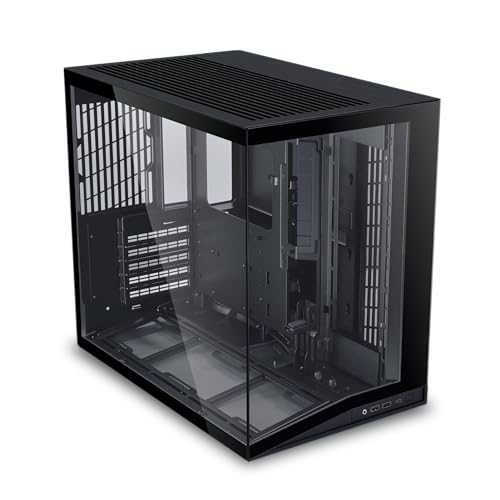
- Pillar-free tempered-glass front and side
- Supports ATX, Micro-ATX, and Mini-ITX
- Full-sized ATX PSU compatibility
Best For: Compact showcase builds with panoramic glass
Best Panoramic Value

- 270° three-sided tempered-glass view
- Micro-ATX and Mini-ITX support
- Three pre-installed fans included
Best For: Compact showcase gaming builds
Best With Included Power Supply

- Pre-installed 400W power supply
- Micro-ATX and Mini-ITX compatible
- Supports up to 240mm or 280mm AIO cooling
Best For: Budget office and compact gaming systems
Best for Modern Hardware
RUIX OV502 Pro Compact Panoramic Case

- Supports GPUs up to 340mm
- Compatible with 240mm AIO cooling
- Dual tempered-glass panoramic panels
Best For: Compact gaming and creator builds
Smallest Footprint – SilverStone SG13B Mini-ITX Case
For builders seeking computer cases for compact builds, the SilverStone SG13B prioritizes a very small 11.5-liter footprint without giving up standard-length expansion-card support. Its Mini-ITX/Mini-DTX compatibility, ATX power-supply support, mesh front panel, and compact liquid-cooling options make it a practical choice for a small desktop or gaming system.
Best For: Mini-ITX builds where space savings and flexible component support matter most.
Pros:
- Very compact 11.5-liter enclosure.
- Supports Mini-ITX/Mini-DTX motherboards and ATX PSUs.
- Accepts 120mm or 140mm single-fan all-in-one liquid coolers.
- Supports standard-length expansion cards and 2.5-inch or 3.5-inch drives.
Cons:
- Limited to Mini-ITX/Mini-DTX motherboard formats.
- Compact dimensions may make installation and cable management more involved.
- Cooling support is centered on a single-fan liquid cooler configuration.
The SG13B is a strong fit when minimizing case volume is the primary goal. Its ATX PSU and standard-length card support add useful flexibility, but builders should plan component placement carefully in this compact chassis.
Portable Style – Thermaltake TR200 WS Micro Chassis
The Thermaltake TR200 WS brings a distinctive wood front trim to the computer cases for compact builds category. Despite its portable, compact design, it supports both mATX and Mini-ITX boards, long graphics cards, a 360mm radiator, and a tall air cooler, giving small-system builders considerable hardware flexibility.
Best For: Compact home or travel builds that need mATX compatibility and a distinctive exterior.
Pros:
- Supports both Micro-ATX and Mini-ITX motherboards.
- Accommodates GPUs up to 365mm and air coolers up to 175mm tall.
- Supports a 360mm radiator and up to seven 120mm fans.
- Optional 5.25-inch bay support adds room for a drive or accessory.
Cons:
- Installing the 5.25-inch bay limits the top radiator support to 240mm.
- Its 19.45-inch depth is larger than many ultra-compact cases.
- The wood front trim may not suit every build aesthetic.
The TR200 WS is less about achieving the absolute smallest footprint and more about balancing portability, expansion room, and visual appeal. Its radiator, GPU, and motherboard support make it one of the more flexible options here for a compact mATX build.
Expandable Airflow – DARKROCK EC2 ATX Mid Tower
The DARKROCK EC2 is a practical option for computer cases for compact builds when you want broad motherboard compatibility without moving to a smaller form factor. Its mesh front, tempered-glass side panels, Type-C readiness, and support for up to eight 120mm fans make it suitable for airflow-focused systems in a mid-tower layout.
Best For: Builders who want ATX compatibility, modern connectivity, and substantial cooling capacity.
Pros:
- Supports ATX, Micro-ATX, and Mini-ITX motherboards.
- Supports up to eight 120mm fans and a 360mm front radiator.
- Mesh front panel and separate magnetic top and bottom dust filters support airflow maintenance.
- Provides up to 340mm of GPU clearance and 200mm of PSU clearance.
Cons:
- At 17.6 inches tall, it is less compact than mini-tower alternatives.
- Only one fan is listed as pre-installed.
- The tempered-glass panels require more care during handling.
The EC2 is a sensible compromise for buyers who want compact-build versatility but still need room for an ATX motherboard or large graphics card. Its cooling support is generous, though you may need to add fans to take full advantage of the chassis.
Sturdy Small-Form-Factor Value – Zalman CUBIX Compact mATX Case
The Zalman CUBIX is a straightforward choice among computer cases for compact builds, combining a 17.1-liter volume with a durable 0.8T steel structure. It supports Micro-ATX and Mini-ITX boards, standard ATX power supplies, graphics cards up to 260mm, and CPU coolers up to 137mm tall.
Best For: Budget-conscious compact desktops that need ATX PSU support and a sturdy steel chassis.
Pros:
- Compact 17.1-liter mini-tower design.
- Supports Micro-ATX and Mini-ITX motherboards.
- Fits standard ATX power supplies, 260mm GPUs, and 137mm CPU coolers.
- Perforated front panel and included 80mm fan support basic airflow.
Cons:
- Cooling is limited to air cooling with one listed 80mm fan.
- GPU clearance is shorter than that of larger compact cases.
- Front connectivity is limited to one USB 3.0, one USB 2.0, and a 3.5mm audio connection.
The CUBIX favors simplicity and durability over extensive cooling or high-end component clearance. It is a good match for modest mATX or Mini-ITX systems, especially when standard ATX PSU support is more important than maximum expansion.
Balanced Airflow Pick – NZXT H5 Flow
For shoppers comparing computer cases for compact builds, the NZXT H5 Flow offers a practical middle ground: it supports ATX and Micro-ATX motherboards while keeping airflow and cooling flexibility in focus. Its mesh panels, two included fans, and compact mid-tower format make it a straightforward foundation for a first gaming or performance-oriented build.
Best For: Builders who want ATX compatibility, strong airflow, and included fans without moving to a larger full tower.
Pros:
- Supports ATX and Micro-ATX motherboards in a compact mid-tower chassis.
- Ultra-fine mesh panels promote airflow and help filter dust.
- Includes two 120mm fans and supports radiators up to 360mm in front.
Cons:
- The two PSU-shroud fans mentioned for GPU intake are not included.
- Its mid-tower dimensions may be larger than necessary for Mini-ITX-only builds.
The H5 Flow is a sensible choice when you want compact-build proportions without giving up standard ATX support. Its included fans and broad cooling support reduce the number of extras needed to get started.
Smallest Flexible Build – JONSBO D32 PRO
The JONSBO D32 PRO is designed for builders who want a genuinely small footprint without limiting component choices too severely. At 24 liters, this Mini-Tower supports Micro-ATX and Mini-ITX motherboards, graphics cards up to 365mm, and either ATX or smaller compatible power supplies.
Best For: Space-conscious builders planning a Micro-ATX system with a full-length GPU and flexible air or liquid cooling.
Pros:
- Compact 24L design measures approximately 15.6 by 8.15 by 12.4 inches.
- Supports GPUs up to 365mm, 240mm AIO radiators, and air coolers up to 163–170mm depending on configuration.
- Offers A/B motherboard modes, including support for compatible back-connect or BTF Micro-ATX boards.
Cons:
- Motherboard mode and hardware configuration affect cooler and component clearances.
- It does not include a power supply or cooling fans based on the supplied specifications.
- Some 16A power plugs are not compatible with the listed PSU clearance.
The D32 PRO is the strongest space-saving option here for a carefully planned Micro-ATX build. Its compatibility is impressive for the size, but builders should verify PSU, motherboard mode, and cooling clearances before purchasing.
Showcase ATX Option – Lian Li O11D Mini V2
For computer cases for compact builds that also need a strong visual presentation, the Lian Li O11D Mini V2 combines a compact ATX layout with pillar-free tempered-glass panels. It supports ATX, Micro-ATX, and Mini-ITX motherboards, while its ventilated design and slanted bottom intake are intended to help direct cooling toward the GPU.
Best For: Showcase-oriented builders who want ATX compatibility, panoramic glass, and support for full-sized ATX power supplies.
Pros:
- Supports ATX, Micro-ATX, and Mini-ITX motherboards.
- Pillar-free tempered-glass front and side panels provide an unobstructed component view.
- Includes GPU anti-sag brackets and supports full-sized ATX power supplies.
Cons:
- Fans are not included, so additional cooling hardware is required.
- Its 22-pound weight and mid-tower dimensions make it less minimal than the smallest compact cases.
- The supplied specifications do not state exact radiator or air-cooler size limits.
The O11D Mini V2 is a good fit when appearance and broad motherboard compatibility matter as much as footprint. Factor the cost of fans into the build, and confirm cooler and radiator dimensions before selecting components.
Best Panoramic Value – MOROVOL V3 Micro-ATX Case
If you want computer cases for compact builds with a strong visual focus, the MOROVOL V3 combines Micro-ATX support with a three-sided 270° tempered-glass view. Its compact desktop layout and three included fans make it a practical starting point for a streamlined gaming build.
Best For: Micro-ATX or Mini-ITX gaming systems where panoramic visibility and included airflow matter.
Pros:
- Three-sided 270° tempered-glass panel showcases components.
- Supports Micro-ATX and Mini-ITX motherboards.
- Includes three pre-installed fans and a front USB 3.0 port.
Cons:
- Air cooling is the listed cooling method, with no liquid-cooling support specified.
- Limited to four expansion slots.
The MOROVOL V3 is a good fit when appearance, basic airflow, and a compact motherboard footprint are higher priorities than extensive expansion or advanced cooling options.
Best With Included Power Supply – Rosewill FBM-X5 Mini Tower
The Rosewill FBM-X5 is among the more practical computer cases for compact builds, pairing a mini-tower chassis with a pre-installed 400W power supply. It supports Micro-ATX and Mini-ITX boards while leaving room for multiple fans, storage drives, and selected liquid-cooling setups.
Best For: Budget-conscious office or compact gaming builds that need an included power supply.
Pros:
- Includes a non-modular 400W power supply.
- Supports Micro-ATX and Mini-ITX motherboards.
- Offers support for a 240mm or 280mm AIO, depending on placement.
- Provides one 3.5-inch bay and two 2.5-inch drive bays.
Cons:
- Only one 120mm fan is pre-installed.
- The included power supply is non-modular.
- Has two USB 2.0 ports alongside two USB 3.0 ports.
For a straightforward compact system, the FBM-X5 reduces the number of components needed to start a build. Check the power requirements of your chosen hardware before relying on the included 400W unit.
Best for Modern Hardware – RUIX OV502 Pro Compact Panoramic Case
The RUIX OV502 Pro offers a compact panoramic design without giving up compatibility with larger modern components. For shoppers comparing computer cases for compact builds, its support for a 340mm graphics card and 240mm AIO cooling makes it a flexible option for gaming or creator systems.
Best For: Compact performance builds using a long graphics card and 240mm liquid cooler.
Pros:
- Supports graphics cards up to 340mm long.
- Accommodates a 240mm AIO cooler.
- Uses dual panoramic tempered-glass panels.
- Includes listed features such as a dust filter, built-in fan, RGB lighting, and four USB 3.0 ports.
Cons:
- The supplied specifications list ATX motherboard support despite the compact M-ATX product naming, so compatibility should be verified before purchase.
- Detailed fan quantity and storage-bay information is not supplied.
The OV502 Pro stands out for balancing a compact footprint with room for substantial graphics and cooling hardware. Confirm motherboard, power-supply, and radiator clearances against your exact parts list before building.
How We Picked the Best Computer Cases for Compact Builds
We focused on the practical constraints that matter most in a smaller chassis: motherboard compatibility, maximum GPU and CPU-cooler dimensions, radiator support, ventilation, included fans, power-supply layout, and ease of assembly. We also considered whether each case offers useful modern features such as front USB-C, removable panels, back-connect motherboard support, and flexible storage mounting.
The selection covers several size classes rather than treating every compact case as interchangeable. Mini-ITX models prioritize minimal footprint, Micro-ATX cases usually provide a better balance of expansion and size, and compact ATX towers offer the broadest component compatibility while remaining smaller than conventional full towers.
Quick Comparison
| Build Type | Best Case Style | Main Advantage | Key Trade-Off |
|---|---|---|---|
| Smallest desktop | Mini-ITX enclosure | Minimal footprint | Limited expansion and cooling flexibility |
| Balanced gaming build | Micro-ATX mini tower | Good value and component support | Less internal room than ATX |
| High-end compact build | Compact ATX or dual-layout case | More GPU, radiator, and motherboard options | Larger footprint and often higher cost |
| Showcase build | Panoramic tempered-glass case | Excellent component visibility | Glass can add weight and requires careful airflow planning |
Key Buying Factors for Computer Cases for Compact Builds
Confirm Motherboard and Component Compatibility
Check whether the enclosure supports Mini-ITX, Micro-ATX, ATX, or multiple formats before buying. Then compare the published maximum graphics-card length, CPU-cooler height, and power-supply dimensions against your exact components. A case may technically support a format while leaving very little room for cable routing or expansion cards.
Prioritize Airflow and Cooling
Mesh front panels and clear intake paths are generally safer choices for gaming systems and high-wattage processors. Count the included fans, check the available fan positions, and verify radiator dimensions if you plan to use an AIO cooler. Smaller cases heat up faster, so unrestricted intake and exhaust matter more than decorative features.
Plan Around the Power Supply
Some compact cases use standard ATX power supplies, while others require SFX or SFX-L units. Confirm the PSU type, cable length, and clearance around the graphics card. Modular power supplies can make a significant difference when interior space is limited.
Consider Assembly and Future Upgrades
Removable side panels, accessible motherboard trays, included dust filters, and sensible cable-routing space can reduce build time. If you expect to add storage, memory, expansion cards, or a larger GPU later, avoid choosing a case that only fits your current parts with zero clearance.
Who Should Buy Which Computer Cases for Compact Builds?
Choose a Mini-ITX model if your top priority is the smallest possible footprint and you are comfortable planning every component carefully. A Micro-ATX case is usually the best choice for a mainstream gaming or workstation build because it offers useful expansion and cooling without becoming bulky.
Pick a compact ATX model if you want broader motherboard compatibility, a large graphics card, or more room for radiators and storage. Panoramic glass cases suit builders who want a display-focused system, while mesh-front designs are better for buyers who prioritize temperatures and quieter fan speeds. If you are building on a strict budget, a model with pre-installed fans or an included power supply can reduce total system cost, but verify the PSU’s quality and wattage before relying on it for a performance build.