The right audio interface can make microphones and instruments sound cleaner while giving your computer reliable, low-latency recording. The best choice depends on your inputs, monitoring needs, software setup, and budget.
We selected 10 USB audio interfaces spanning affordable beginner models, compact two-channel options, and more capable setups for musicians, producers, podcasters, and creators.
Best 10 Audio Interface Picks for 2026
Best Entry-Level Pick
Focusrite Scarlett Solo 3rd Gen
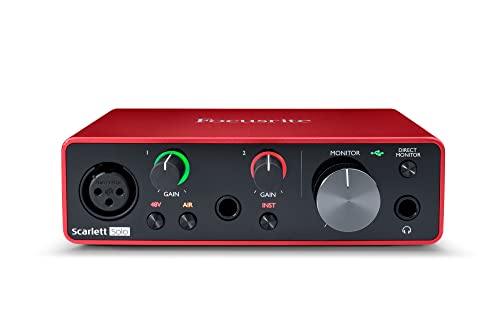
- One XLR mic preamp and one Hi-Z input
- Air mode plus 24-bit/192kHz recording
- Includes useful music-production software
Best For: Solo musicians, vocalists, and podcasters
Best Budget 2x2 Option

- Two combo XLR/TRS inputs with 48V phantom power
- USB-C bus power and driver-free setup
- Direct monitoring with 3.5mm headphone output
Best For: Beginners and mobile home-recording setups
Best Vintage-Style Sound
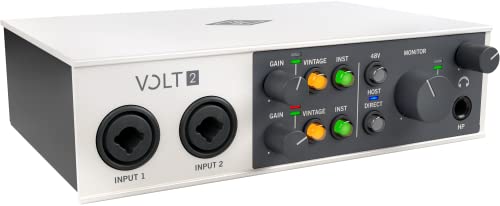
- Vintage mode emulates UA 610-style preamps
- 24-bit/192kHz recording and 2x2 connectivity
- Supports computers and compatible iOS devices
Best For: Musicians, podcasters, and streamers wanting preamp coloration
Best Overall Upgrade
Focusrite Scarlett 2i2 4th Gen

- Two mic preamps and two Hi-Z inputs
- Auto Gain and Clip Safe help protect takes
- 120dB dynamic range with 24-bit/192kHz recording
Best For: Home studios recording two sources at once
High-Resolution Pick

- 24-bit/192kHz recording
- USB-C with hardware monitoring
- Two-channel 2-in/2-out design
Best For: Home studios and mobile recording setups
Budget Studio Starter

- Midas-designed mic preamp
- Direct monitoring and phantom power
- Compact 2x2 USB interface
Best For: Solo musicians starting computer-based recording
Flexible Content Creator
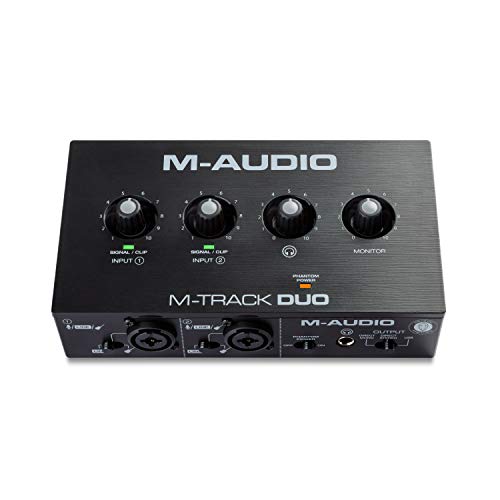
- Dual combo mic/line/instrument inputs
- USB/direct zero-latency monitoring
- Includes MPC Beats and Ableton Live Lite
Best For: Podcasting, streaming, and portable recording
Best All-Around Hub
Focusrite Scarlett 4i4 4th Gen

- 4-in/4-out design with MIDI I/O
- Two mic preamps and two Hi-Z inputs
- Auto Gain, Clip Safe, and Air modes
Best For: Growing home studios and hardware-based setups
Best Rugged Budget Pick

- 2-in/2-out recording at 24-bit/192kHz
- Onyx preamp with 48V phantom power
- Bus-powered with zero-latency monitoring
Best For: Solo musicians and mobile recording
Best for Solo Songwriters
Focusrite Scarlett Solo 4th Gen

- One mic input plus one Hi-Z input
- 24-bit/192kHz recording with 120dB range
- Air mode and extensive included software
Best For: Vocal-and-guitar recording in compact setups
Best Entry-Level Pick – Focusrite Scarlett Solo 3rd Gen
The Focusrite Scarlett Solo 3rd Gen is a compact audio interface for solo musicians, vocalists, and podcasters. It combines one XLR mic preamp, a Hi-Z instrument input, Air mode, and recording resolution up to 24-bit/192kHz in a portable USB-C-connected design.
Best For: Solo recording setups needing a dedicated microphone input and guitar or bass connection.
Pros:
- Air mode can add clarity to acoustic instruments and vocals.
- Hi-Z instrument input supports guitar and bass recording.
- 24-bit/192kHz converters and low-noise balanced outputs support detailed monitoring.
- Includes several recording programs, effects, instruments, and mastering tools.
Cons:
- Only one XLR microphone preamp is included.
- The supplied specifications list a two-year warranty, while the product notes also mention three years.
Choose the Solo when your setup centers on one microphone and one instrument at a time. Its straightforward I/O and included software make it a practical starting point for home recording.
Best Budget 2×2 Option – PIYONE Q2 Alloy Red
The PIYONE Q2 Alloy Red is a portable 2×2 audio interface designed for simple computer or mobile recording. Its USB-C connection is bus-powered and driver-free, while two combo inputs, 48V phantom power, and direct monitoring cover common home-studio needs.
Best For: Mobile creators and beginners who want two inputs, USB-C convenience, and low-latency monitoring.
Pros:
- Two combo inputs accept microphones and instruments.
- 24-bit/192kHz recording supports high-resolution capture.
- USB-C bus power avoids the need for a separate power supply.
- Direct monitoring and a 3.5mm headphone output support zero-latency tracking.
Cons:
- The supplied operating-system details specify Windows compatibility, so other platforms should be verified before purchase.
- The notes do not identify included recording software.
This interface suits a streamlined setup where portability and basic 2-channel recording matter most. Its illuminated controls and one-cable design are useful for compact desks and mobile workflows.
Best Vintage-Style Sound – Universal Audio Volt 2
The Universal Audio Volt 2 is a 2×2 USB audio interface for musicians, podcasters, and streamers who want a vintage-inspired recording option. Its Vintage mode emulates UA 610-style preamps, while converters support recording up to 24-bit/192kHz.
Best For: Creators seeking tube-preamp-style coloration, MIDI connectivity, and flexible computer or mobile recording.
Pros:
- Vintage mode is designed to provide the character of classic 610 preamps.
- Supports up to 24-bit/192kHz recording and mixing.
- Works with macOS, Windows, iPad, and iPhone with the required accessories.
- Includes access to LUNA and listed music-production software and plug-ins.
Cons:
- Mobile use may require an external Volt power supply and Apple adapter, depending on the device.
- The listed manufacturer warranty is one year.
The Volt 2 is a strong fit when tonal character is as important as clean conversion. It also offers a broader mobile-recording path than a basic desktop-only interface, provided the necessary power and adapters are available.
Best Overall Upgrade – Focusrite Scarlett 2i2 4th Gen
The Focusrite Scarlett 2i2 4th Gen is a versatile audio interface for recording two microphones, instruments, or a combination of sources. Its 120dB dynamic range, Auto Gain, Clip Safe, Air modes, and 24-bit/192kHz capability make it well suited to developing home studios.
Best For: Musicians and creators who need two inputs plus automatic level protection and a broad software bundle.
Pros:
- Two mic preamps and two Hi-Z instrument inputs support flexible recording.
- Auto Gain helps set levels, while Clip Safe helps prevent clipping.
- Air modes add presence and harmonic drive to vocals and guitars.
- Includes Pro Tools Intro+, Ableton Live Lite, Cubase LE, and Hitmaker Expansion.
Cons:
- It is larger and heavier than the Scarlett Solo 3rd Gen.
- The supplied notes do not specify a dedicated MIDI connection.
The 2i2 4th Gen is the more adaptable choice for recording two sources at once. Its protective gain features can reduce setup friction, while the included software leaves room to build a complete recording workflow.
High-Resolution Pick – MOTU M2
The MOTU M2 is a capable USB-C audio interface for musicians, creators, and home studios that want two inputs, hardware monitoring, and high-resolution recording. It supports up to 24-bit/192kHz operation and works with macOS, Windows, and iOS devices.
Best For: Home recording, mobile setups, and users who want high-resolution audio with direct hardware monitoring.
Pros:
- 24-bit/192kHz maximum sample rate
- Two-channel, 2-in/2-out design
- USB-C connectivity and hardware monitoring
- Includes 6+ GB of free content
Cons:
- Limited to two input channels
- Supplied notes do not specify included recording software
Choose the M2 if resolution and flexible device compatibility matter more than having a larger number of inputs. Its compact two-channel design is well suited to focused recording projects.
Budget Studio Starter – Behringer UMC22
The Behringer UMC22 is a compact USB audio interface for recording microphones and instruments into a Mac or Windows computer. Its Midas-designed mic preamp, direct monitoring, and broad DAW compatibility make it a practical option for solo musicians.
Best For: Budget-conscious solo musicians who need a straightforward interface for microphones, instruments, and basic computer recording.
Pros:
- Midas-designed microphone preamp
- Combination XLR/TRS/TS input plus a separate instrument input
- Direct monitoring with headphone output
- +48V phantom power for compatible condenser microphones
Cons:
- Maximum sample rate is listed as 48kHz in the product title and specifications are inconsistent in the supplied notes
- USB connectivity rather than USB-C
- Two-channel design limits larger recording setups
The UMC22 focuses on essential recording features rather than advanced routing or high channel counts. It is a sensible entry-level audio interface for getting a microphone or instrument into a DAW quickly.
Flexible Content Creator – M-AUDIO M-Track Duo
The M-AUDIO M-Track Duo is a portable USB audio interface designed for podcasting, recording, and live streaming. It provides two combo inputs for microphones, line-level sources, or instruments, along with USB/direct monitoring and bundled MPC Beats software.
Best For: Podcasters, streamers, and musicians who need a portable two-input audio interface for Mac, PC, iOS, or Android setups.
Pros:
- Dual XLR, line, and instrument inputs
- USB/direct switch enables zero-latency monitoring
- 48kHz recording for podcasting, streaming, and home projects
- Includes MPC Beats and Ableton Live Lite software
Cons:
- Maximum sample rate is limited to 48kHz
- Only two input channels
- Uses USB Type-B connectivity
The M-Track Duo stands out for versatility: its inputs accommodate vocals, guitar, keyboards, and line sources, while its monitoring options suit live content. It is a practical choice when ease of use and bundled software are priorities.
Best All-Around Hub – Focusrite Scarlett 4i4 4th Gen
The Focusrite Scarlett 4i4 4th Gen is a flexible audio interface for producers who need more than a basic two-input setup. It combines two mic preamps, two Hi-Z instrument inputs, four line inputs, four line outputs, and MIDI I/O in a compact USB-C interface.
Best For: Home studios recording microphones, guitars, synths, drum machines, and other hardware.
Pros:
- Offers a versatile 4-in/4-out layout with MIDI I/O.
- Includes two mic preamps, two Hi-Z inputs, and four line inputs.
- Provides 24-bit/192kHz recording and a 120dB dynamic range.
- Auto Gain, Clip Safe, and Air modes simplify recording and tone shaping.
Cons:
- Its larger input and output selection may be more than a solo songwriter needs.
- Requires the included USB-C power supply for its stated setup.
Choose the Scarlett 4i4 when expansion matters. It is the strongest fit here for a growing project studio that needs multiple connections, MIDI, and practical recording-assistance features.
Best Rugged Budget Pick – Mackie Onyx Artist 1X2
The Mackie Onyx Artist 1X2 is a straightforward 2-in/2-out audio interface for musicians who want high-resolution recording without a separate power adapter. Its Onyx mic preamp, Hi-Z input, and direct monitoring cover the essentials for vocals, guitar, and mobile recording.
Best For: Musicians seeking a compact, bus-powered interface for simple recording sessions.
Pros:
- Supports 24-bit/192kHz recording.
- Includes an Onyx mic preamp with 48V phantom power.
- Hi-Z switching supports guitar, bass, and similar instruments.
- Bus power, zero-latency monitoring, and a tank-like build suit mobile use.
Cons:
- Provides fewer inputs and outputs than the Focusrite 4i4.
- Its listed warranty is one year, shorter than the three-year coverage noted for the Focusrite models.
- The supplied operating-system detail lists Windows 10.
The Onyx Artist 1X2 is a practical choice when portability and simplicity take priority. It has the core connections for solo recording while keeping the setup compact and bus-powered.
Best for Solo Songwriters – Focusrite Scarlett Solo 4th Gen
The Focusrite Scarlett Solo 4th Gen is a compact audio interface built around one microphone input and one Hi-Z instrument input. With 24-bit/192kHz recording, Air mode, and broad Mac, Windows, and iOS compatibility, it keeps a songwriter’s setup focused and portable.
Best For: Solo vocal-and-guitar recording, songwriting, and compact home setups.
Pros:
- Provides dedicated inputs for one microphone and one instrument.
- Delivers a 120dB dynamic range and recording up to 24-bit/192kHz.
- Air mode adds presence and harmonic drive to vocals and guitars.
- Includes Pro Tools Intro+, Ableton Live Lite, Cubase LE, and Hitmaker Expansion.
Cons:
- Its single mic preamp limits simultaneous microphone recording.
- It has less I/O than the Scarlett 4i4 for synths, drum machines, or larger setups.
- The supplied cable is USB A-C rather than USB-C to USB-C.
Pick the Scarlett Solo when you primarily record one vocal and one instrument at a time. It offers a streamlined connection layout, strong stated audio specifications, and a useful software bundle without the extra I/O of a larger interface.
How We Picked the Best Audio Interfaces
We compared these models by looking at input and output flexibility, microphone preamp features, recording resolution, monitoring controls, connection type, portability, ease of setup, and overall value. We also considered how well each interface fits common use cases, including vocal recording, guitar and keyboard tracking, podcasting, streaming, and small home studios.
Specifications can vary by model and revision, so confirm the manufacturer’s current compatibility details before buying, particularly if you use iOS, an older computer, or specialized recording software.
Quick Comparison
| Best For | Recommended Options |
|---|---|
| Solo vocalists and guitarists | Focusrite Scarlett Solo 3rd Gen or 4th Gen |
| Two-microphone or stereo recording | Focusrite Scarlett 2i2, Universal Audio Volt 2, or MOTU M2 |
| More inputs and outputs | Focusrite Scarlett 4i4 |
| Budget home recording | Behringer UMC22 or M-AUDIO M-Track Duo |
| Podcasting and simple content creation | Mackie Onyx Artist 1-2 or a compact 2×2 model |
Key Buying Factors for an Audio Interface
Inputs and Outputs
Choose the number and type of connections you need now, not only what you use for your first project. A solo setup may need one microphone input and an instrument input, while two singers, stereo keyboards, or a microphone and guitar at the same time may justify a 2×2 interface. Extra line outputs are useful for studio monitors, headphones, external effects, or a second monitor mix.
Connection and Compatibility
USB-C is common on newer interfaces, but the connector does not automatically determine speed or performance. Check included cables, computer ports, driver support, and compatibility with your operating system. If you plan to record with an iPad or iPhone, verify power and adapter requirements before purchasing.
Sound Quality and Monitoring
Look for clean preamps, enough gain for your microphone, phantom power for condenser microphones, and direct monitoring when you need to hear yourself without distracting latency. Headphone output volume and monitor-control layout also matter in everyday use.
Resolution and Workflow
Higher sample-rate specifications can be useful, but they are not the only measure of quality. Stable drivers, simple controls, low latency, and dependable software support often make a greater practical difference than headline numbers. Confirm that the interface includes the features your recording application requires.
Who Should Buy Which Audio Interface?
Choose a Compact Solo-Style Interface If:
You record one vocalist, guitarist, or other mono source at a time and want a small, straightforward setup. These models are easy to carry and usually provide the essential microphone, instrument, headphone, and monitor connections.
Choose a 2×2 Interface If:
You need two simultaneous inputs for vocals, interviews, stereo sources, or collaborative recording. Models such as the Scarlett 2i2, Volt 2, MOTU M2, and similar interfaces offer a useful balance of flexibility and simplicity.
Choose a 4i4-Style Interface If:
You expect your setup to grow. Additional inputs and outputs make it easier to connect multiple instruments, hardware synthesizers, monitor speakers, and external equipment without replacing the interface.
Choose a Budget Model If:
You are starting a basic home studio and need essential recording functions at the lowest practical cost. Prioritize phantom power, suitable input types, headphone monitoring, and reliable compatibility over maximum specifications.