The best compact audio interfaces make it easier to record vocals, instruments, podcasts, and livestreams without filling your desk with studio hardware. The right model depends on your input needs, connectivity, monitoring, and budget.
We compared 10 compact options from Focusrite, RØDE, MOTU, M-Audio, and MAONO to help you choose a practical interface for home recording, streaming, and mobile production.
Best 10 Compact Audio Interfaces Picks for 2026
Best Compact Starter
Focusrite Scarlett Solo 3rd Gen
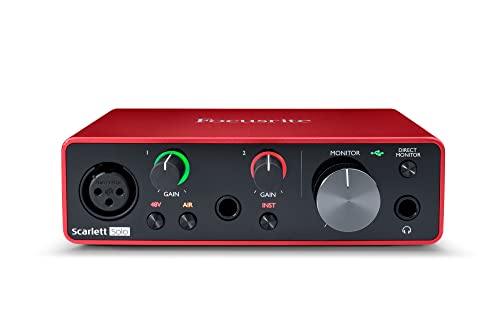
- Air mode and high-performing mic preamp
- Hi-Z input for guitar or bass
- 24-bit/192kHz recording with software bundle
Best For: Solo musicians, vocalists, and podcasters
Best All-in-One Studio
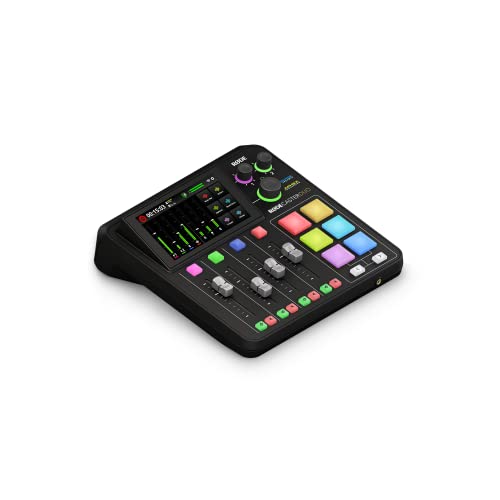
- Two combo inputs with high-gain preamps
- Touchscreen, faders, and SMART pads
- Built-in APHEX effects and headset input
Best For: Podcasters, streamers, and content creators
Best Solo Upgrade
Focusrite Scarlett Solo 4th Gen

- 120dB dynamic range and 24-bit/192kHz support
- Improved Air modes for vocals and guitars
- Compact two-input design with recording software
Best For: Songwriters and home recordists
Best Hardware Monitoring

- Two preamps with two-in/two-out operation
- Hardware monitoring for recording
- 24-bit/192kHz USB-C audio with free content
Best For: Musicians and creators needing two-channel recording
Studio-Ready Pick

- 24-bit/192kHz recording and 120dB dynamic range
- Auto Gain, Clip Safe, and Air modes
- Includes several recording tools and plugins
Best For: Home musicians recording vocals and instruments
Budget Flexibility Pick
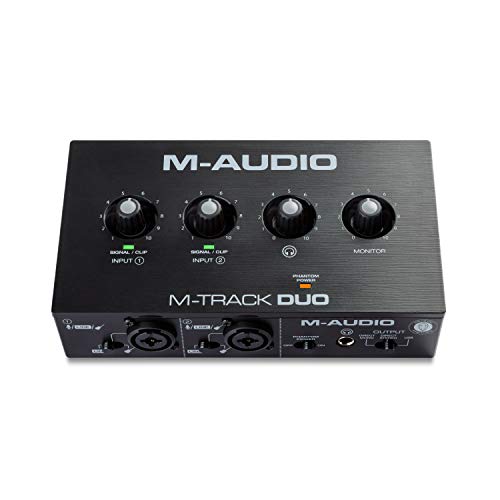
- Dual XLR/line/instrument inputs with phantom power
- USB/Direct switch for zero-latency monitoring
- Includes MPC Beats software
Best For: Beginners, podcasters, and streamers
Simple Recording Pick
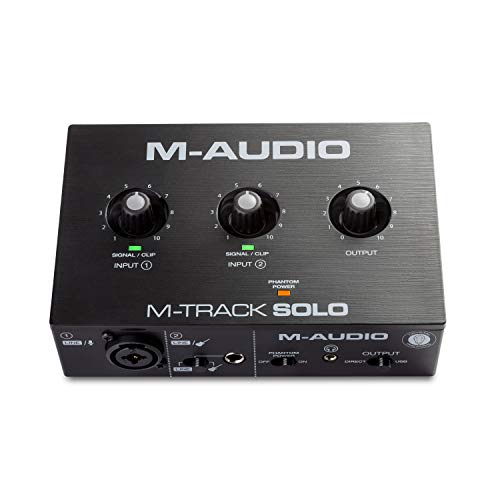
- Two-channel layout for vocals, guitar, and line sources
- 48V phantom power and zero-latency monitoring
- Includes MPC Beats and Ableton Live Lite
Best For: Beginners recording or streaming from a Mac or PC
High-Resolution Starter

- 24-bit/192 kHz recording with 106 dB dynamic range
- Up to 56 dB gain and 48V phantom power
- ProStudio routing software with loopback support
Best For: Creators recording, streaming, or playing guitar on Mac, Windows, or iPad
Mobile Creator Choice
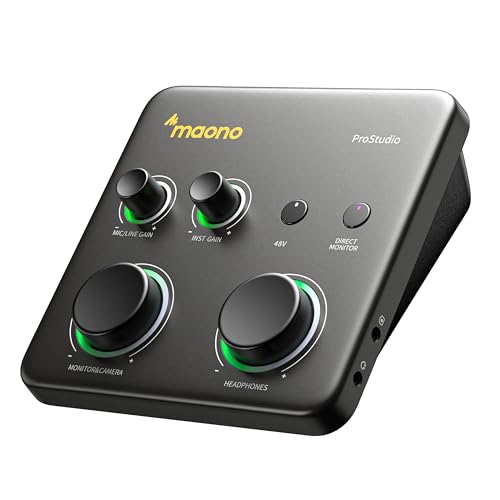
- 70 dB gain for demanding dynamic microphones
- Dual USB support for computers and mobile devices
- ProStudio2 routing and loopback for streaming
Best For: Solo creators recording and streaming across desktop and mobile setups
Best Compact Starter – Focusrite Scarlett Solo 3rd Gen
The Focusrite Scarlett Solo 3rd Gen is a practical choice among compact audio interfaces for solo musicians, vocalists, and podcasters. Its one XLR microphone preamp, Hi-Z instrument input, Air mode, and 24-bit/192kHz recording support cover essential home-recording needs in a small 1.71-by-5.65-by-3.77-inch enclosure.
Best For: Songwriters and creators recording one microphone and one guitar or bass.
Pros:
- High-performing mic preamp with switchable Air mode for added clarity.
- Dedicated Hi-Z instrument input and Gain Halos help manage guitar and vocal levels.
- 24-bit/192kHz converters, low-noise balanced outputs, and headphone monitoring.
- Includes Pro Tools Intro+, Ableton Live Lite, Cubase LE, and Hitmaker Expansion.
Cons:
- Limited to one XLR mic preamp and one instrument input.
- Designed for compact two-channel recording rather than larger sessions.
Choose the Scarlett Solo 3rd Gen if you want straightforward recording essentials and a useful software bundle without a complicated setup. It is especially well suited to a one-person recording workflow.
Best All-in-One Studio – RØDE RØDECaster Duo
The RØDE RØDECaster Duo is a compact audio production studio for users who need more than basic input and output connections. It combines two Neutrik combo inputs, four broadcast-quality faders, a touchscreen, SMART pads, APHEX processing, and podcasting, streaming, music-production, and content-creation features.
Best For: Podcasters, streamers, and creators who want hands-on control and built-in processing.
Pros:
- Two combo inputs with high-gain, ultra-low-noise Revolution Preamps.
- Four faders, a high-resolution haptic touchscreen, and six SMART pads.
- Includes studio-grade effects and APHEX processing such as Aural Exciter and Big Bottom.
- Supports headset monitoring and recording through its 3.5mm TRRS input.
Cons:
- At 2 kg, it is less lightweight than basic compact interfaces.
- Requires corded power rather than operating solely over USB.
- Its broader feature set may be more than a simple two-input recording setup requires.
The RØDECaster Duo makes sense when workflow control, broadcast-style mixing, and onboard effects matter as much as portability. It is a powerful compact hub for spoken-word and live content production.
Best Solo Upgrade – Focusrite Scarlett Solo 4th Gen
The Focusrite Scarlett Solo 4th Gen is one of the most streamlined compact audio interfaces for recording a microphone and instrument. It pairs a 120dB dynamic range with 24-bit/192kHz support, improved Air modes, USB-C connectivity, and a substantial included software collection.
Best For: Songwriters and home recordists seeking a compact interface with enhanced recording specifications.
Pros:
- 120dB dynamic range and converters designed for studio-quality sound.
- One XLR mic preamp and one Hi-Z instrument input suit vocal-and-guitar sessions.
- Improved Air modes add presence and harmonic drive to vocals and guitars.
- Includes Pro Tools Intro+, Ableton Live Lite, Cubase LE, and Hitmaker Expansion.
Cons:
- Only one microphone input is provided.
- Its two-channel design is intended for small recording setups, not larger ensembles.
For a compact solo rig, the 4th Gen model offers a clear step toward newer specifications while retaining a simple control layout. It is a strong fit for creators who want to record vocals and guitar without carrying a larger interface.
Best Hardware Monitoring – MOTU M2
The MOTU M2 is a compact two-in/two-out USB-C audio interface built around two preamps and hardware monitoring. With 24-bit/192kHz support, macOS, Windows, and iOS compatibility, and more than 6GB of included content, it is suited to straightforward computer-based recording.
Best For: Musicians and creators who want two inputs, hardware monitoring, and high-resolution recording in a compact format.
Pros:
- Two preamps and a two-in/two-out configuration support small recording sessions.
- Hardware monitoring helps provide direct monitoring during recording.
- Supports 24-bit/192kHz audio and USB-C connectivity.
- Includes more than 6GB of free content.
Cons:
- The supplied details list MOTU drivers as the supported software rather than a broad bundled DAW collection.
- At 612 g, it is heavier than some ultra-light compact interfaces.
- The supplied operating-system details specifically identify Windows, while compatibility notes also mention macOS and iOS.
The M2 is a sensible option when two-channel recording and direct hardware monitoring are priorities. Its high-resolution support and compact 7.5-by-4.25-by-1.75-inch design make it a practical desktop recording companion.
Studio-Ready Pick – Scarlett 2i2 4th Gen
The Focusrite Scarlett 2i2 4th Gen is a strong choice among compact audio interfaces for musicians who want two inputs, high-resolution recording, and helpful level-management features. Its two mic preamps, Hi-Z instrument inputs, Auto Gain, Clip Safe, and Air modes make it practical for recording vocals, guitars, and other sources.
Best For: Home musicians recording vocals and instruments who want polished sound and bundled software.
Pros:
- 24-bit/192kHz recording with a 120dB dynamic range
- Auto Gain and Clip Safe help manage recording levels
- Includes Air modes plus Pro Tools Intro+, Ableton Live Lite, Cubase LE, and Hitmaker Expansion
- Compact 7.09-by-4.61-inch footprint and 1.3-pound weight
Cons:
- Limited to two audio inputs
- Some bundled features are geared toward users already working with recording software
The 2i2 4th Gen stands out when recording quality and workflow assistance matter more than having many inputs. It is a capable compact setup for a singer-songwriter, instrumentalist, or small home studio.
Budget Flexibility Pick – M-Track Duo
The M-AUDIO M-Track Duo is one of the more straightforward compact audio interfaces for podcasting, streaming, and basic music recording. It provides two combo XLR/line/instrument inputs, phantom power, direct monitoring, and a simple USB connection for Mac or PC.
Best For: Beginners, podcasters, and streamers who need two inputs and uncomplicated monitoring.
Pros:
- Two combo inputs support microphones, guitars, and line-level sources
- Phantom power works with condenser microphones
- USB/Direct switch enables zero-latency monitoring
- Includes MPC Beats and supports 48kHz audio resolution
Cons:
- Its maximum sample rate is 48kHz
- Software support and included tools are less extensive than the Scarlett package
- Only two channels are available
The M-Track Duo focuses on essential recording and monitoring features rather than advanced processing. It makes sense for users building a compact setup for voice, guitar, livestreams, or entry-level production.
Creator Connectivity Pick – MAONO P2 Hybrid
The MAONO P2 Hybrid is a versatile option among compact audio interfaces for creators who record and stream across computers, phones, tablets, or cameras. Its dual USB connectivity, loopback, independent mute controls, and dedicated routing features are designed for podcasts, livestreams, tutorials, and mobile music workflows.
Best For: Streamers, podcasters, and musicians who need computer-and-mobile connectivity with flexible audio routing.
Pros:
- Dual USB ports support simultaneous computer and phone or iPad connections
- 24-bit/192kHz recording with 56dB gain and -130dB EIN
- Built-in loopback and ProStudio 2 support routing, VST effects, and real-time noise reduction
- Independent headphone, monitor, and mute controls simplify live workflows
Cons:
- Its creator-focused routing features may require more setup than a basic interface
- The supplied notes do not specify the number of audio input channels or warranty coverage
The P2 Hybrid is particularly compelling when mobile compatibility and streaming control are priorities. Its compact, angled aluminum-alloy design also suits desks where quick access to controls is important.
Simple Recording Pick – M-Audio M-Track Solo
The M-AUDIO M-Track Solo is one of the more straightforward compact audio interfaces for home recording, podcasting, and live streaming. It combines a combo XLR/line input, a separate line/instrument input, 48V phantom power, and flexible monitoring in a small, lightweight enclosure.
Best For: Beginners recording vocals, guitar, podcasts, or livestream audio from a Mac or PC.
Pros:
- Two-channel design with XLR, line, and instrument connectivity.
- 48 kHz audio resolution and a Crystal Preamp for microphone recording.
- Includes zero-latency USB/direct monitoring, headphone output, and stereo RCA outputs.
- Includes MPC Beats and support for Ableton Live Lite.
Cons:
- Its 48 kHz maximum sample rate is lower than some newer interfaces.
- Only one combo XLR/line input is provided for microphone or line sources.
The M-Track Solo prioritizes uncomplicated connections and practical monitoring over advanced routing. It is a sensible choice when you want a compact interface for solo recording or streaming without needing a large input count.
High-Resolution Starter – MAONO PS22 Lite
The MAONO PS22 Lite is a compact audio interface aimed at creators who want high-resolution recording and simple switching between recording, instrument, and broadcast setups. Its 24-bit/192 kHz capability, 48V phantom power, and included ProStudio routing software give it more flexibility than a basic plug-and-play model.
Best For: Beginners, podcasters, voice actors, guitarists, and livestreamers working on Mac, Windows, or iPad.
Pros:
- Supports 24-bit/192 kHz recording with a stated 106 dB dynamic range.
- Provides up to 56 dB of preamp gain and 48V phantom power for compatible microphones.
- Includes ProStudio routing software with virtual channels and loopback functions.
- Compact design, direct monitoring, and side-mounted headphone access help reduce desk clutter.
Cons:
- The included routing software may require setup within your recording application.
- Its compact, creator-focused design is better suited to solo setups than larger sessions.
The PS22 Lite stands out among compact audio interfaces for combining high sample-rate recording with creator-friendly routing. It is a strong fit if you want one small unit for music practice, voice work, and live content.
Mobile Creator Choice – MAONO P1 USB Interface
The MAONO P1 is a compact audio interface for creators who need substantial microphone gain and a flexible computer-to-mobile workflow. It offers up to 70 dB of gain, 24-bit/192 kHz recording, dual USB connectivity, and software-based routing for voice, guitar, desktop audio, and livestream content.
Best For: Solo creators recording dynamic microphones, vocals, guitar, podcasts, and livestreams across computers and mobile devices.
Pros:
- Up to 70 dB of gain is designed for gain-hungry dynamic microphones.
- Supports 24-bit/192 kHz recording and lists a -130 dB EIN for low-noise operation.
- Dual USB connectivity supports Mac, PC, compatible iPhone/iPad, Android phones, and cameras.
- ProStudio2 offers routing, loopback, VST effects, and real-time noise-reduction options.
Cons:
- Its single-focused input setup is not intended for full-band recording or large podcasts.
- Some routing and effects features depend on software configuration.
The P1 is the most workflow-oriented option here, especially for users moving between a desk and mobile recording setup. Its gain range and routing features are useful for creator audio, while its compact angled housing keeps controls accessible in a small workspace.
How We Picked These Compact Audio Interfaces
We focused on interfaces that balance useful features, portable designs, straightforward operation, and broad device compatibility. The lineup includes simple one-input models for solo creators, two-input interfaces for stereo recording or two-person sessions, and more capable production hubs for podcasting and streaming.
We also considered microphone preamp gain, phantom power, headphone monitoring, direct monitoring, USB connectivity, mobile support, and the overall workflow each product suits. Because audio needs vary widely, no single interface is ideal for every buyer.
Quick Comparison
| Best For | What to Look For |
|---|---|
| Solo vocals or guitar | One quality preamp, instrument input, headphone output, and simple controls |
| Two microphones or stereo instruments | Two independent inputs, phantom power, and balanced outputs |
| Podcasting and streaming | Flexible routing, multiple inputs, monitoring controls, and loopback or mixer features |
| Mobile recording | USB-C connectivity, phone or tablet compatibility, and manageable power requirements |
| Budget home studios | Reliable drivers, low-latency monitoring, and essential I/O without unnecessary extras |
Key Buying Factors for Compact Audio Interfaces
Inputs and Recording Plans
Choose one input if you normally record alone. Two inputs provide more flexibility for stereo keyboards, guitar and vocals, interviews, or two microphones. Check whether the inputs accept XLR microphones, quarter-inch instrument cables, or both.
Gain, Phantom Power, and Monitoring
Condenser microphones require 48V phantom power, while some dynamic microphones need substantial clean gain. A direct-monitoring switch or low-latency headphone path helps you hear yourself without distracting delay. Separate headphone and monitor controls are useful when recording regularly.
Computer and Mobile Compatibility
USB-C is convenient, but the connector alone does not guarantee compatibility with every phone or tablet. Confirm power and adapter requirements before buying for iPad or smartphone recording. For a desktop setup, also check operating-system support and included software.
Portability and Controls
A compact enclosure is valuable for small desks and travel, but very small models may offer fewer controls or connections. If you stream or podcast, dedicated mixing and routing features may matter more than the smallest footprint.
Who Should Buy Which Compact Audio Interfaces?
Solo musicians and beginner vocalists should prioritize a simple one-input interface with dependable monitoring and an instrument connection. Buyers who record two sources at once should choose a two-input model with independent gain controls. Podcasters and livestreamers may benefit from a compact production studio with more hands-on routing and control.
If you move between a computer, phone, and tablet, focus on mobile compatibility and power requirements rather than assuming every USB interface is equally portable. Finally, choose the simplest model that supports your next few projects: extra inputs are useful, but unnecessary features can add cost and complexity.