The best audio interface with low latency lets you monitor vocals, guitars, instruments, and software effects with minimal delay. That makes recording more natural and helps livestreamers, podcasters, and producers work with greater confidence.
We selected 10 interfaces ranging from compact solo-input models to flexible multichannel USB-C options. The right choice depends on your input needs, monitoring setup, software workflow, and budget.
Best 10 Audio Interface with Low Latency Picks for 2026
Best All-Around Choice

- 4-in/4-out USB-C connectivity
- Hardware monitoring and loopback
- LCD screen with MIDI I/O
Best For: Home studios, podcasts, and multi-source recording
Best Entry-Level Pick
Focusrite Scarlett Solo 3rd Gen
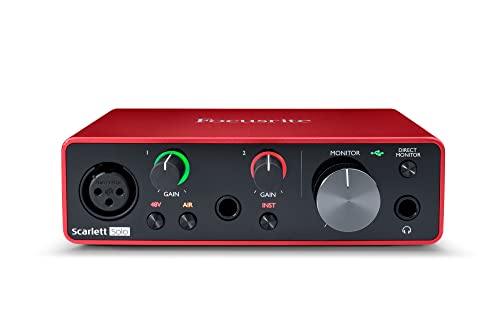
- One XLR and one Hi-Z input
- 24-bit/192 kHz recording
- Air mode and included software
Best For: Solo vocals, guitar, and beginner recording
Best Compact Studio Interface

- Two-in/two-out USB-C design
- Hardware monitoring for low-latency use
- 24-bit/192 kHz support
Best For: Small studios and two-input mobile recording
Best for Streaming Controls

- 80 dB XLR microphone gain
- Ultra-low-latency monitoring
- Onboard effects and Wave Link routing
Best For: Streaming, podcasting, and voice-focused setups
Best for Flexible Streaming

- 24-bit/192kHz recording with 106dB dynamic range
- ProStudio loopback and virtual-channel routing
- Compact design with Mac, Windows, and iPad support
Best For: Streamers, podcasters, beginners, and guitarists needing flexible routing
Best for Straightforward Monitoring
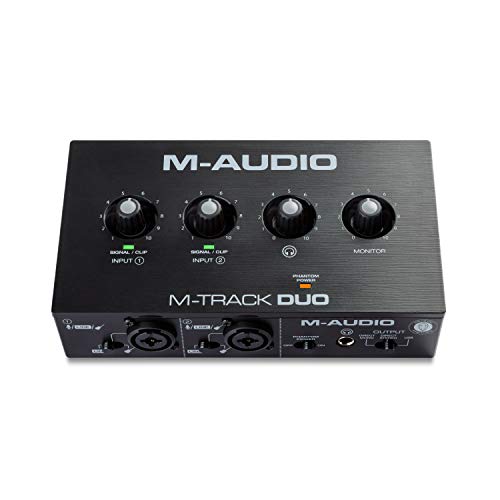
- Dual combo inputs for mic, line, and instrument sources
- USB/Direct switch for zero-latency monitoring
- Includes MPC Beats and Ableton Live Lite
Best For: Home recording, podcasting, and two-source streaming
Best for Direct Monitoring on a Budget

- Two XLR/1/4-inch combo inputs
- Mono and stereo delay-free direct monitoring
- Includes cables, adapter, and 48V phantom power
Best For: Budget recording and streaming with microphones or instruments
Best Budget Pick
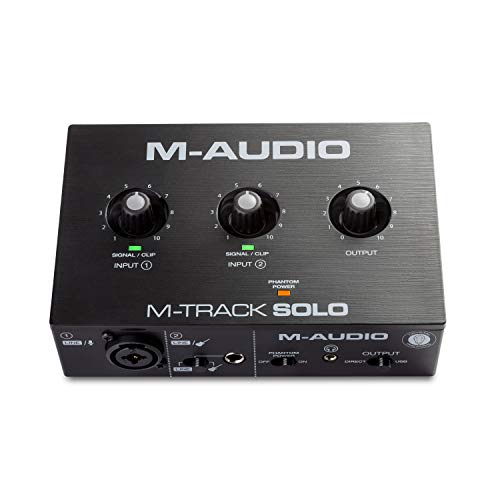
- Zero-latency USB/Direct monitoring
- XLR, line, and instrument inputs
- Includes MPC Beats software
Best For: Beginner recording, podcasting, and streaming
Best Starter Interface
XTUGA Q-12 USB Audio Interface

- Two-channel 16-bit/48kHz recording
- Switchable 48V phantom power
- USB-powered plug-and-play setup
Best For: Beginners, karaoke, and computer streaming
Best for Flexible Monitoring

- Zero-latency USB/Direct monitoring
- Two combo XLR/mic/line inputs
- RCA and 1/4-inch output choices
Best For: Portable recording, podcasting, and streaming
Best All-Around Choice – MOTU M4
The MOTU M4 is a versatile audio interface with low latency for recording, mixing, podcasting, and mobile setups. Its 4-in/4-out USB-C connectivity, hardware monitoring, LCD screen, MIDI I/O, and loopback make it well suited to users who need more routing flexibility than a basic two-channel interface.
Best For: Home studios, podcasters, and musicians needing multiple inputs, outputs, and loopback.
Pros:
- 4-in/4-out USB-C connectivity with two microphone preamps
- Hardware monitoring and low-latency operation
- LCD screen, MIDI I/O, and loopback support
- Supports recording at up to 192 kHz
Cons:
- More features and connections than some simple solo recording setups require
- Its 4×4 format may be less compact than a basic two-channel interface
The M4 is a strong choice when you want low-latency monitoring plus room to expand your recording or streaming setup. Its broad connectivity makes it especially practical for users working with several sources.
Best Entry-Level Pick – Focusrite Scarlett Solo 3rd Gen
The Focusrite Scarlett Solo 3rd Gen is a straightforward audio interface with low latency for vocalists, guitarists, and first-time home recordists. It combines one XLR mic input, one Hi-Z instrument input, 24-bit/192 kHz recording, low-noise outputs, and direct software support in a compact design.
Best For: Solo musicians, vocal recording, guitarists, and beginner home studios.
Pros:
- Dedicated XLR microphone and Hi-Z instrument inputs
- 24-bit/192 kHz converters for studio-quality recording
- Air mode adds clarity to acoustic instruments
- Includes recording software and a three-year warranty
Cons:
- Only two channels, limiting multi-microphone recording
- Does not provide the broader routing and MIDI features of larger interfaces
The Solo keeps the setup simple while covering the essentials for voice, guitar, and basic music production. It is a practical low-latency option when you do not need multiple simultaneous inputs.
Best Compact Studio Interface – MOTU M2
The MOTU M2 is a compact audio interface with low latency for musicians and creators who need a focused two-input setup. It offers USB-C connectivity, two preamps, hardware monitoring, 24-bit/192 kHz operation, and compatibility with macOS, Windows, and iOS.
Best For: Small home studios, mobile recording, and users who need two inputs with hardware monitoring.
Pros:
- Two-in/two-out USB-C design with two preamps
- Hardware monitoring helps support low-latency recording
- 24-bit/192 kHz audio support
- Compatible with macOS, Windows, and iOS
Cons:
- Two-channel configuration is less suitable for larger recording sessions
- Supplied notes do not list MIDI I/O or loopback functionality
The M2 is a sensible middle ground for users who want capable recording specifications without the extra inputs of a larger interface. Its hardware monitoring and USB-C connection suit streamlined studio or mobile workflows.
Best for Streaming Controls – Elgato Wave XLR MK.2
The Elgato Wave XLR MK.2 is an audio interface with low latency built around voice recording, streaming, and hands-on control. It provides 80 dB of gain for XLR microphones, onboard voice processing, touch mute, LED feedback, and Wave Link software for routing, effects, and monitoring.
Best For: Streamers, podcasters, and creators using an XLR microphone with software-based audio control.
Pros:
- 80 dB of gain for a wide range of XLR microphones
- Ultra-low-latency monitoring at 24-bit/48 kHz
- Built-in enhancer, compressor, EQ, and other effects
- Touch controls, LED feedback, and Wave Link integration
Cons:
- Wave Link requires Windows 11 or Apple Silicon Mac systems
- Designed around a single XLR microphone input rather than multi-input recording
- Its streaming-focused controls may be unnecessary for a basic music setup
The Wave XLR MK.2 stands out for creators who want immediate access to voice processing, routing, and mute controls. It is less of a traditional multi-input studio interface and more of an integrated streaming control hub.
Best for Flexible Streaming – MAONO PS22 Lite
The MAONO PS22 Lite is a compact audio interface with low latency for creators who record vocals, guitar, podcasts, or live streams. Its 24-bit/192kHz recording, ASIO-driver support, and ProStudio Routing Software provide a flexible setup for both recording and broadcast work.
Best For: Beginners, streamers, podcasters, and musicians who want a small interface with versatile routing and broad device compatibility.
Pros:
- Supports 24-bit/192kHz recording with a 106dB dynamic range.
- Provides up to 56dB of preamp gain and 48V phantom power for condenser microphones.
- Includes virtual channels and loopback routing through ProStudio software.
- Works with Mac, Windows, and iPads and includes direct monitoring.
Cons:
- The included routing software may be more than beginners need for simple recording.
- The notes do not specify the exact maximum number of simultaneous input channels beyond the available connections.
Choose the PS22 Lite if streaming flexibility and high-resolution recording matter more than having a larger desktop interface. Its compact design and beginner-friendly modes make it a practical starting point for a home setup.
Best for Straightforward Monitoring – M-AUDIO M-Track Duo
The M-AUDIO M-Track Duo is a simple two-channel audio interface with low latency monitoring for recording, podcasting, and live streaming. Its dual combo inputs, phantom power, and USB/Direct monitoring switch cover the essentials without adding unnecessary complexity.
Best For: Home musicians, podcasters, and streamers who need two inputs and direct monitoring in a compact Mac or PC setup.
Pros:
- Two combo XLR/line/instrument inputs accommodate microphones, guitars, and line-level sources.
- USB/Direct switch enables zero-latency monitoring.
- Includes 1/4-inch headphone output and stereo 1/4-inch main outputs.
- Comes with MPC Beats and supports Ableton Live Lite.
Cons:
- Its maximum sample rate is 48kHz, lower than some higher-resolution interfaces.
- Software support listed in the notes is centered on MPC Beats and Ableton Live Lite.
The M-Track Duo is a sensible choice when reliable two-input recording and simple monitoring are the priorities. It is less focused on advanced routing, but its layout suits everyday recording and streaming tasks.
Best for Direct Monitoring on a Budget – Wrugste 2-in/2-out
The Wrugste 2-in/2-out USB interface is an audio interface with low latency aimed at basic recording, podcasting, and streaming. It combines two XLR/1/4-inch combo inputs, direct monitoring modes, 48V phantom power, and rear monitor outputs for a straightforward computer-based setup.
Best For: Budget-conscious users recording microphones and instruments who want direct, delay-free monitoring and broad DAW compatibility.
Pros:
- Combo inputs accept XLR microphones and 1/4-inch instrument or line connections.
- Mono and stereo direct-monitoring modes are designed for delay-free listening.
- Includes 48V phantom power for compatible condenser microphones.
- Includes an XLR cable, USB cables, adapter, and support for several popular DAWs.
Cons:
- The supplied details list 24-bit/192kHz in the feature copy but specify a 96kHz maximum sample rate elsewhere.
- The brand is less established than the other options in this roundup, according to the product notes.
- The notes do not provide detailed preamp or dynamic-range specifications.
The Wrugste is worth considering if direct monitoring and included accessories are more important than brand recognition or detailed performance specifications. Verify the stated sample-rate information before buying if high-resolution recording is essential.
Best Budget Pick – M-Audio M-Track Solo
The M-Audio M-Track Solo is a practical audio interface with low latency for recording, podcasting, and live streaming. Its USB/Direct switch supports zero-latency monitoring, while the combo input, instrument input, and phantom power cover common home-recording setups.
Best For: Beginners recording vocals, guitar, podcasts, or livestream audio on Mac or PC.
Pros:
- USB/Direct switch enables zero-latency monitoring.
- Combo XLR/line input includes phantom power for condenser microphones.
- Includes MPC Beats and supports up to 48kHz audio.
Cons:
- Limited to two channels and a 48kHz maximum sample rate.
- Only one combo XLR/line input is provided.
With straightforward connections and flexible monitoring, the M-Track Solo is a strong entry-level choice when simple operation and low-latency tracking matter more than advanced I/O.
Best Starter Interface – XTUGA Q-12 USB Audio Interface
The XTUGA Q-12 is an audio interface with low latency aimed at beginners who want a simple two-channel setup. It connects over USB, supports XLR and 3.5mm microphone inputs, and includes switchable 48V phantom power for compatible condenser microphones.
Best For: Students, beginners, karaoke users, and home streamers seeking plug-and-play computer recording.
Pros:
- Offers 16-bit/48kHz recording through two inputs.
- Provides switchable 48V phantom power for condenser microphones.
- USB-powered plug-and-play design needs no external adapter.
Cons:
- Designed primarily for personal-computer use.
- Inputs are limited to XLR and 3.5mm microphone connections.
The Q-12 focuses on accessible operation and essential connections. It is a sensible starter option for users who prioritize easy setup and low-latency vocal tracking over a wider range of studio inputs.
Best for Flexible Monitoring – Mini 2-Channel USB Interface
This mini 2-channel model is an audio interface with low latency for recording, streaming, and podcasting. It combines two combo XLR/mic/line inputs, 48V phantom power, and a USB/Direct monitoring switch with RCA and 1/4-inch output options.
Best For: Guitarists, vocalists, podcasters, and producers who need portable two-channel connectivity.
Pros:
- USB/Direct switch provides zero-latency monitoring.
- Two combo inputs support microphones, instruments, and line-level sources.
- Offers 48V phantom power plus RCA and 1/4-inch output options.
Cons:
- Maximum sample rate is limited to 48kHz.
- Two-channel design may not suit larger recording setups.
Its portable design and broad output connectivity make this interface useful for compact home studios and mobile setups. The zero-latency monitoring switch is particularly helpful when tracking vocals or instruments in real time.
How We Picked the Best Audio Interface with Low Latency
We focused on interfaces that support responsive direct monitoring or efficient driver performance, since both are central to a low-latency recording setup. We also considered input and output counts, connection type, microphone preamp features, phantom power, headphone monitoring, portability, and ease of use.
The selection includes established models from MOTU, Focusrite, Elgato, and M-Audio, alongside budget-oriented interfaces for basic recording and streaming. Published sample rates and bit depths can be useful indicators, but they do not guarantee lower monitoring delay by themselves. Computer hardware, drivers, buffer settings, and software also affect real-world latency.
Quick Comparison
| Best For | What to Look For |
|---|---|
| Solo vocals or guitar | One quality mic/instrument input, direct monitoring, and a headphone output |
| Music production | Multiple inputs, MIDI or line connectivity, stable drivers, and balanced outputs |
| Streaming and podcasting | Simple controls, reliable headphone monitoring, loopback or DSP features, and easy mute access |
| Two-person recording | At least two independent inputs with separate gain control and phantom power |
| Lowest-cost setups | Plug-and-play USB operation, basic gain controls, and compatibility with your computer |
Key Buying Factors for an Audio Interface with Low Latency
Monitoring and Driver Design
Direct monitoring routes the input signal to your headphones before it passes through recording software, often providing the most immediate response. If you plan to monitor software effects, choose an interface with dependable drivers and use a suitably low buffer size without causing clicks or dropouts.
Inputs, Outputs, and Phantom Power
Count how many microphones or instruments you will record at once. XLR inputs support microphones, while combination inputs can also accept line-level or instrument connections. Condenser microphones generally require 48V phantom power, so verify that the interface provides it when needed.
Connections and Compatibility
USB-C can simplify modern computer setups, but check whether the included cable and power arrangement match your system. Confirm operating-system support, driver availability, and whether the interface works with tablets or phones if mobile recording matters.
Controls and Everyday Usability
Large gain knobs, clear meters, independent headphone volume, and a physical monitor mix control can make sessions faster and easier. Streamers may benefit from DSP effects, loopback, or dedicated mute functions, while producers may prioritize balanced outputs and expansion options.
Who Should Buy Which Audio Interface with Low Latency?
Choose a compact single-input interface if you mainly record one voice or instrument at a time and want a straightforward desktop setup. A two-input model is a better fit for stereo sources, simultaneous vocal-and-instrument recording, interviews, or collaborative sessions.
Musicians and producers who expect to expand should favor a model with more inputs and outputs, dependable driver support, and flexible monitoring. Streamers and podcasters should prioritize accessible controls, strong headphone monitoring, and workflow features over headline resolution numbers. Budget buyers can start with a basic USB interface, but should still confirm phantom power, input type, and operating-system compatibility before ordering.