A docking station with 10GbE can turn a compatible laptop into a high-performance desktop setup, with faster network transfers for media libraries, backups, shared storage, and demanding professional workflows.
These 10 picks cover Thunderbolt 5 and Thunderbolt 4 docks with different combinations of display outputs, charging capacity, USB ports, storage support, and wired networking. Use the guide below to narrow the list by your laptop, peripherals, and workspace needs.
Best 10 Docking Station with 10gbe Picks for 2026
Best Overall

- PCIe-based 10GbE LAN
- 20 ports with Thunderbolt 5
- Up to 140W host charging
Best For: Thunderbolt 5 workstations needing maximum connectivity
Best for Dual HDMI

- Dual native HDMI 2.1 outputs
- Up to 140W laptop charging
- 2.5Gbps Ethernet and six USB-C ports
Best For: Modern Mac and Windows display workstations
Best for Built-In SSD Storage

- M.2 NVMe support up to 8TB
- 17 ports and Thunderbolt 5
- 2.5GbE with up to 140W charging
Best For: Creators needing dock-based NVMe expansion
Best Mac-Only Powerhouse

- 10GbE and 26 total ports
- Up to quad 6K displays on supported Macs
- Four high-bandwidth downstream USB-C ports
Best For: Professional MacBook Pro production workstations
Best Value 10Gbps Workstation Dock

- 14-in-1 connectivity with dual HDMI
- Up to 10Gbps USB data speeds
- 160W total output
Best For: Windows and ChromeOS dual-monitor workstations
Best True 10GbE Professional Dock
- Built-in 10GbE networking
- 20 interfaces for workstation expansion
- Up to 140W charging and 8K display support
Best For: Professional NAS, networking, and multi-display workflows
Best Thunderbolt 5 Dock

- Up to 120Gbps Thunderbolt 5 transfer
- Supports up to dual 8K displays
- 2.5Gbps Ethernet and 140W charging
Best For: Thunderbolt 5 laptops and 8K workstation setups
Best for Multi-Network Workstations
OWC Thunderbolt 5 Dual 10GbE Dock

- Two independent 10GbE ports plus 2.5GbE
- Link aggregation can deliver up to 20Gb/s NAS access
- Supports three 8K displays and Thunderbolt 5 devices
Best For: High-speed NAS, multiple networks, and professional IP workflows
Best All-Around Connectivity
CalDigit TS4 Thunderbolt 4 Dock
- 18 ports with Thunderbolt 4, USB, video, audio, and card readers
- Provides up to 98W host charging
- Includes 2.5GbE networking rather than native 10GbE
Best For: Broad peripheral connectivity and high-power laptop charging
Best for Mac and Pro Media Workflows

- Dedicated 10GbE RJ-45 networking
- Built-in CFexpress Type B and SD readers
- Supports up to 8K or dual 4K displays
Best For: Professional audio, video, and high-speed media workflows
Best Overall – CalDigit TS5 Plus
For shoppers seeking a docking station with 10gbe, the CalDigit TS5 Plus stands out with 10GbE networking, 20 ports, Thunderbolt 5 connectivity, and up to 140W of host charging. It is especially well equipped for high-speed storage, demanding peripherals, and multi-display workstations.
Best For: Thunderbolt 5 users who want the broadest connectivity and fast 10GbE file transfers.
Pros:
- Built-in PCIe-based 10GbE LAN for high-speed network and NAS access
- 20 ports, including Thunderbolt 5, USB-A, USB-C, DisplayPort 2.1, and UHS-II card readers
- Up to 140W dedicated host charging with a 330W power supply
- Dual USB controllers help reduce bottlenecks across front and rear ports
Cons:
- Maximum performance and functionality require a compatible Thunderbolt 5 or USB4 v2 host
- Display support varies by Mac model and Windows system
The TS5 Plus is a strong all-around choice when 10GbE is a priority and you also need extensive expansion, high-wattage charging, and flexible display support. Older Thunderbolt hosts can use it, but with reduced functionality.
Best for Dual HDMI – Plugable TBT-UDH2
The Plugable TBT-UDH2 is worth considering if you want a docking station with 10gbe-style high-speed connectivity but do not need full 10GbE networking. Its built-in 2.5Gbps Ethernet, dual HDMI 2.1 outputs, six USB-C ports, and 140W laptop charging target modern display-heavy setups.
Best For: MacBook Pro and compatible Windows users who prioritize dual HDMI displays and convenient USB-C expansion.
Pros:
- Native dual HDMI 2.1 outputs support up to dual 8K 60Hz or 4K 144Hz with Thunderbolt 5
- Six USB-C ports, including two front charging ports rated up to 30W each
- Provides up to 140W laptop charging and includes UHS-II card readers
- Fanless, driverless design with lifetime support
Cons:
- Ethernet is 2.5Gbps rather than 10GbE
- Thunderbolt 3, USB-C, Windows ARM, and some gaming laptop configurations are unsupported
This dock is a better fit for display-centric users than for buyers specifically requiring 10GbE. Its dual HDMI design avoids adapters, but compatibility requirements should be checked carefully before purchase.
Best for Built-In SSD Storage – UGREEN Maxidok Thunderbolt 5
The UGREEN Maxidok is a versatile alternative for shoppers comparing a docking station with 10gbe, although its wired networking tops out at 2.5GbE. Its standout feature is a built-in M.2 NVMe slot supporting SSDs up to 8TB, alongside 17 ports and Thunderbolt 5 bandwidth.
Best For: Users who want expandable high-speed storage built directly into a Thunderbolt 5 dock.
Pros:
- Built-in PCIe Gen4x4 M.2 slot supports compatible 2230–2280 NVMe SSDs up to 8TB
- 17 ports include six 10Gbps USB-A and USB-C connections, card readers, audio, and DisplayPort
- Supports up to 240W total system power and up to 140W charging
- Windows systems can support triple independent displays with the listed configuration
Cons:
- Networking is 2.5GbE, not 10GbE
- Some thick or wide M.2 SSD heatsinks are incompatible
- The active cooling fan can produce noise while running
The Maxidok makes the most sense when integrated NVMe storage is more important than 10GbE networking. Confirm SSD dimensions and display requirements, particularly if using HDMI through the DisplayPort output.
Best Mac-Only Powerhouse – iVANKY FusionDock Ultra
The iVANKY FusionDock Ultra is a premium Mac-focused option for anyone searching for a docking station with 10gbe. It combines 10GbE, 26 ports, high-bandwidth downstream USB-C connections, and extensive multi-display support for compatible MacBook Pro systems.
Best For: MacBook Pro professionals working with high-speed storage, large displays, and demanding macOS workflows.
Pros:
- 10Gbps RJ45 Ethernet and four dedicated 80/120Gbps downstream USB-C ports
- Supports up to dual 8K 60Hz or four 6K 60Hz displays on supported Mac configurations
- 26-port design includes SD 4.0, HDMI, DisplayPort, optical audio, and a 45W USB-C charging port
- Active thermal system is designed for sustained high-throughput operation
Cons:
- Incompatible with Windows systems
- Advanced display support depends on the specific MacBook Pro chip and model
- At 2.76 kg, it is substantially heavier than the other listed docks
For compatible MacBook Pro users, the FusionDock Ultra offers an unusually comprehensive professional workstation hub with true 10GbE. Its Mac-only compatibility and substantial size make it less suitable for mixed-device offices or portable setups.
Best Value 10Gbps Workstation Dock – Anker Prime 14-in-1 Dock
If you need a docking station with 10GbE-class connectivity for everyday data-heavy work, the Anker Prime 14-in-1 is a versatile choice with 10Gbps USB data ports, dual HDMI outputs, and substantial charging capacity. It supports USB-C, USB4, and Thunderbolt connections, making it a practical expansion hub for compatible Windows and ChromeOS laptops.
Best For: Windows or ChromeOS users building a dual-monitor workstation with multiple USB peripherals.
Pros:
- 14-in-1 design combines USB, dual HDMI, audio, and Ethernet connectivity.
- Offers data transfer speeds up to 10Gbps across supported ports.
- Provides up to 160W total output, including up to 100W from three USB-C ports.
- Includes a 24-month warranty and a 100W, 10Gbps USB-C cable.
Cons:
- It does not support Linux.
- On macOS, both external displays show identical content.
- It does not support a 5120×1440 monitor.
This Anker is a strong general-purpose dock when 10Gbps peripheral connectivity and dual HDMI matter more than true 10Gb Ethernet. Check your laptop’s DP Alt Mode and Power Delivery support before buying.
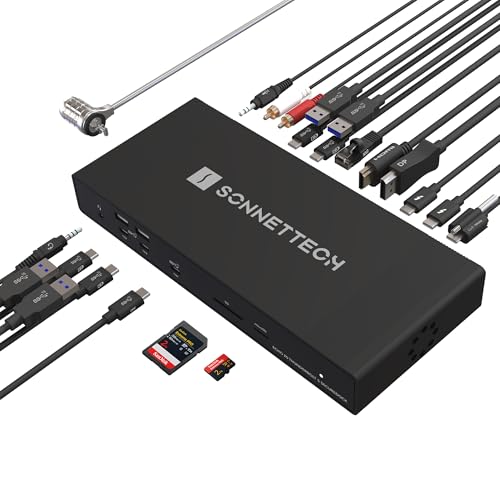
Best True 10GbE Professional Dock – Sonnet Echo 20 Thunderbolt 5
For buyers specifically searching for a docking station with 10GbE, the Sonnet Echo 20 stands out with built-in 10Gb Ethernet for fast NAS and network connections. Its Thunderbolt 5 platform also provides extensive USB connectivity, high-resolution display support, and up to 140W laptop charging for demanding professional setups.
Best For: Professionals who need 10GbE networking, fast storage access, and multi-display Thunderbolt 5 expansion.
Pros:
- Includes built-in 10GbE networking using standard Cat6 or Cat6A cabling.
- Thunderbolt 5 delivers up to 80Gbps bidirectional data bandwidth and up to 120Gbps video bandwidth.
- Provides 20 interfaces, including nine 10Gbps USB ports, HDMI, DisplayPort, and UHS-II card readers.
- Supports up to 140W Power Delivery and displays up to 8K, depending on the computer.
Cons:
- Windows systems require at least Windows 11.
- Display capacity varies by computer and may range from two 8K displays to several 4K, 5K, or 6K displays.
- Its professional feature set may be more than needed for basic laptop expansion.
The Echo 20 is the clearest fit for a true 10GbE docking station, particularly when your workflow depends on NAS access or high-speed network transfers. Confirm your computer’s Thunderbolt 5 compatibility and display support for the intended setup.
Best Thunderbolt 5 Dock – Anker Prime TB5 14-in-1
The Anker Prime TB5 is a high-bandwidth docking station with 10GbE-adjacent workstation capabilities, pairing Thunderbolt 5 performance with 2.5Gbps Ethernet, 8K display support, and fast charging. It is designed for newer MacBooks and Thunderbolt 5 or 4 Windows laptops that need a compact, actively cooled desktop setup.
Best For: Thunderbolt 5 users who prioritize very fast file transfers, high-resolution displays, and modern laptop charging.
Pros:
- Thunderbolt 5 connectivity supports up to 120Gbps maximum data transfer.
- Can support up to 8K at 60Hz on one display or dual 8K displays with compatible Windows laptops.
- Includes 2.5Gbps Ethernet, SD and TF card readers, USB ports, and HDMI or DisplayPort output.
- Provides up to 140W charging and active cooling for sustained operation.
Cons:
- Its Ethernet port is 2.5Gbps, not 10GbE.
- Compatibility is focused on newer MacBooks and Thunderbolt 5 or 4 Windows laptops.
- Mac compatibility requires macOS 15 Sequoia or later according to the supplied specifications.
This compact Anker dock is a better match for Thunderbolt 5 performance and 8K displays than for a true 10GbE network requirement. Choose it when 2.5Gbps Ethernet is sufficient and your laptop can use its full Thunderbolt 5 capabilities.
Best for Multi-Network Workstations – OWC Thunderbolt 5 Dual 10GbE Dock
If you need a docking station with 10GbE for demanding network workflows, the OWC Thunderbolt 5 Dual 10GbE Network Dock stands out with two independent 10Gb/s Ethernet ports and a front-facing 2.5Gb/s port. It also adds Thunderbolt 5 connectivity, USB 10Gb/s ports, and support for up to three 8K displays.
Best For: Workstations using multiple networks, high-speed NAS storage, AVB, Dante, NDI, or distributed rendering workflows.
Pros:
- Two independent 10GbE ports can be bonded for up to 20Gb/s NAS access.
- Includes three Thunderbolt 5 ports and four USB 10Gb/s ports.
- Supports up to three 8K displays and operates quietly with a fanless enclosure.
Cons:
- The Thunderbolt 5 host port does not charge the laptop.
- Requires the laptop’s original power adapter for host charging.
- Best compatibility is with newer Thunderbolt 5, Thunderbolt 4, or USB4 systems.
This is the most network-focused option in the group, especially if you can use link aggregation or need to connect several separate networks. Its lack of host charging is the main limitation for a single-cable laptop setup.
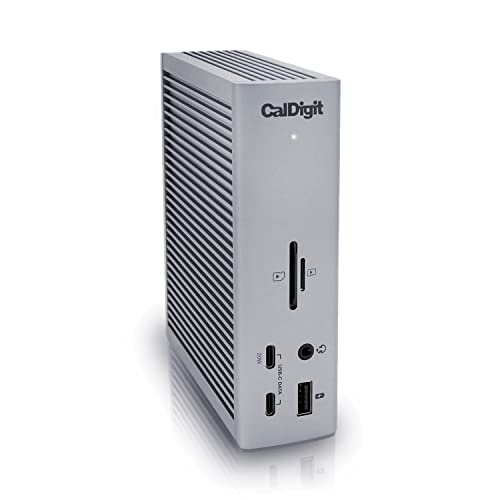
Best All-Around Connectivity – CalDigit TS4 Thunderbolt 4 Dock
The CalDigit TS4 is a versatile alternative for shoppers seeking a docking station with 10GbE-style high-speed networking, although its built-in Ethernet connection is 2.5GbE rather than 10GbE. It combines 18 ports, 98W power delivery, fast USB connections, card readers, audio ports, and broad Mac, Windows, and Chrome OS compatibility.
Best For: Users who want one dock for charging, peripherals, card media, audio gear, and faster-than-gigabit networking.
Pros:
- Provides 18 ports, including Thunderbolt 4, USB 10Gb/s, DisplayPort, audio, and card readers.
- Delivers up to 98W charging to compatible host devices.
- Supports a single 8K display or compatible dual-display configurations.
Cons:
- Its integrated Ethernet port is 2.5GbE, not 10GbE.
- Display support varies by operating system and Mac hardware.
- Maximum performance requires a Thunderbolt 4 or fully equipped USB4 host connection.
The TS4 is a strong general-purpose dock, but it is not the right choice if native 10GbE is non-negotiable. Choose it when charging and broad peripheral connectivity matter more than the fastest possible Ethernet link.
Best for Mac and Pro Media Workflows – OWC Thunderbolt Pro Dock
The OWC Thunderbolt Pro Dock is a practical docking station with 10GbE for creators and professionals who need fast wired networking alongside media-card support. Its 10GbE RJ-45 port sits alongside Thunderbolt 3, USB 10Gb/s, DisplayPort, CFexpress Type B, and SD connections.
Best For: Mac and Windows users handling professional audio, video, high-speed storage, and CFexpress or SD media.
Pros:
- Includes a dedicated 10GbE RJ-45 port.
- Offers CFexpress Type B and SD card readers for media workflows.
- Supports up to one 8K display or two 4K displays at 60Hz, depending on the host.
- Provides 85W power delivery through one Thunderbolt 3 port.
Cons:
- Uses Thunderbolt 3 rather than Thunderbolt 4 or Thunderbolt 5.
- It is a relatively heavy 5.1-pound dock.
- Display capability depends on host hardware and drivers.
With native 10GbE and built-in professional media readers, this dock is particularly well suited to studio and production setups. Its older Thunderbolt 3 platform and substantial weight make it less appealing for lightweight travel use.
How We Picked the Best Docking Station with 10gbe
We focused on docks that provide 10GbE networking directly or are designed around high-speed professional connectivity. We also compared the host connection, power delivery, display support, USB speeds, port selection, storage options, and compatibility with current Mac and Windows laptops.
Because Thunderbolt 5 and Thunderbolt 4 capabilities vary, a dock’s advertised maximums are only part of the decision. Your computer, cable, monitor, network equipment, and operating system can limit real-world performance.
Quick Comparison
- Best for maximum bandwidth: Thunderbolt 5 models from CalDigit, Plugable, UGREEN, iVANKY, Sonnet, Anker, and OWC.
- Best for dual 10GbE networking: OWC Thunderbolt 5 Dual 10GbE Network Dock.
- Best for storage expansion: UGREEN Maxidok, with support for an internal M.2 NVMe SSD.
- Best Thunderbolt 4 option: CalDigit TS4, although its built-in Ethernet is 2.5GbE rather than 10GbE.
- Best for broad compatibility: Models that support both Mac and Windows systems and offer standard USB-C, USB-A, HDMI, or DisplayPort connections.
Key Buying Factors for a Docking Station with 10gbe
Host Connection and Compatibility
Check whether your laptop has Thunderbolt 5, Thunderbolt 4, USB4, or standard USB-C. A Thunderbolt 5 dock may connect to older systems, but features such as display bandwidth, charging, and port performance can be reduced. Confirm operating-system support and any limits on Apple Silicon Mac display output before buying.
Network Hardware and Cables
10GbE is useful only when your laptop dock, switch or router, NAS, and Ethernet cabling support the same speed. Cat6a is a sensible choice for longer 10GbE runs. If your network is limited to 1GbE or 2.5GbE, a 10GbE dock remains usable but will not reach its headline transfer rate.
Displays, Charging, and Ports
Match the dock’s HDMI or DisplayPort outputs to your monitors’ resolution and refresh rate. Also check whether the stated laptop charging power is enough for your computer; a 140W dock may provide less power to the host after accounting for dock operation. Count the ports you actually need, including fast USB connections, card readers, audio, and downstream Thunderbolt ports.
Who Should Buy Which Docking Station with 10gbe?
Choose a Thunderbolt 5 dock if you need high-bandwidth displays, fast storage, or the greatest room for future upgrades. Creators working with large video files or network-attached storage should prioritize 10GbE, fast USB or Thunderbolt ports, and reliable cooling.
Business users with several monitors should compare display compatibility and charging before port count. Choose a storage-focused model if you want to install an internal SSD, while photographers and editors should look for convenient card readers and fast external-drive connections. If your laptop uses Thunderbolt 4 and your network does not exceed 2.5GbE, a mature Thunderbolt 4 dock may offer better value than upgrading solely for newer standards.