A docking station with an NVMe slot can turn a laptop into a more capable workstation while adding fast, removable storage. Instead of choosing between a hub and a separate SSD enclosure, these docks combine both functions in one desktop-friendly device.
This roundup compares 10 options across Thunderbolt 5, USB4, USB-C, monitor support, power delivery, card readers, and NVMe compatibility. Focus on the ports and performance your setup actually needs, because the best dock for a MacBook creator may not be the right choice for a basic office laptop.
Best 10 Docking Station with Nvme Slot Picks for 2026
Professional Powerhouse

- PCIe Gen 4 x4 M.2 slot with up to 64Gbps transfer rate
- Supports extensive high-resolution multi-display setups
- Includes 2.5Gb Ethernet, SD 4.0, USB-A, and Thunderbolt 5 ports
Best For: Windows creators and professionals needing fast local storage and many connections
Compact Storage Hub

- Supports 2242, 2260, and 2280 NVMe or SATA drives
- Adds 4K 60Hz HDMI and Gigabit Ethernet
- Offers up to 90W host charging passthrough
Best For: Portable laptop setups needing storage, display, and networking in one hub
Creator-Centered Expansion

- USB4 connectivity with a 20Gbps M.2 NVMe enclosure
- Supports up to 8K or triple 4K high-refresh display setups
- Provides dual USB4 ports, dual DisplayPort 2.1, and 100W PD
Best For: Windows creators and technical users building fast multi-display workstations
Premium Desktop Cube
Satechi Thunderbolt 5 NVMe Dock

- PCIe 4x4 M.2 enclosure supports up to 8TB and 6000MB/s
- Provides 140W charging and up to 120Gbps bandwidth
- Adds card readers, 2.5Gb Ethernet, and high-resolution display support
Best For: High-end desktop workstations needing fast storage and broad connectivity
Best Balanced Pick
UGREEN Revodok NVMe 10-in-1 Dock

- M.2 NVMe slot plus 10Gbps USB connectivity
- 4K@60Hz HDMI and Gigabit Ethernet
- 100W PD charging with SD/TF readers
Best For: Everyday laptop workstations needing storage and broad connectivity
Best Value Expansion Hub
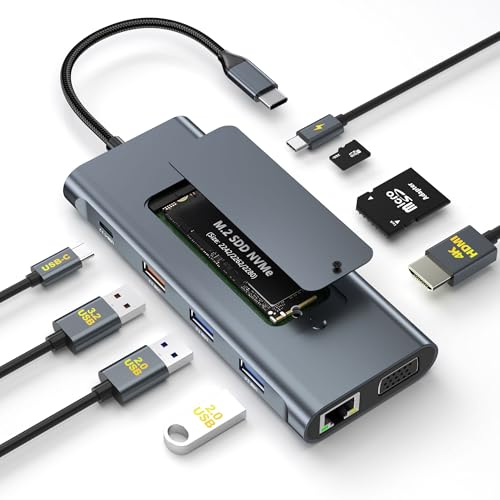
- NVMe enclosure supports drives up to 2TB
- HDMI and VGA dual-display output
- Includes SSD cooling and installation accessories
Best For: Value-focused users adding storage and dual displays
Best High-End Thunderbolt Dock
UGREEN Maxidok Thunderbolt 5 Dock

- PCIe Gen4x4 NVMe support up to 8TB
- 17 ports with Thunderbolt 5 and 2.5GbE
- High-resolution multi-monitor support
Best For: Professional Thunderbolt workstations and demanding creators
Best Compact 9-in-1 Pick
USB-C Dock with NVMe Enclosure

- M-Key PCIe NVMe slot
- 4K@60Hz HDMI and 100W PD
- Compact hub with card readers
Best For: Travelers and compact desk setups
Best NVMe/SATA Flexibility
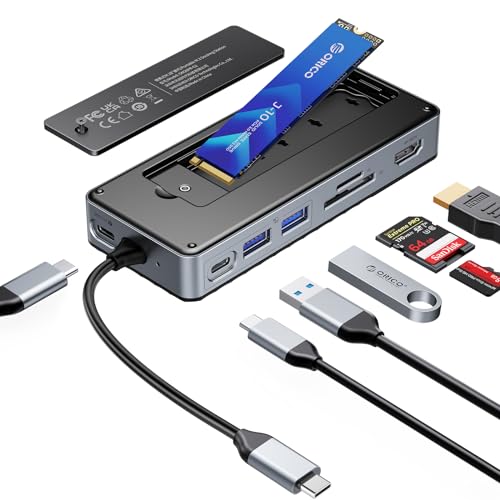
- Fits NVMe and SATA M.2 drives
- 10Gbps USB and 4K@60Hz HDMI
- Includes cable and SSD cooling accessories
Best For: Mixed-drive upgrades and flexible storage expansion
Best for Triple Displays
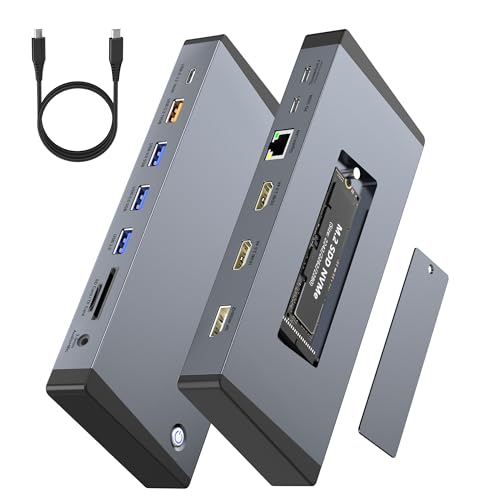
- Up to three 4K@60Hz displays on Windows
- PCIe NVMe slot plus 10Gbps USB
- Gigabit Ethernet and 100W PD
Best For: Windows multi-monitor workstations
Professional Powerhouse – Thunderbolt 5 NVMe Dock
If you need a docking station with nvme slot for demanding office, creative, or engineering workflows, the WAVLINK Thunderbolt 5 Dock combines PCIe Gen 4 x4 M.2 storage with high-speed connectivity. It supports multiple displays, 2.5Gb Ethernet, four USB-A ports, and an SD 4.0 reader in a 13-in-1 design.
Best For: Windows professionals, video editors, photographers, and designers who need fast local storage and extensive display connectivity.
Pros:
- PCIe Gen 4 x4 M.2 slot supports transfer rates up to 64Gbps.
- Supports single 8K, dual 8K, or triple 4K display configurations under stated compatibility conditions.
- Includes 2.5Gb Ethernet, SD 4.0, four USB-A ports, and three downstream Thunderbolt 5 ports.
- Backed by a two-year warranty and technical support.
Cons:
- Requires a computer with Thunderbolt 4 or Thunderbolt 5 support.
- Triple-display support requires Windows 11 or later with a Thunderbolt 5 port; macOS supports two external displays.
- SSD, USB-C video cables, and security lock are not included; the M.2 slot supports M-key 2280 drives only.
This is a highly capable choice when local NVMe caching and multi-monitor output matter more than simplicity. Check host compatibility and budget for a suitable 2280 SSD before buying.
Compact Storage Hub – SABRENT M.2 SSD Dock
The SABRENT HB-6PNV is a practical docking station with nvme slot for adding removable storage without a separate enclosure. Its six-port USB-C hub also provides 4K HDMI, Gigabit Ethernet, and up to 90W USB Power Delivery passthrough in a compact aluminum body.
Best For: Laptop and tablet users who want one portable hub for an M.2 drive, a monitor, wired networking, and everyday USB accessories.
Pros:
- Accepts M.2 NVMe or SATA drives in 2242, 2260, and 2280 sizes.
- Integrated thermal pad helps manage drive heat.
- Provides 4K at 60Hz HDMI output and Gigabit Ethernet.
- Passes through up to 90W of USB Power Delivery to the host device.
Cons:
- The internal drive slot is limited to up to 5Gbps, rather than the full speed of a modern NVMe drive.
- Only one HDMI output is provided, and video requires host support for DisplayPort Alt Mode.
- SSD, charger, and power adapter are not included; there is no SD or microSD reader.
This hub favors convenience and broad drive compatibility over maximum SSD performance. It is a sensible fit for backups, photos, and project files when a compact all-in-one accessory is more important than top NVMe speeds.
Creator-Centered Expansion – WAVLINK USB4 NVMe Dock
Built for demanding Windows workflows, this WAVLINK docking station with nvme slot combines a USB4 M.2 enclosure with dual USB4 ports, dual DisplayPort 2.1 outputs, and 100W power delivery. It is designed for high-speed project storage and multi-monitor editing without virtual graphics drivers.
Best For: Windows video creators, developers, and technical users who need USB4 storage, multiple displays, and high host power delivery.
Pros:
- USB4 provides up to 40Gbps overall throughput, while the M.2 enclosure supports up to 20Gbps.
- Supports up to 8TB of expandable M.2 NVMe storage, with stated read speeds up to 2004MB/s.
- Supports single-screen 8K at 60Hz or triple-screen 4K at 144Hz configurations under suitable host conditions.
- Includes two downstream USB4 ports, two DisplayPort 2.1 ports, and 100W power delivery.
Cons:
- Not compatible with Mac according to the supplied specifications.
- Host support for DP 2.1, DSC, USB4, or Thunderbolt 4/5 is required for full functionality.
- The cooling fan can produce audible noise during operation, and the SSD is not included.
This dock offers a strong balance of fast storage and display expansion for compatible Windows systems. Its fan and strict host requirements make compatibility and noise tolerance important considerations.
Premium Desktop Cube – Satechi Thunderbolt 5 NVMe Dock
The Satechi CubeDock is a premium docking station with nvme slot for users who want high-speed storage and extensive desktop connectivity in a compact enclosure. It combines Thunderbolt 5, up to 140W host charging, multi-display support, card readers, 2.5Gb Ethernet, and a PCIe 4×4 M.2 enclosure.
Best For: Professionals, editors, designers, and gamers seeking a polished Thunderbolt 5 desktop dock with fast expandable storage.
Pros:
- Supports up to 8TB of M.2 NVMe storage with stated speeds up to 6000MB/s.
- Offers up to 120Gbps bandwidth and 140W host charging.
- Supports single 8K at 144Hz, dual 8K at 120Hz, or triple 8K at 60Hz on Windows under stated conditions.
- Includes UHS-II SD and microSD readers, 2.5Gb Ethernet, and 10Gbps USB-C/A ports.
Cons:
- Supports single-sided M.2 NVMe SSDs only; the SSD is not included.
- The cooling fan operates at a stated 20–40 dB(A), which may matter in quiet workspaces.
- Full display capabilities vary by operating system, with macOS supporting dual 6K at 60Hz on specified systems.
CubeDock is an attractive high-end option for a clutter-free workstation that needs storage, charging, networking, card access, and multiple displays. Its premium feature set is best justified when Thunderbolt 5 bandwidth and fast PCIe 4×4 storage are central to the setup.
Best Balanced Pick – UGREEN Revodok NVMe 10-in-1 Dock
If you want a docking station with nvme slot that covers everyday workstation needs without a bulky setup, the UGREEN Revodok combines storage expansion with useful connectivity. It includes an M.2 NVMe slot, 4K@60Hz HDMI, 10Gbps USB ports, Gigabit Ethernet, SD/TF readers, and 100W power delivery in one hub.
Best For: Laptop users who need fast storage expansion, external display support, wired networking, and card readers in a compact dock.
Pros:
- Built-in M.2 NVMe slot adds storage without a separate enclosure.
- HDMI supports 4K output at 60Hz for smooth viewing and multitasking.
- Includes 10Gbps USB-C and USB-A ports, Gigabit Ethernet, and SD/TF readers.
- 100W PD passthrough supports charging while the dock is in use.
Cons:
- The listed operating-system support specifies macOS 14 Sonoma and Windows 11.
- It provides one HDMI display output rather than the broader multi-display connectivity of larger docks.
This is a well-rounded choice for users who want an NVMe-enabled dock with a practical mix of ports, fast USB transfers, and 4K display output. Its plug-and-play design also keeps setup straightforward.
Best Value Expansion Hub – 11-in-1 USB-C NVMe Dock
This 11-in-1 USB-C dock is a practical option if you want a docking station with nvme slot and dual-display flexibility at the same time. Its built-in M.2 NVMe enclosure supports drives up to 2TB, while HDMI, VGA, USB 3.2, Ethernet, card readers, and 100W PD cover common desk and travel needs.
Best For: Photographers, video editors, and power users who want integrated NVMe storage, dual-display output, and a complete accessory kit.
Pros:
- Built-in M.2 NVMe enclosure supports up to 2TB and up to 10Gbps transfer speeds.
- HDMI and VGA can support simultaneous 4K@30Hz and 1080p displays.
- Includes Gigabit Ethernet, SD/TF readers, 10Gbps USB-C and USB-A ports, and 100W PD.
- Comes with a screwdriver, thermal pad, and aluminum heatsink for SSD installation.
Cons:
- M.2 SATA SSDs are not supported.
- The NVMe SSD is not included and may need formatting before first use.
- Video output requires a fully functional USB-C or Thunderbolt 3 port.
With its included cooling and installation accessories, this dock is especially convenient for first-time NVMe expansion. The 4K HDMI plus VGA combination is useful for presentations and dual-monitor productivity, though HDMI is limited to 30Hz at 4K.
Best High-End Thunderbolt Dock – UGREEN Maxidok Thunderbolt 5 Dock
For demanding desktops and modern Thunderbolt systems, the UGREEN Maxidok is a premium docking station with nvme slot built around Thunderbolt 5 bandwidth. It offers 17 ports, a PCIe Gen4x4 M.2 slot supporting up to 8TB, 2.5GbE networking, and high-resolution multi-monitor support.
Best For: Professional creators and power users with Thunderbolt 5 or Thunderbolt 4 laptops who need high-speed storage, networking, and multi-display connectivity.
Pros:
- PCIe Gen4x4 M.2 slot supports 2230–2280 NVMe SSDs up to 8TB.
- Thunderbolt 5 provides up to 120Gbps bandwidth and two downstream Thunderbolt 5 ports.
- Supports triple independent Windows displays and dual displays on Mac, including high-resolution output.
- 17 ports include 2.5GbE, USB ports, SD/TF 4.0, DisplayPort, and audio connections.
Cons:
- It requires a compatible Thunderbolt 5 or Thunderbolt 4 computer for its full feature set.
- The NVMe slot has specific SSD size and heatsink-clearance requirements.
- The built-in cooling fan can make noise while operating.
This is the most capable option in the group for a high-performance workstation, especially where fast networking, large NVMe capacity, and multiple displays matter. Check your computer, monitor adapters, and SSD dimensions carefully before buying.
Best Compact 9-in-1 Pick – USB-C Dock with NVMe Enclosure
If you want a compact docking station with NVMe slot, this 9-in-1 Buerlaseul model combines storage expansion with everyday laptop connectivity. It includes 4K@60Hz HDMI, 100W USB-C Power Delivery, 10Gbps USB ports, and SD/TF card reading in a small aluminum-style hub.
Best For: Travelers, home-office users, and anyone needing an M-Key PCIe NVMe enclosure with essential display and peripheral ports.
Pros:
- Combines an M.2 NVMe enclosure with a 9-in-1 USB-C hub.
- Supports 4K@60Hz HDMI and up to 100W PD charging.
- Includes a heatsink, silicone cooling pad, screwdriver, and quick-start guide.
Cons:
- The SSD slot supports PCIe NVMe M-Key drives only, not SATA M.2 drives.
- Power adapter and charging cable are not included.
- SD and TF cards cannot be used simultaneously.
This is a practical all-in-one option when portability matters more than a large port selection. Confirm that your USB-C host supports video output, data transfer, and Power Delivery before buying.
Best NVMe/SATA Flexibility – ORICO 8-in-1 SSD Dock
The ORICO 8-in-1 is a docking station with NVMe slot designed for users who want broader M.2 drive compatibility. Its enclosure supports both M.2 NVMe and SATA SSDs, while the hub adds 10Gbps USB connectivity, 4K@60Hz HDMI, 100W PD, and SD/TF readers.
Best For: Users upgrading or reusing either NVMe or SATA M.2 drives and needing a flexible USB-C workstation or travel hub.
Pros:
- Supports M.2 NVMe and SATA SSDs up to 8TB, with the SSD sold separately.
- Provides 10Gbps USB-A and USB-C data connections.
- Includes a heatsink, silicone cooling pad, screwdrivers, guide, and USB-C cable.
Cons:
- Power adapter is not included, and PD charging is recommended for stable data transfer.
- SD and TF cards cannot be used at the same time.
- HDMI video requires a compatible USB-C host with video transmission support.
Its standout advantage is drive compatibility: unlike NVMe-only docks, this ORICO model can accommodate SATA M.2 storage as well. It is a strong choice for mixed-drive households, provided you already have a suitable power adapter.
Best for Triple Displays – 15-in-1 NVMe Monitor Dock
For a desktop replacement setup, this 15-in-1 docking station with NVMe slot adds substantial connectivity alongside storage expansion. It offers dual HDMI 2.0 ports, DisplayPort 1.4, 10Gbps USB, Gigabit Ethernet, 100W PD, audio, and SD/TF readers for a multi-monitor workstation.
Best For: Windows professionals, video editors, financial analysts, and multitaskers who need up to three 4K displays and an internal NVMe expansion slot.
Pros:
- Supports triple 4K@60Hz displays on compatible Windows systems.
- Combines an M.2 PCIe NVMe enclosure with 10Gbps USB and Gigabit Ethernet.
- Includes a 1m USB-C host cable and SSD installation toolkit.
Cons:
- The SSD slot supports PCIe NVMe drives, not SATA M.2 drives.
- macOS is limited to one extended 4K display plus the laptop screen.
- Display output requires a host with DisplayPort Alt Mode or Thunderbolt 4.
This is the most capable option in the group for a fixed workstation, especially on Windows 10 or 11. Its display support varies by operating system, so Mac users should carefully account for the stated macOS limitation before purchasing.
How We Picked the Best Docking Station with Nvme Slot
We compared these docks by looking at the complete user experience rather than storage speed alone. Key criteria included the connection standard, available downstream ports, video-output capabilities, power delivery, SSD compatibility, physical design, and the clarity of the stated specifications.
We also considered how each model fits different setups: portable laptop workstations, desktop replacements, content-creation systems, gaming desks, and multi-monitor offices. A dock with an NVMe enclosure is only useful if it matches your computer’s port bandwidth and supports the displays and accessories you plan to connect.
Quick Comparison
| Best For | What to Prioritize | Typical Choice |
|---|---|---|
| Maximum bandwidth | Thunderbolt 5 or USB4 | WAVLINK or UGREEN Thunderbolt 5 models |
| Portable expansion | Compact design and bus-powered operation | SABRENT or compact USB-C hubs |
| Creative workflows | Fast NVMe storage, display bandwidth, and card readers | Satechi, UGREEN, or WAVLINK options |
| Multi-monitor offices | Display count, resolution, and operating-system support | 15-in-1 triple-monitor dock |
| Broad compatibility | USB-C, HDMI, SD/TF, and high-wattage PD | ORICO or 9-in-1 USB-C models |
Key Buying Factors for a Docking Station with Nvme Slot
Connection Standard and Real-World Bandwidth
Thunderbolt 5 and USB4 generally offer the most headroom for fast external storage, high-resolution displays, and multiple peripherals. USB-C docks can still be excellent, but “USB-C” describes the connector, not the actual speed. Check whether the host connection is USB 3.2, USB4, Thunderbolt, or another standard.
NVMe Enclosure Compatibility
Confirm the supported M.2 form factor, usually 2280, and whether the enclosure accepts NVMe drives only or both NVMe and SATA models. An SSD may also require its own purchase, and sustained transfers can be limited by heat, the host interface, or the dock’s internal controller.
Display Support
Check the maximum resolution and refresh rate for every output, not just the headline number. Multi-monitor support can vary significantly between Windows and macOS, and some systems need DisplayLink software or have limitations on mirrored and extended displays.
Power Delivery and Port Layout
High-wattage USB-C PD can reduce charger clutter, but the advertised figure may be shared across the dock and connected devices. Count the ports you need, including USB-A, USB-C, Ethernet, audio, SD, and microSD, and consider whether their placement suits your desk.
Who Should Buy Which Docking Station with Nvme Slot?
Choose a Thunderbolt 5 model if you want the highest bandwidth for demanding storage, multiple displays, or a future-ready workstation. USB4 is a strong middle ground for users who need fast transfers and modern connectivity without necessarily requiring every Thunderbolt feature.
A compact USB-C dock is better for travel, light office work, and laptops with limited expansion. Creative professionals should prioritize sustained NVMe performance, fast card readers, reliable display output, and adequate cooling. Office users connecting several screens should verify operating-system compatibility before choosing a high-port-count model.
Finally, treat the advertised maximums as starting points. Your laptop, SSD, cable, monitor, and operating system all affect final performance. The right docking station with an NVMe slot is the one that matches the slowest required link while leaving enough ports and power for future accessories.