The best document cameras for artists make it easier to demonstrate drawing, painting, lettering, miniatures, and other hands-on work from an overhead view. The right model should deliver sharp detail, stable positioning, useful lighting, and compatibility with your preferred computer or display.
We selected 10 options ranging from compact USB cameras to flexible 4K models with HDMI and wireless connectivity. Use the guide below to narrow your choice by image quality, working area, portability, and budget.
Best 10 Document Cameras for Artists Picks for 2026
Best High-Resolution Value

- 8MP capture up to 3264 x 2448
- Up to 30 fps Full HD streaming
- Fast autofocus with Mac, Windows, and Chromebook support
Best For: Artists and instructors needing sharp wired demonstrations
Best for Large Artwork

- 4K output from a 13MP Sony sensor
- Captures artwork up to A3 size
- Includes lighting, autofocus, macro, and annotation tools
Best For: Large artwork, classroom instruction, and big-screen presentations
Best Wireless Setup
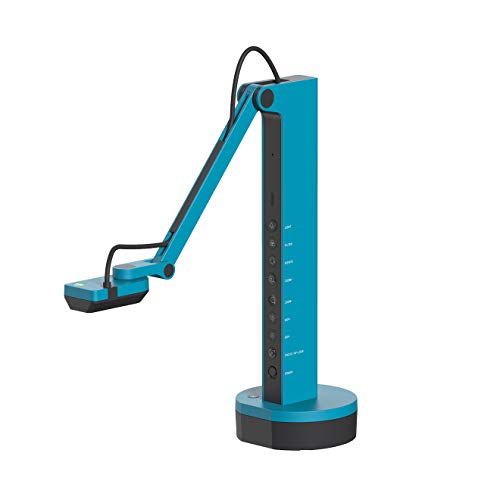
- Wi-Fi, HDMI, and USB connectivity
- Near-4K USB capture with Full HD wireless output
- 9–12-hour battery and up to 33-foot wireless range
Best For: Mobile studio, classroom, and direct-to-display demonstrations
Best for Miniatures and Live Tutorials

- Dual view for face and tabletop artwork
- 2K tabletop capture at 30 fps
- Picture-in-picture, keystone correction, and noise-reduced mics
Best For: Miniature painting, hobby demonstrations, and live streams
Best Flexible USB Pick
Kitchbai 4K A3 Document Camera

- 8MP capture with 2448P video at 30fps
- A3 coverage with a flexible multi-joint arm
- Foldable USB-C design with adjustable lighting
Best For: Live art demonstrations using a computer
Best Premium Detail
ELMO TT-12G 4K Interactive Camera
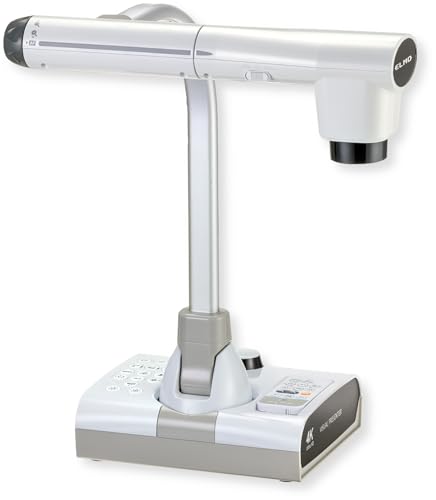
- 4K video from a 12MP sensor
- 192x total zoom with optical and digital zoom
- HDMI, USB, VGA, and Miracast support
Best For: Detailed studio demonstrations and workshops
Best Simple Portable Option
Epson DC-07 1080p Document Camera

- 1080p output with up to 8x digital zoom
- USB connection for Windows, Mac, and Epson projectors
- Autofocus, freeze button, microphone, and carrying case
Best For: Basic portable art demonstrations and lessons
Sharp Detail Pick
INS-1 Classic 8MP Document Camera

- 8MP Sony imaging with 30 fps streaming
- Macro focus down to 3.9 inches
- LED, anti-glare, and annotation tools
Best For: Close-up artwork and desktop demonstrations
Large-Format Choice

- A3-size capture area for larger artwork
- 8MP output with 30 fps live transmission
- Foldable arm and three-level ring light
Best For: Large drawings, paper layouts, and 3D objects
Portable Lighting Pick

- A3 capture with instant image reversal
- Three-level LED and 10 exposure settings
- Foldable arm, dual microphones, and 3-year warranty
Best For: Portable critiques and demonstrations in variable lighting
Best High-Resolution Value – IPEVO V4K
The IPEVO V4K is a strong option for artists seeking document cameras for artists that can show detailed sketches, artwork, and demonstrations without lag. Its 8MP sensor, fast autofocus, and 30 fps Full HD streaming suit frequent material changes and live instruction.
Best For: Artists and instructors who need sharp overhead demonstrations on Mac, Windows, or Chromebook.
Pros:
- 8MP capture reaches up to 3264 x 2448 pixels.
- Streams at up to 30 fps in Full HD for responsive demonstrations.
- Fast autofocus and Sony CMOS processing help with frequent subject changes and dimmer environments.
- Multi-jointed stand and broad software compatibility support flexible setups.
Cons:
- USB connectivity limits it to a wired setup.
- Its maximum shooting area is 13.46 x 10.04 inches, which may not suit very large artwork.
For most tabletop art demonstrations, the V4K balances resolution, speed, and compatibility well. It is especially practical when you want reliable USB operation rather than wireless presentation features.
Best for Large Artwork – INSWAN INS-2 UHD 4K
The INSWAN INS-2 is built for artists who need to display larger work, two-page spreads, or detailed projects. Among document cameras for artists, it stands out with 4K output, a 13MP Sony sensor, A3 capture, and presentation-focused software.
Best For: Art instructors, exhibition presenters, and creators displaying large documents or artwork on a big screen.
Pros:
- 4K video at 3840 x 2160 and a 13MP sensor deliver detailed output.
- Flexible arm supports documents and artwork up to A3 size.
- Built-in LED, anti-glare sheet, dual autofocus, brightness control, and macro capability add presentation flexibility.
- Documate software includes annotation, recording, whiteboard tools, scanning, and OCR.
Cons:
- Its compatibility requirements vary by operating system, especially for newer Mac, iPad, and Chromebook versions.
- At 2.3 pounds, it is heavier than some compact document cameras.
The INS-2 is the most capable choice here for large-format art instruction. Its A3 coverage and built-in presentation tools make it suitable for classrooms, workshops, and exhibition-style demonstrations.
Best Wireless Setup – IPEVO VZ-X
The IPEVO VZ-X gives artists more freedom to position a camera around the studio or classroom. It supports Wi-Fi, HDMI, and USB, making it one of the most flexible document cameras for artists who want to move between computers, displays, tablets, and projectors.
Best For: Artists and presenters who need wireless or direct-to-display demonstrations across multiple devices.
Pros:
- Offers Wi-Fi, HDMI, and USB connectivity.
- Captures near-4K quality in USB mode and Full HD in Wi-Fi and HDMI modes.
- Battery life of 9–12 hours supports extended classes or presentations.
- Swiveling head, multi-jointed stand, LED light, and up to 33 feet of wireless range aid flexible positioning.
Cons:
- Its highest listed resolution is available in USB mode rather than Wi-Fi or HDMI mode.
- Manual focus is listed, which may require more adjustment during demonstrations.
- It weighs 2.6 pounds, making it less portable than lighter wired options.
The VZ-X is a good fit when setup flexibility matters as much as image quality. Choose USB for its highest resolution, or use Wi-Fi and HDMI when cable-free movement and direct display connections are more important.
Best for Miniatures and Live Tutorials – AVerMedia PW313D DualCam
The AVerMedia PW313D is designed for creators who want to show a tabletop project and their face at the same time. For artists comparing document cameras for artists, its dual-camera layout is particularly useful for miniature painting, close-up brushwork, card artwork, and live tutorials.
Best For: Miniature painters, hobby artists, and streamers combining a tabletop view with a presenter view.
Pros:
- Dual-camera design combines a 2K tabletop view with a 1080p face camera.
- 5MP capture reaches 2592 x 1944 at 30 fps with autofocus.
- Picture-in-picture support suits tutorials, streams, and demonstrations.
- Keystone correction helps straighten angled tabletop shots, while dual microphones include AI noise reduction.
Cons:
- It connects through USB 2.0 and is primarily intended for compatible computers and iPads.
- Its 2K tabletop camera is lower resolution than the 4K option in this roundup.
- The dual-camera features rely on AVerMedia Streaming Center for combined views.
The PW313D is the most specialized choice for interactive art content. Its face-and-tabletop format adds context that a conventional single-camera document setup cannot provide, especially for miniature painting and live instruction.
Best Flexible USB Pick – Kitchbai 4K A3 Document Camera
For artists seeking document cameras for artists that can handle sketchbooks, prints, and three-dimensional work, the Kitchbai KB-700 offers an adaptable USB setup. Its 8MP sensor, A3-sized coverage, adjustable lighting, and multi-joint arm make it practical for live demonstrations and remote critique sessions.
Best For: Artists who need a foldable, computer-friendly camera for displaying large artwork and small objects.
Pros:
- 8MP capture with up to 2448P video at 30 frames per second.
- A3 coverage and a multi-angle arm support larger artwork and 3D objects.
- Three brightness levels, manual image reversal, and macro focus improve presentation flexibility.
- USB-C plug-and-play compatibility works with Windows, macOS, Chrome OS, Zoom, Meet, Teams, and Skype.
Cons:
- USB connectivity may be less convenient for setups that require direct HDMI output.
- The listed focus range starts at about 10 cm, so extremely tiny details may need careful positioning.
The KB-700 is a strong all-purpose option for artists who value portability and flexible framing. Its foldable design and built-in microphones are especially useful for demonstrations, while the A3 capture area helps keep larger compositions in view.
Best Premium Detail – ELMO TT-12G 4K Interactive Camera
The ELMO TT-12G is a high-end choice among document cameras for artists who want detailed views of artwork, tools, and demonstrations. Its 12MP sensor, 4K output, large capture area, powerful zoom, and multiple video connections support both studio and presentation use.
Best For: Artists, instructors, and workshop presenters who need maximum detail and broad connection options.
Pros:
- 4K Ultra HD video and a 12MP sensor provide sharp image detail.
- Combines 12x optical zoom with 16x digital zoom for close-up demonstrations.
- Flexible arm and 18.5-by-10.2-inch capture area accommodate varied materials and angles.
- HDMI, USB, and VGA outputs support modern and legacy display equipment.
Cons:
- At 6.6 pounds, it is less portable than compact USB document cameras.
- Its larger footprint and broader feature set may be more than casual users need.
For artists teaching detailed techniques or presenting work to a group, the TT-12G offers the strongest imaging and zoom specifications in this lineup. Built-in lighting, one-touch autofocus, recording to an SD card, and Miracast compatibility add useful presentation flexibility.
Best Simple Portable Option – Epson DC-07 1080p Document Camera
Epson DC-07 Portable Document Camera with USB Connectivity and 1080p Resolution,White
Check Price On AmazonThe Epson DC-07 is a straightforward option for artists who want document cameras for artists with simple USB connectivity and dependable 1080p output. Its autofocus, freeze button, built-in microphone, and included carrying case make it suited to basic demonstrations and remote lessons.
Best For: Artists who prioritize simple computer or projector connection over 4K resolution and advanced controls.
Pros:
- 1080p output and up to 8x digital zoom provide clear views for general demonstrations.
- One-touch autofocus makes setup quick.
- USB connection works with Windows and Mac computers and Epson projectors.
- Includes a soft carrying case and offers a convenient freeze button.
Cons:
- Its 2MP sensor and 15fps video are less detailed and fluid than the other listed models.
- USB connectivity may limit compatibility with displays that lack computer or projector support.
- The supplied notes specify digital zoom rather than optical zoom.
The DC-07 makes sense for artists who need a familiar, uncomplicated camera for showing artwork or recording lessons. It lacks the resolution and flexibility of newer 4K models, but its autofocus, microphone, freeze control, and carrying case keep everyday use convenient.
Sharp Detail Pick – INS-1 Classic 8MP Document Camera
For artists comparing document cameras for artists, the INS-1 is a compact option focused on detailed stills, close-up work, and smooth live demonstrations. Its 8MP Sony camera, autofocus, macro capability, LED light, and anti-glare sheet make it well suited to showing artwork and small materials clearly.
Best For: Artists who need a compact camera for close-up artwork, live demonstrations, and annotated recordings.
Pros:
- 8MP imaging supports captures up to 3264 x 2448 pixels and 30 fps streaming.
- Autofocus and macro shooting can capture objects as close as 3.9 inches.
- LED lighting, anti-glare sheet, and seven brightness levels help with challenging illumination.
- Bundled software includes annotation, digital zoom, snapshots, rotation, and video recording.
Cons:
- Uses USB-A connectivity, so some newer devices may require an adapter.
- The viewing area is smaller than the A3-size coverage offered by some alternatives.
The INS-1 stands out when detail and close focusing matter more than maximum workspace coverage. It is a practical choice for artists presenting sketches, small objects, or hands-on techniques from a desktop setup.
Large-Format Choice – THUSTAR 8MP A3 Visualiser
Artists looking at document cameras for artists may appreciate the THUSTAR for its broad A3-size capture area and flexible multi-joint arm. It combines 8MP resolution, manual image reversal, adjustable brightness, macro focus, and foldable construction for demonstrations involving artwork, paper, or 3D objects.
Best For: Artists who want wide workspace coverage and flexible positioning for paper-based or three-dimensional demonstrations.
Pros:
- Captures an area up to A3 size, making it suitable for larger sheets and layouts.
- 8MP, up to 2448P output, and 30 fps support detailed live viewing.
- Three-level ring lighting and manual brightness controls help adapt to different conditions.
- Foldable, multi-joint design supports portability and multi-angle shooting.
Cons:
- USB 2.0 connectivity may limit flexibility compared with newer USB standards.
- Its feature set is oriented toward live USB use rather than standalone recording.
The THUSTAR is a strong fit for artists who regularly work across larger sheets or need to reposition the camera around models and objects. Its foldable design also makes it easier to transport between workspaces.
Portable Lighting Pick – Gawervan KB700 8MP Camera
For artists choosing document cameras for artists, the Gawervan KB700 emphasizes fast image control and portable setup. Its 8MP camera, image reversal buttons, adjustable LED panel, exposure controls, and foldable arm are useful for live critiques, process demonstrations, and showing artwork from different angles.
Best For: Mobile artists and educators who need adjustable lighting, image flipping, and A3-size coverage over USB.
Pros:
- Provides 8MP imaging, A3-size coverage, and one-touch horizontal or vertical image flipping.
- Three-level LED lighting and 10 exposure settings help manage glare and uneven lighting.
- Foldable design and 180-degree multi-joint movement support portable demonstrations.
- Built-in dual microphones and a stated three-year warranty add convenience for remote sessions.
Cons:
- It does not support HDMI or iPads according to the supplied notes.
- USB connectivity is required for operation.
The KB700 is appealing when portability and hands-on lighting control are priorities. Its image-flip buttons and broad capture area are particularly useful for presenting artwork, worksheets, and physical projects during remote sessions.
How We Picked the Best Document Cameras for Artists
We focused on features that matter during real demonstrations rather than relying on resolution alone. Our selection considers image clarity, autofocus performance, camera-arm flexibility, capture area, lighting, microphone quality, connection options, and compatibility with macOS, Windows, Chromebooks, conferencing software, and classroom displays.
Models with 4K or high-megapixel sensors can preserve fine linework and texture, while 1080p cameras may be sufficient for casual lessons and smaller workspaces. We also looked for practical details such as foldable designs, built-in LEDs, image reversal, wireless operation, and support for A3-sized materials.
Quick Comparison
| Best For | Features to Prioritize |
|---|---|
| Detailed drawing and painting | 4K resolution, strong autofocus, flexible arm |
| Crafts, miniatures, and trading cards | Close-focus performance, stable overhead positioning |
| Online teaching and streaming | USB compatibility, built-in microphone, reliable exposure |
| Large artwork or worksheets | A3 capture area, wide field of view |
| Portable demonstrations | Foldable body, lightweight design, simple USB setup |
| Multi-device presentations | HDMI, Wi-Fi, or multiple connectivity modes |
Key Buying Factors for Document Cameras for Artists
Resolution and Detail
Choose 4K when viewers need to see pencil texture, brush edges, tiny lettering, or miniature details. An 8MP camera can still provide a sharp image for most video calls, particularly when lighting and focus are good.
Focus, Framing, and Working Area
Autofocus is convenient for changing between a sketchbook and a close-up object, but manual control can help prevent distracting focus shifts. Check whether the arm and lens can frame your full workspace. A3 support is useful for large paper, classroom worksheets, and broad compositions.
Lighting and Audio
Built-in LED lights help maintain consistent exposure, especially when your hands or tools cast shadows. Adjustable brightness is preferable. If the camera will be used for live lessons, a built-in microphone adds convenience, although a dedicated microphone may sound better.
Connections and Compatibility
USB is the simplest option for computers and conferencing apps. HDMI is valuable when connecting directly to a monitor, projector, or classroom display, while Wi-Fi can reduce cable clutter. Confirm operating-system and software compatibility before buying.
Who Should Buy Which Document Cameras for Artists?
Choose a high-resolution 4K model if you teach detailed techniques, record polished tutorials, or regularly show small artwork. Choose a dual-camera or close-up-friendly design for trading cards, miniatures, and demonstrations that benefit from a second viewing angle. Choose a foldable USB model if portability, quick setup, and laptop use matter most.
For classrooms and studio presentations, prioritize a large capture area, flexible arm, and HDMI or wireless connectivity. For occasional video calls, an affordable 8MP USB camera with built-in lighting should provide the best balance of cost and usability.