The best document camera for classroom teaching makes worksheets, books, science experiments, and handwritten examples easy to share with every student. The models in this roundup range from compact USB visualisers to advanced 4K cameras with large capture areas, microphones, lighting, and flexible connectivity.
Use the comparison and buying advice below to match image quality, compatibility, coverage, and classroom-friendly features to your teaching setup.
Best 10 Document Camera for Classroom Picks for 2026
Best Overall Value
IPEVO V4K 8MP USB Document Camera

- 8MP Sony CMOS sensor with up to 3264 × 2448 capture
- Up to 30 fps in Full HD for smooth live demonstrations
- Compatible with Mac, Windows, and Chromebook
Best For: Everyday classroom teaching and remote lessons
Best for Large Materials
INSWAN INS-2 4K Document Camera

- 13MP Sony sensor captures 4K video at 30 fps
- Flexible arm supports documents up to A3 size
- Includes LED lighting, mic, autofocus, and annotation software
Best For: Artwork, two-page spreads, and large classroom displays
Best Flexible Budget Pick
8MP 4K USB Classroom Document Camera

- 8MP capture up to 2448p at 30 fps
- Foldable multi-joint stand supports overhead and angled views
- Built-in light, microphone, and one-touch autofocus
Best For: Flexible computer-based teaching and online classes
Best Professional Connectivity
ELMO TT-12G 4K Interactive Document Camera
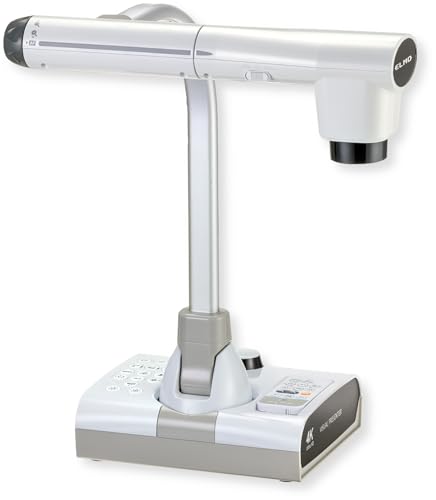
- 4K imaging with a 12MP sensor
- 192x total zoom with 12x optical zoom
- HDMI, USB, VGA, Miracast, and SD recording support
Best For: Permanent classrooms with varied display equipment
Best Flexible 4K Pick
Kitchbai KB-700 Document Camera

- 8MP, 2448P video at 30 fps
- A3 coverage with foldable multi-joint arm
- Adjustable brightness, image reversal, and dual mics
Best For: Portable classroom demonstrations and remote lessons
Best Low-Light Upgrade

- 8MP Sony sensor with 30 fps streaming
- Clearer low-light images without extra LEDs
- AI pointer tracking and feature-rich software
Best For: Hybrid classrooms and interactive presentations
Best Value Classroom Visualiser
THUSTAR 8MP 4K Document Camera

- 8MP 4K capture at 30 fps
- A3 coverage with foldable multi-joint design
- LED lighting, image inversion, and dual microphones
Best For: Everyday classroom and distance-learning demonstrations
Portable Teaching Pick
Gawervan 1080P USB Document Camera

- 1080p video at 30 fps
- Foldable 360° lens design
- Dual noise-reduced microphones
Best For: Portable classroom demos and remote teaching
Large-Format Value
PAKOTOO 8MP A3 USB Document Camera

- Covers up to A3 documents
- Autofocus with one-button activation
- Three LED brightness levels
Best For: Large worksheets and adjustable classroom demos
Feature-Rich Demo Choice
THUSTAND 5MP A3 Document Camera

- 5MP resolution with A3 coverage
- Autofocus and close-up macro capture
- Adjustable LED and ISO exposure
Best For: Detailed demonstrations and online instruction
Best Overall Value – IPEVO V4K 8MP USB Document Camera
The IPEVO V4K is a practical document camera for classroom demonstrations, remote teaching, and live online presentations. Its 8MP Sony CMOS sensor captures detailed images, while autofocus and up to 30 fps at Full HD help keep lessons moving smoothly.
Best For: Teachers who want a versatile USB camera for clear worksheets, books, and demonstrations across Mac, Windows, and Chromebook.
Pros:
- 8MP resolution supports images up to 3264 × 2448 pixels.
- Streams at up to 30 fps in Full HD for responsive demonstrations.
- Autofocus and strong low-light color performance help reduce interruptions.
- Multi-jointed stand can be tightened for continued daily use.
Cons:
- USB connectivity requires a computer and compatible software.
- No optical or digital zoom is listed.
- Performance depends on meeting the stated computer system requirements.
With broad operating-system compatibility and a compact 1.3-pound design, the V4K is a strong everyday choice when a classroom needs dependable overhead imaging without extra outputs or built-in lighting.
Best for Large Materials – INSWAN INS-2 4K Document Camera
The INSWAN INS-2 is a document camera for classroom use when large pages, artwork, and two-page spreads need to remain visible. Its 13MP Sony sensor captures 4K video, and the flexible arm supports documents up to A3 size.
Best For: Professional educators, art instructors, and classrooms presenting oversized documents, artwork, or large-screen demonstrations.
Pros:
- 4K capture at 3840 × 2160 and 30 fps delivers detailed images.
- A3 capture area accommodates large documents and artwork.
- Built-in LED, anti-glare sheet, brightness control, and dual autofocus support polished presentations.
- Documate software includes annotation, recording, whiteboard tools, scanning, and OCR.
Cons:
- Compatibility requires the listed operating-system versions or newer.
- Its 2.3-pound body may be less convenient to move between rooms.
- USB connectivity may require adapters for some setups.
The INS-2 offers a particularly complete teaching setup, combining large-format capture with lighting, audio, and software tools. It is a good fit when presentation quality and document size matter more than minimal equipment.
Best Flexible Budget Pick – 8MP 4K USB Classroom Document Camera
This 8MP document camera for classroom teaching combines clear capture with features designed for frequent repositioning. Its multi-joint alloy stand supports overhead and angled views, while one-touch autofocus and three LED brightness levels help with changing lesson materials and room conditions.
Best For: Teachers who need a flexible, foldable USB camera for worksheets, books, crafts, 3D objects, and online instruction.
Pros:
- Captures up to 2448p at 30 fps for detailed live demonstrations.
- Flexible stand supports A3/A4 materials, overhead views, and webcam positioning.
- Three-level LED lighting improves visibility in different environments.
- Works with Windows, macOS, ChromeOS, Linux, and common video platforms.
Cons:
- It does not connect directly through HDMI.
- It does not operate wirelessly.
- A computer and compatible software are required.
The foldable stand and broad software compatibility make this a convenient choice for teachers who move between document sharing and face-to-face video calls. Its USB-only design is best suited to computer-based classrooms.
Best Professional Connectivity – ELMO TT-12G 4K Interactive Document Camera
The ELMO TT-12G is a professional document camera for classroom environments that need flexible connections and high-powered magnification. It combines 4K imaging, HDMI, USB, and VGA outputs with a wide capture area and a 192x total zoom system.
Best For: Schools and instructors connecting to modern or legacy displays while showing fine details, demonstrations, and large materials.
Pros:
- 4K Ultra HD imaging and a 12MP sensor provide sharp presentation views.
- 192x total zoom combines 12x optical and 16x digital zoom.
- HDMI, USB, and VGA outputs support varied classroom equipment.
- Includes LED lighting, autofocus, Miracast compatibility, and SD-card recording.
Cons:
- At 6.6 pounds, it is substantially heavier than compact USB models.
- The larger footprint may be less convenient for small desks or frequent transport.
- Some functions depend on compatible displays, software, or SD media.
The TT-12G is built for a more permanent or equipment-rich classroom setup. Its multiple outputs and powerful zoom make it especially useful where display compatibility and close-up detail are priorities.
Best Flexible 4K Pick – Kitchbai KB-700 Document Camera
If you need a versatile document camera for classroom demonstrations, the Kitchbai KB-700 combines 8MP imaging, A3 coverage, adjustable brightness, and a foldable multi-joint design. Its manual image-reversal controls are useful for correcting mirrored presentations, while the USB connection supports Windows, macOS, and Chrome OS.
Best For: Teachers who want a portable visualiser for documents, 2D objects, 3D objects, and live online lessons.
Pros:
- 8MP capture with up to 2448P output at 30 fps.
- A3-size coverage and a foldable, multi-angle arm.
- Three-level LED lighting plus manual brightness adjustment.
- Built-in dual microphones and broad computer compatibility.
Cons:
- Requires a USB connection rather than standalone operation.
- Its listed macro focus range begins at about 3.94 inches.
The KB-700 is a practical choice when classroom flexibility matters most. It offers strong resolution and useful controls without giving up portability, making it well suited to mixed in-person and remote teaching setups.
Best Low-Light Upgrade – OKIOCAM S2-4K Document Camera
The OKIOCAM S2-4K is a feature-rich document camera for classroom use, pairing an 8MP Sony Exmor R sensor with smooth 30 fps streaming. Its back-illuminated sensor is designed to maintain clarity in dim conditions without extra LEDs, while OKIOPoint AI tracking can follow a pointer during lessons.
Best For: Teachers who want advanced presentation tools, low-light performance, and support for computers, iPads, and interactive displays.
Pros:
- Captures up to 3264 x 2448 pixels at 30 fps.
- Back-illuminated sensor improves clarity in low light without supplemental LEDs.
- OKIOPoint AI tracking, annotation, recording, snapshots, and picture-in-picture features.
- Supports Windows, Mac, Chromebook, iPadOS 17 or later, and compatible interactive displays.
Cons:
- Its 15.1 x 11.2-inch capture area is smaller than full A3 coverage.
- Some software features depend on the OKIOCAM Live software.
Choose the S2-4K if teaching tools and low-light image quality are higher priorities than maximum capture size. Its durable multi-joint arm and broad platform support also suit hybrid classrooms and mobile teaching.
Best Value Classroom Visualiser – THUSTAR 8MP 4K Document Camera
For teachers seeking a straightforward document camera for classroom demonstrations, the THUSTAR model offers 8MP 4K capture, A3-size coverage, and a foldable design. Manual image inversion, brightness controls, and three-level LED lighting help adapt the camera to different teaching spaces.
Best For: Classrooms and distance-learning setups needing broad paper coverage, simple USB connectivity, and built-in audio.
Pros:
- 8MP 4K capture with 30 fps live transmission.
- A3-size coverage for larger worksheets and teaching materials.
- Foldable multi-joint construction with adjustable LED lighting.
- Dual microphones and compatibility with Windows, macOS, Chromebooks, Zoom, Teams, and other listed platforms.
Cons:
- Uses USB 2.0 connectivity according to the supplied specifications.
- Macro focus is limited to objects about 3.94 inches or farther away.
The THUSTAR is a capable all-around option for teachers who value coverage and ease of setup. It is especially useful for switching between paper documents, objects, and online instruction while keeping the unit compact when folded.
Portable Teaching Pick – Gawervan 1080P USB Document Camera
If you need a portable document camera for classroom demonstrations, the Gawervan combines a foldable design with 1080p video, a rotating lens, and broad computer compatibility. Its manual focus is useful for worksheets, fine text, experiments, and 3D objects.
Best For: Teachers who want a compact camera for live demonstrations, remote lessons, and video conferencing.
Pros:
- 1080p video at up to 30 frames per second
- Foldable USB design with a 360° adjustable lens
- Dual built-in microphones with noise reduction
- Works with Windows, Mac, Chromebooks, Teams, Skype, and similar apps
Cons:
- Uses manual focus rather than autofocus
- No built-in flash
- USB setup may require an adapter depending on the device
The Gawervan is a practical choice when portability and simple computer-based teaching matter most. Its manual focus takes a little more adjustment, but it offers flexible positioning and clear audio for everyday lessons.
Large-Format Value – PAKOTOO 8MP A3 USB Document Camera
The PAKOTOO is a flexible document camera for classroom use that covers up to A3 paper and supports multi-angle positioning. Its autofocus button, adjustable LED lighting, and image-reversal controls help teachers present documents and objects clearly.
Best For: Classrooms that need A3 coverage, adjustable lighting, and hands-on control over image orientation.
Pros:
- 2448P resolution with autofocus activated by a dedicated button
- Covers documents and materials up to A3 size
- Three brightness levels and 10 exposure adjustments
- Foldable, multi-joint design supports multiple viewing angles
Cons:
- Not plug and play; users must select “USB Camera” in system settings
- Does not support zoom or HDMI
- Not compatible with iPad according to the supplied notes
Choose the PAKOTOO if broad coverage and adjustable image controls are higher priorities than HDMI or tablet support. Its foldable construction also makes it easier to store between lessons.
Feature-Rich Demo Choice – THUSTAND 5MP A3 Document Camera
For educators comparing a versatile document camera for classroom demonstrations, the THUSTAND offers A3 coverage, autofocus, image flipping, and a flexible 360° gooseneck. Its 5MP sensor supports detailed captures while the LED light helps in dim or backlit settings.
Best For: Teachers and content creators who need autofocus, image rotation, close-up demonstrations, and flexible lighting.
Pros:
- 5MP sensor with maximum 2592×1944P resolution
- Autofocus and macro capture from about 3.94 inches
- Three-level dimmable LED fill light and five ISO exposure levels
- Compatible with Mac, Windows, Chromebooks, Zoom, OBS, and other listed apps
Cons:
- Requires selecting “USB Camera” during first-time setup
- USB connectivity may require an adapter for some devices
- Its many manual controls may be more than basic users need
The THUSTAND stands out for teachers who want more control over focus, exposure, orientation, and lighting. It is a strong fit for detailed live demos, online instruction, and creative presentations.
How We Picked the Best Document Camera for Classroom Use
We focused on features that affect everyday teaching rather than headline specifications alone. Each selected model offers overhead or document-camera functionality, with attention to resolution, autofocus, capture size, USB compatibility, built-in audio, lighting, arm flexibility, and ease of setup. Models supporting Windows, macOS, or Chromebooks are especially practical for classrooms using mixed devices.
Because classroom needs vary, the list includes affordable 5MP and 8MP USB cameras alongside higher-resolution 4K options and models with HDMI, VGA, tracking, or enhanced presentation features.
Quick Comparison
| What to compare | Best for | Why it matters |
|---|---|---|
| 5MP–8MP USB camera | Everyday worksheets and demonstrations | Good detail without requiring premium hardware |
| 4K or 12MP–13MP resolution | Fine print, diagrams, and large displays | Provides sharper images when enlarged |
| A3 or near-ledger coverage | Textbooks, maps, and larger projects | Reduces repositioning during lessons |
| HDMI, VGA, or USB connectivity | Classrooms with varied display systems | Improves compatibility with monitors and projectors |
| Built-in microphones and LEDs | Hybrid or low-light teaching | Helps students see and hear demonstrations clearly |
Key Buying Factors for a Document Camera for Classroom Teaching
Resolution and Autofocus
Choose at least 5MP for routine documents and handwriting. An 8MP or 4K model is preferable for small print, detailed artwork, or projection onto a large screen. Autofocus is useful when moving between flat pages and three-dimensional objects, while manual focus can be helpful for controlled demonstrations.
Capture Area and Arm Design
A3 coverage gives more room for textbooks, maps, lab materials, and student projects than an A4-only camera. Look for a flexible, stable arm and a foldable design if the camera must be stored between lessons.
Compatibility and Connections
Confirm that the camera works with your operating system and teaching software. USB models are typically simple to deploy with video-conferencing and classroom applications. HDMI or VGA outputs may be valuable when connecting directly to a projector or interactive display.
Lighting, Audio, and Controls
Built-in LED lighting can reduce shadows in dim rooms, while dual microphones help with remote instruction. Image rotation, inversion, and one-touch capture controls can save time during live lessons.
Who Should Buy Which Document Camera for Classroom?
Choose a compact 5MP or 8MP USB model for basic worksheets, remote lessons, and schools outfitting multiple classrooms on a budget. Select a 4K camera when fine detail, projection quality, or large-format materials are priorities. A model with A3 coverage suits teachers who regularly show books, maps, experiments, or artwork. For classrooms using projectors or interactive panels, prioritize broad connection options. If you teach hybrid classes, built-in microphones, LED lighting, and autofocus are worthwhile conveniences.