The best document camera for teachers makes handwriting, worksheets, science demonstrations, and physical materials easy to share with an entire class—whether students are in the room or joining remotely.
We compared 10 classroom-ready models across image quality, connection options, capture size, lighting, microphones, and ease of use to help you choose the right fit for your teaching setup.
Best 10 Document Camera for Teachers Picks for 2026
Best HD Clarity

- 8MP Ultra HD capture up to 3264 × 2448
- Up to 30 fps at Full HD
- Fast autofocus and multi-jointed stand
Best For: Computer-based teaching that demands detailed image quality
Best for Large Materials

- 13MP sensor with 4K video at 30 fps
- Captures documents up to A3 size
- Includes lighting, autofocus, and OCR software
Best For: Artwork, large documents, and big-screen classroom presentations
Best for Direct Display
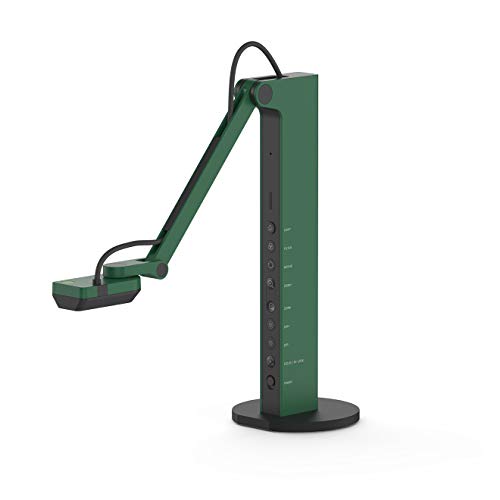
- Connects directly by HDMI or through USB
- Works with TVs, projectors, and computers
- 8MP camera with LED light and fast focus
Best For: Flexible classrooms using projectors with or without a computer
Best Compact Classroom Value

- 8MP capture with 30 fps streaming
- Compact multi-joint design with broad viewing area
- Includes LED light, mic, and annotation software
Best For: Everyday USB lessons and space-conscious teaching setups
Premium Classroom Presenter

- Up to 192x combined zoom
- HDMI, USB, Ethernet, Wi-Fi, and RGB connectivity
- Android apps and Miracast support
Best For: Advanced classroom presentations and high-zoom demonstrations
Flexible USB Teaching Camera

- 8MP capture with 2448p video at 30fps
- Foldable multi-joint design for A3 materials
- USB-C, adjustable lighting, and dual microphones
Best For: Computer-based lessons and portable teaching setups
Wireless Teaching Camera
IPEVO VZ-X 8MP Document Camera
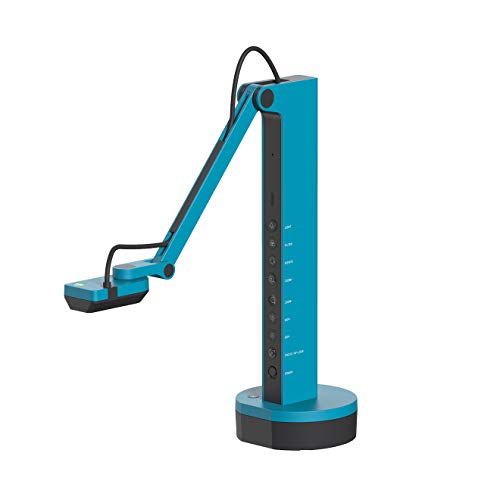
- Wi-Fi, HDMI, and USB connectivity
- 9–12-hour battery life for mobile teaching
- 8MP sensor with near-4K USB capture
Best For: Wireless classroom demonstrations and flexible display setups
Best All-Around 4K Pick

- 8MP capture with 4K video capability
- A3 coverage and 3-level LED lighting
- Foldable design with dual microphones
Best For: High-resolution remote and classroom demonstrations
Best Simple Full HD Presenter

- 1080p Full HD USB video
- One-push autofocus and built-in microphone
- Foldable design with A3 capture area
Best For: Straightforward Full HD classroom presenting
Best Budget Classroom Controls
PAKOTOO 8MP USB Document Camera

- 2448P capture with one-button autofocus
- A3 coverage and adjustable LED lighting
- Physical image inversion and exposure controls
Best For: USB-based classroom and distance teaching
Best HD Clarity – IPEVO V4K Document Camera
For teachers comparing a document camera for teachers, the IPEVO V4K stands out for its 8MP sensor, sharp Ultra HD capture, and responsive autofocus. It connects by USB to Mac, Windows, and Chromebook computers for lessons, demonstrations, and remote teaching.
Best For: Teachers who prioritize detailed image quality and smooth computer-based live instruction.
Pros:
- Captures images up to 3264 × 2448 pixels with an 8MP Sony CMOS sensor.
- Streams up to 30 fps at Full HD for responsive demonstrations.
- Fast autofocus helps when switching between books, worksheets, and objects.
- Multi-jointed stand can be tightened for frequent daily use.
Cons:
- USB connectivity requires a computer for operation.
- Maximum shooting area is 13.46 × 10.04 inches.
- Computer performance and operating-system requirements should be checked before purchase.
The V4K is a strong straightforward choice when classroom materials need to look crisp on screen. Its USB-only design is best suited to teachers who already present through a computer.
Best for Large Materials – INS-2 4K Document Camera
The INS-2 is a feature-rich document camera for teachers working with artwork, two-page spreads, and larger classroom materials. Its 13MP Sony sensor supports 4K video, while the flexible arm accommodates documents up to A3 size.
Best For: Professional educators and art instructors presenting large documents, artwork, or demonstrations on a big screen.
Pros:
- Records 4K video at 3840 × 2160 and 30 fps with a 13MP sensor.
- A3 capture area suits artwork, large documents, and two-page spreads.
- Includes LED lighting, anti-glare sheet, brightness control, and dual autofocus.
- Documate software adds annotation, recording, scanning, whiteboard tools, and OCR.
Cons:
- Its larger-format feature set may be more than needed for basic worksheets.
- Compatibility depends on supported operating-system versions and a suitable USB connection.
- At 2.3 pounds, it is heavier than the compact INS-1.
The INS-2 is the most capable option here for expansive teaching visuals. Choose it when A3 coverage, 4K output, and presentation tools matter more than keeping the setup minimal.
Best for Direct Display – IPEVO VZ-R Dual-Mode Camera
If you want a document camera for teachers that can work with or without a computer, the IPEVO VZ-R offers both HDMI and USB modes. It can connect directly to a monitor, TV, or projector, or function as a webcam for conferencing and distance learning.
Best For: Classrooms that need flexible direct-to-projector display as well as computer-based teaching.
Pros:
- HDMI mode supports direct connection to a TV, monitor, or projector.
- USB mode works with Mac, Windows PC, and Chromebook systems.
- 8MP camera captures up to 3264 × 2448 in USB mode.
- Built-in LED light, fast focus, swiveling head, and tactile controls support live demonstrations.
Cons:
- HDMI cable and wall power adapter are not included.
- HDMI mode is limited to 1920 × 1080 capture.
- It weighs 2.2 pounds, making it less lightweight than the V4K.
The VZ-R is the practical pick for teachers who do not want every lesson tied to a computer. Its dual-mode design adds setup flexibility, though the missing HDMI accessories may require an additional purchase.
Best Compact Classroom Value – INS-1 USB Document Camera
The INS-1 combines a compact multi-joint design with an 8MP camera, making it a practical document camera for teachers who need everyday USB teaching tools. It supports live demonstrations, webcam use, close-up objects, and software-based annotation.
Best For: Teachers seeking a space-saving USB camera with useful lighting, audio, and presentation features.
Pros:
- 8MP Sony camera captures up to 3264 × 2448 and streams at 30 fps.
- Multi-joint design offers a 14.72 × 11 inch viewing area in a compact setup.
- LED light, anti-glare sheet, brightness control, and built-in microphone aid presentations.
- Documate software provides annotation, recording, snapshots, rotation, and digital zoom.
Cons:
- USB-A connectivity means it is designed for computer-based use.
- It does not offer the direct HDMI display mode found on the IPEVO VZ-R.
- Some newer devices may require checking USB compatibility or an adapter.
The INS-1 is a well-rounded choice for routine classroom demonstrations and online teaching. It offers many practical features without the larger format of the INS-2 or the standalone display flexibility of the VZ-R.
Premium Classroom Presenter – ELMO TT-12W STEM-CAM
The ELMO TT-12W is a powerful document camera for teachers who need flexible classroom connectivity and substantial zoom. Its 12x optical and 16x digital zoom, autofocus options, and 1080p video support make it suited to showing small details, demonstrations, and physical materials.
Best For: Classrooms that need advanced connectivity, wireless presentation options, and high-zoom demonstrations.
Pros:
- Combines 12x optical and 16x digital zoom for up to 192x magnification.
- Offers HDMI input and output, RGB, USB, Ethernet, audio, and dual-band Wi-Fi connectivity.
- Supports Android educational apps and Miracast wireless display technology.
- Includes a built-in remote-control dock for convenient storage.
Cons:
- At 11 pounds, it is less convenient to move between classrooms than compact models.
- Its broad feature set may be more than teachers need for basic document sharing.
The TT-12W stands out as a feature-rich presentation hub rather than a simple USB camera. Choose it when classroom integration, multiple video outputs, and zoom flexibility matter more than portability.
Flexible USB Teaching Camera – Kitchbai KB-700 4K Visualiser
The Kitchbai KB-700 is a practical document camera for teachers who want a foldable USB setup for live lessons and web conferencing. Its 8MP sensor captures up to 2448p at 30fps, while adjustable lighting, image reversal, and broad operating-system compatibility help simplify everyday teaching.
Best For: Teachers who use Windows, macOS, or Chrome OS and need a portable camera for documents, objects, and demonstrations.
Pros:
- Captures 8MP images and 2448p video at up to 30fps.
- Foldable, multi-joint design supports multiple viewing angles and easier storage.
- Three LED brightness levels help with difficult lighting conditions.
- USB-C plug-and-play operation and dual microphones support online classes and meetings.
Cons:
- USB connectivity requires a compatible computer or Chromebook rather than direct HDMI output.
- Its listed maximum coverage is designed around A3-sized materials, so larger items may not fit fully in view.
For teachers who primarily work through a computer, the KB-700 offers a useful balance of image detail, portability, and setup convenience. The foldable body and manual image controls are especially helpful for mobile teaching stations.
Wireless Teaching Camera – IPEVO VZ-X 8MP Document Camera
The IPEVO VZ-X is a versatile document camera for teachers who want to present without staying tethered to a computer. It supports Wi-Fi, HDMI, and USB connections, offers up to near-4K still resolution in USB mode, and includes a rechargeable battery rated for 9–12 hours.
Best For: Teachers who need wireless freedom, direct projector or display connections, and flexible capture around the classroom.
Pros:
- Provides Wi-Fi, HDMI, and USB connectivity for computers, mobile devices, projectors, TVs, and monitors.
- Its 8MP Sony sensor supports up to 3264 × 2448 resolution in USB mode.
- Battery life of 9–12 hours can cover a full class or presentation session.
- Swiveling head and multi-jointed stand support different heights, angles, and orientations.
Cons:
- Wi-Fi and HDMI modes are limited to 1920 × 1080 capture, below its USB-mode resolution.
- Focus is manual, which may require more adjustment than an autofocus model.
- Its wireless range is listed as up to 33 feet, so classroom placement may affect flexibility.
The VZ-X is a strong choice for classrooms that value mobility and connection options. Its battery-powered wireless operation is useful for circulating around the room, while HDMI and USB keep it adaptable for more traditional setups.
Best All-Around 4K Pick – THUSTAR 8MP Document Camera
For teachers who want a versatile document camera for teachers, the THUSTAR combines 8MP image capture, 4K video capability, manual image inversion, and a foldable design. Its A3-size coverage and adjustable lighting make it suitable for lessons involving worksheets, books, and three-dimensional objects.
Best For: Teachers who need high-resolution live demonstrations across Windows, macOS, or Chrome OS.
Pros:
- Captures 8MP stills and video up to 2448P at 30fps.
- Supports A3-size coverage and macro focusing from 3.94 inches.
- Offers manual brightness controls, three LED brightness levels, and image inversion.
- Foldable, multi-joint design works with common video meeting and recording platforms.
Cons:
- Uses a USB 2.0 connection.
- The listed compatibility is centered on computers and supported software rather than tablets.
The THUSTAR stands out when image detail and flexible positioning matter. Its built-in dual microphones and lighting controls add convenience for remote instruction, while the foldable body helps with storage between classes.
Best Simple Full HD Presenter – ELMO OX-1 Document Camera
The ELMO OX-1 is a straightforward document camera for teachers focused on Full HD USB presentation. It offers one-push autofocus, a built-in microphone, A3 capture coverage, and a foldable structure for classrooms that need a reliable visual presenter without 4K output.
Best For: Teachers who prioritize a familiar USB visual presenter with Full HD video and easy focusing.
Pros:
- Captures 1080p Full HD at up to 15fps and 720p at up to 30fps.
- One-push autofocus covers working distances from 100mm to infinity.
- Provides 8x digital zoom through software and includes a built-in microphone.
- Folds to a compact 11.4-inch by 3.2-inch by 0.9-inch profile.
Cons:
- Does not provide 4K video output.
- Its 1080p mode is limited to 15fps.
- Digital zoom may provide less detail than optical zoom when enlarged.
The OX-1 is a practical choice for teachers who mainly display documents and classroom materials over USB. Its autofocus button and foldable body keep operation and storage simple, while the built-in microphone supports basic instruction capture.
Best Budget Classroom Controls – PAKOTOO 8MP USB Document Camera
The PAKOTOO offers the core features many teachers need in a document camera for teachers, including 2448P capture, A3 coverage, autofocus, adjustable lighting, and physical image-reversal buttons. Its foldable multi-joint construction is convenient for lessons using both flat documents and 3D objects.
Best For: Teachers seeking an adjustable USB camera for Windows, Mac, or Chromebook instruction.
Pros:
- Supports 2448P high-definition capture with one-button autofocus.
- Covers A3 and A4 materials and can capture close objects from 3.94 inches.
- Includes three LED brightness levels and ten exposure adjustments.
- USB-C cable can connect directly to compatible USB-C devices.
Cons:
- Not plug-and-play; the computer’s USB Camera option must be selected.
- Does not support zoom or HDMI.
- Not compatible with iPad according to the supplied notes.
The PAKOTOO is appealing for teachers who want hands-on control over exposure, lighting, and image orientation. Be prepared to select the camera manually in the computer and to use USB rather than HDMI or iPad connectivity.
How We Picked the Best Document Camera for Teachers
We focused on features that matter during real lessons: sharp image capture, dependable USB or HDMI connectivity, flexible positioning, built-in lighting, microphone quality, and compatibility with common computers and conferencing platforms. Models that support A3 materials, autofocus, image rotation, or wireless operation can be especially useful for demonstrations and hybrid teaching.
Resolution matters, but it is not the only consideration. A well-designed 8MP camera with good autofocus and even lighting may be more practical than a higher-resolution model that is difficult to position or requires extra software.
Quick Comparison
| Feature | What to look for | Best suited to |
|---|---|---|
| Connection | USB, HDMI, or wireless options | Classroom, hybrid, or remote teaching |
| Resolution | 8MP for detailed lessons; 4K for extra clarity | Text, diagrams, crafts, and close-ups |
| Capture area | A3 support for larger pages and objects | Worksheets, books, maps, and demonstrations |
| Lighting | Built-in adjustable LED illumination | Dim rooms and consistent image quality |
| Audio | Built-in microphone or dual microphones | Recorded lessons and video calls |
Key Buying Factors for a Document Camera for Teachers
Image Quality and Autofocus
Choose enough resolution to show small print, handwriting, and detailed objects clearly. Autofocus is helpful when switching between flat documents and three-dimensional demonstrations, while image controls such as rotation and inversion can simplify presentation.
Connectivity and Software Compatibility
USB models are usually the simplest choice for Windows, Mac, and Chromebook classrooms. HDMI models can connect directly to a projector or display, reducing dependence on a computer. Wireless cameras offer more freedom but may require additional setup and a reliable network.
Size, Flexibility, and Lighting
Check whether the camera covers A3 paper if you regularly display textbooks, posters, or larger projects. A folding arm and adjustable head make storage and positioning easier. Built-in LEDs are valuable for shadows, dim classrooms, and close-up objects.
Audio and Classroom Workflow
If you record lessons or teach online, a built-in microphone can reduce equipment clutter. For in-person projection only, audio may be less important than quick focusing, stable controls, and a secure base.
Who Should Buy Which Document Camera for Teachers?
Choose a simple USB model if you want plug-and-play operation for worksheets, handwriting, and video calls. Choose a 4K or high-megapixel camera when fine detail, lab work, or close-up demonstrations is a priority. Choose HDMI support for direct projector or monitor connections. Choose a wireless model if you need to move around the classroom or switch between several teaching devices. Choose an Elmo presenter when dedicated classroom controls, optical zoom, and presentation-focused operation matter more than the lowest price.
Before buying, verify operating-system support, available ports, maximum capture size, and whether the included software works with your school’s devices. The best Document Camera for Teachers is the one that fits your existing display setup and can be ready for the next lesson with minimal adjustment.