Looking for a useful Christmas gift for a gamer? These 14 accessory ideas cover PC setups, consoles, and handheld play, with options for different play styles.
From controllers and charging gear to desk essentials and screen protection, this roundup makes it easier to find a thoughtful gift that fits the recipient’s setup.
14 Christmas Gaming Accessory Gift Ideas Under $50 to Consider in 2026
A Precise PC Gaming Upgrade
Logitech G203 LIGHTSYNC Gaming Mouse

- Adjustable sensitivity up to 8,000 DPI
- Six customizable buttons for gaming or everyday tasks
- LIGHTSYNC RGB offers color and animation options
Best For: A PC gamer who wants a responsive wired mouse.
A Handheld Gaming Setup Helper

- Adds HDMI, USB ports, and Gigabit Ethernet
- Supports compatible handhelds including Steam Deck and ROG Ally
- Foldable stand design is convenient for desk or travel setups
Best For: Someone who plays on a Steam Deck or compatible handheld PC.
Compact Mechanical Keyboard
Redragon K552 Mechanical Gaming Keyboard

- 87-key layout saves desk space
- Linear red switches and anti-ghosting support gaming input
- Rainbow backlighting includes six preset modes
Best For: A PC gamer who enjoys a compact keyboard with mechanical keys.
A Versatile Wireless Gamepad
EasySMX X15 Wireless Controller

- Connects by 2.4G wireless, Bluetooth, or USB-C
- Hall Effect sticks and triggers are designed to avoid stick drift
- Two programmable back buttons and up to 20 hours of playtime
Best For: A PC, Steam, Switch, Android, or iOS player seeking one multi-device controller.
A Small Controller-Feel Upgrade
KontrolFreek Galaxy Performance Thumbsticks

- Includes one high-rise and one mid-rise thumbstick
- Rubber grip is designed to support control and comfort
- Compatible with PS4 and PS5 controllers
Best For: A PlayStation player who wants to customize controller grip and feel.
A Responsive PC Controller
8BitDo Ultimate 2C Wireless Controller

- Hall Effect joysticks and triggers
- 1000Hz polling rate for 2.4G and wired connections
- Remappable L4/R4 bumpers and turbo function
Best For: A Windows PC or Android player looking for a wireless gamepad.
A Screen-Protection Add-On
JSAUX Steam Deck Screen Protectors
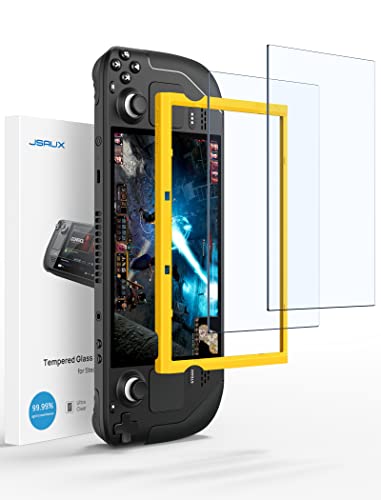
- Two tempered-glass protectors for Steam Deck LCD or OLED
- Guiding frame helps with installation
- Oleophobic coating helps keep the screen tidy
Best For: A Steam Deck owner who wants an extra layer of screen protection.
A Feature-Packed Wired Xbox Controller
PowerA Advantage Wired Xbox Controller

- Hall Effect thumbsticks and two mappable buttons
- Three trigger-lock positions for adjustable travel
- Works with Xbox Series X|S, Xbox One, and Windows 10/11
Best For: An Xbox gamer who prefers a wired controller with extra controls.
A Lightweight Gaming Headset
Turtle Beach Recon 50 Gaming Headset
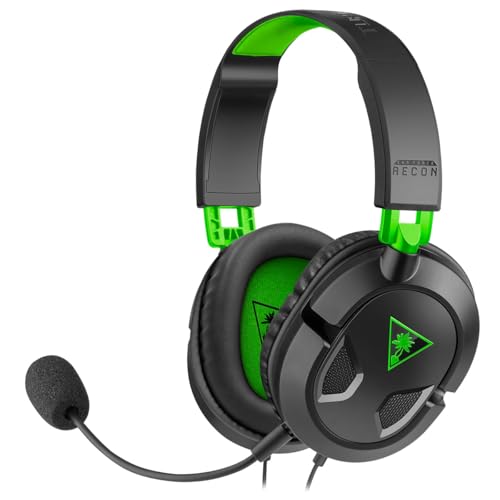
- 40 mm speakers and an adjustable high-sensitivity mic
- In-line controls for convenient adjustments
- Wired 3.5 mm connection works with several gaming platforms
Best For: A console gamer who wants a headset for game audio and chat.
A Steady Surface for Mouse Play
SteelSeries QcK Medium Gaming Mousepad

- Micro-woven cloth surface supports mouse tracking
- Non-slip rubber base helps keep the pad in place
- Medium size measures about 320 by 270 mm
Best For: A PC gamer who wants a consistent mouse surface.
A Travel Case for Switch Essentials
DAYDAYUP Nintendo Switch Carrying Case

- Hard-shell EVA case is designed to protect during travel
- Interior has game-card slots and a mesh pocket
- Nylon zipper head helps reduce scratch risk
Best For: A Switch player who travels with their console and games.
A Tidy PS5 Controller Charging Spot
PlayStation DualSense Charging Station

- Charges up to two DualSense controllers at once
- Click-in design makes docking straightforward
- Frees up PS5 USB ports while charging
Best For: A PS5 owner with two DualSense controllers.
Quick Screen Protection for Switch 2
amFilm Switch 2 Screen Protector Kit

- Includes an auto-alignment kit for installation
- 9H tempered glass is designed to resist scratches
- Two protectors are included
Best For: A Nintendo Switch 2 owner who wants screen protection for everyday use.
A Rechargeable Power Solution for Xbox
Xbox Rechargeable Battery and USB-C Cable
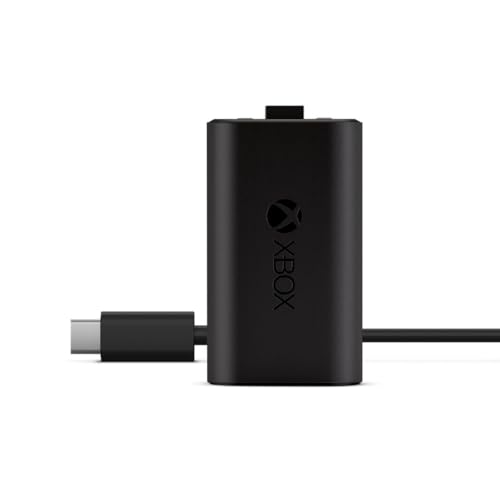
- Recharge the battery while playing or afterward
- Fully charges in under four hours
- Helps avoid disposable batteries
Best For: An Xbox player who wants a rechargeable controller battery.
Christmas Gaming Accessory Gift Ideas Under $50: How to Choose
Christmas gaming accessory gift ideas under $50 can suit a wide range of players, but the best choice starts with the person’s system and everyday habits. A PC gamer may appreciate a mouse, keyboard, mousepad, or headset, while a handheld player may get more use from a dock, carrying case, or screen protector. For console players, consider controller accessories, a charging station, or a rechargeable battery.
Before choosing, check the exact platform and model. Some accessories are designed for specific devices: the DualSense charging station is for PlayStation 5 controllers, the Xbox rechargeable battery is for Xbox controllers, and the Nintendo Switch 2 screen protector is model-specific. Compatibility details matter, especially when the recipient owns more than one console or has a newer handheld version.
Match the Gift to Their Gaming Setup
For PC and Desk Players
Think about what the recipient uses most during a typical session. A wired mouse or compact mechanical keyboard can refresh a PC setup, while a medium mousepad is a practical desk addition. A wired headset may appeal to someone who plays across several platforms, provided its connection and compatibility match their devices. For controllers, compare the listed platform support and connection options, such as wired USB, Bluetooth, or a wireless adapter.
For Console and Handheld Players
Portable players may value easier storage, display connections, or screen protection. A carrying case can help organize a compatible Nintendo Switch and game cartridges, while a dock can add ports and a wired Ethernet connection for supported handhelds. Screen protectors are especially device-specific, so verify whether the gift is for Steam Deck LCD or OLED, or Nintendo Switch 2. For a PS5 owner, a charging station can charge two DualSense controllers and free the console’s USB ports.
Set a Budget and Check the Full Cost
When shopping for gaming gifts under $50, compare current listed prices before adding an item to your shortlist; prices can change. Keep the total in mind if you are buying more than one accessory, and account for any extra item the recipient may need to use it. For example, a dock may be most useful with a compatible display and cables already available, while a wired controller needs a suitable USB connection.
A modest budget can still cover different kinds of useful gifts. Small accessories such as thumbsticks, a mousepad, or a rechargeable battery can solve a specific everyday need. A controller, keyboard, or headset may feel like a larger standalone present. Choose based on how often the person would use it, rather than selecting an item only because it has the most features.
Personalization Tips for a More Thoughtful Gift
Personalization can come from matching an accessory to a gamer’s habits, setup, and preferences. Notice whether they play on PC, Xbox, PlayStation, or a handheld before choosing. If they favor competitive games, a controller with remappable buttons or a mouse with adjustable sensitivity may fit their interests. Someone who travels with a console may prefer a case, while a player who keeps controllers ready between sessions may appreciate charging or rechargeable power options.
Consider colors and desk style, too. A black mousepad or mouse may blend into a simple setup, while a colored controller or purple thumbsticks add a visible accent. If you are unsure about fit, prioritize clear compatibility information and everyday usefulness over appearance alone. A short gift note explaining why you chose an accessory for their setup can make a practical present feel personal.
Last-Minute Christmas Gaming Gift Buying Advice
For a last-minute purchase, start by confirming the device model and checking the retailer’s current availability and delivery estimate. Do not rely on a product title alone when model generations differ. Read the compatibility details, connection type, and package contents so you know what the gift includes. Some products may require a compatible controller or device that is not included.
If delivery timing is uncertain, choose an accessory the recipient can use with equipment they already own, and review the retailer’s pickup or digital gift options where available. Keep the receipt or gift receipt if the retailer offers one, especially for model-specific accessories. With a quick compatibility check and a clear idea of how the gamer plays, you can choose a useful Christmas gift that feels considered and fits the budget.