Computer science students spend their time learning, building, troubleshooting, and juggling busy schedules. A useful Christmas gift can support their studies or make the hours at a desk more comfortable.
This collection of 20 ideas spans practical workspace accessories, hands-on technology kits, creative tools, and everyday gear. Consider how the student likes to work and what they already use before choosing.
20 Christmas Gift Ideas for Computer Science Students to Consider in 2026
A Smoother Coding Setup
Logitech MX Master 3S Bluetooth Mouse

- Scroll through code and research with customizable MagSpeed controls.
- Quiet clicks suit shared study spaces.
- Connect to up to three devices over Bluetooth.
Best For: A student who switches between coding, research, and design work.
Clearer Calls and Interviews

- Full HD video supports classes, meetings, and recorded projects.
- Autofocus and lighting adjustment help in varied room light.
- Dual microphones capture stereo audio.
Best For: A student attending remote classes, interviews, or team meetings.
A More Flexible Laptop Desk
Nulaxy Adjustable Laptop Stand

- Adjust the laptop position for a desk-based study setup.
- Foldable design packs flat for campus or cafe use.
- Ventilated panel supports airflow around the laptop.
Best For: A student who studies from a laptop at a desk.
A Pocket-Sized Study Break

- Six sides offer different ways to keep hands occupied.
- Four sides are silent for discreet fidgeting in class or meetings.
- Includes a protective case for carrying in a bag.
Best For: A student who likes keeping their hands busy while thinking or listening.
A Keyboard Personalization Gift
Tsungup 135-Key Side-Print Keycap Set

- Technology-style side prints bring a custom look to a compatible keyboard.
- PBT keycaps have an oil-resistant coating.
- Includes 135 keys and a keycap puller; keyboard sold separately.
Best For: A student who already owns a compatible US-layout mechanical keyboard.
A Hands-Free Tablet Companion
OMOTON T1 Adjustable Tablet Stand

- Adjust viewing angles for reading, notes, or video calls.
- Holds devices horizontally or vertically.
- Silicone pads help protect devices from scratches and sliding.
Best For: A student who uses a tablet for lecture notes, reading, or a secondary display.
A Hands-On Coding Project Kit
SunFounder Arduino UNO R4 WiFi Starter Kit

- Explore Arduino coding, electronics, and IoT projects.
- Includes an original UNO R4 WiFi board and more than 300 components.
- Step-by-step projects and video lessons support learning.
Best For: A student who enjoys experimenting with programming and electronics.
A Mini Computer to Build on
Vilros Raspberry Pi 5 Starter Kit

- Includes an 8GB Raspberry Pi 5 and a 128GB microSD card with Raspberry Pi OS.
- Case, power supply, cooling, and cables are included.
- A starting point for coding lessons and personal computing projects.
Best For: A student curious about Linux, networking, or hands-on computing projects.
More Connections at the Desk

- Adds HDMI, USB-A, Ethernet, and card-reader connections through USB-C.
- Supports one 4K display at 60Hz or two at 30Hz; macOS mirrors displays.
- Pass-through charging supports up to 85W; charger and cable are required.
Best For: A laptop user who needs more ports for peripherals and displays.
Room for More Code and Tabs
Dell P2725DE 27-Inch QHD Monitor

- 27-inch QHD display offers room for code, documentation, and browser tabs.
- IPS panel has a matte finish and 100Hz refresh rate.
- USB-C supports DisplayPort 1.4 and up to 90W power delivery.
Best For: A student who works with code, documentation, and browser tabs side by side.
A Toolkit for Tech Tinkering

- Designed for computer, tablet, smartphone, and gaming repairs.
- Includes 64 precision bits, tweezers, opening tools, and an anti-static wristband.
- Magnetic case keeps tools stored and organized.
Best For: A student who enjoys maintaining computers and small electronics.
Power for Study Days on the Move
Anker 737 24,000mAh Power Bank

- Offers 24,000mAh capacity and three charging ports.
- 140W Power Delivery supports charging compatible laptops and phones.
- Includes a USB-C cable, travel pouch, and smart display.
Best For: A student who carries a laptop and phone between classes or study spots.
A Shortcut for Repetitive Tasks

- Fifteen customizable LCD keys can launch apps and trigger actions.
- Plugins support tools including OBS, Discord, Spotify, and Philips Hue.
- Hotkeys can streamline creative and computer workflows.
Best For: A student who enjoys customizing shortcuts for apps, streaming, or repetitive tasks.
A Book for Growing Coding Habits

- Covers practical software development habits and tools.
- Topics include flexible code, security, testing, and career development.
- Its self-contained sections suit reading a little at a time.
Best For: A student building software development habits beyond coursework.
A Monitor-Mounted Desk Light
BenQ ScreenBar Pro Monitor Light

- Clamps onto compatible monitors to save desk space.
- Adjustable brightness and color temperature suit task lighting.
- Motion sensor and USB-C power add convenient everyday controls.
Best For: A student who studies or codes at a monitor in the evening.
A Space-Themed Building Project
LEGO Technic NASA Mars Rover Perseverance

- Build a model rover with 360-degree steering and articulated suspension.
- Set includes a buildable Ingenuity helicopter and scientific instruments.
- The accompanying augmented reality app explores the rover and mission.
Best For: A student who enjoys engineering, space, or building models.
A Compact Mechanical Keyboard
Keychron K2 Wireless Mechanical Keyboard

- The 75% layout keeps arrow and shortcut keys in a compact design.
- Connect to up to three devices over Bluetooth or use USB-C wired mode.
- Tactile brown switches and RGB backlighting round out the typing setup.
Best For: A computer science student who spends long hours coding or writing.
A Handy File-Transfer Essential
SanDisk Ultra Flair 128GB USB Flash Drive
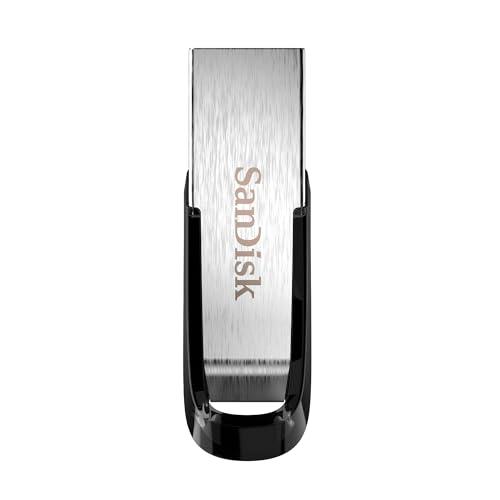
- 128GB capacity gives files a portable home.
- USB 3.0 read speeds are listed up to 150MB/s.
- Metal casing and password-protection software support everyday file carrying.
Best For: A student who occasionally transfers files between computers.
Notes That Can Be Reused
Rocketbook Core Reusable Notebook

- Dotted pages work for notes, sketches, and diagrams.
- Scan pages with the app and upload to supported cloud services.
- Wipe pages clean with a damp cloth to reuse them.
Best For: A student who takes handwritten notes but likes organizing them digitally.
Quieter Listening for Study Sessions
Sony WH-CH720N Wireless Headphones
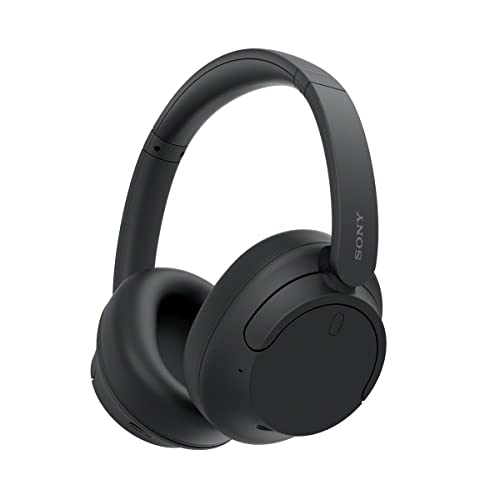
- Active noise cancelling and adjustable ambient sound support different listening settings.
- Lightweight over-ear design weighs 192g.
- Up to 35 hours of battery life and multipoint connection for two devices.
Best For: A student who wants quieter focus in a shared room or library.
Christmas Gift Ideas for Computer Science Students: How to Choose
Christmas gift ideas for computer science students work best when they connect to the recipient’s interests, daily routine, and current setup. Some students spend most of their time coding on a laptop, while others enjoy electronics projects, content creation, or building a more organized desk. Start with what they do often, then look for a gift that supports that activity.
Match the Gift to Their Interests
For someone who likes hands-on learning, consider a kit centered on Arduino or Raspberry Pi projects. These options can support experimentation with coding and electronics. A LEGO Technic Mars rover set may suit a student who enjoys space and engineering builds. For someone keen to grow as a developer, a programming book offers a way to explore software practices beyond the classroom.
Think about the student’s working style, too. A programmable mouse, compact mechanical keyboard, or customizable macro controller may appeal to someone who spends long hours at a computer. A reusable notebook can suit a student who likes sketching diagrams or writing notes by hand, while a flash drive offers a straightforward way to carry files. A fidget cube is a small, simple option for someone who appreciates a pocket-sized desk accessory.
Check Compatibility Before Buying
Computer accessories often depend on ports, operating systems, screen sizes, and existing equipment. Before choosing a keyboard, mouse, webcam, dock, monitor, or tablet stand, check that it fits the recipient’s devices and desk. For example, the docking station described here supports compatible USB-C connections and lists Windows and ChromeOS support, but not Linux. The Logitech Bluetooth mouse does not include a USB receiver or charging cable. For add-on keycaps, verify the keyboard layout and size; the listed set is keycaps only and does not include a keyboard.
For a larger desk upgrade, consider how the student uses their monitor and laptop together. A laptop stand can raise a notebook on a desk, while a monitor with a USB-C hub may suit someone setting up a more complete workstation. A screen light bar or tablet stand can add a useful surface-level convenience. Check measurements and connection requirements against the recipient’s actual setup before deciding.
Budget Considerations for Student Gifts
Set a spending range before comparing choices. Small accessories, such as a notebook, flash drive, or fidget cube, can make thoughtful gifts without requiring a major desk overhaul. Mid-range peripherals and repair tools may be a better fit when you know the student will use them regularly. Monitors, docking stations, and complete computing kits are larger commitments, so they’re best considered when you know the recipient wants that type of equipment.
Value depends on usefulness and fit, not just the number of features. A compatible accessory that solves a recurring inconvenience may be more welcome than a complicated device that duplicates something the student already owns. If you’re buying jointly with family or friends, a shared budget can make a substantial workspace or project gift more manageable.
Personalization Tips for a More Thoughtful Choice
Personalization can start with the student’s interests rather than engraving or custom packaging. A maker who enjoys experimenting may prefer a project kit; a keyboard enthusiast may appreciate a compatible keycap set; someone who likes tidy notes could use a reusable notebook. For a student who streams, records, or manages many computer tasks, consider tools that match those activities.
Use what you already know: their laptop operating system, keyboard layout, available desk space, preferred way to take notes, and any devices they mention wanting to connect. If you’re unsure about technical compatibility, ask a family member or check the device model with the student discreetly. Keep the gift receipt and packaging when possible, especially for equipment that needs to match an existing computer or monitor.
Last-Minute Christmas Buying Advice
For a last-minute choice, focus on items that are easy to understand and fit into everyday routines. A book, notebook, flash drive, or small desk accessory can be simpler to select than a monitor or a multi-device setup. For electronics, confirm the model, connector, and operating system requirements before ordering or purchasing in person. Product availability and delivery timing vary, so check current details with the retailer rather than assuming an item will arrive by a particular date.
If you can’t confirm compatibility in time, choose a flexible option or give a card explaining the gift idea and let the student choose the exact version. A little attention to how they study, build, and work will make the present feel personal and useful throughout the year.