Find Christmas gifts under $50 for digital artists, sketchers, and creative kids, with practical picks for drawing, organizing a workspace, and enjoying finished artwork.
This collection pairs digital drawing tools with thoughtful accessories that make it easier to create, carry, and share art.
12 Christmas Digital Drawing Gift Ideas Under $50 to Consider in 2026
Personal Pet Keepsake
Gleamify Custom Royal Pet Portrait

- Turns a pet photo into digitally created royal-style artwork.
- Includes a preview and unlimited revisions before production.
- Available as wall art in multiple sizes and formats.
Best For: A pet lover who would treasure personalized artwork of a companion.
Shortcut Control
HUION Keydial Mini Bluetooth Keypad

- Offers 18 programmable keys and a dial for creative shortcuts.
- Connects over Bluetooth and works with Mac and Windows.
- Designed for one-handed use by right- or left-handed creators.
Best For: A digital artist who wants shortcut controls close at hand.
Paper-Feel Screen Upgrade
Paperfeel Protectors for XP-PEN Magic Drawing Pad

- Includes two matte protectors made for the 12.2-inch XP-PEN Magic Drawing Pad.
- Matte surface is designed to add paper-like friction for drawing.
- Anti-glare finish helps diffuse reflections.
Best For: An artist who owns the compatible XP-PEN Magic Drawing Pad.
Kids’ Doodle Board
10-Inch LCD Writing Tablet for Kids

- 10-inch color LCD board supports drawing and writing.
- A button clears the screen, and a lock key can save content.
- Lightweight design includes a stylus and is made for ages 3–8.
Best For: A child who enjoys doodling at home or while traveling.
Touchscreen Sketching Set
5-Pack 2-in-1 Capacitive Styluses

- Five capacitive styluses offer disc and rubber tips.
- Works for touchscreen tapping, note-taking, and casual drawing.
- Does not support pressure sensitivity or palm rejection.
Best For: A casual artist who sketches or takes notes on a touchscreen.
Stylus Refill Pack
HUION PN05A Replacement Nibs, 10-Pack
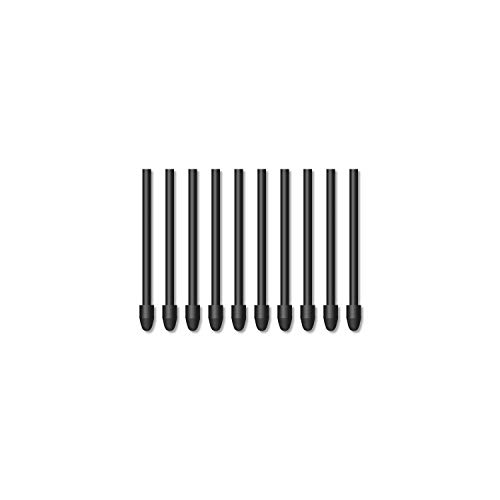
- Includes ten replacement nibs for the PW517 stylus.
- Compatible with selected HUION Kamvas tablet models.
- Check the tablet model before choosing this refill pack.
Best For: A HUION Kamvas owner with a compatible PW517 stylus.
Portable Tracing Light
Rechargeable A4 Light Pad with Case

- A4 light pad offers six brightness levels and stepless dimming.
- Built-in stand and clip support tracing and drawing projects.
- Includes a padded case, USB-C cable, and tracing supplies.
Best For: An illustrator who moves between digital and traditional drawing.
Tablet Carrying Case

- Fits tablets under 13 inches; check dimensions and model compatibility.
- Three storage layers include pockets for small accessories.
- Has a top handle, dual zippers, and detachable shoulder strap.
Best For: A digital artist who carries a compatible tablet and accessories.
Desk Setup Expansion
Anker 8-in-1 USB-C Hub with Dual HDMI

- Adds HDMI, USB-A, Ethernet, and card-reader connections through USB-C.
- Supports one 4K display at 60Hz or two at 4K at 30Hz.
- Pass-through charging supports up to 85W with a separate compatible charger.
Best For: A digital artist connecting a compatible laptop to desk accessories or displays.
Art Print Paper Sampler
Hahnemuhle Matte FineArt Paper Sample Pack

- Includes 12 sheets of matte FineArt paper.
- 13-by-19-inch sheets offer space for printing artwork.
- A sample pack gives artists paper to try with finished illustrations.
Best For: A digital artist interested in printing selected pieces.
Wireless Drawing Tablet
XPPen Deco mini7W V2 Drawing Tablet
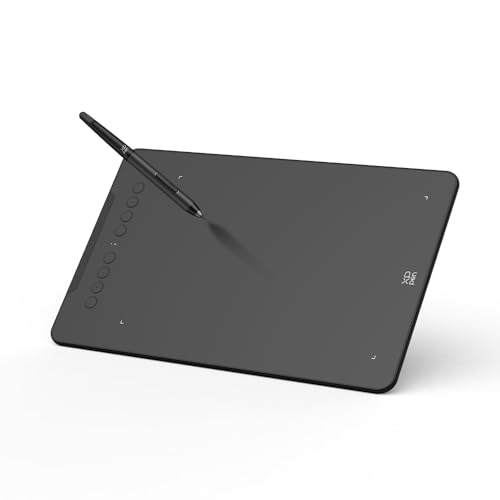
- Offers a 7-by-4.37-inch active area with eight shortcut keys.
- Bluetooth 5.0 supports wireless use, with USB-C wired connection as an option.
- Battery-free stylus supports 16,384 pressure levels and 60-degree tilt.
Best For: A digital artist who wants a compact tablet and wireless workspace.
Roomier Drawing Surface
XPPen Deco 01 V3 Drawing Tablet

- 10-by-6.25-inch drawing area pairs with eight customizable shortcut keys.
- Battery-free stylus supports 16,384 pressure levels and up to 60-degree tilt.
- Includes a stylus, replacement nibs, stand, glove, and protective film.
Best For: An aspiring digital artist who wants a larger tablet workspace.
Christmas Digital Drawing Gift Ideas Under $50
Christmas digital drawing gift ideas under $50 can suit beginners, experienced illustrators, and children who enjoy doodling. Start by thinking about how the recipient creates: on a computer with a pen tablet, directly on a touchscreen, or with paper and light. A well-matched accessory can be as useful as a new drawing surface, especially when you know what devices the artist already owns.
How to Choose the Right Gift
For someone building a digital art setup, first check which devices and operating systems they use. Drawing tablets in this collection connect to computers or Android devices, with compatibility varying by model. One tablet offers a 7-by-4.37-inch active area, wireless Bluetooth connectivity, and eight shortcut keys; another has a larger 10-by-6.25-inch drawing area and a battery-free stylus. Consider whether the artist values portability, a larger workspace, or fewer cables before choosing.
Accessories depend even more on exact model fit. The paper-feel protectors are designed for the XP-PEN Magic Drawing Pad, while the HUION replacement nibs work with particular Kamvas tablets and the PW517 stylus. Check the recipient’s device name and generation before buying. A universal capacitive stylus set can suit casual touchscreen sketching and note-taking, but it does not provide pressure sensitivity or palm rejection.
Match the Gift to Their Creative Routine
Think about where the person draws and what happens after a sketch is finished. A rechargeable A4 light pad supports tracing and other art activities, with a built-in stand, clip, and adjustable brightness. A tablet sleeve with several pockets helps carry a compatible tablet and small accessories. For an artist who prints illustrations, a matte paper sample pack provides sheets for trying finished work on paper. If the recipient enjoys personal keepsakes, a custom pet portrait made from a photo offers a different way to celebrate their creative interests and a beloved animal.
Budget Considerations for Gifts Under $50
Set a total spending limit before comparing features, and leave room for any supplies or device connections the recipient may need. Within this selection, small accessories such as replacement nibs and styluses can be thoughtful, lower-cost choices. A drawing tablet or light pad may use more of the budget while serving as a central creative tool. Prices can change, so confirm the current item price before checkout and make sure the complete gift remains below your limit.
Value also depends on fit. A low-cost accessory is only useful if it works with the person’s equipment. When compatibility is uncertain, choose a broadly useful item such as a carrying sleeve that matches their tablet size, or a customizable shortcut keypad suited to their computer and creative software. Check required ports and operating system support where relevant.
Personalization Tips for a Thoughtful Christmas Gift
Personalization can come from choosing around the recipient’s habits, not only from adding a name. Select a case in a practical size, a tool for their preferred device, or a custom portrait featuring a pet they love. For art supplies, consider the kind of work they make: tracing, digital illustration, sketching, or printing. If you are unsure, a gift receipt or a quick conversation about their tablet model can prevent an otherwise appealing accessory from going unused.
Last-Minute Buying Advice
For a time-sensitive purchase, verify the item page’s current price, stock status, and estimated arrival date before ordering; those details can vary. Check compatibility and included components too. Some products require a separate power source, adapter, or a specific device, while others include a stylus or cable. If delivery timing is uncertain, a clearly explained note about the creative gift can make the Christmas presentation feel considered while the item is on its way.
The best choice is one that fits the artist’s setup and gives them a reason to make something. Use the recipient’s device, experience level, and everyday routine to narrow these Christmas digital drawing gift ideas under $50 to a gift they can enjoy beyond the holiday.