Accurate color starts with a trustworthy reference. The best color calibration tools help photographers, designers, and video creators reduce display errors, set reliable white balance, and make edits that translate more consistently across screens and prints.
This roundup covers monitor colorimeters, portable camera targets, gray cards, and video color checkers. Use the guide below to match the tool to your display type, brightness level, workflow, and budget.
Best 10 Color Calibration Tools Picks for 2026
Fast Display Matching

- Calibrates screens in about five minutes
- Includes room-light monitoring
- Offers before-and-after photo evaluation
Best For: Photographers and designers seeking simple monitor consistency
Portable Camera Color Control
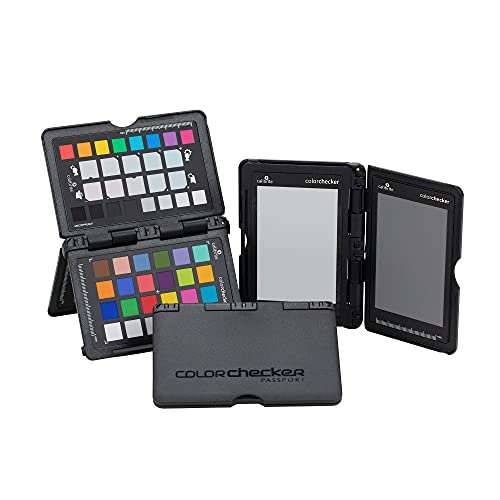
- Four targets for exposure and white balance
- Supports DNG and ICC camera profiles
- Folding case suits location work
Best For: Photo and video creators needing consistent capture color
Quick Entry-Level Calibration

- Calibrates displays in about 90 seconds
- Supports Liquid Retina XDR displays
- Optional upgrades add advanced features
Best For: Creators wanting fast, approachable screen calibration
Best for On-Set Video Matching

- Works with vector scopes for camera matching
- Includes five high-gloss target cards
- Replaceable cards support hybrid workflows
Best For: Video capture, camera matching, and color grading preparation
Best for Simple Photo Editing Calibration

- Easy 1 2 3 guided workflow
- Calibrates up to two displays
- Includes before-and-after comparison
Best For: Photographers and creators wanting straightforward monitor calibration
Portable Reference Kit
DKK White Balance and Color Calibration Charts

- 12% and 18% gray references
- Compact 5-by-7-inch format
- Includes stand and user guide
Best For: On-set video white balance and exposure references
Professional Display Control

- Deep calibration and display analysis
- Supports displays up to 12,000 nits
- Exports 3D LUTs for video workflows
Best For: Advanced photo, video, and multi-monitor color management
High-Luminance Precision – Display Pro HL
The Calibrite Display Pro HL is a versatile choice among color calibration tools for creators working with bright LCD, mini-LED, OLED, Apple XDR, or compatible projector displays. Its high-luminance sensor and PROFILER software are designed for detailed, repeatable monitor profiling.
Best For: Photographers, designers, studios, and HDR workflows that need advanced control across modern high-brightness displays.
Pros:
- Measures displays up to 3000 nits, including LCD, mini-LED, OLED, and compatible projectors.
- PROFILER software supports Basic and Advanced modes, custom presets, and adjustments for white point, luminance, gamma, and contrast.
- Includes validation, uniformity, flare-correction, multi-display, and custom patch-set tools.
- USB-C connectivity includes a USB-A adapter, plus a travel pouch and built-in 1/4-inch mount thread.
Cons:
- Its advanced features may be more than casual users need.
- Requires software on a Mac or Windows computer for profiling.
With support for high-brightness and HDR-capable panels, the Display Pro HL is a strong long-term option for demanding color work and matched multi-monitor setups.
Fast Display Matching – Spyder5PRO
Datacolor Spyder5PRO – Designed for Serious Photographers and Designers (S5P100)
Check Price On AmazonThe Datacolor Spyder5PRO is a practical color calibration tool for photographers and designers who want consistent results across laptop and desktop displays. Its guided process takes about five minutes and includes room-light monitoring to help establish a suitable screen brightness.
Best For: Serious photographers and designers who want a straightforward way to improve screen-to-print consistency.
Pros:
- Full monitor calibration takes about five minutes.
- Supports laptop and desktop display calibration.
- Room-light monitoring helps optimize monitor brightness for shadow and highlight detail.
- Before-and-after evaluation uses the user’s own photographs.
Cons:
- Direct light on the display can adversely affect calibration.
- The supplied notes do not specify support for newer OLED or high-luminance display types.
The Spyder5PRO focuses on an accessible workflow and useful image-based evaluation, making it a sensible fit for photographers trying to reduce the print-edit-print cycle.
Portable Camera Color Control – ColorChecker Passport Photo 2
The Calibrite ColorChecker Passport Photo 2 is a portable color calibration tool for the camera side of a photo or video workflow. Its four targets help with exposure, white balance, camera profiling, and enhancement, while the folding case is designed for convenient use on location.
Best For: Photographers and video creators who need repeatable color references during travel, location shoots, or multi-camera projects.
Pros:
- Four targets cover exposure control, custom white balance, camera profiling, and enhancement.
- Supports custom DNG and ICC profiles through Calibrite PROFILER software.
- Folding protective case adjusts into multiple positions for scene placement.
- Compact design includes a lanyard for quick access during shoots.
Cons:
- It calibrates capture and camera workflows rather than directly profiling a monitor.
- Its benefits depend on photographing the targets as part of the production workflow.
For creators who need consistent color from capture through editing, the Passport Photo 2 provides a compact reference system that can reduce repetitive corrections and improve camera matching.
Quick Entry-Level Calibration – SpyderExpress
The Datacolor SpyderExpress is a streamlined color calibration tool for creators who want a quick way to improve screen accuracy. The supplied notes describe a three-step setup and calibration in about 90 seconds, with support for everyday monitors and current Liquid Retina XDR displays.
Best For: Content creators, photo editors, and designers who prioritize fast setup and the option to add advanced software features later.
Pros:
- Produces an edit-ready calibration in about 90 seconds.
- Supports current Liquid Retina XDR displays, including the MacBook M4 mini-LED screen, alongside everyday monitors.
- Can save profiles and calibrate up to three connected displays per workstation.
- Software upgrades can add ambient-light adjustment, multi-display profiling, and DevicePreview.
Cons:
- OLED and advanced mini-LED support requires a software upgrade.
- Advanced features such as DevicePreview are not included without upgrading.
SpyderExpress is a convenient starting point for basic screen calibration, especially for users who value speed and want the flexibility to expand the software capabilities without replacing the hardware.
Best for HDR Workflows – Display Plus HL
The Calibrite Display Plus HL is a professional color calibration tool for creators working with bright LCD, Mini LED, OLED, Apple XDR, or compatible projector displays. Its high-luminance sensor measures up to 10,000 nits, making it particularly suited to HDR monitoring and demanding video workflows.
Best For: Video editors, colorists, and multi-monitor users who need advanced HDR display calibration and validation controls.
Pros:
- Measures ultra-bright displays up to 10,000 nits for HDR calibration.
- PROFILER software offers Basic and Advanced modes with adjustable white point, luminance, contrast ratio, and gamma.
- Includes broadcast-oriented options such as Rec.709 and BT.1886, plus multi-monitor profiling.
- Validation tools include Quick Check, Profile Validation, and Uniformity Check.
Cons:
- Its advanced feature set may be more than casual photo editors need.
- Requires software and a computer with USB connectivity for operation.
The Display Plus HL is the strongest choice here for HDR-capable screens and color-critical production. It offers extensive control and verification features, though simpler calibration needs may not justify its professional focus.
Best for On-Set Video Matching – SpyderCheckr Video
The Datacolor SpyderCheckr Video is a camera-facing color reference tool rather than a monitor sensor. It helps video teams evaluate color with vector scopes, harmonize different camera and lens combinations, and simplify color correction later in post-production.
Best For: Videographers and production teams matching cameras, lenses, and shots from capture through grading.
Pros:
- Designed to support consistent color across cameras and lens combinations.
- Includes a Color Pattern Card with hues at two saturation levels for detailed evaluation.
- Five high-gloss target cards cover color, greyscale, neutral grey, and focus checking.
- Replaceable, interchangeable cards support photo and video hybrid workflows.
Cons:
- It does not directly calibrate a computer monitor.
- Glossy targets can reveal flare, but they may require careful handling and controlled shooting conditions.
Choose the SpyderCheckr Video when consistency begins on set. It is a practical companion to scopes and grading software, but buyers seeking a display calibration sensor should consider a monitor-focused tool instead.
Best for Simple Photo Editing Calibration – Display 123
The Calibrite Display 123 is an approachable color calibration tool for photographers and creators who want more dependable monitor color without a complicated setup. Its guided Easy 1 2 3 workflow, USB-C connection, and before-and-after comparison make routine calibration straightforward.
Best For: Photographers and creative users who want quick monitor calibration for one- or two-display editing setups.
Pros:
- Guided Easy 1 2 3 software workflow is designed for simple setup.
- Supports calibration of up to two displays for more consistent multi-screen viewing.
- Offers Native or Photo brightness targets and a before-and-after check.
- Compact body and adjustable counterweight help position it on the screen.
Cons:
- Its simplified workflow offers less control than advanced professional calibration systems.
- It is intended for monitors rather than on-set camera color checking.
The Display 123 is a sensible entry point for photo editing and everyday color consistency. It prioritizes ease of use over extensive customization, making it a good fit for creators who want reliable results with minimal configuration.
Portable Reference Kit – DKK White Balance and Color Calibration Charts
For a simple, portable approach to color calibration tools, this DKK set provides white-balance, exposure, colorbar, and grayscale references in a compact 5-by-7-inch format. It is designed for creators who want a physical reference they can bring to video shoots.
Best For: Video creators who need an easy-to-transport calibration reference for consistent white balance, exposure, and color.
Pros:
- Includes both 12% and 18% gray charts for white-balance and exposure references.
- Combines colorbar and grayscale references for practical video calibration.
- Compact design includes a frame stand and user guide for straightforward setup.
- Works with various cameras and video-editing software.
Cons:
- As a physical chart set, it does not directly calibrate a monitor or screen.
- Provides a manual reference rather than the automated profiling offered by software-based tools.
This is a budget-friendly, highly portable choice when you need an on-set reference rather than a digital display calibrator. Its small size and included stand make it especially convenient for mobile video work.
Everyday Display Accuracy – Datacolor Spyder Monitor Calibrator
For photographers, editors, and designers who work on modern screens, this Datacolor Spyder is one of the more convenient color calibration tools for establishing an accurate display starting point. Its guided software is designed to complete calibration in about 90 seconds.
Best For: Users who want quick, guided calibration for laptop or desktop displays, including OLED, mini-LED, and Apple Liquid Retina XDR screens.
Pros:
- Calibrates supported laptop and desktop displays in approximately 90 seconds.
- Supports newer display types, including OLED, mini-LED, and Apple Liquid Retina XDR.
- Offers preset calibration for beginners and customizable settings for experienced users.
- Ambient light sensing can help adjust display brightness and contrast as room lighting changes.
Cons:
- Requires compatible Windows or Mac software and a nonstandard battery.
- Its feature set is less extensive than the SpyderPro model for advanced display analysis and LUT export.
The standard Spyder strikes a useful balance between speed and control. Choose it when you want more reliable screen color without needing the deeper analysis and video-oriented features of a professional-tier calibrator.
Professional Display Control – SpyderPro Monitor Calibrator
SpyderPro is the most advanced of these color calibration tools, adding deeper grayscale measurement, extensive display analysis, projector calibration, and 3D LUT export. It is built for users who need detailed control across demanding photo, design, video, and multi-monitor workflows.
Best For: Professional photographers, designers, and video editors managing high-brightness displays, projectors, multiple monitors, or video workflows using Rec.709, Rec.2020, or DCI-P3.
Pros:
- Offers Standard Calibration and a deeper mode claimed to improve accuracy by 30% or more, depending on the display.
- Supports Wide LED, OLED, QD-OLED, Apple Liquid Retina XDR, and Mini LED displays up to 12,000 nits.
- Exports 3D LUTs and includes projector calibration plus display-quality analysis.
- Supports unlimited displays per computer capability, USB-C, and an included USB-A adapter.
Cons:
- Its extensive professional features may be more than casual users need.
- Requires software, a nonstandard battery, and a compatible Windows or macOS computer.
- Advanced settings and analysis may involve a steeper learning curve than basic calibration.
SpyderPro is the strongest fit when color accuracy must extend beyond a single basic monitor profile. Its multi-display tools, deeper calibration, LUT support, and analysis features make it a compelling upgrade for serious creative workflows.
How We Picked These Color Calibration Tools
We selected tools that address the main sources of color inconsistency: uncalibrated monitors, high-brightness displays, inaccurate white balance, and changing lighting conditions. The lineup includes dedicated monitor colorimeters for LCD, Mini LED, OLED, and brighter HDR-capable screens, along with portable targets for photography and video.
We also considered workflow simplicity, software support, portability, stated measurement range, connection options, and whether each product is better suited to casual editing, professional production, or multi-device work. A useful calibration tool should improve repeatability without adding unnecessary complexity to your process.
Quick Comparison
| Tool type | Best for | Key advantage |
|---|---|---|
| Monitor colorimeter | Display calibration | Creates a display profile for more consistent color |
| Advanced high-brightness colorimeter | Mini LED, OLED, and HDR displays | Supports brighter screens and demanding workflows |
| Color checker passport | Portable photo and video work | Combines white balance, exposure, and color targets |
| Gray card or calibration chart | Manual exposure and white balance | Simple, affordable, and battery-free |
| Video color checker | Color grading and camera matching | Provides visual reference points during production |
Key Buying Factors for Color Calibration Tools
Match the Tool to Your Screen
Check whether the colorimeter supports your panel type and brightness level. Standard LCD users may not need an advanced sensor, while Mini LED, OLED, and HDR displays can benefit from hardware designed for higher luminance. Confirm software and operating-system compatibility before buying.
Consider Your Creative Workflow
Monitor calibrators work at the editing stage, while passports and charts are used during capture. Photographers who shoot in changing locations may benefit from a portable target, whereas studio editors typically need a display colorimeter. Video creators may want both a monitor calibrator and a camera-facing color checker.
Choose the Right Level of Automation
Entry-level tools with guided software are useful for occasional users. Professional models generally provide more control over luminance, white point, presets, and multiple displays. If you regularly deliver commercial work, repeatable settings and profile management may matter more than the lowest price.
Plan for Regular Recalibration
Displays change over time, so calibration is not a one-time task. Look for software that makes recurring checks easy, and store your targets carefully so they remain clean and neutral. A gray card or color chart should be replaced if it fades, stains, or becomes visibly worn.
Who Should Buy Which Color Calibration Tools?
Choose an entry-level monitor calibrator for occasional photo editing, home printing, or general color correction. Choose a professional or high-brightness colorimeter for serious photography, design, HDR work, OLED panels, or multiple displays. Choose a passport-style target if portability, camera white balance, and exposure control are priorities. Choose a video color checker when matching cameras or creating consistent grading references matters. Choose a gray card or chart for an inexpensive, straightforward way to improve in-camera exposure and white balance.