A compact cooling pad can help improve airflow beneath a laptop while raising the screen and keyboard to a more comfortable angle. The right model balances cooling performance with portability, noise, fit, and desk stability.
We compared 10 laptop cooling pads across fan layouts, size compatibility, height adjustment, USB features, and materials to help you choose a practical option for work, study, travel, or gaming.
Best 10 Compact Laptop Cooling Pads Picks for 2026
Best All-Around Choice
TECKNET Triple-Fan Cooling Pad

- Three 1200 RPM fans
- Fits 12- to 17-inch laptops
- Dual USB ports and two height settings
Best For: Broad compatibility and everyday desk use
Best Lightweight Option

- Three ultra-quiet fans
- Slim and portable design
- Two height settings and extra USB port
Best For: Quiet cooling for larger laptops
Best Adjustable Cooling

- Targeted airflow channel
- Adjustable fan speed
- USB-C and USB-A ports
Best For: Portable work and gaming with customizable airflow
Best Stand Features

- Five adjustable height positions
- Two fans for 10- to 15.6-inch laptops
- Hideable side phone holder
Best For: Flexible home or office positioning
Maximum Coverage

- Five quiet fans with selectable operation
- Six height settings and secure front stoppers
- Dual USB hub; supports 12-17-inch laptops
Best For: Larger laptops and adjustable desktop setups
Travel-Friendly Pick
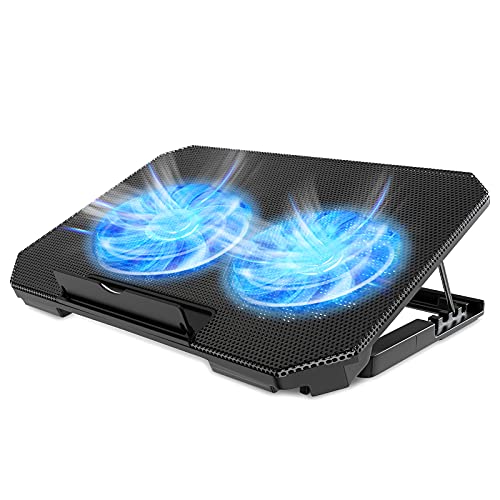
- Lightweight, flat design for bags
- Two speed-adjustable 5.1-inch fans
- Four height settings and dual USB ports
Best For: Mobile users with 12-15.6-inch laptops
Efficient Six-Fan Option
AICHESON Adjustable Cooling Pad

- Six fans with a heat-dispersing metal mesh surface
- 16-30-degree adjustable viewing angle
- Dual USB ports and 1.6-pound portable build
Best For: Mid-size laptops needing broad, quiet airflow
Best Aluminum Stand
ICE COOREL Single-Fan Cooling Pad

- 160mm adjustable-speed fan
- Seven height settings
- Lightweight aluminum design
Best For: Portable cooling and ergonomic positioning for 12- to 15.6-inch laptops
Best Lap-Friendly Design
Targus 17-Inch Dual-Fan Chill Mat

- Dual USB-powered fans
- Soft neoprene lap cushion
- Fits most laptops up to 17 inches
Best For: Comfortable lap use with cushioned support and airflow
Best Multi-Fan Control
LIANGSTAR Six-Fan Laptop Cooler

- Six quiet fans with separate controls
- Seven height-adjustment settings
- Supports laptops up to 17.3 inches
Best For: Larger laptops and users wanting configurable airflow and accessories
Best All-Around Choice – TECKNET Triple-Fan Cooling Pad
For shoppers comparing compact laptop cooling pads, the TECKNET offers broad compatibility, three 1200 RPM fans, and a slim profile that suits laptops from 12 to 17 inches. Its USB-powered design and adjustable height settings make it practical for everyday work or extended gaming.
Best For: Users who want wide laptop compatibility, extra USB connectivity, and three-fan cooling.
Pros:
- Three fans provide airflow for laptops up to 17 inches.
- Two height settings and rubber pads improve comfort and stability.
- Includes a second USB port for peripherals such as a mouse or keyboard.
- Dedicated on/off switch and LED indicators simplify operation.
Cons:
- The included cable is USB-A to USB-A.
- At 1.4 pounds, it is not the lightest option listed.
The TECKNET is a versatile pick when you need one cooling pad for several laptop sizes. Its combination of three fans, ergonomic adjustment, and dual USB ports makes it especially useful at a desk.
Best Lightweight Option – havit HV-F2056 Cooling Pad
The havit HV-F2056 is a slim, portable choice among compact laptop cooling pads, with three ultra-quiet USB-powered fans and a metal-mesh surface. Its two height settings also let it function as a basic ergonomic stand for compatible 15.6- to 17-inch laptops.
Best For: Users prioritizing portability, quiet operation, and a stable metal-mesh laptop surface.
Pros:
- Three ultra-quiet fans help maintain a low-noise workspace.
- Lightweight design is suited to carrying between locations.
- Two height settings support more comfortable viewing and typing.
- Extra USB port and power switch add convenience.
Cons:
- It is intended for laptops measuring 15.6 to 17 inches.
- The included cable is USB to USB; Type-C devices require an adapter.
This havit model is a straightforward option for larger laptops when portability and quiet fan operation matter more than extensive adjustment features.
Best Adjustable Cooling – TECKNET Two-Fan Laptop Cooler
This TECKNET model stands out among compact laptop cooling pads for its targeted airflow channel and freely adjustable fan speed. The two 110mm fans can run quietly for routine work or faster during demanding use, while the thin design is easy to carry.
Best For: Students, office users, and gamers who want adjustable airflow in a portable pad.
Pros:
- Internal channels direct airflow toward the laptop’s central, hotter area.
- Fan speed adjusts from off to maximum using a side switch.
- USB-C and USB-A ports support different laptop connections.
- Flat base and thin construction work on desks, laps, beds, or sofas.
Cons:
- The included connection cable is A-A, so USB-C laptop users may need another cable or adapter.
- Compatibility is listed through 15.6-inch laptops, narrower than some alternatives.
If you want more control than a simple fixed-speed cooler provides, this TECKNET offers useful speed adjustment without giving up a portable form factor.
Best Stand Features – KeiBn S039 Laptop Cooling Pad
The KeiBn S039 combines cooling with stand functionality, making it a useful choice among compact laptop cooling pads for 10- to 15.6-inch laptops. Two fans, five height positions, dual USB ports, and a hideable phone holder give it more workspace features than a basic cooling pad.
Best For: Users who want multiple height adjustments, a phone holder, and cooling for smaller laptops.
Pros:
- Five height settings allow more positioning flexibility.
- Two fans and a metal mesh surface support airflow.
- Hideable phone holder can be used on either side.
- Two USB 2.0 ports provide an additional connection for peripherals.
Cons:
- Compatibility is limited to laptops up to 15.6 inches.
- At 0.8 kg, it is less lightweight than the simplest portable pads.
- The notes do not specify adjustable fan speed.
The KeiBn is a strong fit when ergonomic positioning and desk organization are priorities. Its five height levels and phone holder make it particularly useful for home or office setups.
Maximum Coverage – Kootek 5-Fan Cooling Stand
For shoppers comparing compact laptop cooling pads, the Kootek LCP04 is a versatile option for larger laptops from 12 to 17 inches. Its five-fan layout, adjustable height, and built-in USB hub make it suited to workstations and gaming setups where broad airflow and positioning flexibility matter.
Best For: Users who want extensive cooling coverage, multiple height settings, and compatibility with larger laptops.
Pros:
- Five quiet fans provide selectable cooling coverage, with controls for one, four, or all five fans.
- Six adjustable height settings support a more comfortable viewing and typing angle.
- Dual USB hub adds connections for compatible peripherals.
- Front stoppers help secure 12- to 17-inch laptops.
Cons:
- At 1.16 kg, it is heavier than the other listed compact options.
- Its larger 14.96-by-11.81-inch footprint may be less convenient for small bags.
- The included cable is USB-to-USB; Type-C devices require an adapter.
Choose the Kootek if you prioritize cooling coverage and adjustability over minimum weight. The selectable fan operation also lets you balance airflow and noise for different tasks.
Travel-Friendly Pick – LIENS Two-Fan Cooling Pad
Among compact laptop cooling pads, the LIENS model stands out for its flat, lightweight design and practical adjustability. Two large fans, four height positions, and dual USB ports give mobile users a straightforward way to add airflow and improve laptop positioning.
Best For: Backpack or briefcase users with 12- to 15.6-inch laptops who want a lightweight cooling stand.
Pros:
- Two 5.1-inch fans offer adjustable speeds from 800 to 2,000 RPM.
- Four height settings provide angles from 9 to 28 degrees.
- Detachable non-slip baffle helps keep the laptop in place.
- Weighs about 1.65 pounds and folds flat for transport.
Cons:
- It supports laptops up to 15.6 inches, so it is not intended for larger models.
- Two fans provide less fan coverage than the five- and six-fan alternatives.
- The blue LED lighting may not suit every workspace.
The LIENS is a sensible pick when portability is central to your buying decision. Its large adjustable fans and built-in USB pass-through keep the feature set useful without making the stand especially bulky.
Efficient Six-Fan Option – AICHESON Adjustable Cooling Pad
The AICHESON S036-S039 is a compact laptop cooling pad for 12- to 15.6-inch systems, combining six fans with a metal mesh surface. Its adjustable 16- to 30-degree angle, quiet operation, and low 4W-5W power draw make it a practical choice for work or gaming.
Best For: Users seeking broad fan coverage, adjustable ergonomics, and a relatively lightweight design for mid-size laptops.
Pros:
- Six fans and a metal mesh surface are designed to support heat dispersion.
- Adjustable angles from 16 to 30 degrees help improve viewing and typing comfort.
- Dual USB 2.0 ports support accessories such as a mouse or keyboard.
- Weighs about 1.6 pounds and operates without software or drivers.
Cons:
- Compatibility is limited to laptops up to 15.6 inches.
- The blue lights may be distracting in some environments.
- Its 14.56-by-10.43-inch dimensions may still take up noticeable desk space.
The AICHESON balances high fan count with a portable 1.6-pound build. It is a strong middle-ground option for users who want more airflow coverage than a two-fan pad while staying within a mid-size laptop format.
Best Aluminum Stand – ICE COOREL Single-Fan Cooling Pad
For shoppers comparing compact laptop cooling pads, the ICE COOREL combines a slim aluminum surface with a single 160mm fan. Its seven height settings and lightweight 1.4-pound design make it practical for desk use or carrying in a laptop bag.
Best For: Users who want an adjustable aluminum laptop stand with quiet cooling for 12- to 15.6-inch laptops.
Pros:
- Large 160mm fan offers adjustable speeds from 1000 to 1400 RPM.
- Seven height settings support more comfortable viewing and typing angles.
- Aluminum alloy surface, two USB 2.0 ports, and a lightweight design.
Cons:
- Supports laptops only up to 15.6 inches.
- Uses one fan rather than a multi-fan cooling system.
This is a versatile choice when portability and adjustability matter as much as airflow. The aluminum build and quiet operation add everyday usability, while the compact size keeps it travel-friendly.
Best Lap-Friendly Design – Targus 17-Inch Dual-Fan Chill Mat
The Targus Chill Mat is a comfortable option among compact laptop cooling pads, especially for lap use. It pairs dual USB-powered fans with an open mesh top, a soft neoprene underside, and an ergonomic tilt for typing.
Best For: Users who work with laptops on their lap and want cushioned support for laptops up to 17 inches.
Pros:
- Dual fans help move heat away through the open mesh surface.
- Soft neoprene bottom provides cushioning on the lap.
- Ergonomic tilt and four rubber stops help with comfort and stability.
Cons:
- At 2 pounds, it is heavier than some compact cooling stands.
- It connects through USB-A and does not list height-adjustment settings.
Choose this model when lap comfort is a priority rather than maximum portability. Its 15-by-11.75-inch footprint accommodates larger laptops, while the mesh and dual-fan layout support airflow during use.
Best Multi-Fan Control – LIANGSTAR Six-Fan Laptop Cooler
For shoppers seeking compact laptop cooling pads with flexible airflow control, the LIANGSTAR uses six quiet fans and separate controls. It also adds seven height positions, a phone holder, two USB ports, and support for laptops from 12 to 17.3 inches.
Best For: Users with larger laptops who want adjustable multi-fan cooling, stand positioning, and convenient device storage.
Pros:
- Six quiet fans can run together or in separate groups.
- Two USB ports allow the cooler to power accessories such as a mouse or keyboard.
- Seven height settings, a phone holder, metal mesh, and non-slip supports add versatility.
Cons:
- Its 1.8-pound weight is less travel-friendly than lighter single-fan models.
- The multi-fan layout may be more functionality than smaller laptops require.
This is the most feature-rich option of the three for users who want control over airflow and positioning. Its broad size range and stability features make it especially suitable for larger notebooks and extended desk sessions.
How We Picked These Compact Laptop Cooling Pads
We focused on models that combine a relatively portable footprint with useful cooling and positioning features. The selection includes slim single- and dual-fan designs, multi-fan stands, aluminum options, soft lap-friendly mats, and models that fit laptops from roughly 10 to 17 inches.
We also considered adjustable height, USB pass-through ports, fan-control features, stability, and the practical trade-off between stronger airflow and extra size or noise. Compatibility claims should always be checked against your laptop’s actual dimensions, not only its advertised screen size.
Quick Comparison
| Best For | Look For | Trade-Off |
|---|---|---|
| Travel and small desks | Slim body, low weight, USB power | Usually less airflow and fewer adjustments |
| Gaming laptops | Multiple fans, broad surface, firm stops | More bulk, power draw, and possible fan noise |
| Ergonomic desk use | Several height settings and stable feet | Less convenient to carry |
| Lap use | Soft or cushioned base and restrained heat transfer | May offer less rigid support |
Key Buying Factors for Compact Laptop Cooling Pads
Size and Laptop Fit
Measure your laptop’s width and depth, including any overhang concerns. A pad rated for a larger screen may provide better coverage, but it can be less portable. Smaller 12- to 15.6-inch models are often easier to carry, while 17-inch laptops generally need a wider platform and stronger edge support.
Fan Layout and Cooling Control
More fans do not automatically mean better cooling. Their position matters: airflow should reach the laptop’s intake vents rather than being blocked by the chassis. Adjustable speed is useful when you want quiet operation for writing or stronger airflow during gaming. Keep the laptop’s own vents and exhaust clear.
Noise, Power, and USB Ports
Most cooling pads draw power through USB. A second USB port can preserve connectivity, but it may not replace a full-powered hub. Check whether the pad has separate fan controls and whether the advertised quiet operation matches your priorities. A basic single-fan pad may be preferable for libraries, meetings, or bedrooms.
Height Adjustment and Stability
Multiple height settings can reduce neck strain and improve viewing posture. Look for nonslip feet, a reliable laptop stopper, and a platform that remains steady while typing. The highest setting is not always the most stable, especially with a heavier gaming laptop.
Materials and Portability
Plastic designs are often lighter and cheaper; aluminum stands can feel more rigid and help spread heat, but they may add weight or transmit fan vibration. For frequent travel, prioritize a thin profile and manageable cable storage over maximum fan count.
Who Should Buy Which Compact Laptop Cooling Pads?
- Frequent travelers: Choose a slim, lightweight pad sized closely to your laptop, such as a portable 12- to 15.6-inch design.
- Gamers and creators: Consider a wider multi-fan stand with strong stops, adjustable speed, and enough surface area for a performance laptop.
- Desk-based workers: Prioritize height adjustment, stable feet, quiet fans, and a USB pass-through port.
- Users who work on a couch or bed: A cushioned lap mat can be more comfortable, but avoid blocking the laptop’s intake vents.
- Small-laptop owners: Select a compact model with fan placement that aligns with the underside vents instead of buying the largest available pad.
Before buying, confirm dimensions, USB requirements, and return coverage. A cooling pad is an airflow aid, not a substitute for cleaning blocked vents, updating thermal management, or repairing a laptop with unusually high temperatures.