The right CPU cooler can help a gaming PC maintain steadier performance, lower noise, and safer temperatures during long play sessions. Air cooling remains a practical choice when you want strong results without the pump, radiator, or maintenance considerations of liquid cooling.
This roundup covers compact coolers, high-capacity dual-tower models, replacement fans, and visually focused options. Use the guide below to match cooling capacity, case clearance, noise preferences, and budget to your build.
Best 10 Computer Air Coolers for Gaming PCs Picks for 2026
ARGB Performance Pick
Thermalright Peerless Assassin 120 SE ARGB

- Dual-tower design with six heat pipes
- Two 120mm PWM fans and ARGB lighting
- Supports Intel LGA1700 and AMD AM4/AM5
Best For: Gaming builds seeking strong dual-fan cooling with ARGB
Quiet Fan Upgrade

- 120mm pressure-optimized cooling fan
- 4-pin PWM control up to 1700 RPM
- Rated at 25.1 dB(A) with six-year warranty
Best For: Upgrading a compatible CPU cooler or case fan
Compact Compatibility Pick

- Single-tower design with full memory clearance
- Four heat pipes and upgraded 2000 RPM fan
- Supports Intel LGA1851/1700 and AMD AM4/AM5
Best For: Clearance-sensitive gaming PCs and mid-tower builds
Dual-Tower Value Pick
Thermalright Peerless Assassin 120 SE

- Dual-tower cooler with six AGHP heat pipes
- Two 120mm PWM fans rated up to 66.17 CFM
- Supports Intel LGA1700 and AMD AM4/AM5
Best For: Performance-focused gaming PCs without RGB lighting
Compact ARGB Pick

- 133mm compact tower design
- Four direct-touch heatpipes; up to 200W TDP
- ARGB top cover with synchronization support
Best For: Compact Intel and AMD gaming builds
High-Capacity Tower
be quiet! Pure Rock Pro 3 Black

- 250W TDP double-tower design
- Six copper heatpipes and two 120mm PWM fans
- Offset layout improves RAM and VRM compatibility
Best For: Demanding gaming systems and workstations
Multi-Fan Expansion Pack
Thermalright TL-C12C-S ARGB 5-Pack

- Five 120mm 4-pin PWM fans
- Up to 66.17 CFM at 1,550 RPM
- ARGB effects with motherboard synchronization
Best For: Expanding case and CPU-cooler airflow
Best Display-Equipped Cooler
Peerless Assassin 120 Vision MAX Black

- 5-inch customizable IPS monitoring display
- Twin towers with six copper heat pipes
- Dual 2150 RPM PWM fans with ARGB
Best For: Gaming builders who want cooling with an integrated system display
Best Fan Upgrade Pack
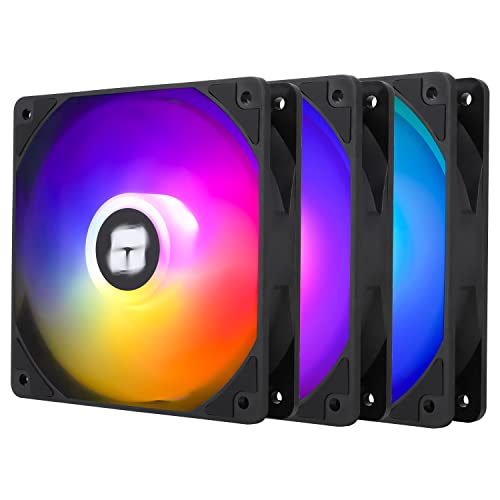
- Three 120mm PWM cooling fans
- Up to 66.17 CFM airflow each
- ARGB lighting with motherboard sync
Best For: Adding case or CPU-cooler airflow to a gaming PC
Best White Display Cooler
Peerless Assassin 120 Vision MAX White

- White twin-tower CPU air cooler
- Integrated 5-inch IPS monitoring screen
- Dual 2150 RPM fans and six heat pipes
Best For: Light-themed gaming PCs needing cooling and customization
ARGB Performance Pick – Thermalright Peerless Assassin 120 SE ARGB
For shoppers comparing computer air coolers for gaming pcs, the Thermalright Peerless Assassin 120 SE ARGB stands out as a substantial dual-tower option with six heat pipes, two PWM fans, and customizable ARGB lighting. Its 155mm height and broad socket support make case and motherboard clearance checks important before buying.
Best For: Gaming builds that need strong air cooling with dual-fan performance and ARGB lighting.
Pros:
- Dual-tower heatsink with six 6mm copper heat pipes and a copper base
- Two 120mm PWM fans provide up to 66.17 CFM of airflow
- Supports Intel LGA115X/1200/1700 and AMD AM4/AM5 platforms
- ARGB lighting adds a customizable look to gaming PCs
Cons:
- The 155mm height may not fit every PC case
- Its 0.97kg weight and dual-tower design require careful installation planning
With a rated noise level of up to 25.6 dB(A), this cooler balances substantial cooling hardware with relatively restrained fan noise. Verify case height, RAM clearance, and the included platform hardware before installation.
Quiet Fan Upgrade – Noctua NF-P12 redux-1700 PWM
The Noctua NF-P12 redux-1700 PWM is a 120mm case or heatsink fan for builders refining airflow in computer air coolers for gaming pcs. Its pressure-optimized blade design, 4-pin PWM control, and 1700 RPM ceiling are suited to systems that need adjustable airflow without excessive noise.
Best For: Replacing or adding a 120mm fan on an air cooler, radiator, or PC chassis.
Pros:
- Pressure-optimized design provides strong static pressure and airflow
- 4-pin PWM control supports automatic motherboard speed adjustment
- 1700 RPM maximum speed balances cooling and quiet operation
- Backed by a six-year manufacturer warranty
Cons:
- This is an individual fan rather than a complete CPU cooler
- At 25mm thick, it requires standard 120mm mounting clearance
Rated at up to 25.1 dB(A), the NF-P12 redux-1700 PWM can run quietly at idle while increasing airflow when temperatures rise. It is a practical choice when the existing fan is noisy, worn, or underperforming.
Compact Compatibility Pick – ID-COOLING SE-214-XT V2 ARGB
The ID-COOLING SE-214-XT V2 ARGB is a single-tower option for buyers who want computer air coolers for gaming pcs with broad component clearance. Its full-memory-clearance design, four heat pipes, upgraded fan, and universal mounting bracket suit many ATX, mATX, and mid-tower systems.
Best For: Mainstream gaming PCs where RAM clearance and straightforward installation are priorities.
Pros:
- Single-tower layout is designed for full memory clearance
- Four direct-touch heat pipes and an upgraded high-static-pressure fan support heat dissipation
- 2000 RPM fan speed and 58 CFM airflow provide adjustable cooling capacity
- Compatible with Intel LGA1851/1700/1200/115X and AMD AM4/AM5
Cons:
- Its 27.2 dB(A) rating is higher than some quieter fan options
- Single-tower cooling hardware is less substantial than a dual-tower design
Reinforced fin locking and fan clips are intended to reduce vibration and improve durability during transport and extended use. The universal bracket also simplifies setup, making this a sensible fit for compact or clearance-sensitive builds.
Dual-Tower Value Pick – Thermalright Peerless Assassin 120 SE
For builders seeking computer air coolers for gaming pcs without added lighting, the Thermalright Peerless Assassin 120 SE combines a dual-tower heatsink, six heat pipes, and two 120mm PWM fans. Its 155mm height delivers a substantial cooling platform, so confirm your case and motherboard clearances first.
Best For: Gaming systems that prioritize robust dual-tower cooling over RGB features.
Pros:
- Six 6mm AGHP copper heat pipes support heat transfer in different orientations
- Dual 120mm PWM fans reach up to 66.17 CFM of airflow
- Supports Intel LGA115X/1200/1700 and AMD AM4/AM5 sockets
- RAM clearance is considered in the cooler design
Cons:
- The 155mm-tall cooler may be too large for some cases
- AMD installation uses the motherboard’s original built-in backplate, which is not included
- There is no ARGB lighting for builders wanting illuminated fans
With a maximum listed noise level of 25.6 dB(A), this model offers a performance-focused air-cooling setup while retaining PWM speed control. Check the case height, motherboard layout, and AMD mounting requirements before ordering.
Compact ARGB Pick – Gamma A40 ARGB CPU Cooler
For shoppers comparing computer air coolers for gaming pcs, the Gamma A40 is a practical compact option for builds with limited CPU-clearance space. Its 133mm height, four direct-touch heatpipes, 100mm PWM fan, and stated support for up to 200W TDP balance fit and cooling performance.
Best For: Compact gaming PCs and mainstream Intel or AMD builds that want ARGB lighting.
Pros:
- Compact 133mm tower design suits more cases.
- Four 6mm direct-touch heatpipes and support for up to 200W TDP.
- ARGB top cover supports customizable effects and synchronization.
- Supports Intel LGA 115X/1200/1700/1851 and AMD AM4/AM5 platforms.
Cons:
- The 100mm fan is smaller than the 120mm fans used by larger coolers.
- Its 200W TDP support is a stated rating, not a guarantee for every overclocked setup.
The Gamma A40 makes the most sense when case compatibility and lighting matter as much as raw cooling capacity. Check your motherboard socket and available cooler height before buying.
High-Capacity Tower – be quiet! Pure Rock Pro 3 Black
The be quiet! Pure Rock Pro 3 is aimed at demanding gaming PCs and workstations that need more thermal headroom. This double-tower cooler combines six 6mm copper heatpipes, two 120mm PWM fans, and a listed 250W TDP rating, while its offset design helps preserve RAM and VRM compatibility.
Best For: Performance-focused systems, demanding workloads, and compatible overclocked CPUs.
Pros:
- Six nickel-plated, high-performance copper heatpipes.
- Two 120mm PWM fans and a funnel-shaped air outlet promote strong airflow.
- Double-tower design is rated for up to 250W TDP.
- Offset layout and adjustable front fan improve RAM and VRM clearance.
Cons:
- Its 6.1-inch height requires a case with sufficient CPU-cooler clearance.
- The larger double-tower design may be excessive for lower-power CPUs.
- Listed noise level is 34.8 dB, higher than some compact alternatives.
Choose the Pure Rock Pro 3 when sustained cooling capacity is a priority and your case can accommodate a large tower. Confirm case height, memory clearance, and socket support before installation.
Multi-Fan Expansion Pack – Thermalright TL-C12C-S ARGB 5-Pack
The Thermalright TL-C12C-S five-pack is a flexible way to improve airflow around computer air coolers for gaming pcs. These 120mm 4-pin PWM fans can serve as case or CPU-cooler fans, delivering up to 66.17 CFM at up to 1,550 RPM while adding synchronized ARGB lighting.
Best For: Builders expanding case airflow or replacing multiple fans around a CPU cooler.
Pros:
- Five 120mm fans provide several installation options.
- 4-pin PWM control lets the motherboard adjust speed based on temperature.
- Rated airflow reaches 66.17 CFM with noise listed at 25.6 dBA.
- ARGB lighting supports up to 17 effects and motherboard synchronization.
Cons:
- These are individual fans, not a complete CPU heatsink and cooler assembly.
- Compatibility depends on available 120mm mounting positions and motherboard headers.
- The 1,550 RPM maximum is lower than some higher-speed cooling fans.
This pack is best viewed as an airflow upgrade rather than a standalone CPU cooler. It is a good fit when your build has multiple 120mm mounts and you want PWM control plus coordinated ARGB lighting.
Best Display-Equipped Cooler – Peerless Assassin 120 Vision MAX Black
For builders choosing computer air coolers for gaming pcs, the Thermalright Peerless Assassin 120 Vision MAX Black combines a twin-tower heatsink with a built-in 5-inch IPS display. Its dual 120mm fans, six heat pipes, and 2150 RPM maximum speed make it a feature-rich option for compatible desktop systems.
Best For: Gaming PC builders who want strong air cooling plus customizable system monitoring and ARGB lighting.
Pros:
- 5-inch 480×854 IPS screen supports real-time monitoring, custom backgrounds, and video playback through TRCC software.
- Dual-tower design, six copper heat pipes, and nickel-plated copper base support efficient heat transfer.
- Includes two 120mm PWM fans rated up to 2150 RPM, 69 CFM airflow, and up to 27 dB(A) noise.
- Supports Intel LGA1851/1700/115x/1200 and AMD AM4/AM5 platforms.
Cons:
- The 164mm height requires checking CPU cooler clearance in the case.
- The display requires a motherboard 9-pin USB connection and TRCC software.
- AMD installation uses the motherboard’s original backplate, which is not included.
The black Peerless Assassin 120 Vision MAX is a practical pick when cooling performance and visual customization matter equally. Confirm case height, motherboard support, USB connectivity, and memory clearance before installation.
Best Fan Upgrade Pack – TL-C12C-S X3 ARGB 120mm Fans
These Thermalright 120mm fans are a useful add-on for computer air coolers for gaming pcs, especially when you need more case airflow or replacement fans for a CPU cooler. The three-pack uses 4-pin PWM control, ARGB lighting, and S-FDB bearings for a balance of airflow, noise control, and longevity.
Best For: Gamers adding intake or exhaust airflow, refreshing a compatible CPU cooler, or expanding ARGB lighting across a desktop build.
Pros:
- Three 120x120x25mm fans can be used in cases, radiators, or with CPU coolers.
- 4-pin PWM control allows motherboard-based automatic speed adjustment up to 1550 RPM.
- Provides up to 66.17 CFM airflow with a stated noise level of 25.6 dBA or less.
- ARGB blades support up to 17 lighting modes and motherboard synchronization.
Cons:
- These are standalone fans, not a complete CPU heatsink and fan cooler.
- ARGB synchronization requires a compatible motherboard connection.
- Verify that your case or cooler supports 120mm fan mounting positions.
This three-pack makes sense for airflow-focused upgrades when your system already has a compatible CPU heatsink. Its PWM control and included series-control cable help simplify multi-fan installation, while the ARGB lighting adds visual consistency.
Best White Display Cooler – Peerless Assassin 120 Vision MAX White
The white Thermalright Peerless Assassin 120 Vision MAX is a strong option for computer air coolers for gaming pcs with a light-themed build. It combines a twin-tower air cooler, dual 120mm fans, and a 5-inch IPS display for system monitoring and customization.
Best For: White gaming PC builds that need a high-performance air cooler with integrated monitoring and ARGB accents.
Pros:
- Built-in 5-inch 480×854 IPS display supports system monitoring and custom themes through TRCC software.
- Six copper heat pipes, a nickel-plated copper base, and twin towers support CPU heat dissipation.
- Dual 120mm fans reach 2150 RPM, provide 69 CFM airflow, and are rated at up to 27 dB(A).
- Compatible with Intel LGA1851/1700/115x/1200 and AMD AM4/AM5 platforms.
Cons:
- The 164mm-tall cooler may not fit every PC case.
- The IPS display needs a motherboard 9-pin USB connection and software setup.
- AMD mounting requires the original motherboard backplate, which is not supplied.
Choose this white model when you want the cooling layout and display features of the Vision MAX in a lighter color scheme. As with any large tower cooler, check case clearance and motherboard mounting requirements before buying.
How We Picked These Computer Air Coolers for Gaming PCs
We focused on compatibility, cooling design, fan configuration, installation practicality, and overall value. The selection includes single-tower and dual-tower CPU coolers, compact options for smaller cases, and standalone PWM fans for builders upgrading airflow rather than replacing a heatsink.
Important specifications include heat-pipe count, radiator size, fan speed, rated thermal capacity, memory clearance, socket support, and included accessories. Features such as ARGB lighting, display panels, and fan-bearing designs were treated as useful extras rather than substitutes for proper thermal performance.
Quick Comparison
| Best For | Look For | Recommended Type |
|---|---|---|
| High-end gaming CPUs | Large heatsink, multiple heat pipes, dual fans | Dual-tower air cooler |
| Midrange gaming builds | Balanced size, PWM control, broad socket support | Single- or compact dual-tower cooler |
| Small cases | Shorter height and full memory clearance | Compact tower cooler |
| Lower-cost upgrades | Simple installation and adequate thermal rating | Entry-level tower cooler |
| Improving case airflow | 120mm PWM support and quiet bearings | Replacement case fans |
Key Buying Factors for Computer Air Coolers for Gaming PCs
CPU Load and Thermal Capacity
Match the cooler to your processor and workload. A modest cooler can suit a lower-power gaming CPU, while high-core-count chips and sustained rendering benefit from a larger heatsink with several heat pipes and two fans. TDP ratings are useful for comparison, but real-world results also depend on case airflow, ambient temperature, and CPU power limits.
Case and Motherboard Clearance
Measure maximum CPU-cooler height before buying. Large dual-tower models may interfere with tall RGB memory, motherboard heatsinks, or side panels. Check socket compatibility as well, especially when moving between current AMD AM5 and Intel platforms.
Noise, Fan Control, and Airflow
PWM fans can adjust speed according to temperature, helping reduce noise at idle and during light gaming. A cooler with two fans may provide stronger airflow, but a well-designed single tower can be quieter and easier to install. If temperatures are acceptable but the case is stagnant, adding 120mm intake and exhaust fans may deliver more benefit than changing the CPU heatsink.
Installation and Aesthetics
Consider mounting hardware, RAM clearance, fan replacement options, and whether ARGB lighting is compatible with your motherboard. Displays and illuminated fans add visual appeal, but they should not outweigh fit, cooling performance, or long-term serviceability.
Who Should Buy Which Computer Air Coolers for Gaming PCs?
Choose a large dual-tower model for a powerful gaming CPU, frequent multitasking, or sustained workloads. A compact tower is better for smaller cases or systems using tall memory modules. Budget-conscious builders should prioritize a reliable PWM tower cooler with adequate socket support over decorative features.
Standalone fans make sense when your current CPU cooler is sufficient but case temperatures or GPU airflow are poor. For a balanced gaming build, prioritize fit and thermal capacity first, then select the fan noise level, ARGB design, or display features that suit your setup.